1. 서론
The JBL Professional CSM-28 is an 8-input, 2-output commercial series audio mixer designed for various applications including background music, security, and paging systems. Its versatile design makes it suitable for environments such as schools, hospitals, restaurants, and fitness facilities. The unit features RJ45 connectors for compatibility with JBL CSR-V in-wall volume controls and includes a universal power supply (100-240 VAC, 50/60 Hz).
주요 특징은 다음과 같습니다.
- 8 inputs with 2 channel outputs.
- Fanless, space-saving 1U design.
- Independent bass/treble controls for each channel.
- Euro-block type mic/line input and output connectors, and unbalanced RCA inputs for consumer devices.
- Illuminated rings on controls for improved visibility and ease of use.

그림 1: 전면 view of the JBL Professional CSM-28 Audio Mixer. This image shows the compact 1U design and front panel controls.
2. 설정
2.1 풀기 및 검사
믹서를 포장에서 조심스럽게 꺼내십시오. 배송 중 발생했을 수 있는 손상 흔적이 있는지 제품을 검사하십시오. 향후 운송 또는 보관을 위해 원래 포장재를 보관하십시오.
2.2 전원 연결
Connect the supplied AC power cord to the mixer's power inlet and then to a suitable AC power outlet. The unit accepts universal AC voltages from 100 to 240 VAC, 50/60 Hz.
2.3 입력 및 출력 연결
The CSM-28 features various input and output options. Refer to the rear panel diagram for specific connection points.
- 마이크/라인 입력: Use Euro-block connectors for balanced microphone or line-level signals.
- RCA 입력: Utilize unbalanced RCA inputs for connecting consumer audio devices such as CD players or media players.
- 출력: 연결하기 amplifiers or other audio processing equipment using the Euro-block output connectors.
- JBL CSR-V Control: Use RJ45 connectors for connecting optional JBL CSR-V in-wall volume controls.
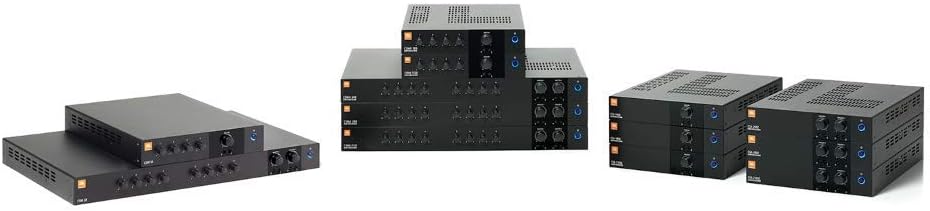
Figure 2: Rear panel connections of the JBL Professional CSM-28 Audio Mixer. This image illustrates the various input (Euro-block, RCA) and output (Euro-block) ports, as well as the power inlet and RJ45 connectors for remote control.
3. 사용 설명서
3.1 전원 켜기/끄기
Ensure all connections are secure before powering on. Use the power switch, typically located on the front or rear panel, to turn the unit on or off. Allow a few seconds for the system to stabilize after powering on.
3.2 입력 레벨 조정
Each input channel has a dedicated level control. Adjust these controls to achieve an optimal signal level without clipping or distortion. Monitor the signal indicators (if present) to ensure proper gain stag주고받음.
3.3 톤 컨트롤
The CSM-28 features independent bass and treble controls. Use these to fine-tune the tonal characteristics of the audio signal for each channel or output zone, depending on the model's configuration.
3.4 출력 레벨 조정
Adjust the master output level controls to set the overall volume for the connected amplification system or speakers. Ensure the output level is appropriate for the listening environment and does not overload downstream equipment.
4. 유지관리
4.1 청소
To clean the exterior of the mixer, use a soft, dry cloth. For stubborn dirt, a slightly damp 순하고 마모성이 없는 세척제를 묻힌 천을 사용하십시오. 청소하기 전에 제품의 전원을 끄고 전원 콘센트에서 분리하십시오. 강한 화학 물질이나 용제는 사용하지 마십시오.
4.2 환기
The CSM-28 features a fanless design, relying on passive cooling. Ensure that the ventilation slots (if any) are not obstructed to allow for proper heat dissipation. Do not operate the unit in enclosed spaces without adequate airflow.
4.3 보관
When not in use for extended periods, store the mixer in a cool, dry place, away from direct sunlight and extreme temperatures. It is recommended to use the original packaging for protection during storage or transport.
5. 문제 해결
| 문제 | 가능한 원인 | 해결책 |
|---|---|---|
| 오디오 출력이 없습니다 |
|
|
| 왜곡된 오디오 |
|
|
| 험 또는 소음 |
|
|
6. 사양
| 특징 | 세부 사항 |
|---|---|
| 모델 번호 | CSM28 |
| 입력 | 8 (Mic/Line Euro-block, RCA) |
| 출력 | 2 (Euro-block) |
| 전원 공급 장치 | 100-240 VAC, 50/60 Hz (Universal) |
| 품목 무게 | 7.5파운드(3.4kg) |
| 제품 크기(L x W x H) | 17.2 x 11.9 x 1.7인치(43.7 x 30.2 x 4.3cm) |
| 연결 기술 | Euroblock, RCA |
| 통제 수단 | Independent Bass/Treble, Input Level, Output Level |
7. 보증 정보
JBL Professional products are covered by a limited warranty. The specific terms and duration of the warranty may vary by region and product. Please refer to the official JBL Professional web자세한 보증 정보 및 등록 절차는 해당 웹사이트 또는 지역 대리점에 문의하십시오. 보증 청구를 위해 구매 증빙 자료를 보관하십시오.
For warranty service, contact JBL Professional customer support or an authorized service center.
8. 지원
For technical assistance, product inquiries, or service requests, please contact JBL Professional support through their official website. Online resources, including FAQs and additional documentation, may also be available.
JBL 프로페셔널 Web대지: https://pro.harman.com/brands/jbl


