소개
The Intermatic TN111RM40 is a mechanical 24-hour timer designed for controlling lamps and small appliances. This timer allows for up to two ON and two OFF events per day, making it suitable for automating various electrical devices, including landscape lighting systems. It features a 2-prong polarized outlet and a manual override function. The timer is housed in a 3R enclosure, indicating its suitability for outdoor use.
This manual provides instructions for the safe and effective operation of your Intermatic TN111RM40 timer.
안전 정보
- 사용하기 전에 모든 지침을 읽으세요.
- 물에 담그지 마십시오.
- Ensure the timer is unplugged before making any adjustments or cleaning.
- 타이머의 정격 용량을 초과하지 마십시오.
- This timer is designed for use with 2-prong polarized plugs only.
제품 끝view
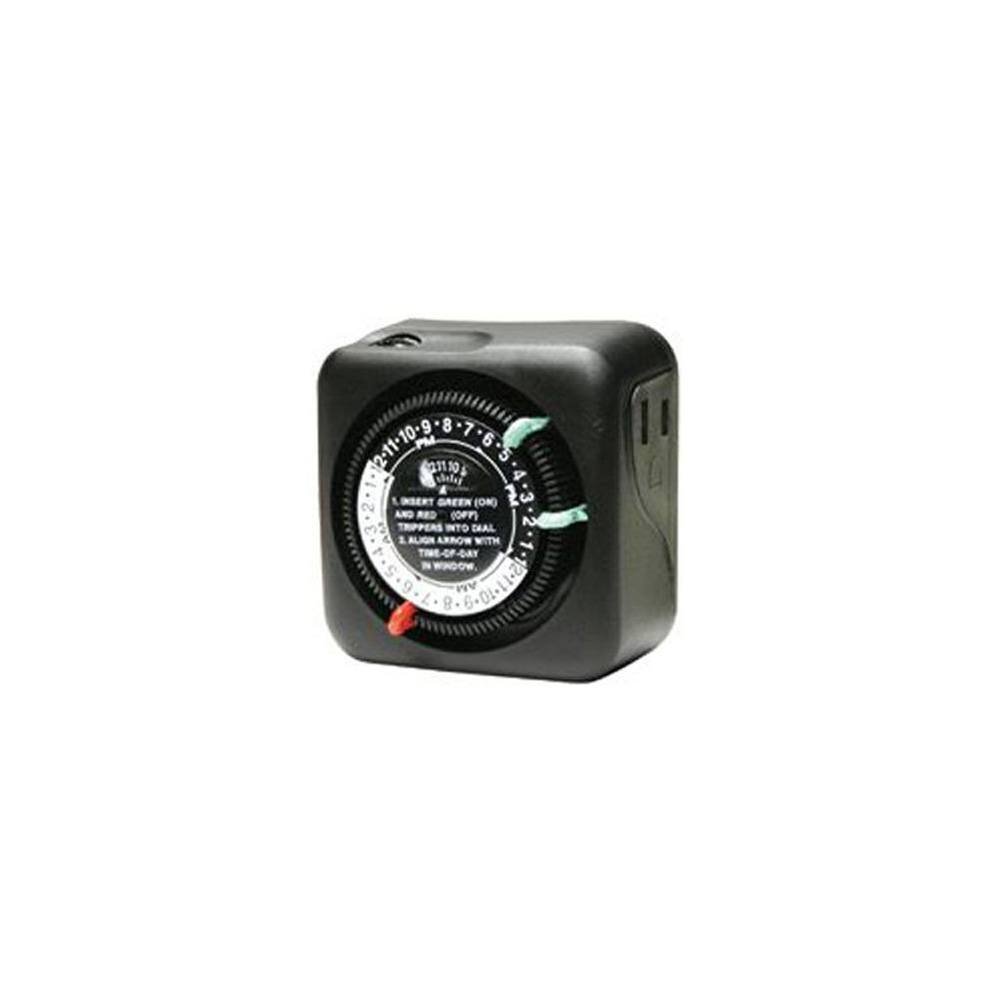
그림 1: 전면 view of the Intermatic TN111RM40 timer, highlighting the 24-hour dial, green (ON) and red (OFF) trippers, and the time-of-day window. The image also shows the product dimensions: 3 inches deep, 4 inches wide, and 3 inches high.
The Intermatic TN111RM40 timer features a rotating 24-hour dial with markings for AM and PM. It includes removable trippers (pins) for setting ON and OFF times, a manual override switch, and a single 2-prong polarized outlet.
설정
- 타이머를 풀어보세요: Carefully remove the timer from its packaging. Inspect for any damage.
- 구성 요소 식별: Locate the green (ON) trippers and red (OFF) trippers. These are small pins that insert into the dial.
- 현재 시간 설정:
- Rotate the entire dial clockwise until the current time aligns with the "TIME-OF-DAY" arrow in the window. Ensure to distinguish between AM and PM hours.
- Insert ON/OFF Trippers:
- Insert the green (ON) trippers into the dial at the desired times you want the connected appliance to turn ON.
- Insert the red (OFF) trippers into the dial at the desired times you want the connected appliance to turn OFF.
- The timer supports up to two ON and two OFF settings per 24-hour period.
- 타이머를 연결하세요: Plug the timer into a standard 2-prong wall outlet.
- 기기 연결: l을 꽂으세요amp or small appliance into the 2-prong polarized outlet on the side of the timer. Ensure the appliance is switched to the ON position if it has its own power switch.
작동 지침
Once set up, the timer will automatically turn your connected appliance ON and OFF according to the programmed times. The dial will continuously rotate clockwise, indicating the passage of time.
수동 오버라이드
The Intermatic TN111RM40 includes a manual override feature. This allows you to temporarily turn the connected appliance ON or OFF without disturbing the programmed schedule.
- To manually turn the appliance ON or OFF, locate the manual override switch (often a small lever or button) on the timer.
- Toggle the switch to the desired position. The timer will resume its programmed schedule at the next ON or OFF event.
유지
- 청소: 청소하기 전에 타이머의 전원 플러그를 뽑으세요. 부드러운 천으로 외부를 닦으세요.amp 천. 연마성 세척제나 용매를 사용하지 마십시오.
- 저장: 타이머를 장기간 보관할 경우 깨끗하고 건조한 상태로 유지하십시오. 직사광선을 피해 서늘하고 건조한 곳에 보관하십시오.
- 점검: Periodically inspect the timer and its cord for any signs of wear or damage. If damage is found, discontinue use and replace the unit.
문제 해결
| 문제 | 가능한 원인 | 해결책 |
|---|---|---|
| 기기가 프로그래밍된 시간에 켜지거나 꺼지지 않습니다. |
|
|
| 타이머 다이얼이 회전하지 않습니다. |
|
|
명세서
- 모델: TN111RM40
- 상표: 인터매틱
- 유형: 24시간 기계식 타이머
- 설정: Up to 2 ON/OFF events per day
- 출구 유형: 2-Prong Polarized
- 울로 둘러싼 땅: 3R (Suitable for outdoor use)
- 색상: 검은색
- 재료: 플라스틱
- 제품 크기: 3인치(깊이) x 4인치(너비) x 3인치(높이)
- 품목 무게: 5.3 온스
- 한국어: 702811361973
보증 및 지원
보증 정보 또는 기술 지원에 대해서는 Intermatic 공식 웹사이트를 참조하십시오. web해당 사이트를 방문하거나 고객 서비스 부서에 문의하세요. 보증 청구를 위해 구매 영수증을 보관하세요.
Intermatic 고객 지원: www.intermatic.com/support