1. 소개 및 이상view
This manual provides essential instructions for the safe and efficient use of your Samsung EC-SH100 Wi-Fi Digital Camera. The EC-SH100 is a 14.2-megapixel digital camera featuring a 5x optical zoom, a 3-inch touchscreen, and integrated Wi-Fi capabilities for easy sharing and connectivity.
주요 특징은 다음과 같습니다.
- Wi-Fi technology for direct photo and video uploads to social media (Facebook, YouTube) or email.
- Intuitive 3-inch LCD touchscreen with drag-and-scroll functionality.
- 14.2-megapixel resolution and 5x optical zoom for high-quality images.
- Face, smile, and blink detection for optimal portrait shots.
- Wireless, automatic file backup to your personal computer.

그림 1.1: 전면 view of the Samsung EC-SH100 Wi-Fi Digital Camera, showcasin렌즈와 플래시를 사용하세요.
2. 상자 안에 무엇이 들어있나요?
다음 품목이 모두 제품 패키지에 포함되어 있는지 확인하세요.
- Samsung EC-SH100 Digital Camera
- AC 어댑터/USB 케이블
- 충전식 리튬 이온 배터리
- 견장
- 터치 펜
- User Manual CD-ROM
- 빠른 시작 매뉴얼
3. 설정
3.1. 배터리 충전
- Insert the rechargeable lithium-ion battery into the camera's battery compartment.
- Connect the camera to the AC adapter using the provided USB cable.
- AC 어댑터를 전원 콘센트에 꽂으세요. 충전 표시등이 켜집니다.
- 처음 사용하기 전에 배터리를 완전히 충전하세요.
3.2. 메모리 카드 삽입
The camera requires a microSD card (up to 8 GB supported) to store photos and videos. A memory card is not included in the box and must be purchased separately.
- 메모리 카드 슬롯 커버를 엽니다.
- microSD 카드의 금색 접촉면이 아래쪽을 향하도록 하여 딸깍 소리가 나면서 제자리에 고정될 때까지 삽입하십시오.
- 메모리 카드 슬롯 덮개를 단단히 닫으세요.
3.3. 전원 켜기 / 끄기
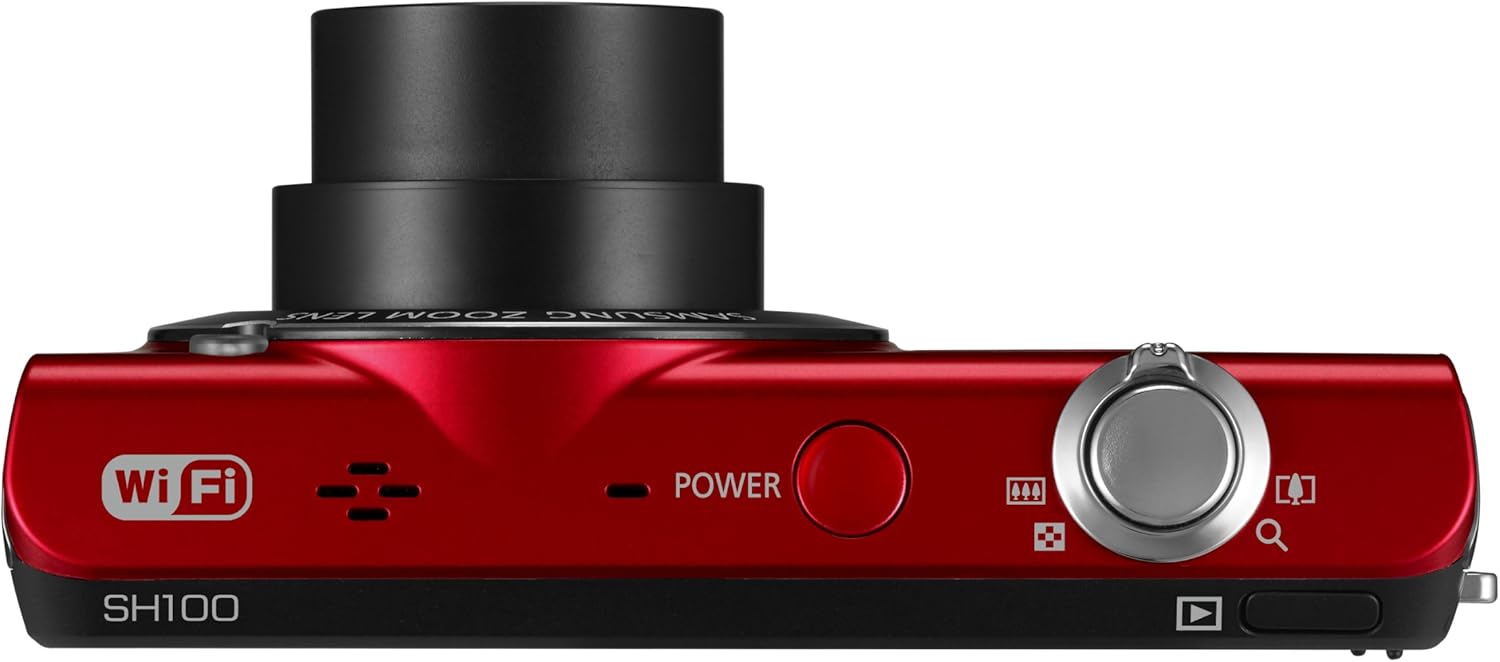
그림 3.1: 상단 view of the camera, highlighting the power button.
를 누르세요 힘 카메라 상단에 있는 버튼을 눌러 카메라를 켜거나 끌 수 있습니다.
4. 카메라 작동
4.1. 기본 사진 촬영
- 카메라를 켭니다.
- Frame your shot using the 3-inch LCD touchscreen.
- 셔터 버튼을 반쯤 눌러 초점을 맞춘 다음, 완전히 눌러 이미지를 촬영합니다.
4.2. Using the Smart Touch Interface

그림 4.1: 후면 view of the camera, showing the Smart Touch interface.
The 3-inch LCD touchscreen allows for intuitive navigation similar to a smartphone. Use the included touch pen or your finger to tap icons, drag, and scroll through menus and images. The "Home" icon provides quick access to the main menu.
4.3. 스마트 오토 2.0
The Smart Auto 2.0 feature automatically analyzes the scene and selects the most appropriate shooting mode from 17 photo modes and 4 movie modes to ensure optimal image quality.
4.4. Face, Smile, and Blink Detection
This feature detects up to nine faces in a frame, adjusting lighting for optimal results. The camera can be set to automatically capture a photo when subjects smile or laugh, and prevent a shot if anyone's eyes are closed.
4.5. 디지털 이미지 안정화
Digital Image Stabilization (DIS) helps reduce blur caused by camera shake, especially in low light conditions or when using the zoom. This feature digitally corrects image data before it is recorded.
4.6. Wi-Fi Connectivity and Sharing
The EC-SH100's integrated Wi-Fi allows for direct sharing:
- 소셜 공유: Upload photos and videos directly to Facebook, Picasa, or YouTube.
- 이메일: Send photos directly from the camera via email.
- AllShare: Wirelessly connect to a compatible Samsung TV to view 사진과 비디오.
- PC Auto Backup: Automatically transfer photos and videos to your PC when within range of a configured Wi-Fi network. The camera will power off after backup to conserve energy.
4.7. Magic Frame
Use Magic Frame to combine two photos using predefined templates, creating unique visual effects and poster-quality images.
4.8. 원격 View파인더
When paired with a compatible Samsung Galaxy Phone, the Remote Viewfinder feature allows you to preview images and control the camera's zoom remotely using your smartphone. This also enables geo-tagging of images if your smartphone has GPS.
5. 유지관리
5.1. 카메라 청소
- 부드럽고 마른 천을 사용하여 카메라 본체를 청소하세요.
- 렌즈와 LCD 화면의 경우, 특수 렌즈 세척용 천과 세척액을 사용하세요. 독한 화학 물질은 피하세요.
5.2. 배터리 관리
- 사용하지 않을 때는 배터리를 서늘하고 건조한 곳에 보관하십시오.
- 배터리를 극한의 온도에 노출시키지 마십시오.
- Charge the battery regularly, even if the camera is not used frequently, to maintain its lifespan.
5.3. 펌웨어 업데이트
주기적으로 삼성 지원을 확인하세요 website for available firmware updates for your camera. Firmware updates can improve performance and add new features. Follow the instructions provided by Samsung carefully when performing an update, typically involving connecting the camera to a computer.
6. 문제 해결
- 카메라가 켜지지 않습니다. 배터리가 완전히 충전되었고 올바르게 삽입되었는지 확인하세요.
- 사진/동영상 촬영 불가: Verify that a microSD card is inserted and has sufficient free space.
- 흐릿한 이미지: Ensure Digital Image Stabilization is active. Hold the camera steady. In low light, use a tripod if possible.
- Poor video audio: Ensure the microphone is not obstructed. Note that some users have reported limited audio quality in video recordings.
- Wi-Fi 연결 문제: Check your Wi-Fi network settings and ensure the camera is within range. Re-enter network passwords if necessary.
- Camera turns on by itself: The power button may be accidentally pressed if the camera is stored in a tight space like a purse. Ensure the camera is stored in a way that prevents accidental button presses.
7. 사양
| 제품 치수 | 3.66 x 0.75 x 2.13 인치 (W x D x H) |
| 품목 무게 | 3.84 온스 |
| 이미지 센서 | 14.2 Megapixels CCD |
| 광학 줌 | 5x |
| 렌즈 | 26mm Samsung lens, 4.7-23.5mm (35mm equivalent: 26-130mm) |
| 최대 조리개 | f/3.3-5.9 |
| 표시하다 | 3인치 LCD 터치스크린 |
| 이미지 안정화 | 디지털, 광학 |
| 내부 메모리 | 6.9메가바이트 |
| 외부 메모리 | microSD 카드 최대 8GB |
| 배터리 | 충전식 리튬이온(포함) |
| 지원됨 File 체재 | MP4 (Video) |
| 연결성 | 와이파이, USB |
| 운영 체제 호환성 | Windows 2000, XP, Vista, 7; Mac OS X 10.3 or higher |
8. 보증 및 지원
8.1. 제한 보증
The Samsung EC-SH100 Wi-Fi Digital Camera is backed by a one-year limited warranty on parts and labor. Please refer to the warranty card included in your product package for full terms and conditions.
8.2. 고객 지원
For further assistance, technical support, or to download the latest drivers and firmware, please visit the official Samsung support website. You may also refer to the User Manual CD-ROM and Quick Start Manual provided with your camera.


