소개
The Casio SA-76 44-Key Mini Personal Keyboard is designed for beginners, offering an intuitive and engaging musical experience. Its compact size and user-friendly interface make it suitable for young musicians and those new to keyboard playing. This manual provides essential information for setting up, operating, and maintaining your SA-76 keyboard.
The keyboard features an easy-to-read LCD display that shows important data such as tone, rhythm, song number, metronome, tempo, and the note being played. With dedicated buttons for Piano and Organ sounds, switching between instrument voices is quick and simple. The 44 mini keys and 5 percussion pads are designed for comfortable play, especially for smaller hands, making it an excellent introduction to the world of keyboard music.
주요 특징
- 44 mini-sized keys for comfortable play.
- 5 percussion pads for rhythmic exploration.
- 100 built-in tones to explore various instrument sounds.
- 50 rhythm patterns to accompany your playing.
- Simple tone selection with dedicated PIANO and ORGAN buttons.
- Melody on/off lesson function for practice.
- Easy-to-read LCD display for clear information.
- Built-in speakers with 1.6 Watts output.
- Headphones jack (3.5mm) for private practice.
- Portable design, can be powered by batteries (6 AA, not included) or an optional AC adapter.
설정
1. 장치에 전원 공급
The Casio SA-76 can be powered by either an optional AC adapter or batteries.
- AC 어댑터(선택 사항): Connect a compatible 9V DC AC adapter (not included) to the DC 9V jack on the rear panel of the keyboard. Plug the adapter into a standard wall outlet.
- 배터리: The keyboard requires 6 AA-size batteries (not included).
2. 배터리 설치
- 키보드가 꺼져 있는지 확인하십시오.
- 키보드 아래쪽에 있는 배터리 덮개를 찾으세요.
- 덮개를 밀어서 여세요.
- Insert 6 AA-size batteries, ensuring correct polarity (+/-) as indicated inside the compartment.
- 배터리함 덮개를 단단히 다시 닫으십시오.
3. 보면대 부착하기
The included music stand can be inserted into the slots on the top panel of the keyboard to hold sheet music or a tablet.
작동 지침
1. 전원 켜기/끄기
- To turn on the keyboard, press and hold the 힘 LCD 화면에 불이 들어올 때까지 버튼을 누르세요.
- To turn off the keyboard, press and hold the 힘 디스플레이가 꺼질 때까지 버튼을 다시 누르세요.
2. 볼륨 조절
사용하세요 볼륨 + 그리고 용량 - buttons located next to the power button to increase or decrease the overall sound volume.
3. 음색 선택
The SA-76 offers 100 different tones. You can select them using the dedicated buttons or the rotary dial.
- 를 누르세요 피아노 or 오르간 button for quick access to these common sounds.
- To select other tones, rotate the 음정 dial to browse through the available options displayed on the LCD.
4. Playing Rhythms
키보드에는 50가지 리듬 패턴이 포함되어 있습니다.
- 회전하다 율 dial to select a desired rhythm pattern.
- 를 누르세요 시작/중지 리듬 재생을 시작하거나 종료하는 버튼입니다.
- 템포를 조절하려면 다음을 사용하세요. 템포 + 그리고 TEMPO - 버튼.
5. Playing Built-in Songs
The SA-76 features 10 built-in songs for listening or practicing with the melody on/off function.
- 회전하다 송 뱅크 dial to select a song.
- 를 누르세요 재생/일시정지 button to start or pause the song.
- 사용하세요 멜로디 켜기/끄기 button to mute or unmute the melody part of the song, allowing you to play along.
6. 기능 유지
활성화 입다 function to make notes linger longer after the key is released, similar to a piano's sustain pedal.
- 를 누르세요 입다 button to toggle the effect on or off.
7. Percussion Pads
The 5 percussion pads allow you to add drum sounds to your performance. Simply press a pad to trigger a percussion sound.
8. 헤드폰 사용
For private practice, connect 3.5mm stereo headphones to the 전화 / 출력 jack on the rear panel. This will mute the built-in speakers.
제품 끝view
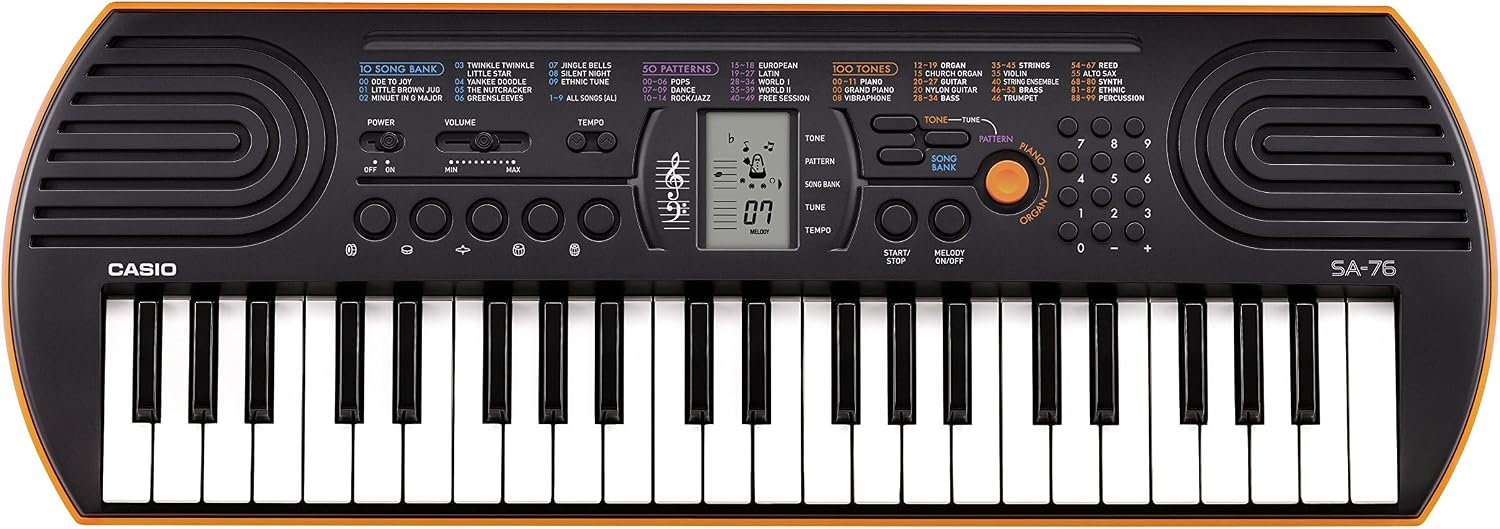
Figure 1: Casio SA-76 44-Key Mini Personal Keyboard. This image shows the overall design of the orange Casio SA-76 keyboard with its 44 mini keys and control panel.

Figure 2: Close-up of the control panel. This image provides a detailed view of the LCD display, tone/rhythm/song dials, volume buttons, and other function buttons on the Casio SA-76.

Figure 3: Diagram highlighting key features. This image illustrates various components of the Casio SA-76, including the 44 mini keys, drum pads, built-in speakers, and easy-to-use controls.

Figure 4: Casio SA-76 product dimensions. This image shows the physical measurements of the keyboard: 23.8 inches (W) x 8.3 inches (D) x 2.24 inches (H).
유지
- 청소: Wipe the keyboard with a soft, dry cloth. Avoid using abrasive cleaners, waxes, or solvents, as these can damage the finish.
- 저장: 키보드는 직사광선, 극한 온도 및 높은 습도를 피해 서늘하고 건조한 곳에 보관하십시오. 장기간 보관할 경우 누액을 방지하기 위해 배터리를 제거하십시오.
- 손질: 키보드를 떨어뜨리거나 강한 충격을 가하지 마십시오. 키보드 위에 무거운 물건을 올려놓지 마십시오.
문제 해결
| 문제 | 가능한 원인 | 해결책 |
|---|---|---|
| 전원이 없습니다 | Batteries are dead or incorrectly installed; AC adapter not connected or faulty. | Replace batteries or check polarity. Ensure AC adapter is securely connected and functional. |
| 소리가 나지 않습니다 | Volume is too low; headphones are connected; speakers are muted. | Increase volume. Disconnect headphones. Check if any mute function is active. |
| 키가 응답하지 않음 | Keyboard may be in a specific mode (e.g., lesson mode with melody off) or requires a reset. | Check current mode settings. Turn the keyboard off and on again to reset. |
명세서
| 특징 | 세부 사항 |
|---|---|
| 키의 개수 | 44 mini-sized keys |
| 톤 | 100 |
| 리듬 | 50 |
| 노래 | 10 |
| 타악기 패드 | 5 |
| 스피커 | 2 x 1.2 W (Amp Output: 1.6 Watts) |
| 헤드폰 잭 | 3.5mm 스테레오 미니 잭 |
| 전원 | 6 AA batteries or optional AC adapter (DC 9V) |
| 치수(폭 x 깊이 x 높이) | 23.8" x 8.3" x 2.24"(60.45cm x 21.08cm x 5.69cm) |
| 품목 무게 | 3.08파운드(1.4kg) |
보증 및 지원
보증 정보 또는 기술 지원이 필요하시면 제품에 동봉된 설명서를 참조하시거나 카시오 공식 웹사이트를 방문하십시오. web사이트. 보증 청구에 대비해 구매 증빙 자료로 구매 영수증을 보관하세요.


