1. ಪರಿಚಯ
The Samsung Galaxy Z Flip7 FE is a compact and powerful foldable smartphone designed for convenience and performance. Its unique clamshell design allows for a large screen experience when unfolded and a pocket-friendly form factor when closed. This manual provides essential information for setting up, operating, maintaining, and troubleshooting your device.

The Samsung Galaxy Z Flip7 FE offers a compact design with a large display when unfolded.
Key features include a 50MP camera for high-quality photos, a long-lasting battery, and AI-powered insights accessible directly from the cover screen. The FlexMode allows for hands-free usage, enhancing video calls and photography.
2. ಸೆಟಪ್
2.1 ಪೆಟ್ಟಿಗೆಯಲ್ಲಿ ಏನಿದೆ
- Samsung Galaxy Z Flip7 FE Device
- ತ್ವರಿತ ಪ್ರಾರಂಭ ಮಾರ್ಗದರ್ಶಿ
- ಸಿಮ್ ಟ್ರೇ ಎಜೆಕ್ಟರ್
- USB Cable (Type-C to Type-C)
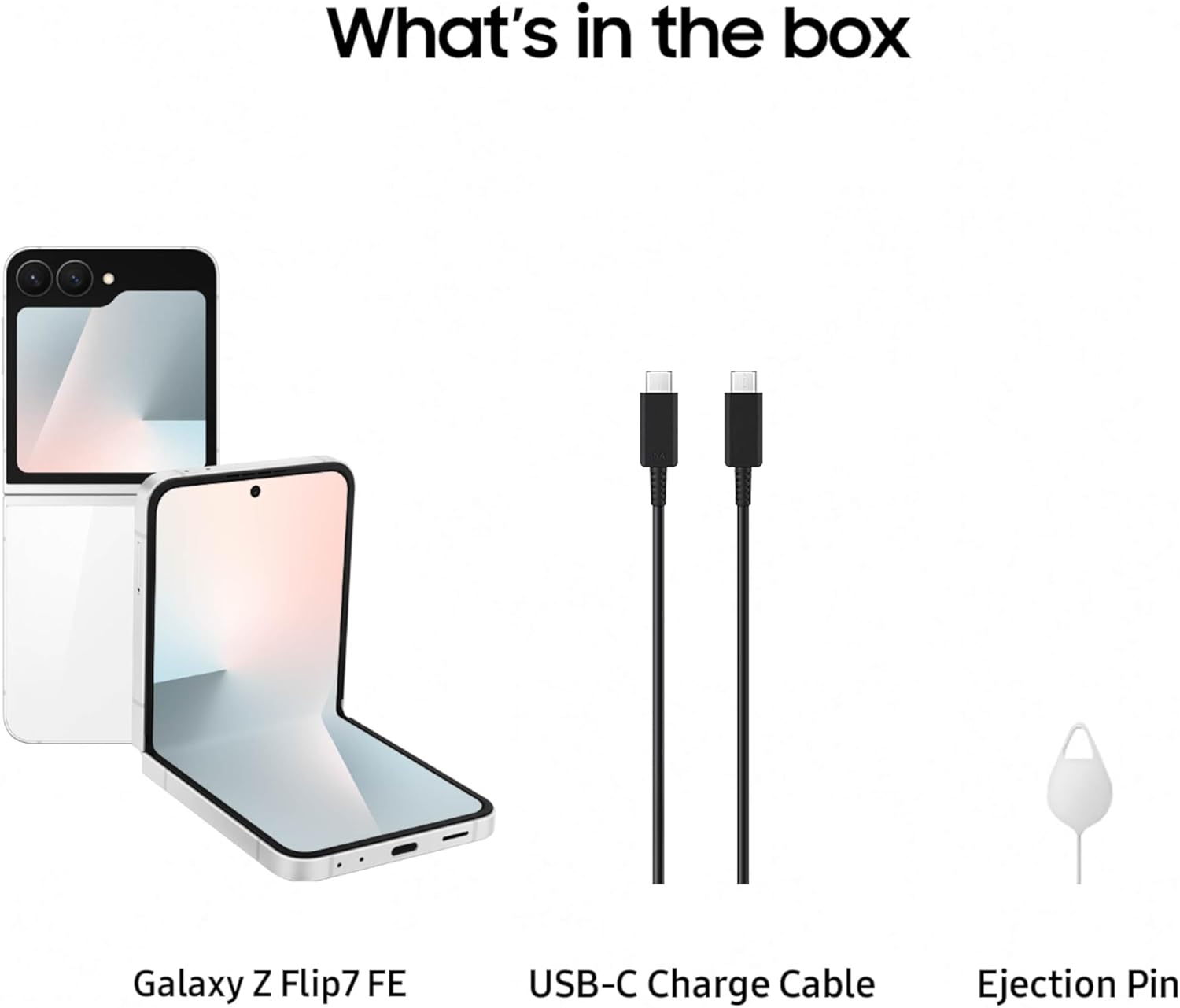
The package includes the Galaxy Z Flip7 FE, a USB-C charge cable, and a SIM tray ejector.
2.2 ಆರಂಭಿಕ ಸಾಧನ ಸೆಟಪ್
- ಸಿಮ್ ಕಾರ್ಡ್ ಸೇರಿಸಿ: Use the provided SIM tray ejector to open the SIM card slot and insert your Nano-SIM card.
- ಪವರ್ ಆನ್: ಸ್ಯಾಮ್ಸಂಗ್ ಲೋಗೋ ಕಾಣಿಸಿಕೊಳ್ಳುವವರೆಗೆ ಪವರ್/ಸೈಡ್ ಕೀಲಿಯನ್ನು ಒತ್ತಿ ಹಿಡಿದುಕೊಳ್ಳಿ.
- ತೆರೆಯ ಮೇಲಿನ ಸೂಚನೆಗಳನ್ನು ಅನುಸರಿಸಿ: The device will guide you through initial setup, including language selection, Wi-Fi connection, Google account setup, and data transfer options.
ಈ ವೀಡಿಯೊ ಒಂದು ಉತ್ಪನ್ನವನ್ನು ಒದಗಿಸುತ್ತದೆview of the Samsung Galaxy Z Flip7 FE, demonstrating its design and key features.
3. ಸಾಧನವನ್ನು ನಿರ್ವಹಿಸುವುದು
3.1 FlexMode
FlexMode allows you to partially fold your Galaxy Z Flip7 FE, enabling hands-free operation. This is ideal for video calls, watching content, or taking photos and selfies without needing a tripod. Simply fold the device to your desired angle, and the interface will adapt.

Utilize FlexMode for hands-free photography and video calls.
3.2 FlexWindow (Cover Screen)
The FlexWindow on the exterior of your device provides quick access to essential information and controls without needing to open the phone. You can check notifications, control music playback, view the time, weather, and access AI-powered insights like the 'Now Brief' for daily updates.

The FlexWindow provides quick access to information and AI-powered insights.
3.3 ಕ್ಯಾಮೆರಾ ವೈಶಿಷ್ಟ್ಯಗಳು
The Galaxy Z Flip7 FE features an impressive 50MP main camera, allowing you to capture clear and detailed photos. It also includes an ultra-wide lens for broader shots and supports 2x optical-quality zoom. The camera system is optimized for hands-free selfies and high-quality image capture in various conditions.

The 50MP camera system captures stunning details and hands-free selfies.
3.4 ಬ್ಯಾಟರಿ ಮತ್ತು ಚಾರ್ಜಿಂಗ್
Equipped with a 4000 mAh battery, the Galaxy Z Flip7 FE is designed to provide long-lasting power for your daily tasks. The device supports fast charging and wireless charging, allowing for quick power-ups throughout your day.

The device features a 4000 mAh battery for extended usage.
3.5 AI ವೈಶಿಷ್ಟ್ಯಗಳು ಮತ್ತು ಸಂಪರ್ಕ
The Galaxy Z Flip7 FE integrates AI features such as Gemini Live and personalized wellness tips when paired with compatible Galaxy wearables like the Galaxy Ring. It also supports RCS Messaging for enhanced communication and Samsung Wallet for convenient digital payments and transfers.

Integrate with Galaxy wearables for comprehensive health tracking.

Utilize Samsung Wallet for secure and convenient digital transactions.

Enjoy enhanced messaging with RCS Messaging features.
4. ನಿರ್ವಹಣೆ
4.1 ಸ್ಕ್ರೀನ್ ಕೇರ್
The foldable screen is a key feature of your device. To ensure its longevity, avoid pressing hard on the screen with sharp objects. Keep the screen free from dust and debris, especially in the hinge area. Use a soft, lint-free cloth to clean the screen.
4.2 ಸಾಫ್ಟ್ವೇರ್ ನವೀಕರಣಗಳು
Regularly check for and install software updates to ensure optimal performance, security, and access to the latest features. You can typically find update options in your device's Settings menu under 'Software update'.
4.3 ಸಾಮಾನ್ಯ ಆರೈಕೆ
Protect your device from extreme temperatures, direct sunlight, and liquids. While the phone is designed for durability, using a protective case can further safeguard it from accidental drops and scratches.
5. ನಿವಾರಣೆ
5.1 ಸಾಮಾನ್ಯ ಸಮಸ್ಯೆಗಳು
- ಸಾಧನವು ಪ್ರತಿಕ್ರಿಯಿಸುತ್ತಿಲ್ಲ: If your device freezes, press and hold the Power/Side key and Volume Down key simultaneously for more than 7 seconds to restart it.
- ಬ್ಯಾಟರಿ ಬೇಗನೆ ಖಾಲಿಯಾಗುತ್ತಿದೆ: Check background app usage in Settings > Battery and device care. Reduce screen brightness and disable unnecessary features like Wi-Fi, Bluetooth, or GPS when not in use.
- ಅಪ್ಲಿಕೇಶನ್ ಕ್ರ್ಯಾಶ್ಗಳು: Ensure all apps are updated to their latest versions. Clear the cache and data for problematic apps in Settings > Apps.
5.2 Android Auto Compatibility
Some users have reported compatibility issues with Android Auto. If you experience problems connecting your Galaxy Z Flip7 FE to Android Auto, ensure your phone's software and the Android Auto application are fully updated. Consult Samsung support or your vehicle manufacturer for specific compatibility information and potential solutions.
6. ವಿಶೇಷಣಗಳು
| ವೈಶಿಷ್ಟ್ಯ | ವಿವರ |
|---|---|
| ಮಾದರಿ ಹೆಸರು | ಗ್ಯಾಲಕ್ಸಿ Z ಫ್ಲಿಪ್7 FE |
| ಐಟಂ ಮಾದರಿ ಸಂಖ್ಯೆ | SM-F761UZWAXAA |
| ಆಪರೇಟಿಂಗ್ ಸಿಸ್ಟಮ್ | ಆಂಡ್ರಾಯ್ಡ್ 16, ಒನ್ಯುಐ 8 |
| CPU ಮಾದರಿ | Exynos 2400 S5E9945 |
| ಮೆಮೊರಿ ಶೇಖರಣಾ ಸಾಮರ್ಥ್ಯ | 128 ಜಿಬಿ |
| ಸ್ಥಾಪಿಸಲಾದ RAM ಮೆಮೊರಿ ಗಾತ್ರ | 8 ಜಿಬಿ |
| ಸ್ಟ್ಯಾಂಡಿಂಗ್ ಸ್ಕ್ರೀನ್ ಡಿಸ್ಪ್ಲೇ ಗಾತ್ರ | 6.7 ಇಂಚುಗಳು |
| ರೆಸಲ್ಯೂಶನ್ | 1080 x 2400 |
| ರಿಫ್ರೆಶ್ ದರ | 120 Hz |
| ಬ್ಯಾಟರಿ ಸಾಮರ್ಥ್ಯ | 4000 ಮಿಲಿamp ಗಂಟೆಗಳು |
| ಉತ್ಪನ್ನ ಆಯಾಮಗಳು | 6.5 x 2.83 x 0.27 ಇಂಚುಗಳು |
| ಐಟಂ ತೂಕ | 11.7 ಔನ್ಸ್ |
| ಸಂಪರ್ಕ ತಂತ್ರಜ್ಞಾನಗಳು | ಬ್ಲೂಟೂತ್, NFC, USB, Wi-Fi |
| ವಿಶೇಷ ವೈಶಿಷ್ಟ್ಯಗಳು | Always On Display, Built-In GPS, Fast Charging Support, Mobile Hotspot Capability, Wireless Charging |
7. ಖಾತರಿ ಮತ್ತು ಬೆಂಬಲ
7.1 ತಯಾರಕರ ಖಾತರಿ
Your Samsung Galaxy Z Flip7 FE comes with a 1-year manufacturer warranty in the US. Please refer to the warranty card included with your device or visit the official Samsung webವಿವರವಾದ ನಿಯಮಗಳು ಮತ್ತು ಷರತ್ತುಗಳಿಗಾಗಿ ಸೈಟ್.
7.2 ಐಚ್ಛಿಕ ರಕ್ಷಣಾ ಯೋಜನೆಗಳು
Additional protection plans, such as Samsung Care+ Device Protection, are available for purchase to extend coverage beyond the standard manufacturer warranty. Options include 2-year plans or monthly subscriptions.
- Samsung Care+ Device Protection 2 YR
- Samsung Care+ Device Protection Monthly
- Complete Protect (covers eligible past and future purchases)
7.3 ಗ್ರಾಹಕ ಬೆಂಬಲ
ಹೆಚ್ಚಿನ ಸಹಾಯ, ತಾಂತ್ರಿಕ ಬೆಂಬಲ ಅಥವಾ ಸೇವಾ ವಿಚಾರಣೆಗಳಿಗಾಗಿ, ದಯವಿಟ್ಟು ಅಧಿಕೃತ Samsung ಬೆಂಬಲಕ್ಕೆ ಭೇಟಿ ನೀಡಿ. webಸೈಟ್ ಅಥವಾ ಅವರ ಗ್ರಾಹಕ ಸೇವೆಯನ್ನು ಸಂಪರ್ಕಿಸಿ. ನೀವು ಹೆಚ್ಚಿನ ಮಾಹಿತಿ ಮತ್ತು ಬೆಂಬಲ ಸಂಪನ್ಮೂಲಗಳನ್ನು ಇಲ್ಲಿ ಕಾಣಬಹುದು ಸ್ಯಾಮ್ಸಂಗ್ ಸ್ಟೋರ್.


