1. ಪರಿಚಯ
The VEVOR 48" Commercial Indoor Air Curtain (Model LFM120-1200-E) is designed to create an invisible air barrier over doorways, effectively separating indoor and outdoor environments. This unit helps maintain indoor temperatures, blocks dust, fumes, and unwanted insects, contributing to a cleaner and more comfortable space. It is suitable for various commercial and heavy-duty applications.

ಚಿತ್ರ 1: ಮುಂಭಾಗ view of the VEVOR 48-inch Commercial Indoor Air Curtain.
2. ಪ್ರಮುಖ ಲಕ್ಷಣಗಳು
- Powerful Air Wall: Delivers 1200 CFM airflow, creating an effective barrier against dust, odors, and temperature fluctuations.
- ಕಡಿಮೆ ಶಬ್ದದ ಕಾರ್ಯಾಚರಣೆ: Engineered for quiet performance, ensuring minimal disturbance in various settings.
- ಎರಡು-ವೇಗದ ಸೆಟ್ಟಿಂಗ್ಗಳು: Offers adjustable fan speeds (low for energy efficiency, high for robust isolation) to adapt to different seasonal needs.
- Magnetic Door Switches: Includes two magnetic door switches for automatic operation, activating the unit when doors open and deactivating when closed. Compatible with both sliding and swinging doors.
- ಬಾಳಿಕೆ ಬರುವ ನಿರ್ಮಾಣ: Features a slim metal body with corrosion resistance and rust prevention. Equipped with a pure copper motor for reliable and stable performance, and large-diameter fan blades for high airflow and low noise.

Figure 2: The air curtain creates an invisible barrier to maintain indoor air quality.

Figure 3: Quiet operation ensures a comfortable environment.

Figure 4: Two-speed settings for adaptable performance.

Figure 5: Internal components highlighting durability and efficiency.
3. ಒಳಗೊಂಡಿರುವ ಘಟಕಗಳು
ಪ್ಯಾಕೇಜ್ ಈ ಕೆಳಗಿನ ವಸ್ತುಗಳನ್ನು ಒಳಗೊಂಡಿದೆ:
- 1 x Air Curtain Unit
- 1 x Swing-Type Stroke Switch (Magnetic Door Switch)
- Mounting Bracket Plates x 3
- Various screws and nuts for installation (M4x6 Nuts, M4x36 Self-tapping Screws x 2, M4x20 Self-tapping Screws x 2, M4x28 Screws x 4, M4x18 Screws x 2, M6x16 Round Head Screws x 4)

ಚಿತ್ರ 6: ಉತ್ಪನ್ನದ ಆಯಾಮಗಳು ಮತ್ತು ಒಳಗೊಂಡಿರುವ ಪರಿಕರಗಳು.
4. ಸುರಕ್ಷತಾ ಸೂಚನೆಗಳು
- ಅನುಸ್ಥಾಪನೆ ಮತ್ತು ಕಾರ್ಯಾಚರಣೆಯ ಮೊದಲು ಎಲ್ಲಾ ಸೂಚನೆಗಳನ್ನು ಓದಿ.
- ವಿದ್ಯುತ್ ಸರಬರಾಜು ಘಟಕದ ಅವಶ್ಯಕತೆಗಳಿಗೆ (110V) ಹೊಂದಿಕೆಯಾಗುತ್ತದೆ ಎಂದು ಖಚಿತಪಡಿಸಿಕೊಳ್ಳಿ.
- Do not insert fingers or objects into the air inlet or outlet while the unit is operating.
- Keep the unit away from water or excessive moisture.
- ನಿಮಗೆ ಖಚಿತವಿಲ್ಲದಿದ್ದರೆ, ಅನುಸ್ಥಾಪನೆಯನ್ನು ಅರ್ಹ ವೃತ್ತಿಪರರು ನಿರ್ವಹಿಸಬೇಕು.
- Ensure the unit is securely mounted to prevent falling.
5. ಸೆಟಪ್ ಮತ್ತು ಅನುಸ್ಥಾಪನೆ
Follow these steps for proper installation of your VEVOR Air Curtain:
- ಅನ್ಬಾಕ್ಸಿಂಗ್ ಮತ್ತು ತಪಾಸಣೆ: Carefully remove the air curtain from its packaging. Inspect the unit for any shipping damages.
- ಆರೋಹಣಕ್ಕೆ ತಯಾರಿ: Ensure a 10cm (approximately 4 inches) gap from the ceiling for optimal air intake. Unscrew and remove the back mounting plate from the air curtain unit.
- ಮೌಂಟಿಂಗ್ ಪ್ಲೇಟ್ ಸ್ಥಾಪನೆ: Secure the mounting plate to the wall above the doorway using appropriate fasteners (screws and nuts provided). Ensure it is level and firmly attached to a sturdy surface.
- Hang the Air Curtain: Carefully hang the main air curtain body onto the installed mounting plate. Tighten the bottom screws to secure the unit in place.
- Connect Magnetic Switch: Attach the magnetic door switch components to the door edge and frame. Connect the two yellow wires from the air curtain to the magnetic switch. Ensure the magnetic pieces align for proper function.

Figure 7: Easy installation in five simple steps.
ವೀಡಿಯೊ 1: ಉತ್ಪನ್ನ ಮುಗಿದಿದೆview and Unboxing. This video demonstrates the unboxing process and provides a general overview of the air curtain unit and its components.
Video 2: Easy Magnetic Switch Installation. This video illustrates the simple installation process for the magnetic door switch, ensuring automatic operation of the air curtain.
6. ಆಪರೇಟಿಂಗ್ ಸೂಚನೆಗಳು
The VEVOR Air Curtain offers simple operation with two-speed settings and an optional magnetic door switch for automated control.
- ಪವರ್ ಆನ್/ಆಫ್: Use the main power switch on the unit to turn the air curtain on or off.
- ವೇಗ ಆಯ್ಕೆ: Select between two fan speeds (Low and High) using the designated switch or remote control (if included). Low speed is ideal for energy efficiency and minimal noise, while high speed provides robust isolation for extreme conditions.
- Automatic Operation (with Magnetic Switch): If the magnetic door switch is installed and connected, the air curtain will automatically activate when the door opens and turn off when the door closes. This ensures convenience and energy savings.
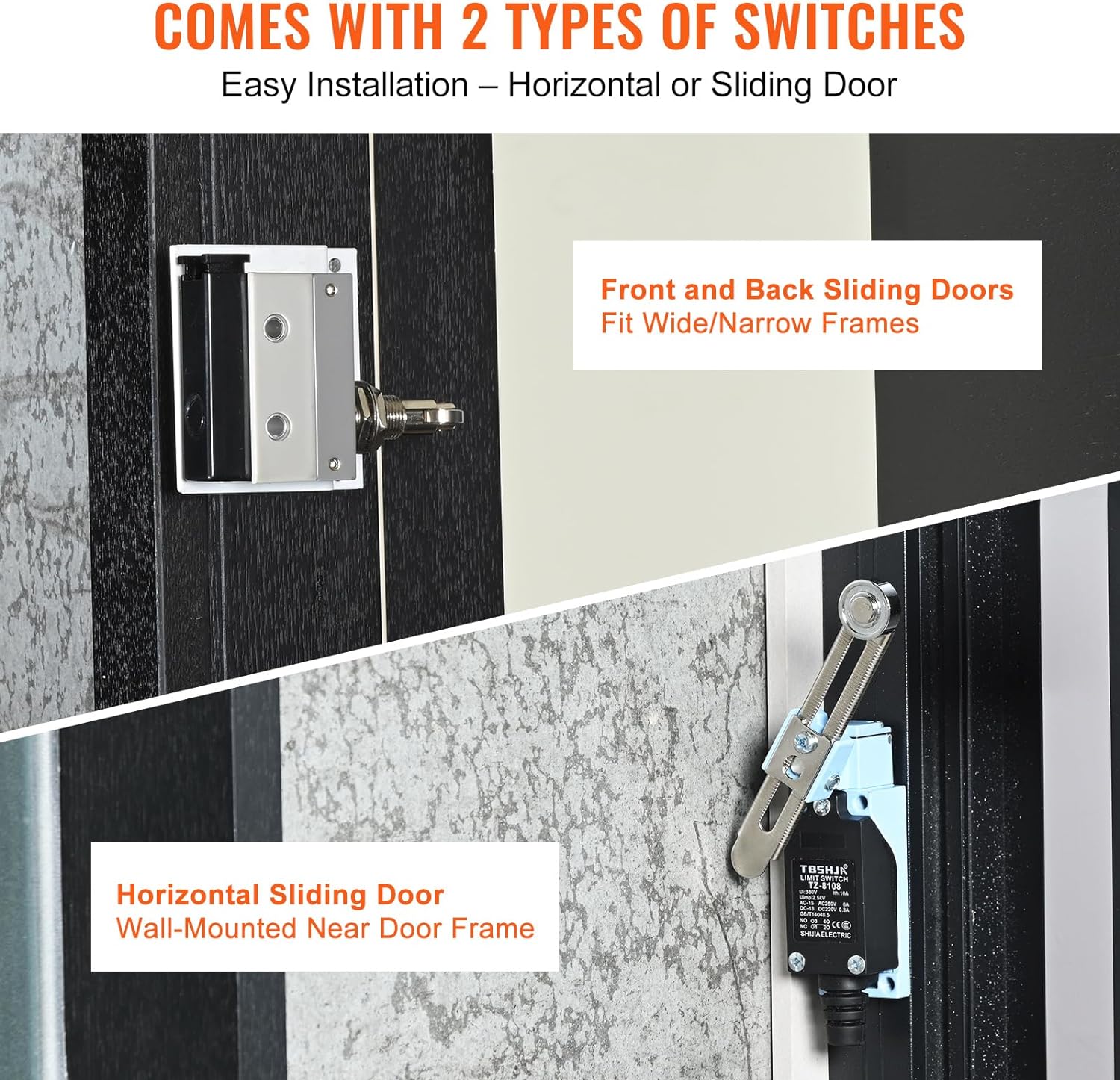
Figure 8: Magnetic door switches for automatic operation.
7. ನಿರ್ವಹಣೆ
Regular maintenance ensures optimal performance and longevity of your air curtain.
- ಸ್ವಚ್ಛಗೊಳಿಸುವಿಕೆ: ನಿಯತಕಾಲಿಕವಾಗಿ ಯೂನಿಟ್ನ ಹೊರಭಾಗವನ್ನು ಮೃದುವಾದ, ಡಿ-ಪ್ಯಾನ್ನಿಂದ ಒರೆಸಿ.amp cloth. Ensure the air intake and outlet grilles are free from dust and debris. Do not use abrasive cleaners or solvents.
- ತಪಾಸಣೆ: Regularly check the power cord for any damage. Inspect the mounting hardware to ensure the unit remains securely attached to the wall.
- ಫ್ಯಾನ್ ಬ್ಲೇಡ್ಗಳು: If accessible, ensure the fan blades are clean and free from obstructions.
8. ನಿವಾರಣೆ
If you encounter issues with your air curtain, refer to the following common troubleshooting steps:
- ಘಟಕ ಆನ್ ಆಗುತ್ತಿಲ್ಲ:
- ಪವರ್ ಕಾರ್ಡ್ ಅನ್ನು ಕೆಲಸ ಮಾಡುವ ಔಟ್ಲೆಟ್ಗೆ ಸುರಕ್ಷಿತವಾಗಿ ಪ್ಲಗ್ ಮಾಡಲಾಗಿದೆಯೇ ಎಂದು ಪರಿಶೀಲಿಸಿ.
- Ensure the main power switch on the unit is in the 'ON' position.
- If using the magnetic switch, verify it is correctly installed and aligned, and the door is open.
- ದುರ್ಬಲ ಗಾಳಿಯ ಹರಿವು:
- Check if the air intake and outlet grilles are obstructed by dust or debris. Clean if necessary.
- Ensure the unit is set to the desired speed (High for stronger airflow).
- ಅಸಾಮಾನ್ಯ ಶಬ್ದ:
- Inspect for any loose parts or foreign objects inside the unit.
- Ensure the unit is securely mounted and not vibrating against the wall.
If the problem persists after attempting these steps, contact VEVOR customer support for assistance.
9. ವಿಶೇಷಣಗಳು
| ಗುಣಲಕ್ಷಣ | ಮೌಲ್ಯ |
|---|---|
| ಬ್ರ್ಯಾಂಡ್ | VEVOR |
| ಮಾದರಿ ಸಂಖ್ಯೆ | LFM120-1200-E |
| ಉತ್ಪನ್ನ ಆಯಾಮಗಳು | 47.24 x 8.66 x 9.45 ಇಂಚುಗಳು (1200 x 220 x 240 ಮಿಮೀ) |
| ಐಟಂ ತೂಕ | 32 ಪೌಂಡ್ |
| ಗಾಳಿಯ ಹರಿವು (CFM) | 1200 |
| ವೇಗ ಸೆಟ್ಟಿಂಗ್ಗಳು | 2 (ಕಡಿಮೆ, ಹೆಚ್ಚು) |
| ಸಂಪುಟtage | 110V |
| ಶಬ್ದ ಮಟ್ಟ | 63.5 Decibels (63.7±5dB) |
| ಫಾರ್ಮ್ ಫ್ಯಾಕ್ಟರ್ | ವಾಲ್ ಮೌಂಟೆಡ್ |
| ಅಸೆಂಬ್ಲಿ ಅಗತ್ಯವಿದೆ | ಹೌದು |
| ಬಣ್ಣ | ಬಿಳಿ |
10. ಖಾತರಿ ಮತ್ತು ಬೆಂಬಲ
VEVOR products are designed for durability and performance. For warranty information, technical support, or service inquiries, please refer to the contact details provided in your product packaging or visit the official VEVOR webಸೈಟ್. ಖಾತರಿ ಹಕ್ಕುಗಳಿಗಾಗಿ ಖರೀದಿಯ ಪುರಾವೆಯಾಗಿ ನಿಮ್ಮ ಖರೀದಿ ರಶೀದಿಯನ್ನು ಇರಿಸಿ.


