ಪರಿಚಯ
The Tenda MF6 is a portable 4G LTE Mobile Wi-Fi Router designed to provide high-speed internet access on the go. It supports Wi-Fi 6 technology, offering 2.4 GHz Wi-Fi speeds up to 286 Mbps. Featuring a 1.44-inch color LCD screen and a 2100 mAh rechargeable battery, the MF6 is compact and easy to use. This manual will guide you through the setup, operation, and maintenance of your device.

Image: Tenda MF6 Mobile WiFi Router and its packaging, showcasing the device's design and key features on the box.
ಪ್ಯಾಕೇಜ್ ವಿಷಯಗಳು
ನಿಮ್ಮ ಪ್ಯಾಕೇಜ್ನಲ್ಲಿ ಎಲ್ಲಾ ವಸ್ತುಗಳು ಇವೆಯೇ ಎಂದು ಖಚಿತಪಡಿಸಿಕೊಳ್ಳಿ:
- 1 x Tenda MF6 Mobile Wi-Fi Router
- 1 x Rechargeable Battery (2100 mAh)
- 1 x USB-C ಕೇಬಲ್
- 1 x ತ್ವರಿತ ಅನುಸ್ಥಾಪನ ಮಾರ್ಗದರ್ಶಿ
ಸೆಟಪ್
1. ಸಿಮ್ ಕಾರ್ಡ್ ಮತ್ತು ಬ್ಯಾಟರಿ ಅಳವಡಿಕೆ
The Tenda MF6 uses a Nano SIM card. Before installation, ensure your Nano SIM card is unlocked and the PIN code is disabled. You can disable the PIN code by inserting the SIM into a mobile phone and adjusting its security settings.
- ಸಾಧನದ ಹಿಂದಿನ ಕವರ್ ತೆಗೆದುಹಾಕಿ.
- Insert the Nano SIM card into the designated slot. Ensure it is correctly oriented.
- Insert the 2100 mAh rechargeable battery into its compartment.
- ಹಿಂದಿನ ಕವರ್ ಅನ್ನು ಬದಲಾಯಿಸಿ.
- ಸಾಧನವನ್ನು ಆನ್ ಮಾಡಲು ಪವರ್ ಬಟನ್ ಅನ್ನು ಒತ್ತಿ ಹಿಡಿದುಕೊಳ್ಳಿ.

Image: Step-by-step diagram illustrating the installation of the Nano SIM card and the 2100 mAh battery into the Tenda MF6 Mobile WiFi Router.

Image: Visual guide for inserting the Nano SIM card and battery, highlighting compatibility with Nano SIM (4FF) and incompatibility with Micro SIM (3FF) and Mini SIM (2FF).
2. ಆರಂಭಿಕ ಸಂರಚನೆ
After powering on, the device will attempt to connect to the 4G network.
- Wi-Fi ಗೆ ಸಂಪರ್ಕಪಡಿಸಿ: On your smartphone, tablet, or computer, search for the Wi-Fi network name (SSID) displayed on the MF6's LCD screen or found on the device label. Enter the Wi-Fi password (Key) also displayed on the screen or label.
- Web ನಿರ್ವಹಣಾ ಇಂಟರ್ಫೇಸ್: ತೆರೆಯಿರಿ a web ಬ್ರೌಸರ್ ಮತ್ತು ನ್ಯಾವಿಗೇಟ್ ಮಾಡಿ http://192.168.0.1 or http://tendawifi.com. The default login credentials are usually ನಿರ್ವಾಹಕ/ನಿರ್ವಾಹಕ (check the device label for exact details). From here, you can configure APN settings, data limits, guest Wi-Fi, and other advanced options.
- QR Code Connection: Double-press the power button to display a QR code on the LCD screen. Scan this QR code with your smartphone's camera to quickly connect to the Wi-Fi network.

Image: A smartphone scanning the QR code displayed on the Tenda MF6's LCD screen for quick and convenient Wi-Fi connection.

Image: Screenshot of the Tenda MF6's mobile web management interface, accessible via a browser, showing data usage and settings.
ಆಪರೇಟಿಂಗ್ ಸೂಚನೆಗಳು
LCD ಸ್ಕ್ರೀನ್ ಓವರ್view
The 1.44-inch color LCD screen provides real-time information about the device status:
- ಸಿಗ್ನಲ್ ಸಾಮರ್ಥ್ಯ: 4G LTE ಸಿಗ್ನಲ್ನ ಶಕ್ತಿಯನ್ನು ಸೂಚಿಸುತ್ತದೆ.
- ಬ್ಯಾಟರಿ ಮಟ್ಟ: ಉಳಿದ ಬ್ಯಾಟರಿ ಚಾರ್ಜ್ ಅನ್ನು ತೋರಿಸುತ್ತದೆ.
- ಡೇಟಾ ಬಳಕೆ: Displays current data consumption.
- ವೈ-ಫೈ ಸ್ಥಿತಿ: Indicates if Wi-Fi is active and the number of connected devices.
- SMS: Notifies you of new messages received on the SIM card.
- Wi-Fi Name (SSID) & Password (Key): Essential for connecting devices.

Image: Close-up of the Tenda MF6's 1.44-inch color LCD screen, showing various status indicators like available data, download speed, signal strength, battery level, and Wi-Fi name.

Image: The Tenda MF6's LCD screen providing a quick overview of the device's network status and data usage.
USB ಟೆಥರಿಂಗ್
You can use the included USB-C cable to connect the MF6 to a computer. This allows you to share the device's internet connection with the computer directly, functioning as a USB modem.

Image: The Tenda MF6 connected to a laptop via USB-C for data tethering and simultaneously charging from a wall adapter.
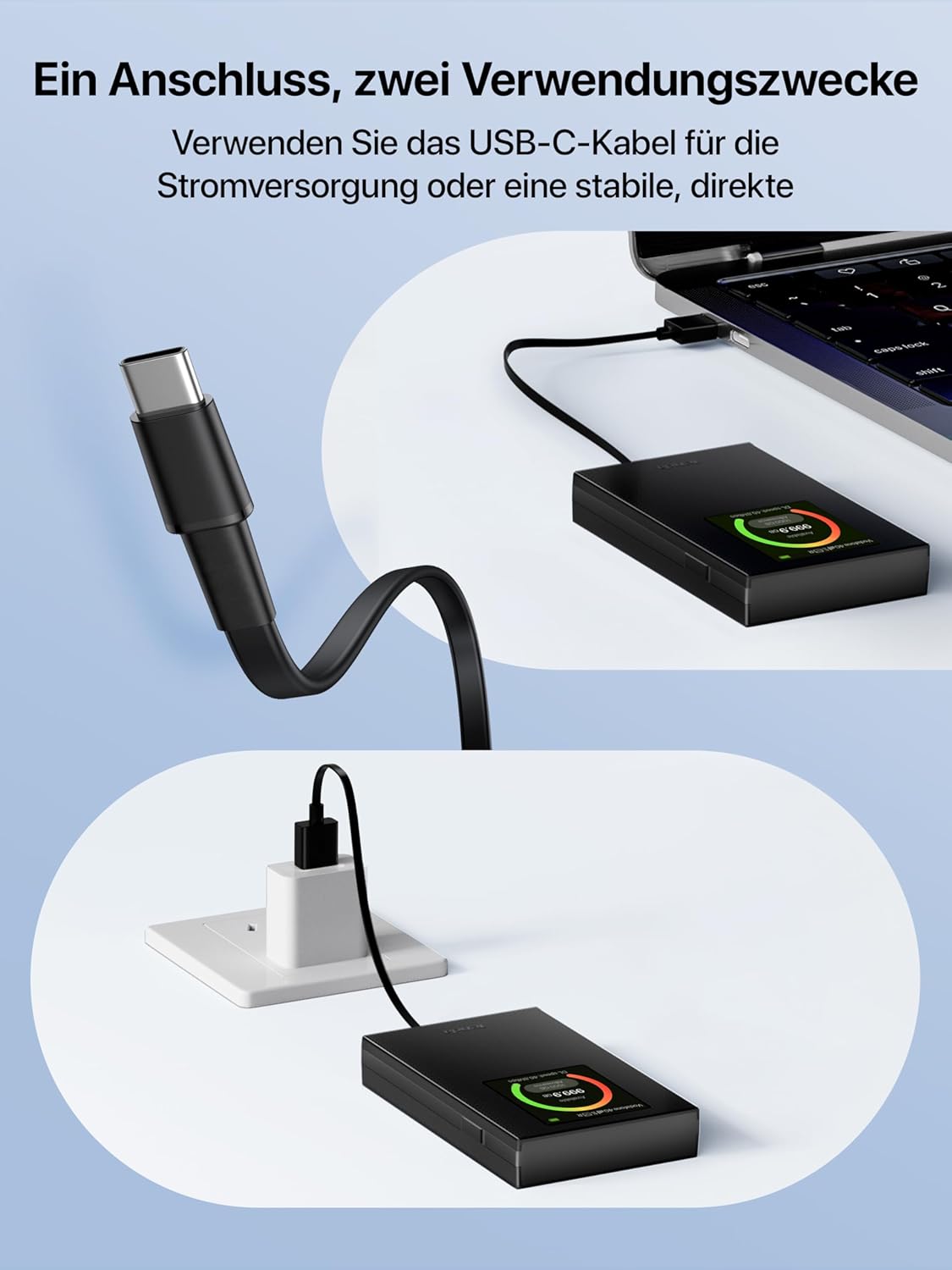
Image: Illustration of the Tenda MF6's USB-C port being used for both power supply and stable, direct data connection to a laptop.
Wi-Fi ಸ್ಲೀಪ್ ಮೋಡ್
To conserve battery, the MF6 portable router automatically turns off Wi-Fi if no wireless devices are connected for 10 minutes. To reactivate Wi-Fi, simply press the power button.
ನಿರ್ವಹಣೆ
ಬ್ಯಾಟರಿಯನ್ನು ಚಾರ್ಜ್ ಮಾಡಲಾಗುತ್ತಿದೆ
Charge the MF6 using the provided USB-C cable connected to a standard USB power adapter (5V/1A or 5V/2A recommended, not included) or a power bank.

Image: Illustration suggesting up to 8 hours of battery life for the Tenda MF6, with a note that actual battery life may vary based on connected devices and usage scenarios.
Optimal Usage Conditions
- ಕಾರ್ಯಾಚರಣಾ ತಾಪಮಾನ: The recommended operating temperature range is 0°C to 35°C (32°F to 95°F).
- ವಿಸ್ತೃತ ಬಳಕೆ: For intensive and prolonged use, it is recommended to keep the device connected to a power source via USB-C without the battery inserted to protect the battery's lifespan.
ದೋಷನಿವಾರಣೆ
ಇಂಟರ್ನೆಟ್ ಸಂಪರ್ಕವಿಲ್ಲ
- ಸಿಮ್ ಕಾರ್ಡ್ ಪರಿಶೀಲನೆ:
- Ensure the Nano SIM card is correctly inserted.
- Verify that the SIM card is active and has a valid data plan.
- Confirm that the SIM card's PIN code is disabled. This can be done by inserting the SIM into a mobile phone and disabling the PIN via its settings. Alternatively, you can attempt to disable it via the MF6's web ನಿರ್ವಹಣಾ ಪುಟ (192.168.0.1).
- APN ಸೆಟ್ಟಿಂಗ್ಗಳು: Consult your 4G SIM card operator for the correct APN (Access Point Name) settings. These can be configured in the MF6's web ನಿರ್ವಹಣೆ ಇಂಟರ್ಫೇಸ್.
- ತಿರುಗಾಟ: If using the device abroad, ensure that data roaming is enabled on your SIM card plan and configured correctly in the device settings.
- ಸಿಗ್ನಲ್ ಸಾಮರ್ಥ್ಯ: Check the signal strength indicator on the LCD screen. If the signal is weak, try moving to a location with better network coverage.
Slow Speed or Unstable Connection
- ಪರಿಸರ ಅಂಶಗಳು: Signal strength and speed are affected by the router's location, 4G operator coverage, and obstacles between the router and connected devices.
- ವೈ-ಫೈ ಚಾನೆಲ್: ಪ್ರವೇಶಿಸಿ web ನಿರ್ವಹಣಾ ಪುಟ (192.168.0.1) and set the Wi-Fi channel to "Auto". The router will automatically select the best channel every 15 minutes if no devices are connected. If devices are connected, you can manually select a fixed channel to avoid interference.
- ಸಾಧನ ಲೋಡ್: Excessive connected devices or high bandwidth usage can impact performance.
ವಿಶೇಷಣಗಳು
| ಬ್ರ್ಯಾಂಡ್ | ಟೆಂಡಾ |
| ಮಾದರಿ ಹೆಸರು | MF6 |
| ಬಣ್ಣ | ಕಪ್ಪು |
| ಸಂಪರ್ಕ ತಂತ್ರಜ್ಞಾನ | 4G LTE, Wi-Fi |
| 4G LTE Speed | Up to 150 Mbps Download, 50 Mbps Upload (Cat4) |
| ವೈ-ಫೈ ಸ್ಟ್ಯಾಂಡರ್ಡ್ | 802.11ax (Wi-Fi 6) |
| Wi-Fi ವೇಗ | Up to 286 Mbps (2.4 GHz band only) |
| ಆವರ್ತನ ಬ್ಯಾಂಡ್ ವರ್ಗ | Single-band (2.4 GHz) |
| ಪರದೆಯ ಗಾತ್ರ | 1.44 Inches (Color LCD) |
| ಬ್ಯಾಟರಿ ಸಾಮರ್ಥ್ಯ | 2100 mAh (Rechargeable Lithium) |
| ಚಾರ್ಜಿಂಗ್ ಇಂಟರ್ಫೇಸ್ | USB-C |
| Compatible SIM Type | ನ್ಯಾನೋ ಸಿಮ್ |
| ಆಪರೇಟಿಂಗ್ ಸಿಸ್ಟಮ್ | Tenda's proprietary firmware |
| ಆಪರೇಟಿಂಗ್ ತಾಪಮಾನ | 0°C ~ 35°C (32°F ~ 95°F) |
| ಶಿಫಾರಸು ಮಾಡಲಾದ ಉಪಯೋಗಗಳು | Camping, Cycling, Home, Travel, Business Trips |
| ಆಯಾಮಗಳು | ೨೩ x ೪.೫ x ೧.೨ ಸೆಂ.ಮೀ (ಅಂದಾಜು) |

Image: Infographic detailing the Tenda MF6's speed capabilities: up to 150 Mbps download and 50 Mbps upload for 4G LTE (Cat4), and up to 286 Mbps for 2.4 GHz Wi-Fi 6.

Image: Visual representation of the Tenda MF6's compact dimensions (9.8 x 5.9 x 1.55 cm), highlighting its portability.
ಖಾತರಿ ಮತ್ತು ಬೆಂಬಲ
ಖಾತರಿ: The Tenda MF6 Mobile WiFi Router comes with a 3 ವರ್ಷದ ಉತ್ಪನ್ನ ಖಾತರಿ.
ತಾಂತ್ರಿಕ ಬೆಂಬಲ: For any technical assistance or inquiries, please contact Tenda support via email at support.it@tenda.cn.
ಬಳಕೆಯ ಸನ್ನಿವೇಶಗಳು
The Tenda MF6 is designed for reliable network access in various situations:

Image: Collage depicting the Tenda MF6 providing internet connectivity in diverse environments such as a hotel, airport, campsite, and a temporary retail space.

Image: A grid of images illustrating various scenarios where the Tenda MF6 provides reliable network access, including travel, work, camping, cycling, driving, and remote work.

Image: Group of friends outdoors, all connected to the Tenda MF6 Mobile WiFi Router, demonstrating its ability to share a fast and stable connection with multiple devices using 4G FDD/TDD-LTE and Wi-Fi 6 technology.

Image: Illustration of the Tenda MF6 providing a fast and stable Wi-Fi hotspot for multiple devices, leveraging 4G FDD/TDD-LTE and Wi-Fi 6 technology.


