ಪರಿಚಯ
Welcome to your new OttLite Mood LED Desk Lamp. This manual provides essential information for the safe and efficient operation of your lamp. Please read all instructions carefully before use and retain this manual for future reference.

Image: The OttLite Mood LED Desk Lamp, ತೋರಿಸುasing its sleek design with a white flexible neck and a color-changing base glowing in blue.
ಪ್ರಮುಖ ಸುರಕ್ಷತಾ ಸೂಚನೆಗಳು
To reduce the risk of fire, electric shock, or injury to persons, please observe the following safety precautions:
- Read all instructions before operating the lamp.
- ಎಲ್ ಅನ್ನು ನಿರ್ವಹಿಸಬೇಡಿamp near water or in excessively humid environments.
- Clean only with a dry cloth. Unplug the lamp ಸ್ವಚ್ಛಗೊಳಿಸುವ ಮೊದಲು.
- ಯಾವುದೇ ವಾತಾಯನ ತೆರೆಯುವಿಕೆಗಳನ್ನು ನಿರ್ಬಂಧಿಸಬೇಡಿ. ತಯಾರಕರ ಸೂಚನೆಗಳಿಗೆ ಅನುಗುಣವಾಗಿ ಸ್ಥಾಪಿಸಿ.
- ತಯಾರಕರು ನಿರ್ದಿಷ್ಟಪಡಿಸಿದ ಲಗತ್ತುಗಳು ಮತ್ತು ಬಿಡಿಭಾಗಗಳನ್ನು ಮಾತ್ರ ಬಳಸಿ.
- Unplug this lamp ಮಿಂಚಿನ ಬಿರುಗಾಳಿಗಳ ಸಮಯದಲ್ಲಿ ಅಥವಾ ದೀರ್ಘಕಾಲದವರೆಗೆ ಬಳಸದೆ ಇರುವಾಗ.
- Refer all servicing to qualified service personnel. Servicing is required when the lamp has been damaged in any way, such as power-supply cord or plug is damaged, liquid has been spilled or objects have fallen into the lamp, ಎಲ್amp ಮಳೆ ಅಥವಾ ತೇವಾಂಶಕ್ಕೆ ಒಡ್ಡಿಕೊಂಡಿದೆ, ಸಾಮಾನ್ಯವಾಗಿ ಕಾರ್ಯನಿರ್ವಹಿಸುವುದಿಲ್ಲ ಅಥವಾ ಕೈಬಿಡಲಾಗಿದೆ.
- Ensure the power adapter is easily accessible and can be disconnected quickly if needed.
- Avoid looking directly into the LED light source for extended periods, as this may cause eye discomfort.
ಪ್ಯಾಕೇಜ್ ವಿಷಯಗಳು
ಪ್ಯಾಕೇಜ್ನಲ್ಲಿ ಎಲ್ಲಾ ವಸ್ತುಗಳು ಇವೆಯೇ ಎಂದು ಪರಿಶೀಲಿಸಿ:
- ಒಟ್ಲೈಟ್ ಮೂಡ್ ಎಲ್ಇಡಿ ಡೆಸ್ಕ್ ಎಲ್amp (Model CSB3000W)
- ಪವರ್ ಕೇಬಲ್
ಉತ್ಪನ್ನದ ವೈಶಿಷ್ಟ್ಯಗಳು
The OttLite Mood LED Desk Lamp is designed to enhance your workspace with advanced lighting and convenient features:
- ClearSun LED Technology: Reduces eye strain by up to 51% by providing a balanced, smooth light spectrum that closely matches natural daylight.
- Color Changing Base: ದಿ ಎಲ್amp base glows in your choice of color or cycles through a spectrum of colors, allowing you to set the mood.
- ಸಂಯೋಜಿತ USB ಚಾರ್ಜಿಂಗ್ ಪೋರ್ಟ್: A 5V, 2.1A USB port is built into the base for convenient charging of smartphones, tablets, and other electronic devices.
- Touch Activated Controls: Easily switch between three brightness settings with simple touch controls.
- ಹೊಂದಿಕೊಳ್ಳುವ ಕುತ್ತಿಗೆ: The rubberized neck allows for adjustable illumination, directing light precisely where needed.
- ಹೈ ಕಲರ್ ರೆಂಡರಿಂಗ್ ಇಂಡೆಕ್ಸ್ (CRI): With a CRI of 95+, the ClearSun LEDs provide excellent color accuracy, making colors appear vivid and true-to-life.
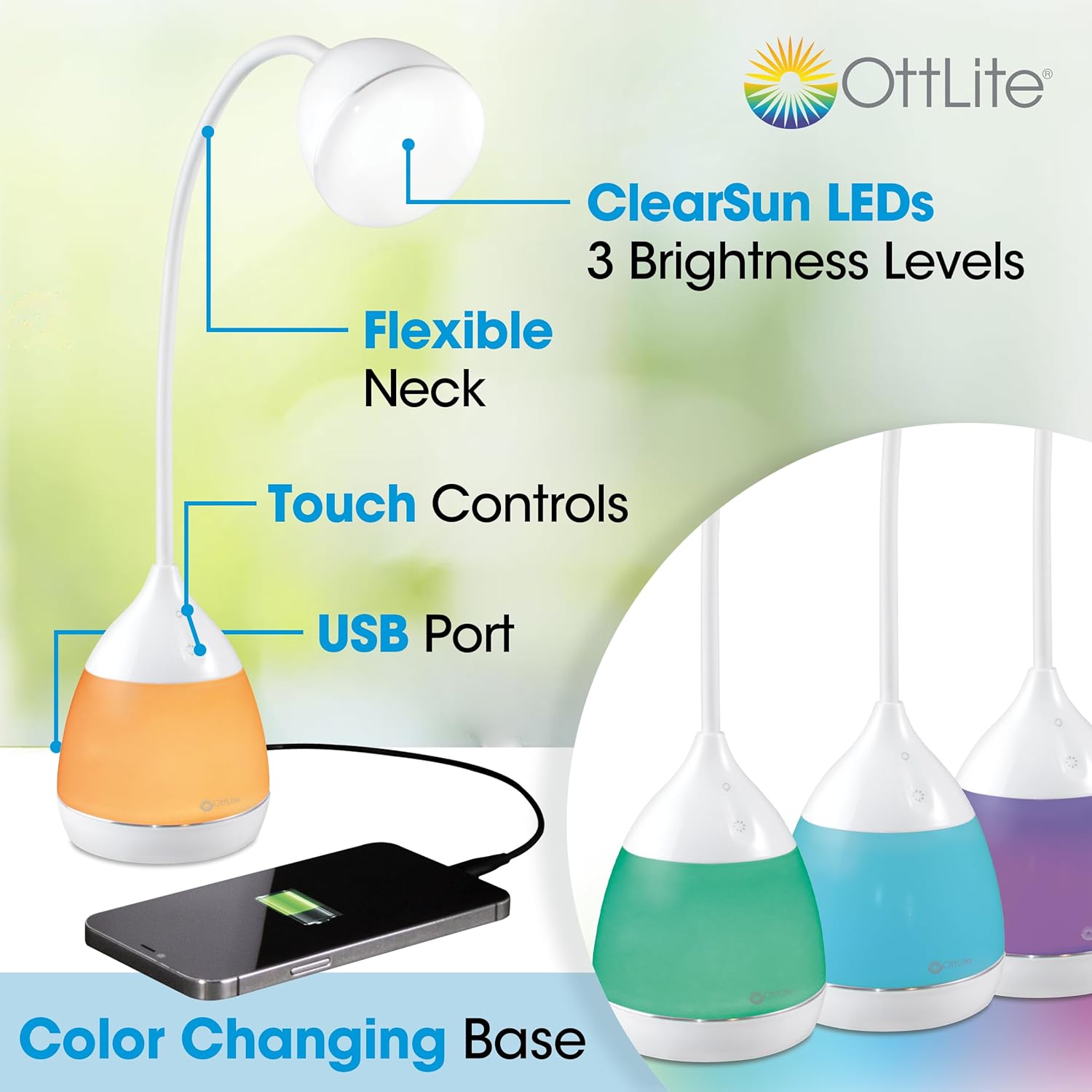
Image: An illustration of the OttLite Mood LED Desk Lamp highlighting its key features: ClearSun LEDs, flexible neck, touch controls, USB port, and color-changing base.
ಸೆಟಪ್
Follow these steps to set up your OttLite Mood LED Desk Lamp:
- ಎಲ್ ಅನ್ನು ಅನ್ಪ್ಯಾಕ್ ಮಾಡಿamp: ಎಲ್ ಅನ್ನು ಎಚ್ಚರಿಕೆಯಿಂದ ತೆಗೆದುಹಾಕಿamp and all components from the packaging.
- ಎಲ್ ಅನ್ನು ಇರಿಸಿamp: ಎಲ್ ಅನ್ನು ಇರಿಸಿamp on a stable, flat surface in your desired location. Ensure there is adequate space around the lamp ವಾತಾಯನಕ್ಕಾಗಿ.
- ವಿದ್ಯುತ್ ಸಂಪರ್ಕ: Insert the power cable into the power input port located on the back of the lamp base. Plug the other end of the power cable into a standard electrical wall outlet.
ಆಪರೇಟಿಂಗ್ ಸೂಚನೆಗಳು
Power On/Off and Brightness Control
ದಿ ಎಲ್amp features touch-activated controls for easy operation:
- ಎಲ್ ಅನ್ನು ತಿರುಗಿಸಲುamp ON, gently touch the power symbol on the lamp ಬೇಸ್.
- To adjust the brightness, continue to touch the power symbol. The lamp will cycle through three brightness settings (low, medium, high).
- ಎಲ್ ಅನ್ನು ತಿರುಗಿಸಲುamp ಆಫ್ ಆಗಿದೆ, touch the power symbol after the highest brightness setting, or hold the power symbol for a few seconds.
Color Changing Base Operation
The base of your lamp offers customizable ambient lighting:
- To activate the color-changing base, locate the color control symbol on the lamp ಬೇಸ್.
- Touch the color control symbol to cycle through various static colors.
- Hold the color control symbol to initiate a continuous color-cycling mode.
- Touch the color control symbol again to pause on a desired color or to turn off the color-changing feature.

Image: A display of six OttLite Mood LED Desk Lamps, each with its base illuminated in a different color, demonstrating the color-changing feature.
USB ಚಾರ್ಜಿಂಗ್ ಪೋರ್ಟ್
The integrated USB port allows you to charge your devices conveniently:
- Locate the USB charging port on the side of the lamp ಬೇಸ್.
- Connect your device's USB charging cable to the port.
- The USB port provides 5V, 2.1A output, suitable for charging most smartphones, tablets, and other USB-powered devices.
- ಎಲ್ ಅನ್ನು ಖಚಿತಪಡಿಸಿಕೊಳ್ಳಿamp is connected to power for the USB charging function to operate.

Image: The OttLite Mood LED Desk Lamp with key dimensions indicated, showing a smartphone connected to and charging from the lamp's USB port.
ನಿರ್ವಹಣೆ
Proper care will ensure the longevity and optimal performance of your lamp:
- ಸ್ವಚ್ಛಗೊಳಿಸುವಿಕೆ: ಎಲ್ ಅನ್ನು ಯಾವಾಗಲೂ ಅನ್ಪ್ಲಗ್ ಮಾಡಿamp before cleaning. Use a soft, dry, non-abrasive cloth to wipe down the lamp's surfaces. Do not use liquid cleaners or aerosol sprays, as they may damage the finish or internal components.
- ಎಲ್ಇಡಿ ಬೆಳಕಿನ ಮೂಲ: ಈ ಎಲ್ ನಲ್ಲಿರುವ ಎಲ್ಇಡಿ ಬೆಳಕಿನ ಮೂಲamp is designed for long-term use and is not user-replaceable. Do not attempt to replace the LEDs.
- ಸಂಗ್ರಹಣೆ: ಎಲ್ ಅನ್ನು ಸಂಗ್ರಹಿಸಿದರೆamp for an extended period, ensure it is clean, dry, and stored in a safe place away from extreme temperatures and direct sunlight.
ದೋಷನಿವಾರಣೆ
If you encounter issues with your OttLite Mood LED Desk Lamp, ಈ ಕೆಳಗಿನ ಸಾಮಾನ್ಯ ಸಮಸ್ಯೆಗಳು ಮತ್ತು ಪರಿಹಾರಗಳನ್ನು ನೋಡಿ:
- Lamp ಆನ್ ಆಗುವುದಿಲ್ಲ:
- Ensure the power cable is securely plugged into both the lamp's power input and a functional wall outlet.
- ಎಲ್ ಅನ್ನು ಪ್ಲಗ್ ಮಾಡಲು ಪ್ರಯತ್ನಿಸಿamp into a different wall outlet to rule out an issue with the power source.
- Avoid using power strips if possible; plug the lamp ನೇರವಾಗಿ ಗೋಡೆಯ ಔಟ್ಲೆಟ್ಗೆ.
- USB Charging Port Not Working:
- ಎಲ್ ಎಂಬುದನ್ನು ಪರಿಶೀಲಿಸಿamp is powered on and connected to a live electrical outlet.
- Check the USB cable for damage and ensure it is properly connected to both the lamp ಮತ್ತು ನಿಮ್ಮ ಸಾಧನ.
- Test with a different USB cable or device to confirm the issue is with the lamp's port and not the cable or device.
- Color Changing Base Not Responding:
- ಎಲ್ ಅನ್ನು ಖಚಿತಪಡಿಸಿಕೊಳ್ಳಿamp ಚಾಲಿತವಾಗಿದೆ.
- Gently touch the color control symbol to cycle through colors or activate the cycling mode.
- If unresponsive, unplug the lamp from the power source for a few minutes, then plug it back in and try again.
If these steps do not resolve the issue, please contact OttLite customer support for further assistance.
ವಿಶೇಷಣಗಳು
| ವೈಶಿಷ್ಟ್ಯ | ನಿರ್ದಿಷ್ಟತೆ |
|---|---|
| ಮಾದರಿ ಸಂಖ್ಯೆ | CSB3000W |
| ಬೆಳಕಿನ ಮೂಲ ಪ್ರಕಾರ | ಎಲ್ಇಡಿ (ಕ್ಲಿಯರ್ ಸನ್ ತಂತ್ರಜ್ಞಾನ) |
| ಕಲರ್ ರೆಂಡರಿಂಗ್ ಇಂಡೆಕ್ಸ್ (CRI) | 95+ |
| ಹೊಳಪು | 308 ಲುಮೆನ್ಸ್ |
| ಬಣ್ಣದ ತಾಪಮಾನ | 5000 ಕೆಲ್ವಿನ್ (ಹಗಲು) |
| ವಾಟ್tage | 4.51 ವ್ಯಾಟ್ಗಳು |
| ಸಂಪುಟtage | 120 ವೋಲ್ಟ್ಗಳು |
| USB ಚಾರ್ಜಿಂಗ್ ಔಟ್ಪುಟ್ | 5V, 2.1A |
| ಉತ್ಪನ್ನದ ಆಯಾಮಗಳು (D x W x H) | 3.93" x 3.93" x 10.25" |
| ಮೂಲ ವ್ಯಾಸ | 3.94 ಇಂಚುಗಳು |
| Neck Length | 11.75 Inches (approx.) |
| ಐಟಂ ತೂಕ | 1.54 ಪೌಂಡ್ |
| ವಸ್ತು | ಪ್ಲಾಸ್ಟಿಕ್ |
| ನಿಯಂತ್ರಣ ವಿಧಾನ | ಸ್ಪರ್ಶಿಸಿ |
ಖಾತರಿ ಮತ್ತು ಬೆಂಬಲ
OttLite products are manufactured with quality and care. For warranty information, product support, or to inquire about replacement parts, please visit the official OttLite website or contact their customer service department directly. Please have your model number (CSB3000W) and purchase date available when contacting support.
For the most up-to-date contact information, please refer to the OttLite official webಸೈಟ್: www.ottlite.com


