ಪರಿಚಯ
This manual provides detailed instructions for the installation, operation, and maintenance of your Reolink RLC-820A 8MP 4K PoE Security IP Camera. Please read this manual thoroughly before using the product to ensure proper functionality and safety. The Reolink RLC-820A features 4K Super HD resolution, AI-powered person and vehicle detection, Power over Ethernet (PoE) for simplified installation, and multiple recording options.
ಉತ್ಪನ್ನ ಮುಗಿದಿದೆview
ಪ್ರಮುಖ ಲಕ್ಷಣಗಳು
- 4K Super HD Resolution: Captures video at 8MP (3840x2160) for clear and detailed images, offering 1.6 times the clarity of 5MP and 4 times that of 1080p.
- AI Person/Vehicle Detection: Advanced detection technology distinguishes between people, vehicles, and other moving objects, reducing false alarms from minor movements like swaying leaves or insects.
- ಪವರ್ ಓವರ್ ಈಥರ್ನೆಟ್ (PoE): Simplifies installation by transmitting both power and data through a single network cable.
- ಬಹು ರೆಕಾರ್ಡಿಂಗ್ ಆಯ್ಕೆಗಳು: Supports motion-activated recording, scheduled recording, and 24/7 continuous recording.
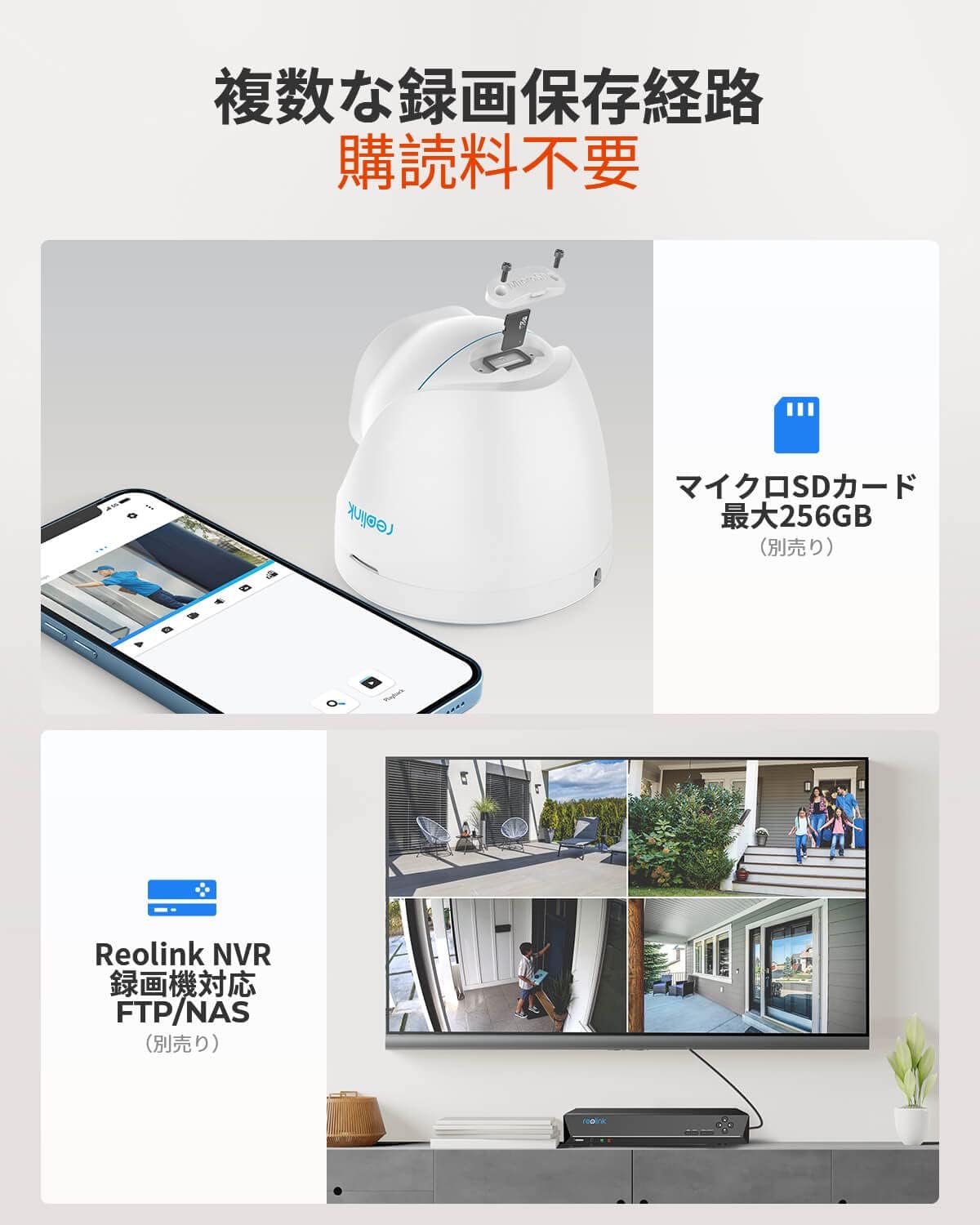
- ಸ್ಥಳೀಯ ಸಂಗ್ರಹಣೆ: ರೆಕಾರ್ಡ್ಸ್ ಫೂtage to a microSD card (up to 256GB, sold separately) or a Reolink NVR. FTP server storage is also supported.
- Instant Motion Alerts: Sends real-time app push notifications and email alerts upon detecting threats.
- ರಾತ್ರಿ ದೃಷ್ಟಿ: Equipped with infrared LEDs for clear surveillance in low-light conditions up to 30 meters.
- ಅಂತರ್ನಿರ್ಮಿತ ಮೈಕ್ರೊಫೋನ್: Records audio along with video for enhanced surveillance.
- ರಿಮೋಟ್ ಪ್ರವೇಶ: View live feeds, playback recordings, and manage settings via the Reolink App or Client software on smartphones and PCs.
- Time-Lapse Function: Capture long-term events in a condensed video format.
- ಹವಾಮಾನ ನಿರೋಧಕ ವಿನ್ಯಾಸ: IP66 rated for outdoor use, protecting against dust and water ingress.

ಪ್ಯಾಕೇಜ್ ವಿಷಯಗಳು
The following items are included in your Reolink RLC-820A package:
- Reolink RLC-820A Camera
- 1-meter Network Cable
- ಜಲನಿರೋಧಕ ಮುಚ್ಚಳ
- ಆರೋಹಿಸುವಾಗ ಟೆಂಪ್ಲೇಟು
- ಆರೋಹಿಸುವಾಗ ತಿರುಪುಮೊಳೆಗಳು
- ಕಣ್ಗಾವಲು ಚಿಹ್ನೆ
- ತ್ವರಿತ ಪ್ರಾರಂಭ ಮಾರ್ಗದರ್ಶಿ
ಗಮನಿಸಿ: A DC power adapter and PoE switch are sold separately and are required for operation if not using a PoE NVR.

ಸೆಟಪ್ ಮತ್ತು ಅನುಸ್ಥಾಪನೆ
1. Powering the Camera
The RLC-820A camera supports Power over Ethernet (PoE) for simplified power and data transmission. You can power the camera using one of the following methods:
- PoE Switch/Injector: Connect the camera to a PoE switch or injector using a single Ethernet cable. This method provides both power and network connectivity.
- DC ಪವರ್ ಅಡಾಪ್ಟರ್: If a PoE switch is not available, connect the camera to a 12V DC power adapter (sold separately) and a standard router via an Ethernet cable for network access.

2. ಆರಂಭಿಕ ಸಂರಚನೆ
After connecting the camera, you can perform initial setup and registration using the free Reolink App, PC Client software, or a web browser (Edge, Chrome, Firefox, Safari).
- Download the Reolink App from the App Store or Google Play.
- Follow the in-app instructions to add your camera and complete the initial setup, including setting a password.


3. ಭೌತಿಕ ಅನುಸ್ಥಾಪನೆ
The RLC-820A is designed for outdoor use and can be mounted on ceilings or walls. Use the provided mounting template and screws for secure installation.
- ನಿಮಗೆ ಬೇಕಾದುದನ್ನು ಒದಗಿಸುವ ಸ್ಥಳವನ್ನು ಆರಿಸಿ viewing angle and is within range of your network connection.
- Use the mounting template to mark screw holes.
- Drill pilot holes and secure the camera using the provided screws.
- Ensure all cable connections are protected with the waterproof lid, especially for outdoor installations.

ಆಪರೇಟಿಂಗ್ ಸೂಚನೆಗಳು
1. ಲೈವ್ View ಮತ್ತು ಪ್ಲೇಬ್ಯಾಕ್
Access live video streams and review ದಾಖಲಿಸಿದ footage through the Reolink App or Client software.
- Open the Reolink App or Client and select your camera from the device list.
- ಲೈವ್ view will display automatically.
- To access playback, navigate to the playback section within the app/client and select the desired date and time.

2. AI Detection and Alerts
The RLC-820A features intelligent detection to minimize false alarms.
- Person/Vehicle Detection: The camera can differentiate between human and vehicle shapes, triggering alerts only for relevant events.
- ಚಲನೆಯ ವಲಯಗಳು: ಕ್ಯಾಮೆರಾದೊಳಗೆ ನಿರ್ದಿಷ್ಟ ಪ್ರದೇಶಗಳನ್ನು ಕಾನ್ಫಿಗರ್ ಮಾಡಿ view to detect motion, ignoring irrelevant zones.
- ಸೂಕ್ಷ್ಮತೆಯ ಹೊಂದಾಣಿಕೆ: Adjust the detection sensitivity to suit your environment and reduce unwanted alerts.
- ಎಚ್ಚರಿಕೆಗಳು: Receive instant push notifications on your smartphone or email alerts when motion is detected.
3. ರೆಕಾರ್ಡಿಂಗ್ ವಿಧಾನಗಳು
Choose from three recording modes based on your surveillance needs:
- Motion-Activated Recording: Records only when motion is detected, saving storage space.
- ನಿಗದಿತ ರೆಕಾರ್ಡಿಂಗ್: Records during specific time periods set by the user.
- 24/7 ನಿರಂತರ ರೆಕಾರ್ಡಿಂಗ್: Records continuously, ensuring no event is missed. This requires sufficient storage capacity (microSD card or NVR).

4. Time-Lapse Function
The time-lapse feature allows you to capture dynamic long-term events, such as construction projects or changing weather patterns, and condense them into short, engaging videos.
- Access the time-lapse settings in the Reolink App or Client.
- Configure the capture interval and duration.
- The camera will automatically compile the images into a time-lapse video.

ನಿರ್ವಹಣೆ
- ನಿಯಮಿತ ಶುಚಿಗೊಳಿಸುವಿಕೆ: Periodically clean the camera lens with a soft, dry cloth to ensure clear image quality. Avoid abrasive cleaners.
- ಫರ್ಮ್ವೇರ್ ಅಪ್ಡೇಟ್ಗಳು: Check for and install the latest firmware updates through the Reolink App or Client. Firmware updates often include performance improvements and security enhancements.
- ಕೇಬಲ್ ತಪಾಸಣೆ: Regularly inspect all cables for any signs of wear or damage, especially for outdoor installations. Ensure waterproof connections remain sealed.
- ಶೇಖರಣಾ ನಿರ್ವಹಣೆ: If using a microSD card, periodically review ಮತ್ತು ಸಂಗ್ರಹಿಸಲಾದ ಫೂ ಅನ್ನು ನಿರ್ವಹಿಸಿtage to prevent the card from filling up, especially if not set to overwrite old recordings.

ದೋಷನಿವಾರಣೆ
ಸಾಮಾನ್ಯ ಸಮಸ್ಯೆಗಳು ಮತ್ತು ಪರಿಹಾರಗಳು
- ಕ್ಯಾಮರಾ ಆನ್ ಆಗುತ್ತಿಲ್ಲ:
- Ensure the PoE switch or injector is powered on and functioning correctly.
- If using a DC adapter, verify it is properly connected and providing the correct voltagಇ (12V).
- Check the Ethernet cable for damage and ensure it is securely connected.
- No video feed:
- Verify network connectivity. Ensure the camera is connected to your router/network.
- Check if the camera's IP address is correctly configured and accessible on your network.
- Restart the camera and your network equipment (router, PoE switch).
- Frequent false alarms:
- Adjust the motion detection sensitivity in the Reolink App/Client.
- Configure motion detection zones to exclude areas with frequent irrelevant movement (e.g., trees, busy roads).
- Ensure AI detection for person/vehicle is enabled to filter out non-human/vehicle movements.
- ಕಳಪೆ ಚಿತ್ರದ ಗುಣಮಟ್ಟ:
- ಕ್ಯಾಮರಾ ಲೆನ್ಸ್ ಅನ್ನು ಸ್ವಚ್ಛಗೊಳಿಸಿ.
- Ensure there are no obstructions in front of the lens.
- Check your network bandwidth; insufficient bandwidth can affect streaming quality.
- Compatibility with third-party NVRs/Software:
- The RLC-820A supports ONVIF protocol, allowing it to be added to many third-party software/NVRs like Blue Iris or Synology.
- For optimal performance and full feature access, using Reolink NVRs and software is recommended.
- Compatibility with third-party products is not guaranteed for all features.
ವಿಶೇಷಣಗಳು
| ವೈಶಿಷ್ಟ್ಯ | ವಿವರ |
|---|---|
| ಮಾದರಿ ಹೆಸರು | ಆರ್ಎಲ್ಸಿ -820 ಎ |
| ವೀಡಿಯೊ ಕ್ಯಾಪ್ಚರ್ ರೆಸಲ್ಯೂಶನ್ | 4K (8MP) |
| ಪರಿಣಾಮಕಾರಿ ವೀಡಿಯೊ ರೆಸಲ್ಯೂಶನ್ | 8 ಎಂಪಿ |
| ಆರೋಹಿಸುವ ವಿಧ | ಸೀಲಿಂಗ್ / ವಾಲ್ ಮೌಂಟ್ |
| ಬಣ್ಣ | ಬಿಳಿ |
| ಐಟಂಗಳ ಸಂಖ್ಯೆ | 1 |
| ಒಳಗೊಂಡಿರುವ ಘಟಕಗಳು | RLC-820A Camera, 1M Network Cable, Waterproof Lid, Manual, Mounting Tools, Surveillance Sign, Screws |
| ಚಾನಲ್ ಎಣಿಕೆ | 8 (referring to NVR compatibility) |
| ಫಾರ್ಮ್ ಫ್ಯಾಕ್ಟರ್ | ತಿರುಗು ಗೋಪುರ |
| ನೈಟ್ ವಿಷನ್ ಶ್ರೇಣಿ | 30 ಮೀಟರ್ |
| ಫ್ರೇಮ್ ದರ | 25 fps, 15 fps, 10 fps, 2 fps |
| ಸಂಪುಟtage | 5 Volts (for DC adapter, PoE provides 48V) |
| ಉತ್ಪನ್ನದ ಆಯಾಮಗಳು (LxWxH) | 14 x 14 x 14 ಸೆಂ |
| ಉತ್ಪನ್ನ ತೂಕ | 570 ಗ್ರಾಂ |
| ಬೆಳಕಿನ ಮೂಲ | ಅತಿಗೆಂಪು |
| ವಿಶೇಷ ವೈಶಿಷ್ಟ್ಯಗಳು | HD Resolution, Motion Sensor, Local Recording, Night Vision |
| ಸಂಪರ್ಕ ತಂತ್ರಜ್ಞಾನ | ವೈರ್ಡ್ (ಈಥರ್ನೆಟ್) |
| ಶಿಫಾರಸು ಮಾಡಲಾದ ಬಳಕೆ | ಹೊರಾಂಗಣ ಭದ್ರತೆ |
| ಶಕ್ತಿಯ ಮೂಲ | Corded Electric (PoE or DC adapter) |
| ಬೆಂಬಲಿತ ಸಾಧನಗಳು | Desktop, Laptop, iOS, Android |
| Connection Protocols | HTTPS, SSL, TCP/IP, UDP, HTTP, IPv4, UPnP, RTSP, RTMP, SMTP, NTP, DHCP, DNS, DDNS, FTP, P2P |
ಖಾತರಿ ಮತ್ತು ಬೆಂಬಲ
Reolink provides comprehensive support for its products:
- ಖಾತರಿ: The Reolink RLC-820A comes with a 2-year quality warranty.
- ರಿಟರ್ನ್ ಪಾಲಿಸಿ: A 30-day full refund and free return guarantee is offered.
- ಗ್ರಾಹಕ ಬೆಂಬಲ: 24/7 online support is available for any technical assistance or inquiries.
- Transparency Verified: Each product has a unique code that can be verified using the Transparency app to confirm authenticity.
- ಗೌಪ್ಯತೆ: Reolink is committed to protecting your privacy. Video data is encrypted using 2048-bit RSA, 128-bit AES-GCM algorithms, and TSL.
For further assistance, please visit the official Reolink webಸೈಟ್ ಅಥವಾ ಅವರ ಗ್ರಾಹಕ ಬೆಂಬಲವನ್ನು ಸಂಪರ್ಕಿಸಿ.


