


myQ L955W Multi Function Control Panel

លក្ខណៈបច្ចេកទេស
- Models: L955W, 003-0859-002, & 041-0491-000
- ឆបគ្នាជាមួយឧបករណ៍បើកទ្វារយានដ្ឋាន Security+ 3.0TM
- Minimum installation height: 5 feet (1.5m)
ជាងview
Your Multi-Function Control Panel is compatible with Security+ 3.0™ garage door openers. All Security+ 3.0 garage door openers have a white learn button. The images throughout this manual are for reference only and your product may look different.
ការណែនាំអំពីសុវត្ថិភាព
ព្រមាន
ដើម្បីបងា្ករការរងរបួសឬការស្លាប់ពីការឆ្លងចរន្តអគ្គិសនី៖
- ត្រូវប្រាកដថាថាមពលមិនត្រូវបានភ្ជាប់មុនពេលដំឡើងការត្រួតពិនិត្យទ្វារ។
- ភ្ជាប់តែវ៉ុលទាប 12 វ៉ុលប៉ុណ្ណោះ។tagអ៊ីខ្សភ្លើង។
ដើម្បីបងា្ករការរងរបួសឬការស្លាប់ពីទ្វារយានដ្ឋានបិទ៖
- ដំឡើងការត្រួតពិនិត្យទ្វារនៅចំពោះមុខទ្វារយានដ្ឋានឱ្យឆ្ងាយពីកុមារនៅកម្ពស់យ៉ាងតិច ៥ ហ្វីត (១.៥ ម៉ែត្រ) និងនៅឆ្ងាយពីផ្នែកខ្លះនៃការផ្លាស់ប្តូរទ្វារ។
- កុំអនុញ្ញាតឱ្យកុមារធ្វើប្រតិបត្តិការឬលេងជាមួយប៊ូតុងរុញទ្វារឬឧបករណ៍បញ្ជូនបញ្ជាពីចម្ងាយ។
- ធ្វើឱ្យទ្វារបើកបានតែនៅពេលដែលវាអាចមើលឃើញយ៉ាងច្បាស់ត្រូវបានកែតម្រូវឱ្យបានត្រឹមត្រូវហើយមិនមានឧបសគ្គក្នុងការធ្វើដំណើរតាមទ្វារទេ។
- តែងតែទុកទ្វារយានដ្ឋានឱ្យមើលឃើញរហូតដល់បានបិទទាំងស្រុង។ កុំអោយនរណាម្នាក់ឆ្លងកាត់ផ្លូវបិទទ្វារយានដ្ឋាន។
- ឧបករណ៍ និងមុខងារដែលមិនមានការយកចិត្តទុកដាក់គឺត្រូវប្រើតែជាមួយទ្វារផ្នែកប៉ុណ្ណោះ។
ព្រមាន៖ ផលិតផលនេះអាចធ្វើឲ្យអ្នកប្រឈមនឹងសារធាតុគីមី រួមទាំងសារធាតុសំណ ដែលត្រូវបានគេស្គាល់នៅក្នុងរដ្ឋកាលីហ្វ័រញ៉ា ដើម្បីបង្កជំងឺមហារីក ឬពិការភាពពីកំណើត ឬគ្រោះថ្នាក់ដល់ការបន្តពូជផ្សេងទៀត។ សម្រាប់ព័ត៌មានបន្ថែម សូមចូលទៅកាន់ គេហទំព័រ www.P65 ប្រយ័ត្ន.
ការដំឡើង
ដំឡើងបន្ទះវត្ថុបញ្ជាឱ្យមើលឃើញទ្វារយានដ្ឋាននៅកម្ពស់អប្បបរមា 5 ហ្វីត (1.5 ម៉ែត្រ) ដែលកុមារតូចៗមិនអាចទៅដល់បាន និងឆ្ងាយពីផ្នែកដែលផ្លាស់ទីនៃទ្វារ។
ឧបករណ៍ដែលត្រូវការ
រួមបញ្ចូលផ្នែករឹង

ភ្ជាប់ផ្ទាំងបញ្ជា
- Unplug the garage door opener to prevent the garage door opener from activating during wiring. Disconnect the garage door opener battery (if applicable).
- Separate the wires and strip 7/16 inch (11 mm) of insulation from the end of each wire.

- ភ្ជាប់ខ្សែភ្លើងមួយទៅវីសនីមួយៗនៅខាងក្រោយការគ្រប់គ្រងទ្វារ។ ខ្សភ្លើងអាចភ្ជាប់ជាមួយវីសទាំង។

ដំឡើងផ្ទាំងបញ្ជា
- សម្គាល់ទីតាំងនៃរន្ធម៉ោនខាងក្រោម ហើយខួងរន្ធ 5/32 អ៊ីញ (4 ម) ។
- Tap in anchor with hammer if installing on drywall. Install the bottom screw, allowing 1/8 inch (3 mm) to protrude from the wall.

- ដាក់រន្ធខាងក្រោមនៃផ្ទាំងបញ្ជាលើវីស (ក) ហើយរុញចុះក្រោមទៅកន្លែង (ខ) ។
- លើករបាររុញបន្ទះវត្ថុបញ្ជា ហើយសម្គាល់រន្ធខាងលើ។

- ដោះបន្ទះវត្ថុបញ្ជាចេញពីជញ្ជាំង ហើយខួងរន្ធ 5/32 អ៊ីញ (4 ម) សម្រាប់វីសខាងលើ។ ប៉ះក្នុងយុថ្កាដោយប្រើញញួរ ប្រសិនបើដំឡើងនៅលើជញ្ជាំងស្ងួត។
- ដាក់រន្ធខាងក្រោមនៃផ្ទាំងបញ្ជាលើវីស ហើយរុញចុះក្រោម។ ដំឡើងវីសខាងលើហើយបិទរបាររុញ។

Wire to Garage Door Opener
- Separate the wires and strip 7/16 inch (11 mm) of insulation from the end of each wire.
- Connect one of the wires to the red terminal and the other wire to the white terminal. To insert or release wire, push in tab with screwdriver tip.

- ភ្ជាប់ថាមពលឡើងវិញទៅឧបករណ៍បើកទ្វារយានដ្ឋាន។
- The command LED will flash until the control panel has been programmed to the garage door opener. See page 6 for programming instructions.

If the control panel command LED does not light up, first, verify the wires to both the control panel and garage door opener are installed properly. Having done so, if the control panel command LED does not light up, check for breaks or a short in the wires. If either are found, replace the wire.
ការសរសេរកម្មវិធី
ការសរសេរកម្មវិធីផ្ទាំងបញ្ជាទៅកាន់អ្នកបើកទ្វារយានដ្ឋានរបស់អ្នក។
- កំណត់ទីតាំងប៊ូតុង LEARN នៅលើឧបករណ៍បើកទ្វារយានដ្ឋានរបស់អ្នក (អាចតម្រូវឱ្យមានជណ្ដើរ)។
Press and immediately release the LEARN button. The LEARN button LED will turn on solid.
- Within 30 seconds, press and hold the control panel push bar until the garage door opener lights flash and/or two clicks are heard.

តេស្តដើម្បីជោគជ័យ៖
- Press the control panel push bar. The garage door opener will activate.
- If the garage door does not activate, repeat the programming steps.
លក្ខណៈពិសេសនិងប្រតិបត្តិការ
លក្ខណៈពិសេស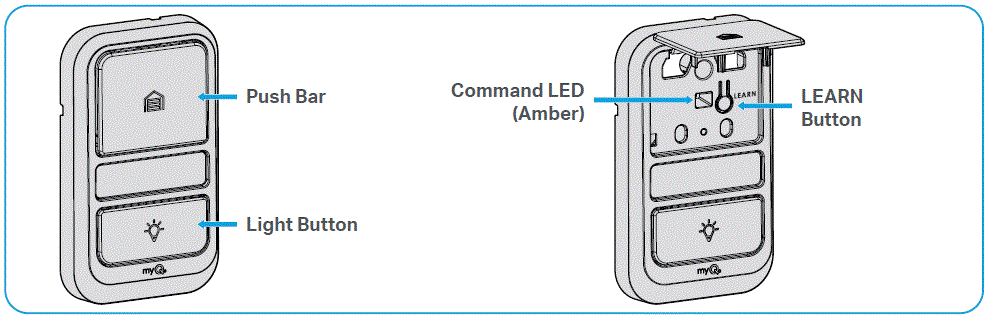
ប្រតិបត្តិការ
របាររុញ
Press push bar to open / close the garage door.
ប៊ូតុងពន្លឺ
ចុចប៊ូតុងពន្លឺ ដើម្បីបើក ឬបិទភ្លើងបើកទ្វារយានដ្ឋាន។ នៅពេលដែលភ្លើងត្រូវបានបើក ពួកគេនឹងបើករហូតទាល់តែប៊ូតុងពន្លឺត្រូវបានចុចម្តងទៀត ឬរហូតដល់ឧបករណ៍បើកទ្វារយានដ្ឋានត្រូវបានធ្វើឱ្យសកម្ម។ នៅពេលដែលឧបករណ៍បើកទ្វារយានដ្ឋានត្រូវបានធ្វើឱ្យសកម្ម ភ្លើងនឹងរលត់បន្ទាប់ពីរយៈពេលជាក់លាក់មួយ (ការកំណត់របស់រោងចក្រគឺ 4 1/2 នាទី)។ ប៊ូតុងពន្លឺនឹងមិនគ្រប់គ្រងភ្លើងនៅពេលដែលទ្វារមានចលនា។
ចំណាំ៖ Connect your garage door opener to the myQ app to manage the length of time the light stays on.
Light Feature for the Safety Reversing Sensors
ភ្លើងបើកទ្វារយានដ្ឋាននឹងបើកនៅពេលដែលធ្នឹមឧបករណ៍ចាប់សញ្ញាបញ្ច្រាសសុវត្ថិភាពត្រូវបានរំខាន។ លំនាំដើមរបស់រោងចក្រត្រូវបានបើក។
- បើក៖ Start with the garage door opener lights on. Press and hold the light button to turn off the light, continue to hold until the light turns on (about 10 seconds).
- បិទ: Start with the garage door opener lights off. Press and hold the light button to turn on the light, continue to hold until the light turns off (about 10 seconds).
រៀបចំកម្មវិធីបញ្ជាពីចម្ងាយ ឬក្តារចុចឥតខ្សែទៅកាន់ឧបករណ៍បើកទ្វារយានដ្ឋានរបស់អ្នក។
- លើករបាររុញ។ ចុចប៊ូតុង LEARN ពីរដង (បន្ទាប់ពីការចុចលើកទីពីរ LED នៅលើផ្ទាំងបញ្ជាទ្វារនឹងលោតម្តងហើយម្តងទៀត) ។

- ក្នុងរយៈពេល 30 វិនាទី ចុចឱ្យជាប់ប៊ូតុងនៅលើឧបករណ៍បញ្ជាពីចម្ងាយដែលអ្នកចង់ប្រើ។ លែងប៊ូតុងនៅពេលដែលភ្លើងបើកទ្វារយានដ្ឋានបញ្ចេញពន្លឺ និង/ឬចុចពីរដងត្រូវបានឮ។
តេស្តដើម្បីជោគជ័យ៖ ចុចប៊ូតុងពីចម្ងាយដែលអ្នកបានរៀបចំកម្មវិធី។ ឧបករណ៍បើកទ្វារយានដ្ឋាននឹងធ្វើឱ្យសកម្ម។ ប្រសិនបើទ្វារយានដ្ឋានមិនដំណើរការទេ សូមធ្វើជំហានសរសេរកម្មវិធីម្តងទៀត។- ក្នុងរយៈពេល 30 វិនាទី បញ្ចូលលេខអត្តសញ្ញាណផ្ទាល់ខ្លួន 4-8 ខ្ទង់ (PIN) នៃជម្រើសរបស់អ្នក។ ចុចឱ្យជាប់ប៊ូតុង HOME រហូតដល់ភ្លើងបើកទ្វារយានដ្ឋានបញ្ចេញពន្លឺ និង/ឬចុចពីរដងត្រូវបានឮ។
តេស្តដើម្បីជោគជ័យ៖ With the garage door closed, enter the PIN you programmed and press the HOME button. The garage door opener will open the door. If the garage door does not open, repeat the programming steps.
- ក្នុងរយៈពេល 30 វិនាទី បញ្ចូលលេខអត្តសញ្ញាណផ្ទាល់ខ្លួន 4-8 ខ្ទង់ (PIN) នៃជម្រើសរបស់អ្នក។ ចុចឱ្យជាប់ប៊ូតុង HOME រហូតដល់ភ្លើងបើកទ្វារយានដ្ឋានបញ្ចេញពន្លឺ និង/ឬចុចពីរដងត្រូវបានឮ។
ធនធានបន្ថែម
ការធានាមានកំណត់
ការធានាមួយឆ្នាំមានកំណត់
- Chamberlain Group LLC ("អ្នកលក់") ធានាដល់អ្នកទិញដំបូងនៃផលិតផលនេះថាវាមិនមានពិការភាពលើសម្ភារៈ និង/ឬស្នាដៃក្នុងរយៈពេល 1 ឆ្នាំគិតចាប់ពីថ្ងៃទិញ។
- សម្រាប់ព័ត៌មានបន្ថែម សូមចូលទៅកាន់ www.myq.com/warranty
ទាក់ទងមកយើងខ្ញុំ
សម្រាប់ព័ត៌មានបន្ថែម ឬជំនួយ សូមចូលទៅកាន់៖ support.chamberlaingroup.com
ព្រមាន FCC
សេចក្តីជូនដំណឹង៖ This device complies with part 15 of the FCC rules and Innovation, Science and Economic Development Canada license- exempt RSSs. Operation is subject to the following two conditions:
- ឧបករណ៍នេះប្រហែលជាមិនបង្កឱ្យមានការជ្រៀតជ្រែកដែលបង្កគ្រោះថ្នាក់ និង
- ឧបករណ៍នេះត្រូវតែទទួលយកការជ្រៀតជ្រែកណាមួយដែលទទួលបាន រួមទាំងការជ្រៀតជ្រែកដែលអាចបណ្តាលឱ្យប្រតិបត្តិការដែលមិនចង់បាន។
រាល់ការផ្លាស់ប្តូរឬការកែប្រែដែលមិនត្រូវបានអនុម័តដោយភាគីដែលទទួលខុសត្រូវចំពោះការអនុលោមតាមច្បាប់អាចចាត់ទុកជាមោឃៈនូវសិទ្ធិអំណាចរបស់អ្នកប្រើប្រាស់ក្នុងការដំណើរការឧបករណ៍។
របៀបបញ្ជាទិញផ្នែកជួសជុល
- DEVAN CANADA 19192 HAY ROAD, UNIT Q SUMMERSTOWN,ON, KOC 2E0
- ឥតគិតថ្លៃ 1-៨៦៦-៤៤៧-២១៩៤
- WWW.DEVANCOCANADA.COM
នៅពេលបញ្ជាទិញគ្រឿងបន្លាស់
សូមផ្តល់ព័ត៌មានខាងក្រោម៖
- PART NUMBER
- ការពិពណ៌នា
- លេខម៉ូដែល
- 114-6087-000 (វិវរណៈ ខ)
©2025 The Chamberlain Group LLC myQ and the myQ logo are trademarks, service marks, and/or registered trademarks of The Chamberlain Group LLC. All other trademarks, service marks and product names used herein are the property of their respective owners. The Chamberlain Group LLC. 300 Windsor Drive, Oak Brook, IL, 60523, United States See Chamberlain.com/patents
សំណួរគេសួរញឹកញាប់
What should I do if the control panel command LED does not light up?
First, verify that the wires are properly installed to both the control panel and garage door opener. If there are no issues with the wiring, check for breaks or shorts in the wires. If any issues are found, replace the wire.
ឯកសារ/ធនធាន
 |
myQ L955W Multi Function Control Panel [pdf] សៀវភៅណែនាំអ្នកប្រើប្រាស់ L955W, 003-0859-002, 041-0491-000, L955W Multi Function Control Panel, L955W, Multi Function Control Panel, Function Control Panel, Control Panel, Panel |