1. សេចក្តីផ្តើម
This manual provides detailed instructions for the proper setup, operation, and maintenance of your AOC ACW2212 Headset. Designed for PC use, this headset features a noise-cancelling microphone and voice isolation technology to enhance communication clarity in various work environments. Please read this manual thoroughly before using the product to ensure optimal performance and longevity.
2. មាតិកាកញ្ចប់
ផ្ទៀងផ្ទាត់ថារបស់របរទាំងអស់ដែលបានរាយខាងក្រោមមានវត្តមាននៅក្នុងកញ្ចប់ផលិតផលរបស់អ្នក៖
- AOC ACW2212 Headset
- យូអេសប៊ីឥតខ្សែដុង
- ខ្សែអូឌីយ៉ូ 3.5mm
- ខ្សែសាក (USB-C ទៅ USB-A)
- សៀវភៅណែនាំអ្នកប្រើ (ឯកសារនេះ)
3. ផលិតផលលើសview
Familiarize yourself with the components of your AOC ACW2212 Headset:
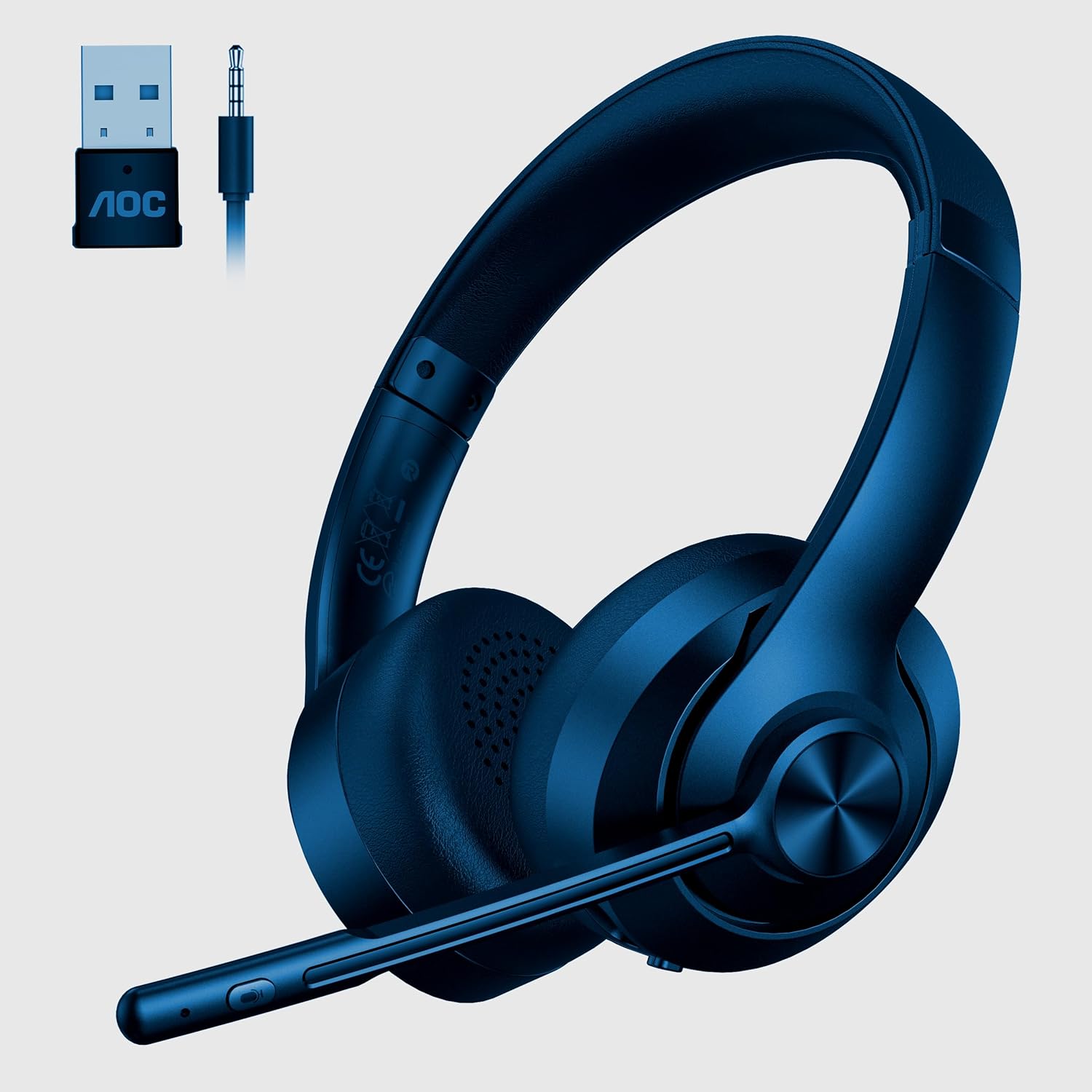
Image 1: AOC ACW2212 Headset with included USB wireless dongle and 3.5mm audio jack. The headset features an adjustable headband, over-ear cups, and a flexible boom microphone with integrated controls.
Headset Components:
- ខ្សែក្បាលដែលអាចលៃតម្រូវបាន៖ For comfortable fit.
- កាសត្រចៀក៖ Over-ear design for sound isolation.
- មីក្រូហ្វូន Boom៖ Flexible and adjustable, with noise-cancelling capabilities.
- ការត្រួតពិនិត្យកម្រិតសំឡេង៖ Buttons located on the earcup for adjusting audio output.
- ប៊ូតុងបិទសំឡេងមីក្រូហ្វូន៖ For quick muting/unmuting of the microphone.
- ប៊ូតុងថាមពល៖ To turn the headset on or off.
- រន្ធសាក USB-C៖ សម្រាប់បញ្ចូលថ្មខាងក្នុង។
- 3.5mm Audio Jack៖ សម្រាប់ការតភ្ជាប់ខ្សែ។
4. រៀបចំ
4.1 Wired Connection (3.5mm Audio Cable)
- Connect one end of the 3.5mm audio cable to the 3.5mm audio jack on the headset.
- Connect the other end of the 3.5mm audio cable to the audio output port on your PC or device.
- Ensure your device's audio settings are configured to use the headset as the input and output device.
4.2 Wireless Connection (USB Dongle)
- Insert the USB wireless dongle into an available USB port on your PC.
- Power on the headset by pressing and holding the Power button until the indicator light illuminates.
- The headset and dongle should automatically pair. A solid indicator light on the headset typically signifies a successful connection.
- Adjust your PC's sound settings to select the AOC ACW2212 Headset as the default playback and recording device.
4.3 ការភ្ជាប់ប៊្លូធូស
- ធានាថាកាសត្រូវបានបិទ។
- Press and hold the Power button for approximately 5-7 seconds until the indicator light flashes rapidly, indicating pairing mode.
- On your device (PC, smartphone, etc.), navigate to the Bluetooth settings and enable Bluetooth.
- ស្វែងរក available devices and select "AOC ACW2212" from the list.
- Once connected, the headset's indicator light will typically become solid or flash slowly.
5. សេចក្តីណែនាំប្រតិបត្តិការ
5.1 បើក/បិទថាមពល
- ដើម្បីបើកដំណើរការ៖ ចុចឱ្យជាប់ប៊ូតុងថាមពលរយៈពេល 2 វិនាទី។
- ដើម្បីបិទថាមពល៖ ចុចឱ្យជាប់ប៊ូតុងថាមពលរយៈពេល 3 វិនាទី។
5.2 ការគ្រប់គ្រងកម្រិតសំឡេង
- កម្រិតសំឡេងឡើង៖ ចុចប៊ូតុង '+' ។
- បរិមាណចុះក្រោម៖ ចុចប៊ូតុង '-' ។
5.3 Microphone Mute/Unmute
- Press the Microphone Mute button on the boom mic to toggle mute on or off. An indicator light on the mic or headset may show the mute status.
5.4 ការសាកថ្មកាស
- Connect the charging cable to the USB-C port on the headset and the other end to a USB power source.
- The indicator light will typically show charging status (e.g., red for charging, green/off for fully charged).
6. ការថែទាំ
To ensure the longevity and optimal performance of your headset, follow these maintenance guidelines:
- ការសម្អាត៖ Use a soft, dry cloth to clean the headset. For earcups, a slightly damp cloth can be used, but avoid excessive moisture. Do not use harsh chemicals or abrasive cleaners.
- ការផ្ទុក៖ ទុកកាសនៅក្នុងកន្លែងត្រជាក់ និងស្ងួតឆ្ងាយពីពន្លឺព្រះអាទិត្យដោយផ្ទាល់ និងសីតុណ្ហភាពខ្លាំង។
- ការថែទាំខ្សែ៖ Avoid bending or twisting cables excessively to prevent damage.
- ថ្ម៖ For optimal battery life, avoid fully discharging the headset frequently. Charge it regularly.
7. ការដោះស្រាយបញ្ហា
If you encounter issues with your headset, refer to the following table for common problems and solutions:
| បញ្ហា | មូលហេតុដែលអាចកើតមាន | ដំណោះស្រាយ |
|---|---|---|
| គ្មានសំឡេងចេញពីកាស | Headset not powered on; Incorrect audio output selected; Low battery; Loose cable connection. | Ensure headset is on; Check PC audio settings; Charge headset; Reconnect cables securely. |
| មីក្រូហ្វូនមិនដំណើរការទេ។ | Microphone muted; Incorrect audio input selected; Loose cable connection. | Unmute microphone; Check PC audio input settings; Reconnect cables securely. |
| Cannot pair via Bluetooth/Wireless | Headset not in pairing mode; Device Bluetooth off; Dongle not properly inserted. | Put headset in pairing mode; Enable Bluetooth on device; Reinsert USB dongle. |
| គុណភាពសំឡេងខ្សោយ | Interference; Distance from dongle/device; Low battery. | Move closer to device/dongle; Charge headset; Avoid sources of interference. |
8. លក្ខណៈបច្ចេកទេស
Technical specifications for the AOC ACW2212 Headset:
| លក្ខណៈ | លម្អិត |
|---|---|
| ឈ្មោះម៉ូដែល | ACW2212 |
| បច្ចេកវិទ្យាតភ្ជាប់ | Wired (3.5mm), Wireless (USB Dongle), Bluetooth |
| កត្តាទម្រង់ | នៅលើត្រចៀក |
| ការដាក់ត្រចៀក | លើសត្រចៀក |
| ពណ៌ | ខ្មៅ |
| ក្រុមហ៊ុនផលិត | AOC |
| ទំងន់ធាតុ | ៣៨៥ ក្រាម។ |
| ថ្ម | ថ្ម 1 A (រួមបញ្ចូល) |
9. ការធានា និងការគាំទ្រ
This AOC ACW2212 Headset comes with a standard manufacturer's warranty. For specific warranty terms and conditions, please refer to the warranty card included in your product packaging or visit the official AOC website. For technical support, troubleshooting assistance, or service inquiries, please contact AOC customer support through their official channels.


