1. សេចក្តីផ្តើម
The Fujifilm Instax Mini SE is a compact instant film camera designed for ease of use and immediate photo development. It features exposure control adjustment and simple point-and-shoot functionality, producing credit-card-sized prints. This manual provides essential information for setting up, operating, and maintaining your camera.
2. សេចក្តីណែនាំអំពីសុវត្ថិភាពសំខាន់ៗ
- Do not disassemble, modify, or attempt to repair the camera yourself.
- Keep the camera and film away from water and moisture.
- Avoid exposing the camera to extreme temperatures or direct sunlight for extended periods.
- Use only specified batteries and Instax Mini film.
- ទុកហ្វីល និងថ្មឲ្យឆ្ងាយពីដៃកុមារតូចៗ។
- Dispose of batteries and film cartridges according to local regulations.
3. តើមានអ្វីនៅក្នុងប្រអប់
- Fujifilm Instax Mini SE Camera
- ខ្សែកាមេរ៉ា
- សៀវភៅណែនាំអ្នកប្រើ (ឯកសារនេះ)
- (Batteries and film are typically sold separately)
4. សមាសធាតុកាមេរ៉ា
Familiarize yourself with the key parts of your Instax Mini SE camera:
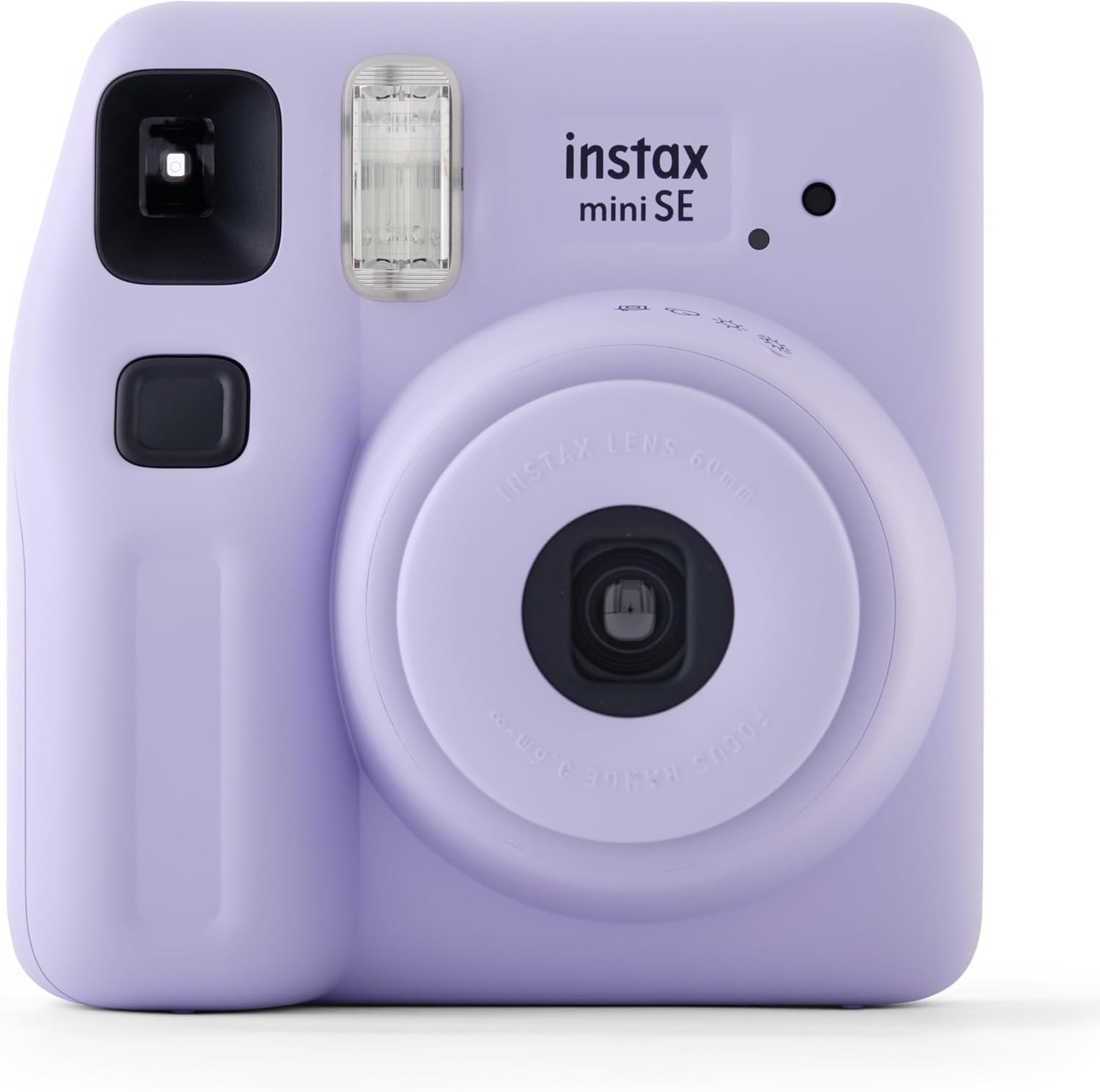
ខាងមុខ view of the Fujifilm Instax Mini SE camera in purple. Visible components include the lens, flash, viewfinder, shutter button, and the 'instax mini SE' branding.
- ប៊ូតុងបិទ៖ ចុចដើម្បីថតរូប។
- ពន្លឺ៖ ផ្តល់ពន្លឺក្នុងស្ថានភាពពន្លឺតិច។
- Viewអ្នកស្វែងរក៖ Used for framing your shots.
- កញ្ចក់៖ The primary optical component for capturing images.
- Lens Ring/Power Switch: Rotate to turn the camera on/off and adjust exposure settings.
- រន្ធដោតចេញខ្សែភាពយន្ត៖ កន្លែងដែលរូបថតដែលបានអភិវឌ្ឍលេចចេញមក។
- Film Door Latch: Opens the compartment for film loading.
- ប្រអប់ដាក់ថ្ម៖ កាន់ថ្ម។
5. រៀបចំ
5.1. ការបញ្ចូលថ្ម
The Instax Mini SE typically uses two AA-size alkaline batteries. Ensure correct polarity when inserting them into the battery compartment, usually located on the side or back of the camera. Close the battery compartment securely.
5.2. កំពុងផ្ទុកហ្វីល Instax Mini
To load film:
- Open the film compartment door on the back of the camera.
- តម្រឹមសញ្ញាពណ៌លឿងលើកញ្ចប់ហ្វីលជាមួយនឹងសញ្ញាពណ៌លឿងនៅខាងក្នុងបន្ទប់ហ្វីលរបស់កាមេរ៉ា។
- Gently push the film pack in until it clicks into place. Do not press on the black surface of the film pack.
- Close the film compartment door.
- Turn on the camera and press the shutter button once. The dark protective sheet will eject automatically. This indicates the film is loaded correctly and the camera is ready to shoot.
6. ដំណើរការកាមេរ៉ា
6.1. បើក/បិទ
To turn on the camera, rotate the lens ring from "OFF" to "ON". The lens will extend. To turn off, rotate the lens ring back to "OFF". The lens will retract.
6.2. Taking a Photo
- បើកកាមេរ៉ា។
- រកមើលតាមរយៈ viewfinder to frame your subject.
- Press the shutter button firmly. The flash will fire automatically if needed, and the photo will eject from the top slot.
- Allow the photo to develop naturally for a few minutes. Do not shake or bend the print.
6.3. Exposure Adjustment
The Instax Mini SE features automatic exposure control. The camera will automatically detect the brightness of the environment and adjust the flash and shutter speed accordingly. For specific lighting conditions, you can manually adjust the exposure by rotating the lens ring to select one of the following modes:
- Indoor/Night: For darker environments.
- Cloudy/Shade: For overcast days or shaded outdoor areas.
- Sunny/Bright: For bright outdoor conditions.
- Hi-Key: For softer, brighter images.
7. ការថែទាំ
- ការសម្អាត Lens៖ Use a soft, dry, lint-free cloth to gently wipe the lens. Avoid using chemical cleaners.
- សម្អាតតួកាមេរ៉ា៖ Wipe the camera body with a soft, slightly damp ក្រណាត់។ កុំប្រើសម្ភារៈសំណឹក។
- ការផ្ទុក៖ Store the camera in a cool, dry place away from direct sunlight and extreme temperatures. Remove batteries if the camera will not be used for an extended period.
- ការថែទាំភាពយន្ត៖ Store film packs in a cool, dry place. Once a photo is taken, allow it to develop in a normal room temperature environment.
8. មគ្គុទ្ទេសក៍ដោះស្រាយបញ្ហា
| បញ្ហា | មូលហេតុដែលអាចកើតមាន | ដំណោះស្រាយ |
|---|---|---|
| កាមេរ៉ាមិនបើកទេ។ | ថ្មងាប់ ឬបញ្ចូលមិនត្រឹមត្រូវ។ | ប្តូរថ្មជាមួយថ្មថ្មី ធានាបាននូវប៉ូលត្រឹមត្រូវ។ |
| ខ្សែភាពយន្តមិនបញ្ចេញទេ។ | Film pack empty or incorrectly loaded. | Check film counter. If 0, replace film pack. Re-insert film pack correctly. |
| រូបថតងងឹត/ភ្លឺពេក។ | Incorrect exposure setting or challenging lighting. | Adjust the exposure mode on the lens ring to match ambient light conditions. |
| Flash មិនឆេះទេ។ | Batteries low or flash disabled (if applicable). | Replace batteries. Ensure camera is not in a mode that disables flash. |
9. លក្ខណៈបច្ចេកទេស
| លក្ខណៈ | ការបញ្ជាក់ |
|---|---|
| ភាពយន្ត | ហ្វីល Fujifilm Instax Mini ភ្លាមៗ |
| កែវ | 2 components, 2 elements, f=60mm, 1:12.7 |
| Viewអ្នកស្វែងរក | អ្នកស្វែងរករូបភាពពិត ០.៣៧ គុណនឹងចំណុចគោលដៅ |
| កន្លែងបាញ់ប្រហារ | 0.3m and beyond (use selfie mode for 0.3m to 0.5m) |
| បិទទ្វារ | ប៊ូតុងបិទដោយអេឡិចត្រូនិកដែលបានកំណត់កម្មវិធីពី 1/2 ទៅ 1/250 វិនាទី។ មុខងារធ្វើសមកាលកម្មយឺតសម្រាប់ពន្លឺតិច។ |
| ការគ្រប់គ្រងការប៉ះពាល់ | ស្វ័យប្រវត្តិ ពី 5.0 ទៅ 14.5 (ISO 800) |
| ការច្រានចោលខ្សែភាពយន្ត | ស្វ័យប្រវត្តិ |
| ពន្លឺ | Constant firing flash (automatic light adjustment) |
| ការផ្គត់ផ្គង់ថាមពល | ថ្មអាល់កាឡាំងទំហំ AA ពីរ (LR6) |
| វិមាត្រ | 6.73 x 5.35 x 4.29 អ៊ីញ (ប្រហែល) |
| ទម្ងន់ | 1.08 pounds (without batteries, strap, and film) |
10. ការធានា និងការគាំទ្រអតិថិជន
For warranty information and customer support, please refer to the documentation provided with your purchase or visit the official Fujifilm webគេហទំព័រ។ រក្សាភស្តុតាងនៃការទិញរបស់អ្នកសម្រាប់ការទាមទារធានាណាមួយ។


