1. សេចក្តីផ្តើម
This manual provides detailed instructions for the setup, operation, and maintenance of your GEEKOM Air12 Lite Mini PC. Please read this manual thoroughly before using the device to ensure proper functionality and longevity.
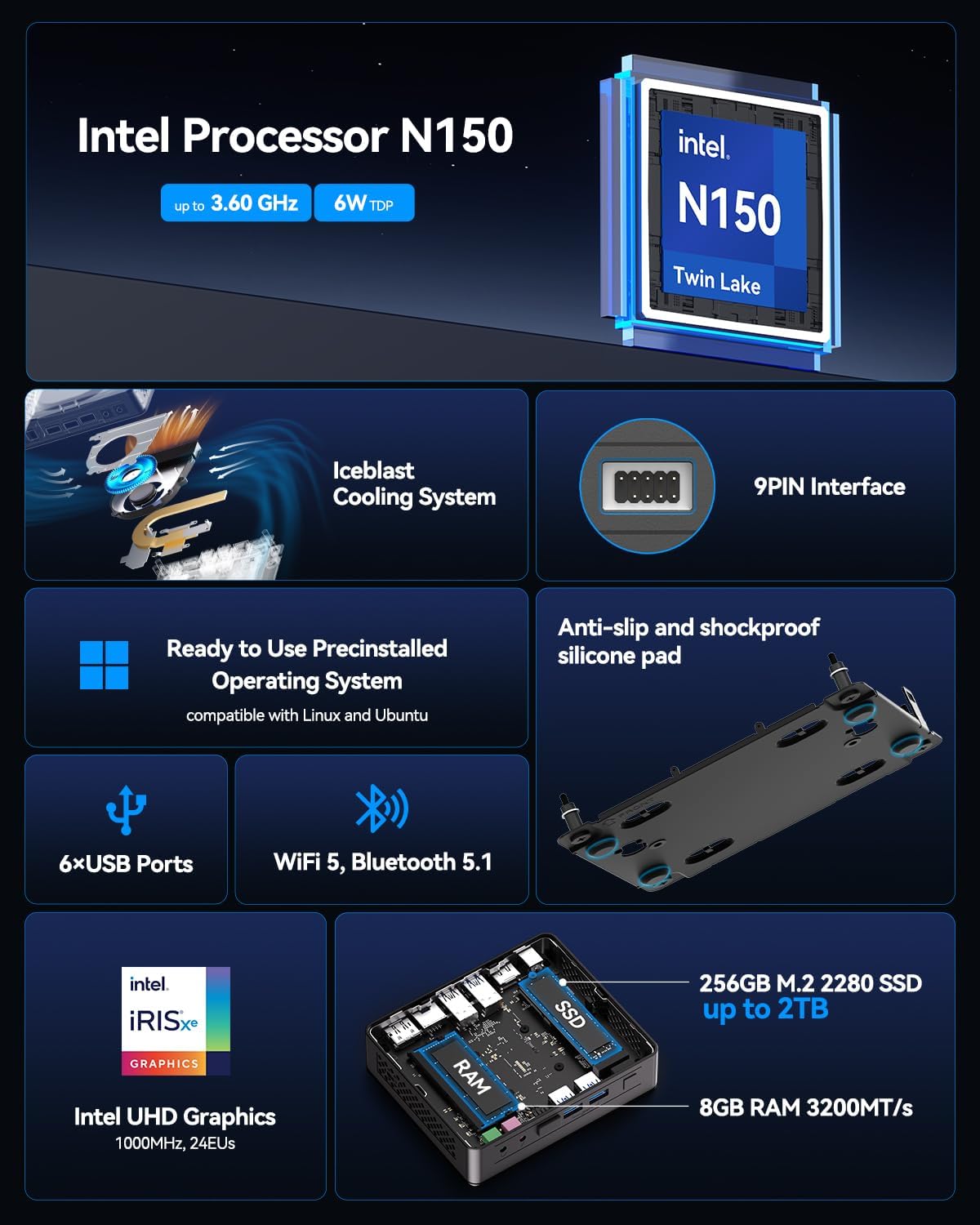
The GEEKOM Air12 Lite is a compact and efficient mini PC powered by the Intel 12th Gen Twin Lake N150 processor. It offers robust performance for various tasks, from office productivity to media streaming, and supports dual 4K displays. Its versatile connectivity, including multiple USB ports and a 9-pin serial interface, makes it suitable for both modern and legacy equipment.
2. មាតិកាកញ្ចប់
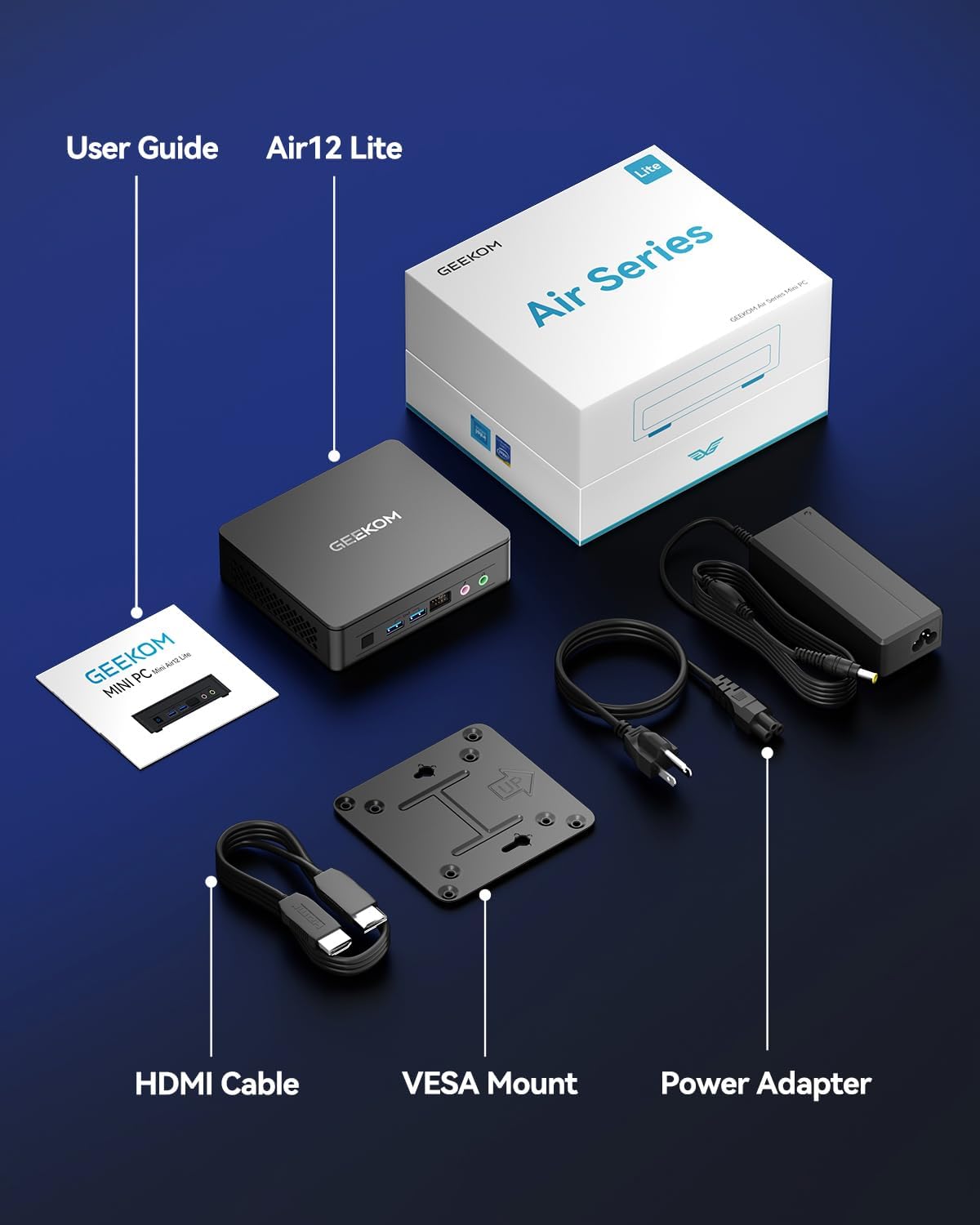
ផ្ទៀងផ្ទាត់ថាធាតុទាំងអស់ដែលបានរាយខាងក្រោមមាននៅក្នុងកញ្ចប់របស់អ្នក៖
- 1 x GEEKOM Mini Air12 Lite
- 1 x ការណែនាំអ្នកប្រើប្រាស់
- 1 x ខ្សែ HDMI
- 1 x VESA Mount
- អាដាប់ទ័រថាមពល 1 x
3. ផលិតផលលើសview
3.1 ផ្នែកខាងមុខ
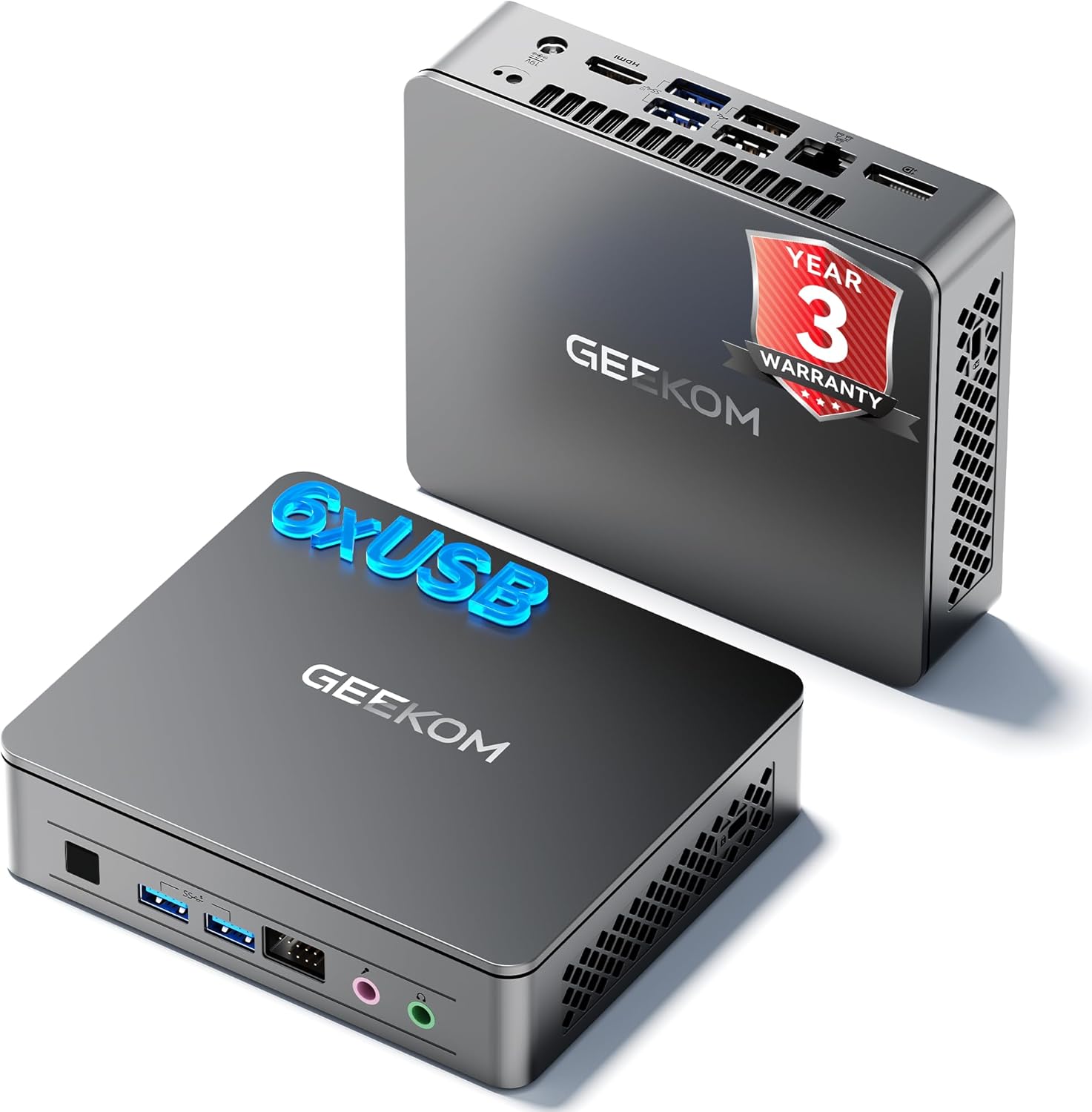
- ប៊ូតុងថាមពល៖ ចុចដើម្បីបើក ឬបិទឧបករណ៍។
- USB 3.2 Gen 1 Type-A Port (x2): សម្រាប់ភ្ជាប់ឧបករណ៍យូអេសប៊ី។
- រន្ធដោតកាស 3.5mm៖ សម្រាប់ការបញ្ចេញសំឡេង។
- រន្ធដោតមីក្រូហ្វូន 3.5 ម.ម៖ សម្រាប់ការបញ្ចូលសំឡេង។
- Front 9-pin Expansion Jack: For specialized peripheral connections.
3.2 បន្ទះខាងក្រោយ
- Power Input (DC IN): ភ្ជាប់អាដាប់ទ័រថាមពលនៅទីនេះ។
- រន្ធ HDMI 2.0៖ For connecting to a display.
- DisplayPort 1.4 (DP1.4): For connecting to a second display.
- USB 3.2 Gen 2 Type-A Port (x2): For high-speed USB devices.
- USB 2.0 Type-A Port (x2): សម្រាប់ឧបករណ៍ USB ស្តង់ដារ។
- ច្រក Ethernet RJ45៖ សម្រាប់ការតភ្ជាប់បណ្តាញខ្សែ។
3.3 បន្ទះចំហៀង
- កម្មវិធីអានកាត SD៖ សម្រាប់ការអានកាតអង្គចងចាំ SD ។
- រន្ធចាក់សោ Kensington៖ សម្រាប់ធានាសុវត្ថិភាពឧបករណ៍។

4. ការណែនាំអំពីការដំឡើង
- ភ្ជាប់អេក្រង់៖ Connect your monitor(s) to the HDMI and/or DisplayPort on the rear panel using the provided HDMI cable or a compatible DisplayPort cable.
- ភ្ជាប់គ្រឿងកុំព្យូទ័រ៖ ភ្ជាប់ក្តារចុច កណ្ដុរ និងឧបករណ៍ USB ផ្សេងទៀតរបស់អ្នកទៅរន្ធ USB ដែលមាន។
- ភ្ជាប់បណ្តាញ (ស្រេចចិត្ត)៖ For a wired internet connection, connect an Ethernet cable to the RJ45 port. Alternatively, the device supports Wi-Fi.
- ភ្ជាប់ថាមពល៖ Plug the power adapter into the DC IN port on the rear panel, then plug the adapter into a power outlet.
- បើកថាមពល៖ Press the power button on the front panel to turn on the Mini PC.
- ការដំឡើងដំបូង៖ Follow the on-screen instructions to complete the operating system setup (e.g., Windows 11).
4.1 VESA Mount Installation
The GEEKOM Air12 Lite includes a VESA mount for attaching the Mini PC to the back of a compatible monitor or to a wall, saving desk space.
- Attach the VESA mount bracket to the back of your monitor using the provided screws, aligning with the VESA mounting holes.
- Slide the Mini PC onto the bracket until it clicks securely into place.
5. សេចក្តីណែនាំប្រតិបត្តិការ
5.1 បើក/បិទថាមពល
- ដើម្បីបើកដំណើរការ៖ ចុចប៊ូតុងថាមពលម្តង។
- ដើម្បីបិទ៖ From the operating system, select "Shut down". Alternatively, press and hold the power button for 5 seconds to force a shutdown (use only when necessary).
- របៀបនៃការគេង: Briefly press the power button to put the PC into sleep mode. Press again to wake it up.
5.2 Dual Display Setup
The Air12 Lite supports connecting two 4K displays simultaneously via its HDMI 2.0 and DisplayPort 1.4 outputs. This allows for an extended desktop experience.
- Connect your primary monitor to the HDMI port.
- Connect your secondary monitor to the DisplayPort.
- Once both monitors are connected and powered on, the operating system should automatically detect them.
- Adjust display settings (resolution, orientation, extension/duplication) through your operating system's display settings.

5.3 ភាពឆបគ្នានៃប្រព័ន្ធប្រតិបត្តិការ
The GEEKOM Air12 Lite comes with Windows pre-installed and is fully compatible with Ubuntu and other Linux distributions.
6. ការថែទាំ
6.1 ការសម្អាត
- ត្រូវប្រាកដថាឧបករណ៍ត្រូវបានបិទ និងផ្តាច់ចេញមុនពេលសម្អាត។
- Use a soft, dry cloth to wipe the exterior of the Mini PC.
- សម្រាប់សញ្ញារឹងរូសស្រាល ឃampជូតក្រណាត់ជាមួយទឹក ឬទឹកសម្អាតស្រាល និងមិនមានសំណឹក។
- ជៀសវាងការបាញ់ទឹកដោយផ្ទាល់ទៅលើឧបករណ៍ ឬចូលទៅក្នុងរន្ធណាមួយឡើយ។
- Use compressed air to gently clear dust from ventilation grilles.
6.2 ប្រព័ន្ធត្រជាក់
The Air12 Lite features GEEKOM's Iceblast cooling system. To ensure optimal performance and longevity:
- Ensure proper airflow around the device. Do not block ventilation openings.
- Operate the Mini PC in a well-ventilated area.
- Regularly check and clean dust from the vents to prevent overheating.

6.3 Component Upgrades
The Air12 Lite supports tool-free upgrades for certain components. Refer to the detailed exploded view សម្រាប់ទីតាំងនៃសមាសធាតុ។

7. ការដោះស្រាយបញ្ហា
- គ្មានថាមពល៖
- Ensure the power adapter is securely connected to both the Mini PC and a working power outlet.
- ផ្ទៀងផ្ទាត់ថាព្រីភ្លើងមានមុខងារដោយដោតឧបករណ៍ផ្សេង។
- សាកល្បងព្រីភ្លើងផ្សេង។
- គ្មានការបង្ហាញ៖
- Check that the HDMI/DisplayPort cable is securely connected to both the Mini PC and the monitor.
- Ensure the monitor is powered on and set to the correct input source (HDMI/DisplayPort).
- Try connecting to a different monitor or using a different cable.
- ដំណើរការយឺត៖
- បិទកម្មវិធីដែលមិនចាំបាច់ដែលកំពុងដំណើរការក្នុងផ្ទៃខាងក្រោយ។
- Check for available operating system updates and install them.
- Ensure the Mini PC has adequate ventilation and is not overheating.
- Run a disk cleanup or defragmentation tool (if applicable to your storage type).
- គ្រឿងកុំព្យូទ័រមិនត្រូវបានរកឃើញ៖
- Ensure the peripheral is properly connected to the correct port.
- សាកល្បងភ្ជាប់គ្រឿងកុំព្យូទ័រទៅរន្ធ USB ផ្សេង។
- Update or reinstall the drivers for the peripheral.
8. លក្ខណៈបច្ចេកទេស
| លក្ខណៈ | ការបញ្ជាក់ |
|---|---|
| ម៉ាស៊ីនដំណើរការ | Intel 12th Gen Twin Lake N150 (4 Cores / 4 Threads, up to 3.6GHz, 6MB Cache) |
| ក្រាហ្វិក | ក្រាហ្វិក Intel UHD (រួមបញ្ចូលគ្នា) |
| RAM | អង្គចងចាំ SDRAM ទំហំ 8GB DDR4 3200MHz |
| ការផ្ទុក | 256GB M.2 2280 SSD (PCIE x 4) |
| ប្រព័ន្ធប្រតិបត្តិការ | Windows (Pre-installed), compatible with Ubuntu/Linux |
| លទ្ធផលវីដេអូ | 1x HDMI 2.0, 1x DisplayPort 1.4 (Supports Dual 4K@60Hz) |
| ច្រក USB | 2x USB 3.2 Gen 1 Type-A (Front), 2x USB 3.2 Gen 2 Type-A (Rear), 2x USB 2.0 Type-A (Rear) |
| កំពង់ផែផ្សេងទៀត | 1x 9-pin Serial Interface, 1x RJ45 Ethernet, 1x 3.5mm Headphone Jack, 1x 3.5mm Microphone Jack, 1x SD Card Reader |
| ការតភ្ជាប់ឥតខ្សែ | 802.11ax (Wi-Fi), Bluetooth 5.1 |
| វិមាត្រ (LxWxH) | ប្រហែល 5.3 x 4.5 x 1.4 អ៊ីង (13.5 x 11.5 x 3.5 សង់ទីម៉ែត្រ) |
| ទម្ងន់ | ប្រហែល 2.81 ផោន (1.27 គីឡូក្រាម) |
9. ការធានា និងការគាំទ្រ
GEEKOM provides a ការធានារយៈពេល 3 ឆ្នាំ។ for the Air12 Lite Mini PC from the date of purchase. This warranty covers failures caused by design or craftsmanship.
9.1 ជំនួយអតិថិជន
For technical assistance, warranty claims, or any other inquiries, please contact GEEKOM customer service:
- អ៊ីមែល៖ shirley.li@geekom.tw
- លើបណ្តាញ៖ Visit the official GEEKOM website or your Amazon order page to find seller contact options.
When contacting support, please provide your product model (Air12 Lite) and purchase details to expedite assistance.


