1. សេចក្តីផ្តើម
This manual provides comprehensive instructions for the setup, operation, and maintenance of your eufy Eufycam 2 Pro Wireless Smart Security Camera System. Please read this manual thoroughly before using the product to ensure proper functionality and safety.
The eufy Eufycam 2 Pro system offers 2K resolution, two-way communication, and IP67 weather protection, designed for reliable home security monitoring.
2. មាតិកាកញ្ចប់
ផ្ទៀងផ្ទាត់ថាធាតុទាំងអស់ដែលបានរាយខាងក្រោមមាននៅក្នុងកញ្ចប់របស់អ្នក៖
- eufy HomeBase (Main Unit)
- eufyCam 2 Pro Cameras (2 units)
- Mounting Kits (for 2 cameras)
- AC Power Adapter for HomeBase
- ខ្សែអ៊ីសឺរណិត
- Micro-USB Charging Cable for Cameras
- មគ្គុទ្ទេសក៍ចាប់ផ្តើមរហ័ស

Figure 2.1: The eufy Eufycam 2 Pro system, including the HomeBase and two wireless cameras.
3. ផលិតផលលើសview
២.១. លក្ខណៈសំខាន់ៗ
- គុណភាពបង្ហាញ 2K៖ ថតវីដេអូច្បាស់ និងលម្អិតtage.
- Wireless & Wire-Free: Easy installation without complex wiring.
- អាយុកាលថ្ម ១២ ថ្ងៃ៖ ប្រតិបត្តិការបន្ថែមលើការគិតថ្លៃតែមួយ។
- IP67 ធន់នឹងអាកាសធាតុ៖ Designed to withstand various outdoor conditions.
- ការមើលឃើញពេលយប់កម្រិតខ្ពស់៖ Enhanced visibility in low-light environments.
- អូឌីយ៉ូពីរផ្លូវ៖ Communicate directly through the camera.
- ការផ្ទុកក្នុងស្រុក៖ 16GB eMMC storage on HomeBase, no monthly fees.
- ការរួមបញ្ចូលឆ្លាតវៃ៖ Compatible with Apple HomeKit.

Figure 3.1: Visual comparison demonstrating the clarity of 2K resolution provided by the eufyCam 2 Pro.

Figure 3.2: An illustration of the enhanced visibility offered by the eufyCam 2 Pro's advanced night vision capabilities.

Figure 3.3: The eufyCam 2 Pro camera operating in rainy conditions, highlighting its IP67 weather resistance.
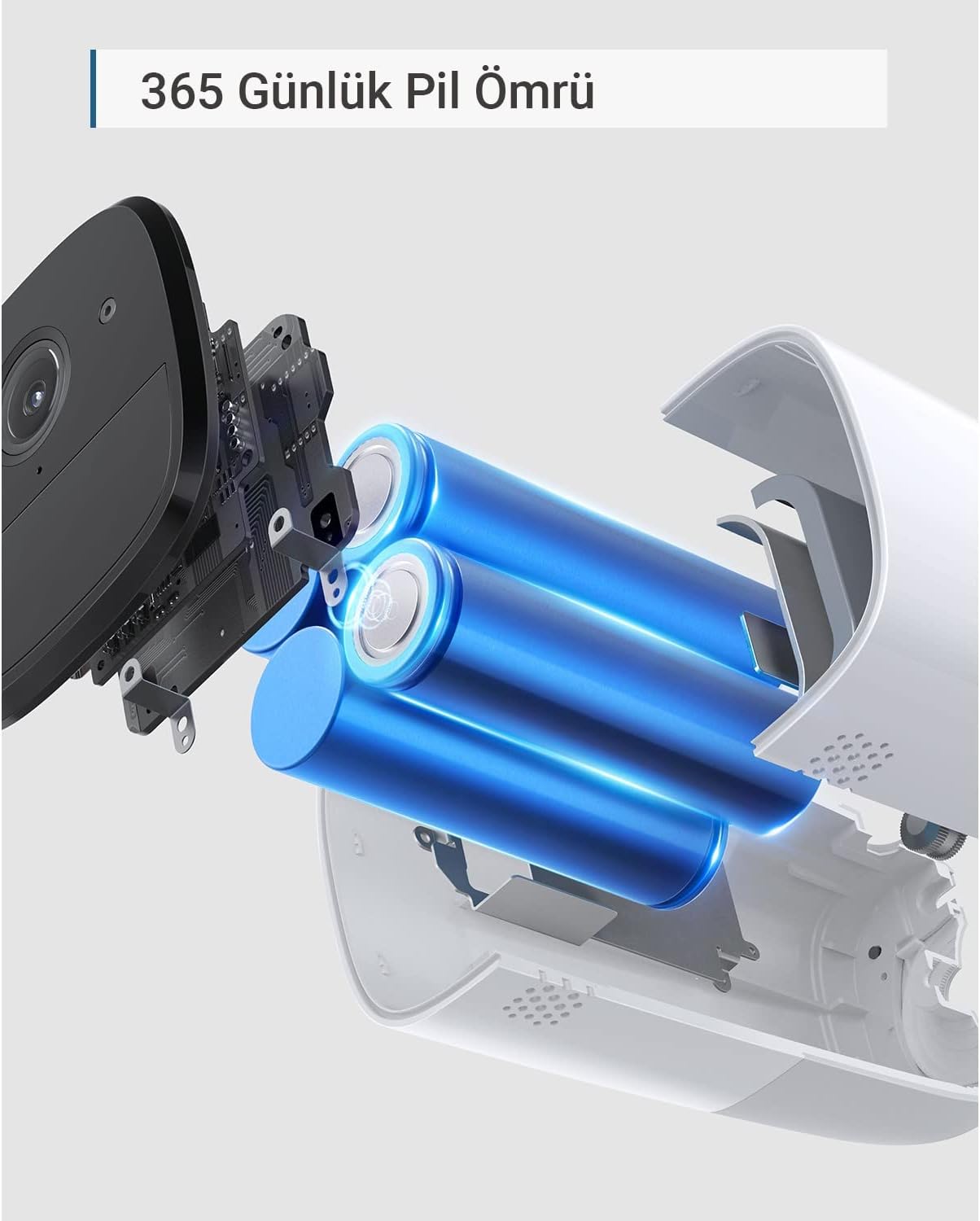
Figure 3.4: An internal diagram of the eufyCam 2 Pro, illustrating its long-lasting battery components.
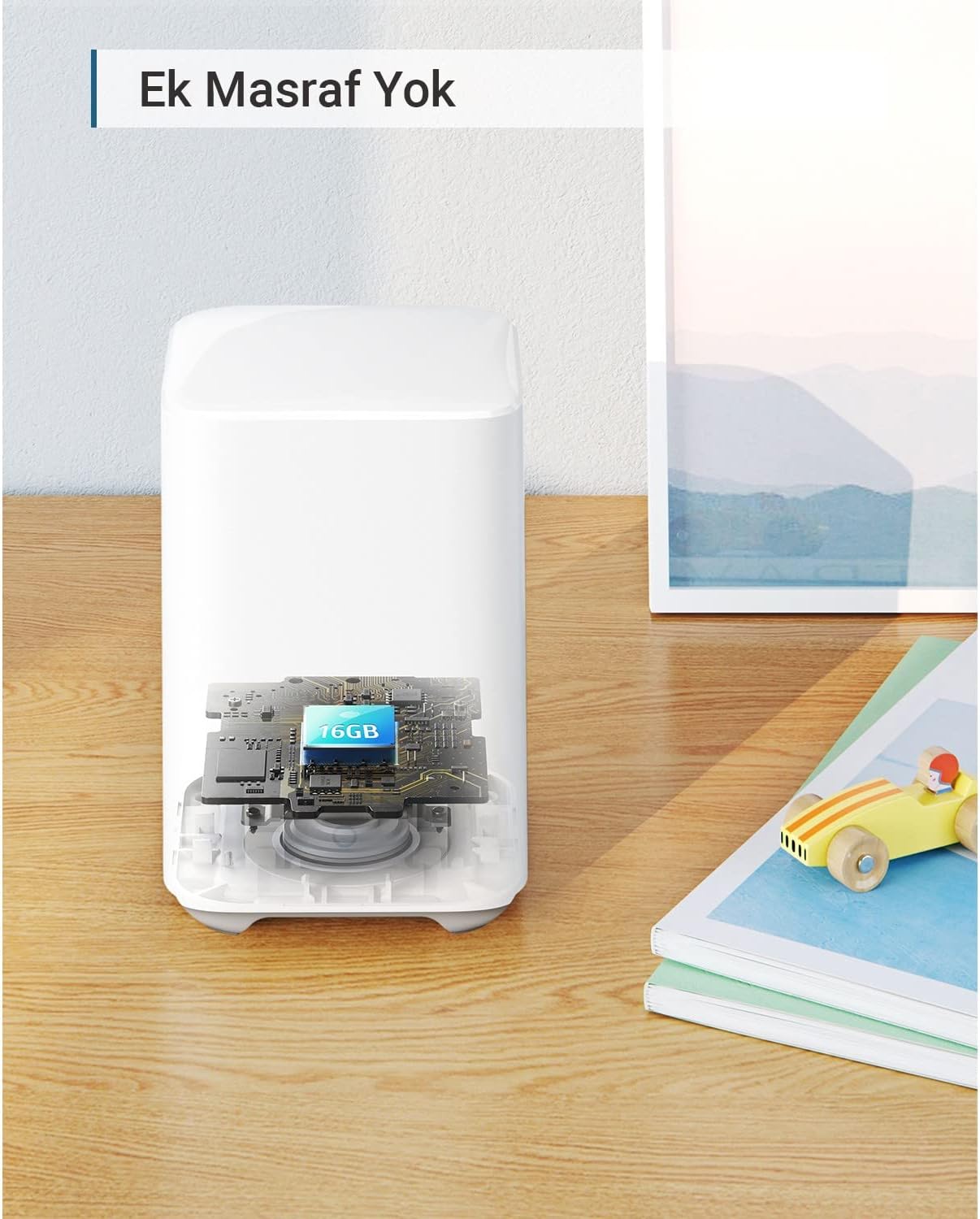
Figure 3.5: A cutaway view of the eufy HomeBase, indicating the integrated 16GB eMMC local storage.
4. ការណែនាំអំពីការដំឡើង
4.1. Charging the Cameras
Before initial use, fully charge both eufyCam 2 Pro cameras using the provided Micro-USB charging cable and a standard USB power adapter (not included). The LED indicator on the camera will show charging status.
4.2. HomeBase Setup
- Connect the HomeBase to your router using the supplied Ethernet cable.
- Plug the AC power adapter into the HomeBase and a power outlet.
- Wait for the HomeBase LED indicator to turn solid blue, indicating it is ready for pairing.
4.3. eufy Security App Installation
Download the eufy Security app from the App Store (iOS) or Google Play (Android). Create an account or log in if you already have one.
4.4. Pairing Cameras with HomeBase
- Open the eufy Security app and tap "Add Device".
- Select "eufyCam 2 Pro" from the list of devices.
- Follow the on-screen instructions to pair each camera. This typically involves pressing the SYNC button on the camera until it beeps.
4.5. Camera Mounting
Choose a suitable location for your cameras, ensuring good Wi-Fi signal and an unobstructed view. Use the provided mounting kits to securely attach the cameras to a wall or ceiling. The cameras are designed for outdoor use with IP67 protection.
5. សេចក្តីណែនាំប្រតិបត្តិការ
5.1. Using the eufy Security App
The eufy Security app is the primary interface for managing your camera system. From the app, you can:
- View រស់នៅហ្វូtage ពីកាមេរ៉ារបស់អ្នក។
- Access recorded events.
- Adjust motion detection sensitivity and zones.
- Enable/disable two-way audio.
- Configure notification settings.
- ពិនិត្យកម្រិតថ្ម។

Figure 5.1: A user interacting with the eufy Security system, demonstrating live feed access and smart home integration.
៣៨០. ផ្សាយផ្ទាល់ View និងការថត
Tap on a camera in the app to view its live feed. The system automatically records events triggered by motion detection. These recordings are stored locally on the HomeBase and can be reviewed តាមរយៈកម្មវិធី។
5.3. អូឌីយ៉ូពីរផ្លូវ
Use the microphone icon in the live view to speak through the camera's speaker. This feature allows for direct communication with individuals near the camera.
5.4. ការរកឃើញចលនា
Configure motion detection settings within the app to receive alerts and record footage when activity is detected. You can customize detection zones and sensitivity to minimize false alarms.
5.5. ចក្ខុវិស័យពេលយប់
The eufyCam 2 Pro automatically switches to night vision mode in low-light conditions, providing clear black-and-white footage.
6. ការថែទាំ
6.1. ការគ្រប់គ្រងថ្ម
The eufyCam 2 Pro cameras feature a long-lasting battery. Monitor battery levels through the eufy Security app. Recharge cameras when the battery level is low using the provided Micro-USB cable. Full charge typically takes several hours.
6.1. ការសម្អាត
សម្អាតកញ្ចក់កាមេរ៉ា និងលំនៅឋានឱ្យបានទៀងទាត់ដោយទន់ ឃamp cloth to ensure optimal image quality and prevent debris buildup. Do not use harsh chemicals or abrasive cleaners.
6.3. ការអាប់ដេតកម្មវិធីបង្កប់
eufy regularly releases firmware updates to improve performance and add new features. Ensure your HomeBase and cameras are connected to the internet to receive automatic updates. You can check for updates manually in the eufy Security app settings.
7. ការដោះស្រាយបញ្ហា
- Camera not connecting to HomeBase: Ensure HomeBase is powered on and connected to the internet. Move camera closer to HomeBase during pairing. Reset camera by pressing the SYNC button for 10 seconds.
- គុណភាពវីដេអូខ្សោយ៖ Check Wi-Fi signal strength in the camera's location. Clean the camera lens. Ensure there are no obstructions.
- ការរកឃើញចលនាមិនដំណើរការទេ៖ Verify motion detection is enabled in the app. Adjust sensitivity settings. Ensure detection zones are correctly configured.
- អាយុកាលថ្មខ្លី៖ Reduce the number of motion events or live view sessions. Ensure the camera is fully charged. Extreme temperatures can affect battery performance.
- គ្មានការជូនដំណឹង៖ Check app notification settings and phone's system notification settings for the eufy Security app.
8. លក្ខណៈបច្ចេកទេស
| លក្ខណៈ | លម្អិត |
|---|---|
| លេខម៉ូដែល | T88513D1 |
| ដំណោះស្រាយវីដេអូ | 2K (1440p) |
| ការតភ្ជាប់ | Wi-Fi, Ethernet (HomeBase) |
| ប្រភពថាមពល | Corded Electric (HomeBase), Battery (Cameras) |
| អាយុកាលថ្ម | Up to 365 days (eufyCam 2 Pro) |
| ធន់នឹងអាកាសធាតុ | IP67 |
| ចក្ខុវិស័យពេលយប់ | បាទ |
| អូឌីយ៉ូពីរផ្លូវ | បាទ |
| ការផ្ទុកក្នុងស្រុក | 16GB eMMC (HomeBase) |
| សីតុណ្ហភាពប្រតិបត្តិការ | -20°C ទៅ 50°C (-4°F ដល់ 122°F) |
| វិមាត្រ (កាមេរ៉ា) | ប្រហែល 10.7 x 5.7 x 5.7 សង់ទីម៉ែត្រ (4.2 x 2.2 x 2.2 អ៊ីញ) |
| Dimensions (HomeBase) | ប្រហែល 13 x 8.5 x 8.5 សង់ទីម៉ែត្រ (5.1 x 3.3 x 3.3 អ៊ីញ) |
| Weight (Camera) | ប្រហែល 360 ក្រាម (0.79 ផោន) |
| Weight (HomeBase) | ប្រហែល 340 ក្រាម (0.75 ផោន) |
9. ការធានា និងការគាំទ្រ
9.1. ព័ត៌មានធានា
eufy products typically come with a limited warranty. Please refer to the warranty card included in your package or visit the official eufy website for the most current and detailed warranty information specific to your region and product model. Keep your purchase receipt as proof of purchase for warranty claims.
៥.៧. ជំនួយអតិថិជន
For technical assistance, troubleshooting, or general inquiries, please contact eufy customer support:
- Webគេហទំព័រ៖ ទស្សនា www.eufylife.com សម្រាប់សំណួរដែលសួរញឹកញាប់ អត្ថបទជំនួយ និងជម្រើសទំនាក់ទំនង។
- អ៊ីមែល៖ Refer to your product packaging or the eufy website for regional email support addresses.
- ទូរស័ព្ទ៖ Refer to your product packaging or the eufy webគេហទំព័រសម្រាប់លេខទូរស័ព្ទជំនួយក្នុងតំបន់។
When contacting support, please have your product model number (T88513D1) and purchase information ready.


