1. ផលិតផលលើសview
The Philips SRP5016/10 is a modern and elegant 6-in-1 universal remote control designed to simplify your home entertainment experience. It allows you to control up to six different devices, such as televisions, DTVs, DVRs, home theater systems, soundbars, and streaming devices. This remote features a learning function, enabling it to receive and store infrared codes from your original remote controls, providing comprehensive control over various brands and models.
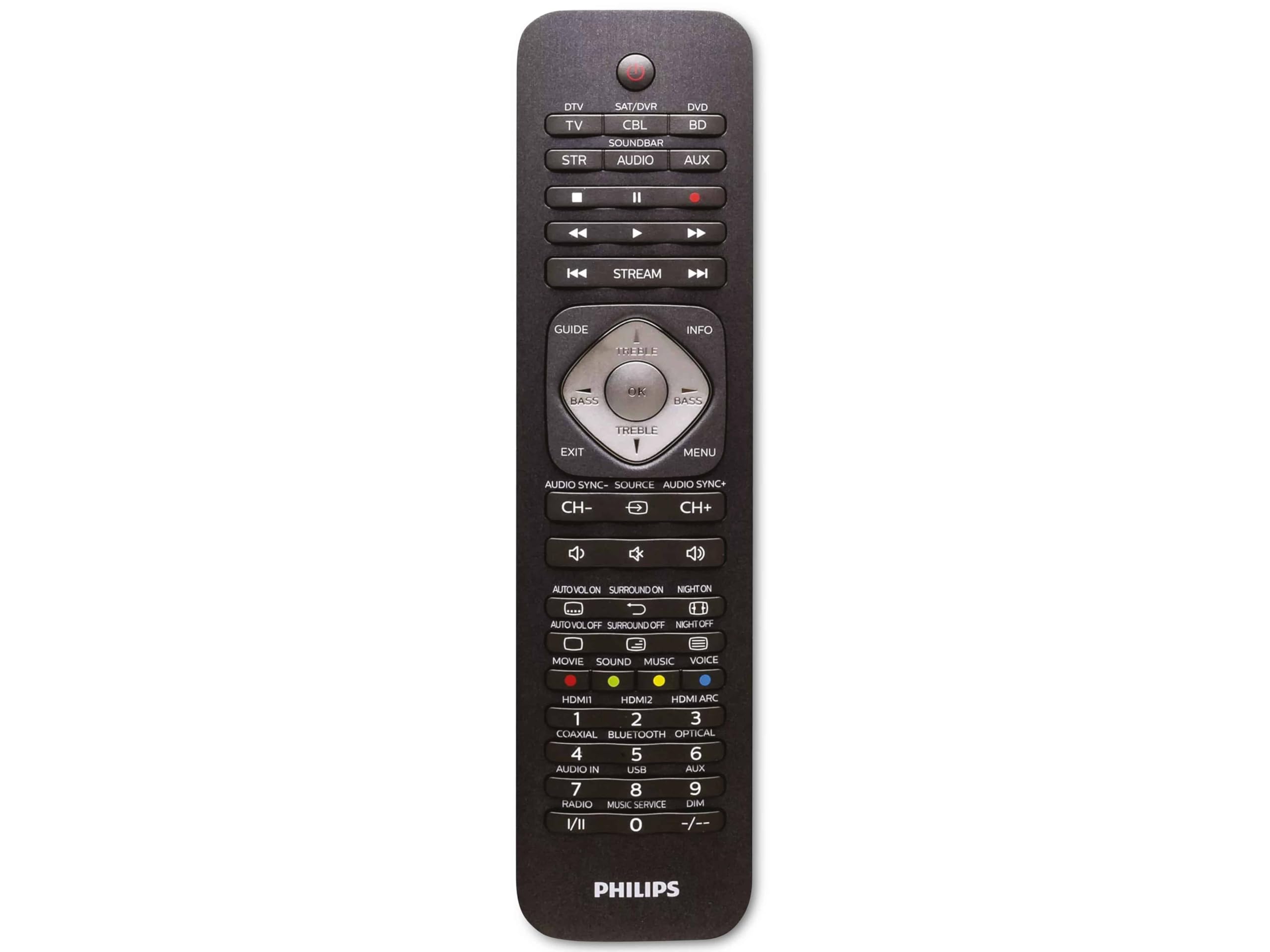
Image 1.1: Philips SRP5016/10 6-in-1 Universal Remote Control. This image displays the front view of the black universal remote control, highlighting its ergonomic design and button layout.
2. រៀបចំ
2.1. ការដំឡើងថ្ម
- បើកគម្របប្រអប់ថ្មដែលមានទីតាំងនៅខាងក្រោយឧបករណ៍បញ្ជាពីចម្ងាយ។
- បញ្ចូលថ្ម AAA ចំនួនពីរ ធានាបាននូវប៉ូលត្រឹមត្រូវ (+ និង -) ដូចដែលបានបង្ហាញនៅខាងក្នុងប្រអប់។
- បិទគម្របប្រអប់ថ្មដោយសុវត្ថិភាព។
ចំណាំ៖ ថ្មមិនត្រូវបានរួមបញ្ចូលទេហើយត្រូវតែទិញដោយឡែកពីគ្នា។
2.2. ឧបករណ៍សរសេរកម្មវិធី
The Philips SRP5016/10 can be programmed using either direct code entry or the learning function.
2.2.1. Direct Code Entry (Recommended for common brands)
- Turn on the device you wish to control (e.g., TV, DVD player).
- Press and hold the desired device button on the universal remote (e.g., TV, ឌីវីឌី) for approximately 3 seconds until the device button lights up.
- Enter the 4-digit code for your device's brand (refer to the code list provided with your remote, if available, or search online for Philips universal remote codes).
- If the device turns off or responds, the code is correct. Press the device button again to save the code. If not, try the next code for your brand.
2.2.2. Learning Function (For devices not in the code list or advanced functions)
- Place the universal remote and your original remote control head-to-head, approximately 1-3 cm apart.
- Press and hold the desired device button on the universal remote (e.g., TV) for approximately 3 seconds until the device button lights up.
- ចុចឱ្យជាប់ រៀន button on the universal remote until the device button starts blinking.
- On your original remote, press the button you wish to teach (e.g., ថាមពល). The device button on the universal remote will blink rapidly and then stay solid, indicating successful learning.
- Repeat step 4 for all other buttons you wish to learn.
- ចុច រៀន ចុចប៊ូតុងម្តងទៀតដើម្បីចេញពីរបៀបរៀន។
3. សេចក្តីណែនាំប្រតិបត្តិការ
៤.១. ការជ្រើសរើសឧបករណ៍
To control a specific device, press the corresponding device button (e.g., TV, ឌីវីឌី, SAT, AUX, សាន់ដាប, ស្ទ្រីម) once. The selected device button will light up briefly to confirm your selection. You can then use the remote's buttons to control that device.
3.2. មុខងារជាមូលដ្ឋាន
- ថាមពល៖ បើក ឬបិទឧបករណ៍ដែលបានជ្រើសរើស។
- បរិមាណ +/-៖ លៃតម្រូវកម្រិតសំឡេងនៃឧបករណ៍អូឌីយ៉ូដែលបានជ្រើសរើស។
- CHANNEL +/-: Changes channels on the selected TV or DTV device.
- បិទសំឡេង៖ បិទសំឡេង។
- ប៊ូតុងចំនួន (0-9): សម្រាប់ការបញ្ចូលឆានែលដោយផ្ទាល់ ឬការបញ្ចូលលេខផ្សេងទៀត។
- NAVIGATION (Arrow buttons, OK): សម្រាប់ការរុករក និងជ្រើសរើសម៉ឺនុយ។
4. ការថែទាំ
4.1. ការជំនួសថ្ម
When the remote control's range decreases or buttons become unresponsive, it is time to replace the batteries. Follow the battery installation steps in Section 2.1. Always replace both AAA batteries simultaneously with new ones.
4.2. ការសម្អាត
ដើម្បីសម្អាតឧបករណ៍បញ្ជាពីចម្ងាយ សូមប្រើក្រណាត់ទន់ និងស្ងួត។ ចំពោះភាពកខ្វក់រឹងចចេសបន្តិច ឃampen the cloth with water or a mild cleaning solution. Avoid using abrasive cleaners, solvents, or alcohol, as these can damage the remote's surface or internal components.
5. ការដោះស្រាយបញ្ហា
- ពីចម្ងាយមិនដំណើរការ៖
- សូមពិនិត្យមើលថាតើថ្មត្រូវបានបញ្ចូលត្រឹមត្រូវ ហើយមិនអស់ឬអត់។ សូមប្តូរវាចេញប្រសិនបើចាំបាច់។
- ត្រូវប្រាកដថាមិនមានការស្ទះរវាងឧបករណ៍បញ្ជាពីចម្ងាយ និងឧបករណ៍នោះទេ។
- Verify that the correct device button (e.g., TV, DVD) is selected.
- ឧបករណ៍មិនឆ្លើយតបទៅនឹងពាក្យបញ្ជា៖
- The device code may be incorrect. Try reprogramming the device using a different code from the code list or use the learning function.
- Ensure the remote's infrared emitter is pointed directly at the device's infrared receiver.
- មុខងារសិក្សាមិនដំណើរការទេ៖
- Ensure the original remote's batteries are fresh and it is functioning correctly.
- Make sure the remotes are positioned correctly (head-to-head, 1-3 cm apart) during the learning process.
- Try learning the button again. Some original remotes have weaker IR signals that require multiple attempts.
6. លក្ខណៈបច្ចេកទេស
| លក្ខណៈ | ការបញ្ជាក់ |
|---|---|
| ម៉ាក | ហ្វីលីព |
| ឈ្មោះម៉ូដែល | 6 ក្នុង 1 |
| លេខម៉ូដែល | SRP5016/10 |
| ឧបករណ៍ដែលត្រូវគ្នា។ | Home Theater, DVD/Blu-ray Player, SoundBar, Television, Streaming Device |
| លក្ខណៈពិសេស | មុខងារសិក្សាជាសកល |
| បច្ចេកវិទ្យាតភ្ជាប់ | អ៊ីនហ្វ្រារ៉េដ |
| Maximum Number of Supported Devices | 6 |
| ប្រភេទឧបករណ៍បញ្ជា | ការគ្រប់គ្រងប៊ូតុង |
| ចំនួនប៊ូតុង | Not specified (typical universal remote layout) |
| ជួរអតិបរមា | 10 ម៉ែត្រ |
| ប្រភពថាមពល | ថ្ម 2 x AAA (មិនរួមបញ្ចូល) |
| ប្រភេទសម្ភារៈ | ផ្លាស្ទិច |
| វិមាត្រផលិតផល | 21.4 x 5.3 x 2.2 សង់ទីម៉ែត្រ |
| ទំងន់ផលិតផល | ៣៨៥ ក្រាម។ |
7. ការធានា និងការគាំទ្រ
For warranty information, please refer to the documentation provided at the time of purchase or contact your retailer. Philips offers customer support for their products. If you encounter issues that cannot be resolved using this manual, please visit the official Philips support webគេហទំព័រ ឬទាក់ទងសេវាកម្មអតិថិជនរបស់ពួកគេសម្រាប់ជំនួយ។
សូមរក្សាភស្តុតាងនៃការទិញរបស់អ្នកសម្រាប់ការទាមទារធានា។