1. សេចក្តីផ្តើម
This manual provides essential information for setting up, operating, and maintaining your RCA 40-Inch Full HD 1080p Roku Smart LED TV. This television integrates the Roku TV platform, offering a simple and intuitive interface to access broadcast TV, streaming channels, gaming consoles, and other devices. Experience content with Full HD 1080p resolution and enjoy a user-friendly experience with the included remote and dual-band wireless connectivity.
2. មាតិកាកញ្ចប់
ត្រូវប្រាកដថាធាតុទាំងអស់មាននៅក្នុងប្រអប់៖
- RCA 40-Inch Full HD 1080p Roku Smart LED TV
- Roku Remote Control
3. រាងកាយលើសview

រូបភាពទី 3.1៖ ខាងមុខ view of the RCA Roku Smart TV, showcasing the intuitive home screen with quick access to streaming services and inputs.

រូបភាពទី 3.2៖ គាំទ្រផ្នែកខាងfile of the television, demonstrating its sleek and slender design suitable for various placements.

រូបភាពទី 3.3៖ Back panel of the TV, illustrating the arrangement of input/output ports and the standard VESA mounting pattern.

រូបភាពទី 3.4៖ Dimensional drawing of the television, providing measurements for planning placement or wall mounting.
4. រៀបចំ
4.1 ការដំឡើងឈរ (ស្រេចចិត្ត)
If not wall-mounting, attach the included quad-pedestal stands to the bottom of the TV using the provided screws. Ensure they are securely fastened for stability.
4.2 ការដំឡើងជញ្ជាំង (ស្រេចចិត្ត)
The TV is lightweight and supports VESA wall mounts. Refer to the wall mount manufacturer's instructions for proper installation. Ensure the wall mount is compatible with the TV's VESA pattern and weight.
4.3 ការតភ្ជាប់ថាមពល
Connect the power cord to the TV and then to a standard electrical outlet.
4.4 ការដំឡើងដំបូង
- បើកទូរទស្សន៍ដោយប្រើឧបករណ៍បញ្ជាពីចម្ងាយ។
- ធ្វើតាមការណែនាំនៅលើអេក្រង់ ដើម្បីជ្រើសរើសភាសា ប្រទេសរបស់អ្នក និងភ្ជាប់ទៅបណ្តាញ Wi-Fi របស់អ្នក។
- Activate your Roku account or create a new one if you don't have one.
5. សេចក្តីណែនាំប្រតិបត្តិការ
5.1 Navigating the Roku TV Home Screen
The Roku TV home screen provides a centralized interface for all your entertainment. Use the directional pad on your remote to navigate between options:
- ឆានែលស្ទ្រីម៖ Access popular streaming services like Netflix, Hulu, Prime Video, Disney+, and more.
- ធាតុចូល៖ Switch between connected devices such as cable boxes, game consoles, or an HD antenna.
- ទូរទស្សន៍ផ្សាយផ្ទាល់៖ Access over-the-air broadcast channels if an antenna is connected.

រូបភាពទី 5.1៖ លម្អិត view of the Roku TV interface, showing various streaming applications and input selections.
5.2 ការប្រើប្រាស់ឧបករណ៍បញ្ជាពីចម្ងាយ
The included Roku remote is designed for simple navigation. Dedicated buttons provide quick access to popular streaming services. The Roku mobile app (available for iOS and Android) can also be used as a remote, offering additional features like voice search.

រូបភាពទី 5.2៖ The physical Roku remote control, featuring dedicated buttons for popular streaming services and essential navigation.
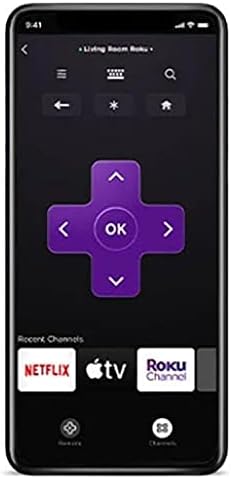
រូបភាពទី 5.3៖ The Roku mobile application, which can serve as an alternative remote control with voice search capabilities.
5.3 Roku Search and Voice Search
Utilize Roku Search to find movies, TV shows, and content across various streaming channels. Voice search is available through the Roku mobile app for quick and convenient content discovery.
5.4 Live TV Features
If an over-the-air antenna is connected, you can enjoy broadcast TV. The Live TV Pause feature allows you to pause and playback live antenna TV. You can also create a list of Favorite Channels for easy access.
5.5 ការស្តាប់ឯកជន
For private viewing, use the Roku mobile app with headphones while watching streaming content on your Roku TV. This feature is exclusively for streaming content.
6. Smart TV Features & Connectivity
6.1 មាតិកាស្ទ្រីម
The Roku TV platform provides access to over 500,000 streaming channels, including popular services like Netflix, Vudu, YouTube, Hulu, Prime Video, and Disney+. Enjoy a vast library of movies, TV episodes, live sports, news, and music.

រូបភាពទី 6.1៖ ជាងview of the Roku streaming platform, highlighting the extensive content library and diverse channel offerings.
6.2 ភាពឆបគ្នានៃជំនួយការសំឡេង
The RCA Roku TV is compatible with popular voice assistants such as Siri, Alexa, and Google Assistant, allowing for convenient voice control of your television.

រូបភាពទី 6.2៖ Visual representation of the TV's compatibility with major voice assistant platforms for enhanced control.
6.3 Casting and Screen Mirroring (AirPlay)
Share photos, videos, and music directly from your compatible smartphone or tablet to your Roku TV using the free Roku mobile app or AirPlay for Apple devices. This allows for easy viewing of personal media on the large screen.
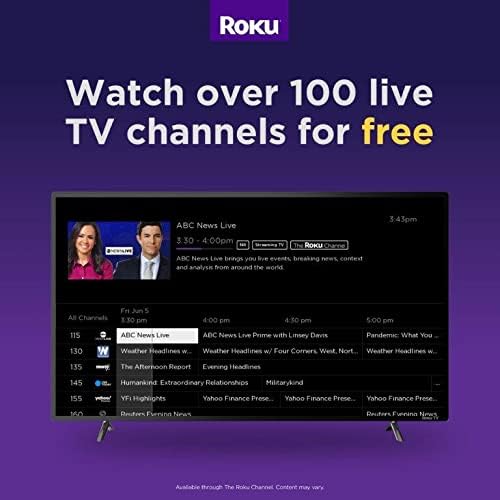
រូបភាពទី 6.3៖ Explanation of AirPlay features, enabling seamless content sharing from Apple devices to your Roku TV.
6.4 ច្រកតភ្ជាប់
The TV features multiple input options for connecting various external devices:
- HDMI៖ Three HDMI inputs for connecting game consoles, cable boxes, Blu-ray players, etc.
- RF៖ For connecting an HD antenna for over-the-air broadcasts.
- USB៖ សម្រាប់ការចាក់សារថ្មីពីឧបករណ៍ផ្ទុក USB ។
- VGA៖ For connecting older computers or devices.
- វ៉ាយហ្វាយ៖ Dual-band wireless for internet connectivity.
7. លក្ខណៈបច្ចេកទេស
| លក្ខណៈ | ការបញ្ជាក់ |
|---|---|
| ម៉ាក | RCA |
| លេខម៉ូដែល | RTR4061 |
| ទំហំអេក្រង់ | ៤.៧៥ អ៊ីញ |
| បច្ចេកវិទ្យាបង្ហាញ | LED |
| ដំណោះស្រាយ | កម្រិត Full HD 1080p |
| អត្រាធ្វើឱ្យស្រស់ | 60 ហឺត |
| សមាមាត្រ | ១៦:៩ |
| បច្ចេកវិទ្យាតភ្ជាប់ | HDMI, RF, USB, VGA, Wi-Fi |
| ប្រភេទឧបករណ៍បំពងសំឡេង | ភ្ជាប់មកជាមួយ |
| ពណ៌ | ខ្មៅ |
| វិមាត្រផលិតផល | 22"D x 22"W x 22"H |
| ទំងន់ធាតុ | 0.01 អោន (ប្រហែល 0.28 ក្រាម) |
| វ៉ុលtage | 110 វ៉ុល |
| វត្តtage | 8 វ៉ាត់ |
8. ការដោះស្រាយបញ្ហា
If you encounter issues with your RCA Roku TV, consider the following general troubleshooting steps:
- គ្មានថាមពល៖ Ensure the power cord is securely connected to both the TV and the electrical outlet. Try a different outlet.
- គ្មានរូបភាព/សំឡេង៖ Verify that the correct input source is selected on the TV. Check all cable connections (HDMI, RF) for looseness.
- បញ្ហាការតភ្ជាប់បណ្តាញ៖ Restart your Wi-Fi router and modem. Go to the TV's settings menu to re-establish the Wi-Fi connection.
- ពីចម្ងាយមិនឆ្លើយតប៖ ដាក់ថ្មនៅក្នុងឧបករណ៍បញ្ជាពីចម្ងាយវិញ។ ត្រូវប្រាកដថាមិនមានឧបសគ្គរវាងឧបករណ៍បញ្ជាពីចម្ងាយ និងទូរទស្សន៍ទេ។
- បញ្ហាកម្មវិធី៖ If a specific app is not working, try restarting the app or reinstalling it from the Roku Channel Store.
- កំណត់រោងចក្រឡើងវិញ៖ As a last resort, a factory reset can resolve many software-related issues. This will erase all settings and installed apps, returning the TV to its original state. Access this option through the TV's settings menu.
9. ការថែទាំ និងថែទាំ
- ការសម្អាតអេក្រង់៖ ប្រើក្រណាត់ទន់ និងគ្មានជាតិសរសៃ ដែលត្រូវបានរចនាឡើងជាពិសេសសម្រាប់គ្រឿងអេឡិចត្រូនិច។ កុំប្រើសារធាតុគីមីខ្លាំង ឬសារធាតុសំណឹក។
- ការសម្អាតរាងកាយ៖ Wipe the TV's exterior with a soft, dry cloth.
- ខ្យល់ចេញចូល៖ Ensure adequate airflow around the TV to prevent overheating. Do not block ventilation openings.
- បិទថាមពល៖ ដកទូរទស្សន៍ចេញពីព្រីភ្លើងកំឡុងពេលមានព្យុះរន្ទះ ឬពេលដែលវានឹងត្រូវទុកចោលដោយមិនមានអ្នកមើលក្នុងរយៈពេលយូរ។
10. វីដេអូផលិតផលផ្លូវការ
វីដេអូទី ១៖ An official video introducing the features and benefits of RCA Roku TVs, provided by Curtis International LTD.
11. ការធានា និងការគាំទ្រ
For warranty information and technical support, please refer to the documentation included with your product or visit the official RCA support webគេហទំព័រ។ រក្សាបង្កាន់ដៃទិញរបស់អ្នកសម្រាប់ការទាមទារធានា។


