1. សេចក្តីផ្តើម និងជាងview
The THINKWARE X700 Dash Cam is a high-definition dashboard camera designed to record your daily commutes and provide crucial evidence in case of incidents. It captures crystal-clear Full HD 1080P footage at 30 frames per second with a wide 142.7° viewing angle, utilizing a Sony STARVIS image sensor for enhanced clarity. The device features a 2.7-inch LCD touchscreen for instant video playback, menu navigation, and settings configuration. Advanced Driver Assistance System (ADAS) features, such as Forward Collision, Lane Departure, and Front Vehicle Departure warnings, enhance driver safety (requires optional GPS antenna). Super Night Vision technology improves image quality in low-light conditions, ensuring clear recordings even in challenging lighting environments.
2. តើមានអ្វីនៅក្នុងប្រអប់
Upon unboxing your THINKWARE X700 Dash Cam, please verify that all the following components are included:
- X700 Dash Cam Unit
- 3M Windshield Mount with extra tape
- ខ្សែថាមពល 12V
- ខ្ទាស់ខ្សែកាប
- THINKWARE 16GB microSD card with SD adapter (User Manual stored inside microSD card)
- ការណែនាំចាប់ផ្តើមរហ័ស/ព័ត៌មានធានា

Figure 1: Included components of the THINKWARE X700 Dash Cam package.
3. រៀបចំ
3.1. ការដំឡើង Dash Cam
Select a suitable location on your vehicle's windshield, typically behind the rearview mirror, to ensure an unobstructed view of the road. Clean the windshield surface thoroughly before applying the 3M Windshield Mount. Securely attach the dash cam to the mount.

Figure 2: THINKWARE X700 Dash Cam installed on the vehicle's windshield.
3.2. ការភ្ជាប់ថាមពល
Connect the provided 12V Power Cable to the dash cam and route the cable along the windshield trim and dashboard to the vehicle's 12V power outlet. Use the Adhesive Cable Clips to secure the cable neatly and prevent interference with driving. For optional parking surveillance modes, hardwiring to the vehicle's fuse box or an OBD II power source may be required (accessories sold separately).
3.3. ការបញ្ចូលកាត MicroSD
Insert the 16GB microSD card (included) into the designated slot on the dash cam. The device will automatically format the card upon first use or when required. Ensure the card is properly inserted for recording functionality.
3.4. Optional GPS Antenna Connection
If you have purchased the optional GPS antenna, connect it to the designated port on the dash cam. The GPS antenna enables ADAS features and records speed and location data for your footage.

Figure 3: THINKWARE X700 Dash Cam from an exterior perspective.
4. ប្រតិបត្តិការ
4.1. 2.7-inch LCD Touchscreen
The intuitive 2.7-inch LCD touchscreen allows for direct interaction with the dash cam. You can instantly play back recorded videos, navigate through menus, and configure various settings without needing a separate device.

Figure 4: Touchscreen interface for video playback and settings.
៥.២. របៀបថត
The X700 supports various recording modes to suit different driving and parking scenarios:
- ការកត់ត្រាបន្ត៖ កំណត់ត្រាហ្វូtage in one-minute segments, overwriting the oldest files when the microSD card is full.
- Event (Impact) Recording: Automatically records and saves footage when an impact is detected by the built-in G-Sensor, preventing these files ពីការសរសេរជាន់លើ។
- Optional Parking Mode: When hardwired, this mode offers:
- ការកត់ត្រាការរកឃើញចលនា៖ កត់ត្រានៅពេលដែលចលនាត្រូវបានរកឃើញនៅជុំវិញយានយន្ត។
- ការថតទុកពេលវេលា៖ Records at 2 frames per second, extending recording time significantly.
- របៀបសន្សំថាមពល៖ Reduces power consumption for extended parking surveillance.
៥.៤. ប្រព័ន្ធជំនួយអ្នកបើកបរកម្រិតខ្ពស់ (ADAS)
With the optional GPS antenna, the X700 provides real-time audio and visual alerts for:
- ប្រព័ន្ធព្រមានការប៉ះទង្គិចគ្នាទៅមុខ (FCWS): Alerts when approaching the vehicle ahead at a high closing rate.
- ប្រព័ន្ធព្រមានការចាកចេញពីគន្លងផ្លូវ (LDWS): Warns if the vehicle drifts out of its lane.
- ការព្រមានអំពីការចេញដំណើររបស់យានយន្តខាងមុខ (FVDW): Notifies when the vehicle ahead starts to move from a complete stop.

Figure 5: Visual representation of ADAS alerts.
៥.១១. ចក្ខុវិស័យពេលយប់ដ៏អស្ចារ្យ
The THINKWARE X700 features Super Night Vision technology, which utilizes the Sony STARVIS image sensor to reduce noise and enhance image quality in low-light conditions. This ensures that recordings made during nighttime driving or parking surveillance are crisp and clear, capturing important details.
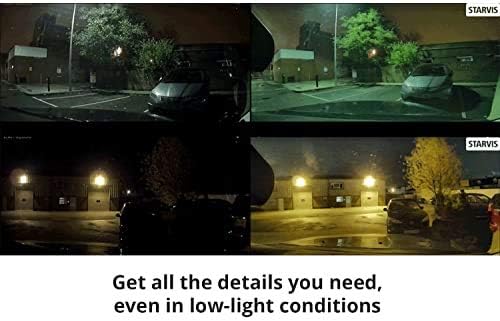
Figure 6: Super Night Vision enhances clarity in low-light environments.
4.5. មុខងារ GPS
When the optional GPS antenna is connected, the X700 records the vehicle's driving speed, location, and routes. This data can be viewed through the PC Viewer software, providing a comprehensive overview of your journeys and aiding in accident analysis.
៤.១.៣. ភាសាដែលគាំទ្រ
The THINKWARE X700 supports multiple languages for its interface and voice alerts, including English, English UK, Spanish, Portuguese, French, French (Canada), German, Italian, Russian, Simplified Chinese, Chinese (Hong Kong), Chinese (Taiwan), Thai, Japanese, and Korean.
4.7. ផលិតផលលើសview វីដេអូ
វីដេអូ ៤.១៖ ផលិតផលផ្លូវការមួយview of the THINKWARE X700 Dash Cam, highlighting its key features and functionalities.
5. ការថែទាំ
5.1. ការគ្រប់គ្រងកាត MicroSD
The X700 utilizes loop recording, automatically overwriting the oldest continuous recording files when the microSD card is full. Event (impact) recordings are saved in a separate folder and are protected from overwriting. Regularly back up important footage to a computer. It is recommended to periodically format the microSD card using the dash cam's menu to maintain optimal performance and prevent data corruption.
5.2. Automatic Temperature Sensitive Shutdown
The dash cam is equipped with a self-protection shutdown function. If the internal temperature rises and exceeds a certain level due to strong sunlight or extreme heat, the device will automatically power off to protect the product and its stored videos. This feature ensures the longevity and reliability of the dash cam.
6. ការដោះស្រាយបញ្ហា
If you encounter any issues with your THINKWARE X700 Dash Cam, please refer to the following common troubleshooting steps:
- គ្មានថាមពល៖ Ensure the 12V Power Cable is securely connected to both the dash cam and the vehicle's power outlet. Check the vehicle's fuse box if necessary.
- បញ្ហាថត៖ Verify that the microSD card is properly inserted and formatted. If issues persist, try using a different compatible microSD card.
- False ADAS Alerts: Adjust the sensitivity settings for ADAS features through the touchscreen menu. Ensure the GPS antenna is properly connected and receiving a signal.
- មុខងារអេក្រង់៖ Attempt a soft reset of the device. If the problem continues, consult the full user manual on the microSD card or contact customer support.
- ការឡើងកំដៅខ្លាំង៖ Ensure the dash cam is not exposed to direct sunlight for extended periods when parked. The automatic shutdown feature is designed to protect the device.
7. លក្ខណៈបច្ចេកទេស
| លក្ខណៈ | តម្លៃ |
|---|---|
| វិមាត្រផលិតផល | 4.1 x 1.1 x 2.1 អ៊ីញ |
| ទំងន់ធាតុ | 4 អោន |
| លេខម៉ូដែលធាតុ | TW-X700 |
| ដំណោះស្រាយការថតវីដេអូ | 1080 ទំ |
| វាលនៃ View | 142.7 ដឺក្រេ |
| បច្ចេកវិទ្យាតភ្ជាប់ | ជំនួយ |
| ប្រភេទម៉ោន | ម៉ោនវ៉ែនតា |
| លក្ខណៈពិសេស | 2.7" LCD Touchscreen, ADAS Driver Alerts (Optional GPS Antenna required), Smart Parking, Super Night Vision (Parking Surveillance mode only) |
8. ការធានា និងការគាំទ្រ
For detailed warranty information, please refer to the Quick Start Guide/Warranty document included in your product packaging or the full User Manual stored on the provided microSD card. For technical support or further assistance, please visit the official THINKWARE webគេហទំព័រ ឬទាក់ទងផ្នែកសេវាកម្មអតិថិជនរបស់ពួកគេ។


