1. សេចក្តីផ្តើម
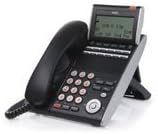
This manual provides instructions for the proper setup, operation, and maintenance of your NEC DTL-12D-1 DT330 12-Button Digital Phone. Please read this manual thoroughly before using the device to ensure optimal performance and longevity.
2. ការដំឡើងនិងការដំឡើង
Follow these steps to set up your NEC DTL-12D-1 DT330 Digital Phone:
- ការវេចខ្ចប់៖ Carefully remove all components from the packaging. Verify that all parts are present: phone unit, handset, handset cord, and base stand.
- ការភ្ជាប់មូលដ្ឋាន៖ The phone features a modular design with a four-step adjustable base. Attach the base to the phone unit and adjust it to your preferred viewមុំ។
- Connecting the Handset: Connect one end of the coiled handset cord to the handset and the other end to the handset jack on the phone unit.
- Connecting to the System: Connect the phone to your compatible NEC Univerge 8100/8300 system using the appropriate digital line cable. This phone requires a corded electric power source, typically supplied via the digital line connection from the phone system.
3. សេចក្តីណែនាំប្រតិបត្តិការ
The NEC DTL-12D-1 DT330 is designed for efficient communication. Here are basic operating procedures:
- ធ្វើការហៅទូរសព្ទ៖
- លើកទូរសព្ទ ឬចុចគ្រាប់ចុច វាគ្មិន ប៊ូតុងសម្រាប់ប្រតិបត្តិការដោយមិនប្រើដៃ។
- Dial the desired number using the backlit 10-key dialpad.
- Press the appropriate line key (Red or Green LED) if required by your system configuration.
- ឆ្លើយតបការហៅទូរស័ព្ទ៖
- នៅពេលទូរសព្ទរោទ៍ លើកទូរសព្ទ ឬចុចគ្រាប់ចុច វាគ្មិន ប៊ូតុង។
- The 3-color LED indicator will show the status of incoming calls.
- Using Line Keys: The phone features 12 line keys, including 8 line keys with Red and Green LEDs, for accessing different lines or features. Consult your system administrator for specific assignments.
- Soft Keys and Display: The 168 x 58 dot matrix backlit LCD with cursor keys provides menu and soft key operation. Four soft keys (e.g., Help, Exit) are context-sensitive and their functions are displayed on the LCD.
- ឧបករណ៍បំពងសម្លេង៖ The phone supports full-duplex hands-free operation via its speakerphone. Press the វាគ្មិន ប៊ូតុងដើម្បីធ្វើឱ្យសកម្ម ឬអសកម្ម។
- ការលៃតម្រូវកម្រិតសំឡេង៖ Use the dedicated volume control buttons to adjust the handset, speaker, or ringer volume.
4. ការថែទាំ
To ensure the longevity and proper functioning of your digital phone, follow these maintenance guidelines:
- ការសម្អាត៖ Use a soft, dry cloth to clean the phone's exterior. For stubborn dirt, slightly dampen the cloth with water. Avoid using harsh chemicals, abrasive cleaners, or solvents, as these can damage the finish and electronic components.
- ការបង្ហាញការថែទាំ៖ The backlit LCD screen should be cleaned gently with a soft, lint-free cloth. Do not press hard on the screen.
- លក្ខខណ្ឌបរិស្ថាន៖ Keep the phone away from direct sunlight, excessive heat, humidity, and dust. Do not expose it to liquids.
- ការគ្រប់គ្រងខ្សែ: Ensure handset and line cords are not tangled or stretched excessively to prevent damage.
5. ការដោះស្រាយបញ្ហា
If you encounter issues with your NEC DTL-12D-1 DT330, try the following troubleshooting steps:
- គ្មានសំឡេងចុច៖
- Check all cable connections, ensuring they are securely plugged into the phone and the wall jack/system.
- Verify that the phone system is operational.
- ការបង្ហាញមិនដំណើរការ៖
- Ensure the phone is receiving power from the system.
- If the display is dim, check if the backlight settings can be adjusted via the menu.
- Speakerphone Issues:
- ធានាបាននូវ វាគ្មិន button is illuminated when in use.
- ពិនិត្យមើលការកំណត់កម្រិតសំឡេង។
- ប៊ូតុងមិនឆ្លើយតប៖
- Gently clean around the buttons to remove any debris.
- If the issue persists, a system reset might be required (consult your system administrator).
For persistent issues, contact your system administrator or NEC technical support.
6. លក្ខណៈបច្ចេកទេស
| ម៉ាក | គ.ជ.ប |
| លេខម៉ូដែល | DTL-12D-1 DT330 (680003) |
| ទំងន់ធាតុ | 4 ផោន |
| ពណ៌ | ស |
| ប្រភពថាមពល | ខ្សែអគ្គិសនី |
| ប្រភេទអ្នកហៅទូរសព្ទ | ក្តារចុចតែមួយ |
| ប្រភេទប្រព័ន្ធឆ្លើយតប | ឌីជីថល |
| អត្តសញ្ញាណអ្នកហៅចូល | ទេ |
| បង្ហាញ | 168 x 58 dot matrix backlit LCD with cursor keys |
| សោ | 12 Line Keys (8 with Red/Green LEDs), 4 Soft Keys, Backlit 10-key Dialpad |
| ឧបករណ៍បំពងសម្លេង | Full-duplex hands-free operation |
| ភាពឆបគ្នា។ | NEC Univerge 8100/8300 systems |
| UPC | 722580084996 |
7. ការធានា និងការគាំទ្រ
Warranty information for the NEC DTL-12D-1 DT330 Digital Phone is typically provided at the point of purchase or with the original product documentation. Please refer to those resources for details regarding warranty coverage and terms.
For technical support, service, or further inquiries, please contact your authorized NEC dealer or visit the official NEC website for support resources specific to your region.


