Altronix PD4

Altronix PD4 Power Distribution Module User Manual

ម៉ូដែល: PD4

សេចក្តីផ្តើម

The Altronix PD4 is a 4-output fused power distribution module designed to efficiently distribute power to multiple electronic devices. This unit provides individual fused outputs for enhanced protection and reliability. It is suitable for various applications requiring organized power distribution.

លក្ខណៈសំខាន់ៗ

ផលិតផលលើសview

Below is an image of the Altronix PD4 Power Distribution Module, highlighting its key components and connections.
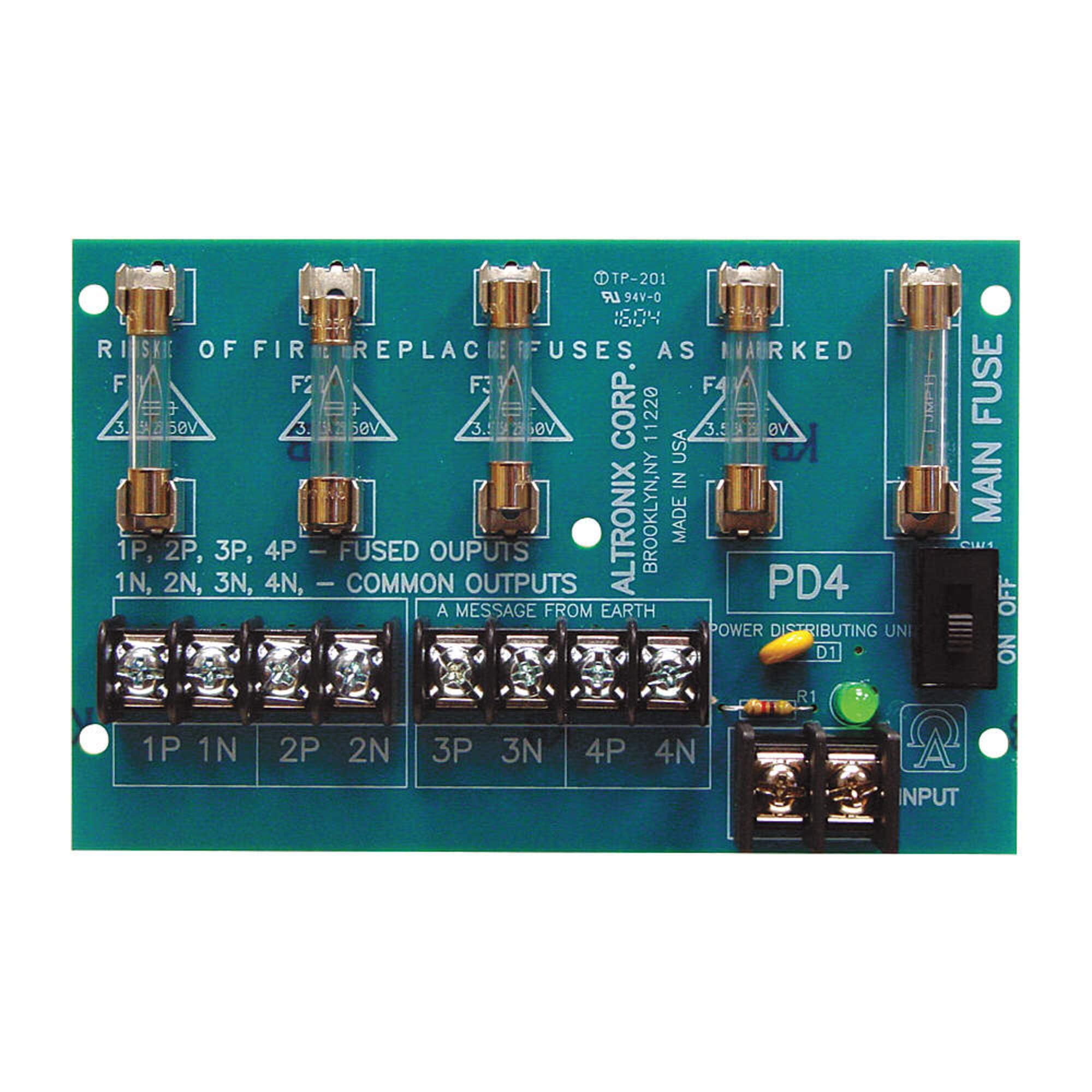
Altronix PD4 Power Distribution Module with four fused outputs, common terminals, main fuse, and input terminals.

ការពិពណ៌នារូបភាព៖ A green circuit board, the Altronix PD4 Power Distribution Module. At the top, there are four clear glass fuses. Fuses F1 and F2 are rated 3.5A 50V, while Fuses F3 and F4 are rated 3.5A 250V. To the right of these, a larger main fuse is visible next to a black ON/OFF switch. Below the fuses, there are eight screw terminal blocks arranged in pairs, labeled 1P 1N, 2P 2N, 3P 3N, 4P 4N. These are for the fused outputs (P) and common negative returns (N). On the bottom right, another pair of screw terminals is labeled "INPUT" for connecting the main power source. A green LED (D1) and a resistor (R1) are located near the input terminals, indicating power status. The board also displays "PD4 POWER DISTRIBUTING UNIT" and "ALTRONIX CORP. BROOKLYN, NY 11220 MADE IN USA". A critical safety warning reads: "RISK OF FIRE REPLACE FUSES AS MARKED".

ការដំឡើងនិងការដំឡើង

  1. ការតភ្ជាប់ប្រភពថាមពល៖

    Ensure the main power source is disconnected before making any connections. Connect the positive (+) lead of your power supply to the 'INPUT' positive terminal and the negative (-) lead to the 'INPUT' negative terminal on the PD4 module. Observe proper polarity.

  2. ការតភ្ជាប់ឧបករណ៍៖

    Connect your devices to the respective output terminals. For each device, connect its positive (+) power input to one of the 'P' (Fused Output) terminals (e.g., 1P, 2P, 3P, or 4P) and its negative (-) power input to the corresponding 'N' (Common Output) terminal (e.g., 1N, 2N, 3N, or 4N).

  3. Fuse Verification:

    Verify that the installed fuses (F1-F4 and Main Fuse) match the required specifications for your application and the markings on the board. Fuses F1 and F2 are rated 3.5A 50V, while Fuses F3 and F4 are rated 3.5A 250V. WARNING: RISK OF FIRE. REPLACE FUSES AS MARKED.

  4. ការដំឡើង (ស្រេចចិត្ត)៖

    Secure the PD4 module in a suitable enclosure or mounting location using appropriate hardware (not included) to prevent accidental damage or short circuits.

Important Safety Note: Always ensure power is disconnected before making or changing any wiring connections to prevent electrical shock or damage to equipment.

សេចក្តីណែនាំប្រតិបត្តិការ

  1. បើកថាមពល៖

    Once all connections are securely made and verified, connect the main power source to the 'INPUT' terminals. Then, switch the 'MAIN FUSE' ON/OFF switch to the 'ON' position.

  2. សូចនាករថាមពល៖

    The green LED (D1) should illuminate, indicating that power is being supplied to the module and is ready for distribution.

  3. ប្រតិបត្តិការឧបករណ៍៖

    Your connected devices should now receive power through their respective fused outputs. Monitor device operation to ensure proper functionality.

  4. បិទថាមពល៖

    To disconnect power, first switch the 'MAIN FUSE' ON/OFF switch to the 'OFF' position, then disconnect the main power source from the 'INPUT' terminals.

ថែទាំ

ការជំនួស Fuse

The Altronix PD4 module utilizes fuses to protect connected equipment from overcurrent conditions. If a device connected to an output stops functioning, or if the power indicator LED (D1) does not illuminate, a fuse may have blown.

  1. Identify Blown Fuse:

    Visually inspect the glass fuses (F1-F4 and Main Fuse). A blown fuse will typically have a broken filament inside the glass tube.

  2. ផ្តាច់ថាមពល៖

    Before replacing any fuse, ensure the main power source is completely disconnected from the PD4 module and the ON/OFF switch is in the 'OFF' position.

  3. យក Fuse ចាស់ចេញ៖

    Carefully pull the blown fuse straight out from its holder.

  4. ដំឡើង Fuse ថ្មី៖

    Insert a new fuse of the exact same type and rating into the fuse holder. Refer to the board markings for the required fuse specifications: F1 and F2 require 3.5A 50V fuses, while F3 and F4 require 3.5A 250V fuses. WARNING: Using a fuse with an incorrect rating can lead to fire or damage to the unit and connected equipment.

  5. ស្តារថាមពលឡើងវិញ៖

    Once the new fuse is securely in place, reconnect the main power source and switch the ON/OFF switch to 'ON'.

ត្រួតពិនិត្យការភ្ជាប់ខ្សែភ្លើងឱ្យបានទៀងទាត់ ដើម្បីភាពតឹងណែន និងសញ្ញានៃការពាក់ ឬច្រេះ។

ការដោះស្រាយបញ្ហា

បញ្ហាមូលហេតុដែលអាចកើតមានដំណោះស្រាយ
No power to any output, D1 LED is off.
  • Main power source disconnected or faulty.
  • Main fuse blown.
  • ON/OFF switch in 'OFF' position.
  • Verify main power supply connection and functionality.
  • Check and replace the Main Fuse if blown (refer to Maintenance section).
  • ត្រូវប្រាកដថាកុងតាក់ ON/OFF ស្ថិតនៅក្នុងទីតាំង 'ON'។
One specific output has no power, D1 LED is on.
  • Corresponding output fuse (F1-F4) blown.
  • Device connected to output is faulty.
  • Loose connection at output terminals.
  • Check and replace the specific output fuse if blown (refer to Maintenance section).
  • Test the device with an alternative power source to confirm functionality.
  • Tighten screw terminals for the affected output.
Intermittent power to outputs.
  • ការភ្ជាប់ខ្សែរលុង។
  • ការផ្គត់ផ្គង់ថាមពលមានកំហុស។
  • Inspect and tighten all input and output wiring connections.
  • Test the power supply for stable voltagលទ្ធផលអ៊ី។

លក្ខណៈបច្ចេកទេស

Note: Specifications are subject to change without notice. Always refer to the product itself for the most accurate markings.

ការធានា និងការគាំទ្រ

For warranty information, technical support, or service inquiries regarding your Altronix PD4 Power Distribution Module, please contact Altronix customer service directly or visit their official webគេហទំព័រ។ រក្សាបង្កាន់ដៃទិញរបស់អ្នកសម្រាប់ការទាមទារធានា។

ក្រុមហ៊ុនផលិត៖ អាល់ត្រូនិច

Webគេហទំព័រ៖ www.altronix.com

ឯកសារពាក់ព័ន្ធ - PD4

មុនview Altronix ALTV1224DC Series CCTV Power Supplies Guide installation
Comprehensive installation guide for Altronix ALTV1224DC Series CCTV Power Supplies. Details models, specifications, features, terminal identification, safety warnings, and enclosure dimensions for reliable CCTV power distribution.
មុនview Altronix ACMS12 Series Access Power Controllers Installation Guide
Installation guide for Altronix ACMS12 and ACMS12CB series sub-assembly access power controllers. Details specifications, wiring, and application diagrams for secure access control systems.
មុនview Altronix RDC48 Relay and Base Module Specifications and Installation
Detailed specifications and installation instructions for the Altronix RDC48 Relay and Base Module, featuring DPDT contacts and DIN rail mountability.
មុនview Altronix PD4ULCB UL រាយបញ្ជីម៉ូឌុលចែកចាយថាមពលអនុសន្និបាត
ព័ត៌មានលម្អិតអំពី Altronix PD4ULCB ដែលជាម៉ូឌុលចែកចាយថាមពលរងដែលបានចុះបញ្ជី UL ដែលមានលទ្ធផលការពារ PTC ចំនួនបួន លក្ខណៈបច្ចេកទេស និងការណែនាំអំពីការដំឡើង។
មុនview Altronix RBSNTTL Ultra Sensitive Relay Module Specifications and Installation
Detailed specifications and installation instructions for the Altronix RBSNTTL Ultra Sensitive Relay Module, including power requirements, trigger specifications, contact ratings, and board dimensions.
មុនview ភាពជាក់លាក់នៃម៉ូឌុលបញ្ជូនត Altronix RBSN និងខ្សែ
ការបញ្ជាក់លម្អិត និងដ្យាក្រាមខ្សែភ្លើងសម្រាប់ម៉ូឌុលបញ្ជូនត Altronix RBSN រួមទាំងប្រតិបត្តិការ ទំនាក់ទំនង និងការដំឡើង។