1. សេចក្តីផ្តើម
This instruction manual provides comprehensive guidance for the safe and effective use of your JVC UX-QD7-S Micro Component DVD/MD System. Please read this manual thoroughly before operating the system and retain it for future reference. This system integrates a DVD video player, an MD deck, and a 3-way speaker setup, designed to deliver a high-quality audio and video experience.
2. ព័ត៌មានសុវត្ថិភាព
- ការផ្គត់ផ្គង់ថាមពល៖ Ensure the system is connected to a power source that matches the voltage បានបញ្ជាក់នៅលើឯកតា។
- ខ្យល់ចេញចូល៖ កុំបិទរន្ធខ្យល់។ អនុញ្ញាតឱ្យមានកន្លែងទំនេរគ្រប់គ្រាន់នៅជុំវិញអង្គភាពសម្រាប់លំហូរខ្យល់ឱ្យបានត្រឹមត្រូវដើម្បីការពារការឡើងកំដៅ។
- សំណើម៖ កុំធ្វើឱ្យអង្គភាពមានភ្លៀង សំណើម ឬសំណើមលើស។ ទុកវត្ថុរាវឱ្យឆ្ងាយពីប្រព័ន្ធ។
- វត្ថុបរទេស៖ Do not insert any objects into the unit's openings.
- សេវាកម្ម៖ កុំព្យាយាមផ្តល់សេវាកម្មផលិតផលនេះដោយខ្លួនឯង។ សូមណែនាំសេវាកម្មទាំងអស់ដល់បុគ្គលិកសេវាកម្មដែលមានលក្ខណៈសម្បត្តិគ្រប់គ្រាន់។
- ទីតាំង៖ ដាក់ឧបករណ៍នៅលើផ្ទៃរាបស្មើ និងមានស្ថេរភាព។ ជៀសវាងការដាក់វានៅជិតប្រភពកំដៅ ឬនៅក្រោមពន្លឺព្រះអាទិត្យដោយផ្ទាល់។
3. ប្រព័ន្ធលើសview និងមាតិកាកញ្ចប់
The JVC UX-QD7-S system consists of a central main unit, two stereo speakers, and a remote control. The main unit houses the DVD player, MD deck, and amplifier. The speakers are designed for optimal sound reproduction, and the remote control provides convenient operation from a distance.
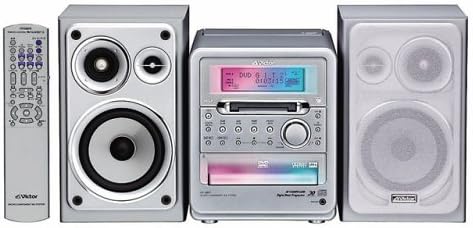
មាតិកាកញ្ចប់៖
- Main Unit (DVD/MD Player)
- វាគ្មិនខាងឆ្វេង
- វាគ្មិនស្តាំ
- ការបញ្ជាពីចម្ងាយ
- ខ្សែថាមពល
- ខ្សែឧបករណ៍បំពងសម្លេង
- សៀវភៅណែនាំ (ឯកសារនេះ)
4. រៀបចំ
៤.៣ ការតភ្ជាប់អូប៉ាល័រ
- Connect the speaker cables from the main unit's speaker terminals to the corresponding terminals on each speaker. Ensure correct polarity (red to red, black to black) for optimal sound.
- Position the speakers to the left and right of the main unit for stereo sound.
4.2 ការតភ្ជាប់ថាមពល
- Plug the power cord into the AC inlet on the rear of the main unit.
- Insert the other end of the power cord into a wall outlet.
4.3 Connecting to a Television (for DVD Video)
ទៅ view DVD video content, connect the system to your television using appropriate video cables (e.g., composite video, S-video, or component video, depending on available ports on both devices). Refer to your TV's manual for specific input connections.
4.4 Connecting External Audio Sources (AUX)
To connect an external audio device (e.g., a portable music player), use an audio cable to connect the device's audio output to the AUX input jacks on the JVC UX-QD7-S main unit.
5. សេចក្តីណែនាំប្រតិបត្តិការ
5.1 ប្រតិបត្តិការមូលដ្ឋាន
- បើក/បិទថាមពល៖ ចុច ថាមពល button on the main unit or remote control.
- ការគ្រប់គ្រងកម្រិតសំឡេង៖ ប្រើ វ៉ុល +/- buttons on the main unit or remote control to adjust the sound level.
- ការជ្រើសរើសប្រភព៖ ចុច មុខងារ or ប្រភព button to cycle through DVD, MD, AUX, and Tuner (if available) inputs.
5.2 ការចាក់ឌីវីឌី
- Select the DVD function.
- ចុច បើក/បិទ ប៊ូតុងដើម្បីបើកថាសឌីស។
- Place a DVD video or DVD audio disc onto the tray with the label side up.
- ចុច បើក/បិទ again to close the tray. Playback will usually start automatically.
- ប្រើ លេង, ផ្អាក, បញ្ឈប់, រំលង, និង ស្វែងរក buttons on the remote for control.
- The system supports 5.1ch surround sound reproduction with 3D phonics and is compatible with DVD Audio discs for high-quality audio playback.
5.3 MD Deck Operation
- Select the MD function.
- Insert a MiniDisc (MD) into the MD slot.
- ការចាក់សារថ្មី៖ ចុច លេង ប៊ូតុង។
- ថត៖ The MD deck supports MDLP (MiniDisc Long Play) for extended recording times. Refer to the detailed MD recording section in the full manual for specific instructions on recording modes and procedures.
- លុប៖ Follow the instructions in the full manual to erase tracks or entire MDs.
5.4 External Input (AUX)
To listen to an external device connected to the AUX input, select the AUX function using the មុខងារ or ប្រភព ប៊ូតុង។
6. ការថែទាំ
- ការសម្អាតអង្គភាព៖ Wipe the unit with a soft, dry cloth. For stubborn stains, use a cloth lightly dampលាងសម្អាតជាមួយសាប៊ូបោកខោអាវស្រាល រួចជូតឱ្យស្ងួត។ កុំប្រើទឹកសម្អាតដែលមានជាតិกัดกร่อน ឬសារធាតុរំលាយ។
- Disc/MD Handling: Handle discs and MDs by their edges. Keep them clean and free from scratches. Store them in their cases when not in use.
- ការថែទាំអ្នកនិយាយ៖ Keep speakers free from dust. Do not press on the speaker cones.
7. ការដោះស្រាយបញ្ហា
| បញ្ហា | មូលហេតុដែលអាចកើតមាន | ដំណោះស្រាយ |
|---|---|---|
| គ្មានអំណាច | ខ្សែថាមពលមិនបានភ្ជាប់; ព្រីភ្លើងមានបញ្ហា | ពិនិត្យការតភ្ជាប់ខ្សែថាមពល; សាកល្បងហាងផ្សេង |
| គ្មានសំឡេង | Volume too low; Speakers not connected; Incorrect source selected | Increase volume; Check speaker connections; Select correct input source |
| ឌីសមិនលេង | Disc inserted incorrectly; Disc dirty or scratched; Disc format not supported | Insert disc correctly; Clean or replace disc; Ensure disc is DVD video or DVD audio |
| MD not recording | MD is full or protected; Incorrect recording mode | Use a blank MD or erase existing content; Check recording settings |
| ការបញ្ជាពីចម្ងាយមិនដំណើរការទេ។ | Batteries depleted; Obstruction between remote and unit | ជំនួសថ្ម; ដកការស្ទះណាមួយចេញ |
If the problem persists after attempting these solutions, please contact JVC customer support or a qualified service technician.
8. លក្ខណៈបច្ចេកទេស
- លេខម៉ូដែល៖ UX-QD7-S
- ម៉ាក៖ JVC
- បច្ចេកវិទ្យាតភ្ជាប់៖ AUX
- ប្រភេទធុងបាស៖ ហ៊ុំព័ទ្ធ
- របៀបបញ្ចេញអូឌីយ៉ូ៖ ហ៊ុំព័ទ្ធ
- ទំងន់ផលិតផល៖ ប្រហែល 6151 ក្រាម។
- ប្រព័ន្ធផ្សព្វផ្សាយដែលគាំទ្រ៖ DVD Video, DVD Audio, MiniDisc (MD, MDLP)
- វេទិកា៖ ប្រព័ន្ធអូឌីយ៉ូលើតុ
9. ការធានា និងការគាំទ្រ
For warranty information, please refer to the warranty card included with your product or visit the official JVC webគេហទំព័រ។ រក្សាបង្កាន់ដៃទិញរបស់អ្នកជាភស្តុតាងនៃការទិញសម្រាប់ការទាមទារធានា។
For technical support or service inquiries, please contact JVC customer service. Contact details can typically be found on the official JVC webគេហទំព័រ ឬនៅក្នុងការវេចខ្ចប់ផលិតផល។


