1. Кіріспе
This instruction manual provides detailed guidance for the assembly, installation, and maintenance of your Samsung VG-SESB11K/XC Studio Stand. This stand is designed to provide a freestanding display solution for compatible Samsung The Frame televisions, offering an easel-like aesthetic. Please read this manual thoroughly before proceeding with installation to ensure correct setup and safe operation.
2. Қауіпсіздік туралы ақпарат
Observe the following safety precautions to prevent injury or damage to your product and property:
- Салмақ шегі: Ensure your television's weight and size are within the stand's specified limits. This stand is compatible with televisions up to 50 inches.
- Тұрақты бет: Always place the assembled stand on a flat, stable, and level surface to prevent tipping.
- Ассамблея: Барлық құрастыру қадамдарын дәл орындаңыз. Қадамдарды өткізіп жібермеңіз немесе рұқсат етілмеген бөлшектерді пайдаланбаңыз.
- Балалар мен үй жануарлары: Keep children and pets away from the stand during assembly. Do not allow them to climb on or play with the stand or attached television.
- Кабельдерді басқару: Secure all cables to prevent tripping hazards and accidental dislodgement of the television.
- Стендті жылжыту: When moving the stand with a television attached, always do so with assistance and lift carefully to avoid strain or damage.
3. Пакет мазмұны
Verify that all components are present before beginning assembly. If any parts are missing or damaged, contact Samsung customer support.
- Studio Stand Legs (3 pieces)
- Central Support Column
- Mounting Plate for Television
- Құрастыру жабдықтары (бұрандалар, шайбалар және т.б.)
- Нұсқаулық

Figure 3.1: Fully assembled Samsung VG-SESB11K/XC Studio Stand.
4. Орнату және орнату
Қажетті құралдар: Phillips бас бұрағышы.
- Негізді жинаңыз: Attach the three stand legs to the central support column. Ensure all connections are secure and tightened according to the included hardware instructions.
- Монтаждау тақтасын бекітіңіз: Secure the television mounting plate to the top of the central support column. Verify that it is oriented correctly for your television model.
- Prepare Television: Carefully place your compatible Samsung The Frame television face down on a soft, clean surface. Attach the appropriate mounting brackets (usually provided with the TV or stand) to the back of the television using the specified screws.
- Mount Television: With assistance, carefully lift the television and align the mounting brackets on the TV with the mounting plate on the stand. Secure the television to the stand using the provided screws and hardware. Ensure the television is firmly attached and stable.
- Кабельдерді басқару: Route all necessary cables (power, HDMI, One Connect cable for The Frame TVs) through the designated cable management channel within the central support column. This helps maintain a clean appearance and prevents cable damage.
- Соңғы орналастыру: Carefully move the assembled stand and television to its desired location. Ensure the floor is level and the stand is stable.
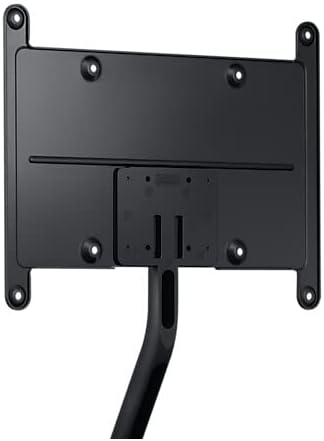
Figure 4.1: Detail of the mounting plate for television attachment.

4.2-сурет: Фронтальды view of the mounting plate, illustrating attachment points.
5. Пайдалану нұсқаулары
The Samsung VG-SESB11K/XC Studio Stand is a passive support structure. Its primary function is to securely hold your television in a freestanding position. Once assembled and the television is mounted, no further "operation" is required beyond ensuring stability and proper cable management.
- Орналастыру: Position the stand in a location where it will not be easily bumped or disturbed.
- Кабельді бағыттау: Regularly check that cables are neatly routed through the central column and are not pinched or strained.
- Тұрақтылықты тексеру: Periodically verify the stability of the stand and the security of the television attachment.
6. Техникалық қызмет көрсету
Regular maintenance helps prolong the life and appearance of your studio stand.
- Тазалау: Тұғырды жұмсақ, құрғақ шүберекпен сүртіңіз. Қыңыр белгілер үшін сәл damp Жұмсақ сабын қосылған шүберекті пайдалануға болады, содан кейін кептіріңіз. Абразивті тазартқыштардан немесе еріткіштерден аулақ болыңыз.
- Аппараттық құралдарды тексеру: Барлық бұрандалар мен қосылымдардың берік болуын қамтамасыз ету үшін мезгіл-мезгіл тексеріп тұрыңыз. Қажет болса, қайта қатайтыңыз.
- Қоршаған орта жағдайлары: Avoid exposing the stand to extreme temperatures, high humidity, or direct sunlight for prolonged periods, as this may affect the material.
7. Ақаулықтарды жою
If you encounter issues with your Samsung VG-SESB11K/XC Studio Stand, refer to the following common solutions:
- Стенд тұрақсыз:
- Ensure all leg connections and the central column are securely tightened.
- Тұғырдың толығымен тегіс және тегіс бетке қойылғанын тексеріңіз.
- Confirm the television is properly mounted and centered.
- Жетіспейтін бөліктер:
- Барлық қаптама материалдарын мұқият тексеріңіз.
- If parts are genuinely missing, contact Samsung customer support with your product model and purchase information.
- Television Does Not Fit:
- Confirm your television's VESA mounting pattern and screen size are compatible with the stand. This stand is designed for televisions up to 50 inches.
- Ensure you are using the correct screws and spacers for your specific television model.
8. Техникалық сипаттамалар
| Бренд | Samsung |
| Үлгі нөмірі | VG-SESB11K (Part Number), 716865 (Item Model Number) |
| Үйлесімді құрылғылар | Televisions (specifically Samsung The Frame TVs) |
| Экранның максималды өлшемі | 50 дюйм |
| Материал | Алюминий |
| Монтаждау түрі | Floor Stand (also listed as Ceiling Mount in some specifications, but primarily functions as a floor stand) |
| Қозғалыс түрі | Еңкейту |
| Өнім өлшемдері | 99.97 x 67.57 x 103.15 cm; 4.7 kg (approximate assembled dimensions) |
| Модель жылы | 2022 |
9. Кепілдік және қолдау
For warranty information, technical support, or to inquire about replacement parts, please contact Samsung customer service. Refer to your product's packaging or the official Samsung webСіздің аймағыңызда қолданылатын ең соңғы байланыс мәліметтері мен кепілдік шарттарын алу үшін сайт.
Желідегі қолдау: www.samsung.com/support