

Product Function instruction
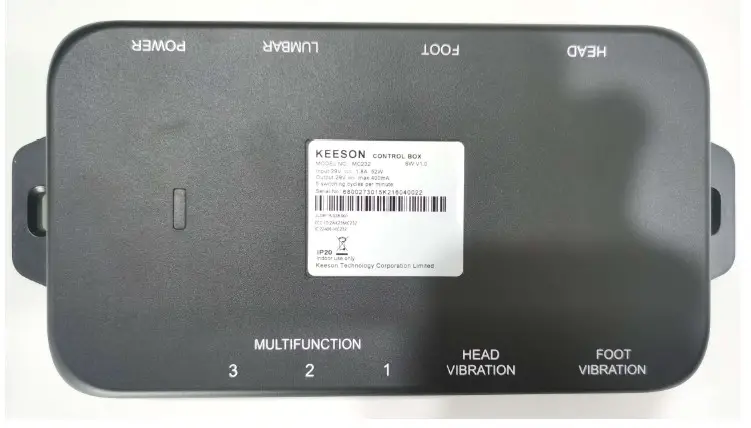
MC232
Version:1.1
Electrical configuration diagram

Function Picture
Process of test
HEAD port
Connect to head actuator, control by a remote single:
Click head-up button on the remote, head actuator moves out, stop when released;
Click head down button,head actuator moves in, stop when released;
This function takes effect only by pressing the corresponding button on the remote.
FOOT port
Connect to foot actuator, control by a remote single:
Click foot up button, foot actuator moves out, stop when released;
Click foot down button, foot actuator moves in, stop when released;
This function takes effect only by pressing the corresponding button on the remote.
Massage
Connect to head massage, control by remote:
Click head massage + button, head massage strengthens by one level;
Click head massage – button, head massage weaken by one level;
This function takes effect only by pressing the corresponding button on the remote.
MULTIFUNCTION port
Connect with the same other Control box or Other accessories;
Power LED & PAIRING LED
Power supply for control box, PAIRING LED of control box flashes for 4 times,and then turns off, POWER LED turns on。
Power
Connect to the 29V DC;
Pair Function
Power up control box, pairing LED will be flash, the control box enters into the mode of code paring, Press and holds the pairing LED of Remote, the backlight of paring LED flashes, the backlight of remote flashes, the remote enters into the mode of code paring; The backlight of paring LED of remote stops flashing, and the paring led of control box stop flash, it indicates that
the code paring is successful;
If fails, repeat all the processes above;
FLAT function
Press and release the FLAT button on the remote, the head and foot actuators moves to a lower position(when the actuator is free, can turn off the vibration motor and turn off the indicator light when press once ), stop when pressing any button;
This function takes effect only by pressing the corresponding button on the remote.
ZERO-G position function
Press and release ZERO-G button on remote, the head and foot actuator moves to preset memory position, stop when pressing any button;
This function takes effect only by pressing the corresponding button on the remote.
FCC Warning:
Please take attention that changes or modifications not expressly approved by the party responsible for compliance could void the user’s authority to operate the equipment.
This device complies with part 15 of the FCC Rules. Operation is subject to the following two conditions: (1) This device may not cause harmful interference, and (2) this device must accept any interference received, including interference that may cause undesired operation.
ISED RSS Warning:
This device complies with Industry Canada licence-exempt RSS standard(s). Operation is subject to the following two conditions:
(1) this device may not cause interference, and (2) this device must accept any interference, including interference that may cause undesired operation of the device.
Documents / Resources
 | MC232 Control Box |
References
- User Manualmanual.tools
What remote is made for this and where can I buy it?
Which remote is compatible with the KEESON MC232 control box and where can I purchase it?
The provided manual for the KEESON MC232 Control Box (manufactured by OKIN Refined) does not specify a unique model number for the remote control. However, the manual indicates that the compatible remote must feature specific buttons to operate the system, including Head Up/Down, Foot Up/Down, Massage +/-, FLAT, and ZERO G.
Because this control box is an OEM component used by various adjustable bed brands (such as Tempur-Pedic, as seen in the wiring diagram), the specific remote design may vary by bed manufacturer. To find a replacement:
You can typically purchase these remotes through the bed manufacturer's official website or specialized adjustable bed parts retailers.
Read the full Q&A page