1. შესავალი
This manual provides essential information for the safe and efficient operation of your Xiaomi Toaster BHR8811EU. Please read these instructions carefully before first use and retain them for future reference. This 2-slice toaster features 6 browning settings, a defrost function, and a removable crumb tray for easy cleaning.
2. უსაფრთხოების ინსტრუქციები
- ტოსტერი ყოველთვის დარწმუნდით, რომ მოთავსებულია სტაბილურ, სითბოს მდგრად ზედაპირზე, აალებადი მასალებისგან მოშორებით.
- არ შეეხოთ ცხელ ზედაპირებს. გამოიყენეთ სახელურები ან სახელურები.
- Unplug the toaster from the outlet when not in use and before cleaning. Allow it to cool completely before handling or cleaning.
- ელექტრული საფრთხისგან დასაცავად, არ ჩაყაროთ კაბელი, შტეფსელი ან ტოსტერი წყალში ან სხვა სითხეში.
- Do not insert oversized foods, metal foil packages, or utensils into the toaster as this may create a fire or electric shock hazard.
- არ გამოიყენოთ ტოსტერი, თუ კაბელი ან შტეფსელი დაზიანებულია, ან თუ მოწყობილობა გაუმართავად მუშაობს ან რაიმე ფორმით დაზიანებულია.
- არასოდეს დატოვოთ ტოსტერი უყურადღებოდ გამოყენებისას.
- Do not use abrasive cleaners or sharp objects to clean the toaster.
- ეს მოწყობილობა განკუთვნილია მხოლოდ საყოფაცხოვრებო გამოყენებისთვის.
3. პროდუქტის კომპონენტები

სურათი 1: წინა view of the Xiaomi Toaster BHR8811EU. This image displays the control panel with the browning control knob, defrost button, and cancel button, along with the bread slots.
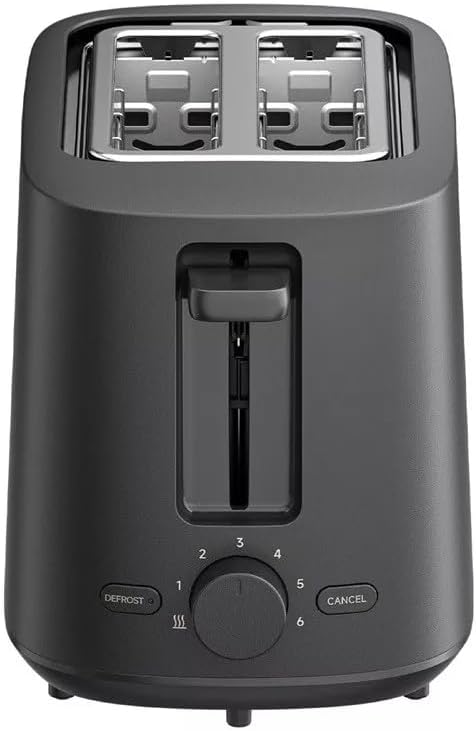
სურათი 2: ზედა view of the Xiaomi Toaster BHR8811EU. This image highlights the two wide bread slots designed to accommodate various bread types.

სურათი 3: მხარე view of the Xiaomi Toaster BHR8811EU. This image shows the side of the toaster, featuring the pull-out handle for the removable crumb tray at the bottom.
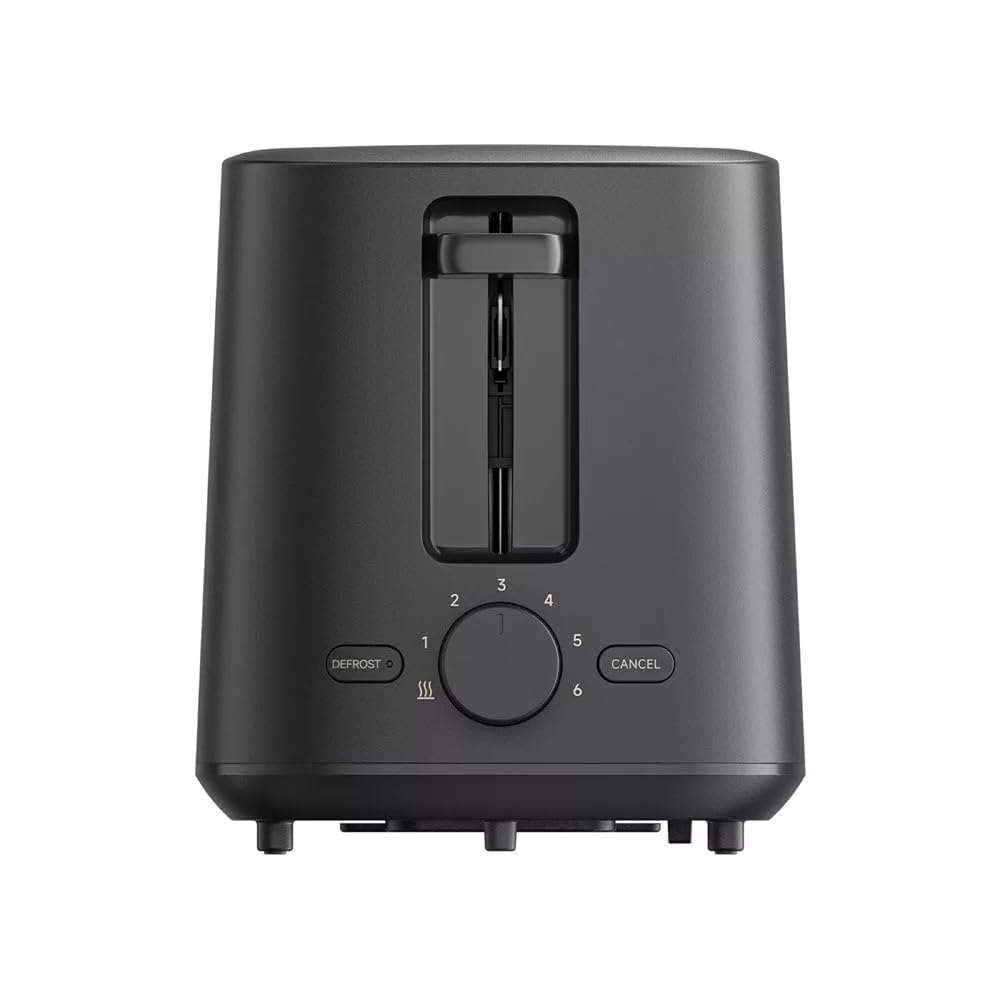
სურათი 4: უკანა view of the Xiaomi Toaster BHR8811EU. This image displays the back of the appliance, featuring the Xiaomi brand logo.
- პურის სლოტები: Two wide slots for bread slices.
- შეწვის ბერკეტი: Lowers bread into the slots and initiates the toasting cycle.
- Browning Control Knob: Adjusts the desired level of browning from 1 (lightest) to 6 (darkest).
- გაყინვის ღილაკი: Activates the defrost function for frozen bread.
- გაუქმების ღილაკი: შეწვის ციკლს ნებისმიერ დროს აჩერებს.
- მოსახსნელი ნამცხვრის უჯრა: აგროვებს ნამცეცებს მარტივი გაწმენდისთვის.
4. დაყენება
- შეფუთვა: ფრთხილად ამოიღეთ ტოსტერი და ყველა შესაფუთი მასალა. დარწმუნდით, რომ ყველა კომპონენტი ადგილზეა და დაუზიანებელია.
- განთავსება: Place the toaster on a flat, stable, and heat-resistant surface. Ensure there is adequate space around the toaster for ventilation.
- პირველი გამოყენება: Before toasting bread for the first time, operate the toaster without bread for a few cycles at the highest browning setting. This will burn off any manufacturing residues and eliminate initial odors. A slight smell or smoke is normal during this process. Ensure the area is well-ventilated.
5. საოპერაციო ინსტრუქციები
- დაკავშირება ძალა: შეაერთეთ კვების კაბელი შესაბამის 220-240 ვოლტიან, 60 ჰერციან ელექტროგადამცემში.
- პურის ჩასმა: Place one or two slices of bread into the bread slots. The toaster features automatic bread centering for even toasting.
- აირჩიეთ შეწვის დონე: Turn the browning control knob to your desired setting, from 1 (lightest) to 6 (darkest).
- დაიწყეთ შეწვა: დააჭირეთ შეწვის ბერკეტს, სანამ არ ჩამაგრდება. ინდიკატორი აინთება და შეწვის ციკლი დაიწყება.
- Defrost Function (for frozen bread): If toasting frozen bread, insert the bread, select your desired browning level, press the toasting lever down, and then press the ᲒᲐᲚᲦᲝᲑᲐ ღილაკი. გალღობის ინდიკატორის ნათურა აინთება.
- გაუქმების ფუნქცია: შეწვის ციკლის ნებისმიერ დროს შესაჩერებლად დააჭირეთ ღილაკს გაუქმება button. The bread will automatically pop up.
- დასრულება: Once the selected browning cycle is complete, the bread will automatically pop up, and the toaster will switch off.
6. მოვლა და დასუფთავება
რეგულარული წმენდა უზრუნველყოფს ოპტიმალურ მუშაობას და ახანგრძლივებს თქვენი ტოსტერის სიცოცხლეს.
- ყოველთვის გამორთეთ დენის წყაროდან: Before cleaning, always unplug the toaster from the power outlet and allow it to cool completely.
- სუფთა ნამცეცების შესაგროვებელი უჯრა: Pull out the removable crumb tray from the bottom of the toaster. Dispose of accumulated crumbs. Wipe the tray with a damp cloth and dry thoroughly before reinserting it. Ensure the crumb tray is fully inserted before using the toaster.
- გარე გაწმენდა: ტოსტერის გარე ზედაპირი გაწმინდეთ რბილი, დ...amp cloth. Do not use abrasive cleaners, metal scouring pads, or harsh chemicals, as these can damage the surface.
- ინტერიერის გაწმენდა: Do not attempt to clean the inside of the toaster with any tools or objects. If bread becomes jammed, unplug the toaster and carefully remove the bread after it has cooled.
7. Დიაგნოსტიკა
- ტოსტერი არ ირთვება: Ensure the power cord is securely plugged into a working outlet. Check if the toasting lever is fully pressed down and locked.
- Bread is unevenly toasted: Ensure bread slices are not too thick or irregularly shaped. The automatic centering mechanism works best with standard bread slices.
- კვამლის ან წვის სუნი: This can occur if crumbs accumulate in the toaster or if food is jammed. Immediately press the გაუქმება button, unplug the toaster, and allow it to cool. Clean the crumb tray and remove any jammed food.
- Bread does not pop up: დააჭირეთ გაუქმება button. If the bread still does not pop up, unplug the toaster and carefully remove the bread once it has cooled.
8. სპეციფიკაციები
| ბრენდი | Xiaomi |
| მოდელის ნომერი | BHR8811EU |
| ფერი | შავი |
| სიმძლავრე / ვატიtage | 930 ვატი |
| ტtage | 220-240 ვოლტი |
| სიხშირე | 60 ჰც |
| მასალა | მეტალი, ალუმინი |
| სლოტების რაოდენობა | 2 |
| განსაკუთრებული თვისებები | Defrost function, 6 browning settings, Removable crumb tray, Automatic bread centering |
| პროდუქტის ზომები (D x W x H) | 15 სმ x 28 სმ x 26 სმ (დაახლოებით) |
| ნივთის წონა | 1.7 კგ |
9. გარანტია და მხარდაჭერა
Your Xiaomi Toaster BHR8811EU is covered by a manufacturer's warranty. Please refer to the warranty card included with your purchase for specific terms and conditions, including warranty duration and coverage details. For technical support, service, or inquiries, please visit the official Xiaomi webადგილზე ან დაუკავშირდით მათ მომხმარებელთა მომსახურების განყოფილებას თქვენს რეგიონში. შეინახეთ შეძენის დამადასტურებელი საბუთი გარანტიის მოთხოვნებისთვის.


