Pambuka
Welcome to the user manual for your new Infinix Smart 8 smartphone. This guide provides essential information on setting up, operating, maintaining, and troubleshooting your device. The Infinix Smart 8 is designed for efficient performance, featuring a G36 processor, 4GB RAM, 64GB internal storage, a 50MP main camera, and a long-lasting 5000 mAh battery. Please read this manual thoroughly to ensure optimal use of your device.
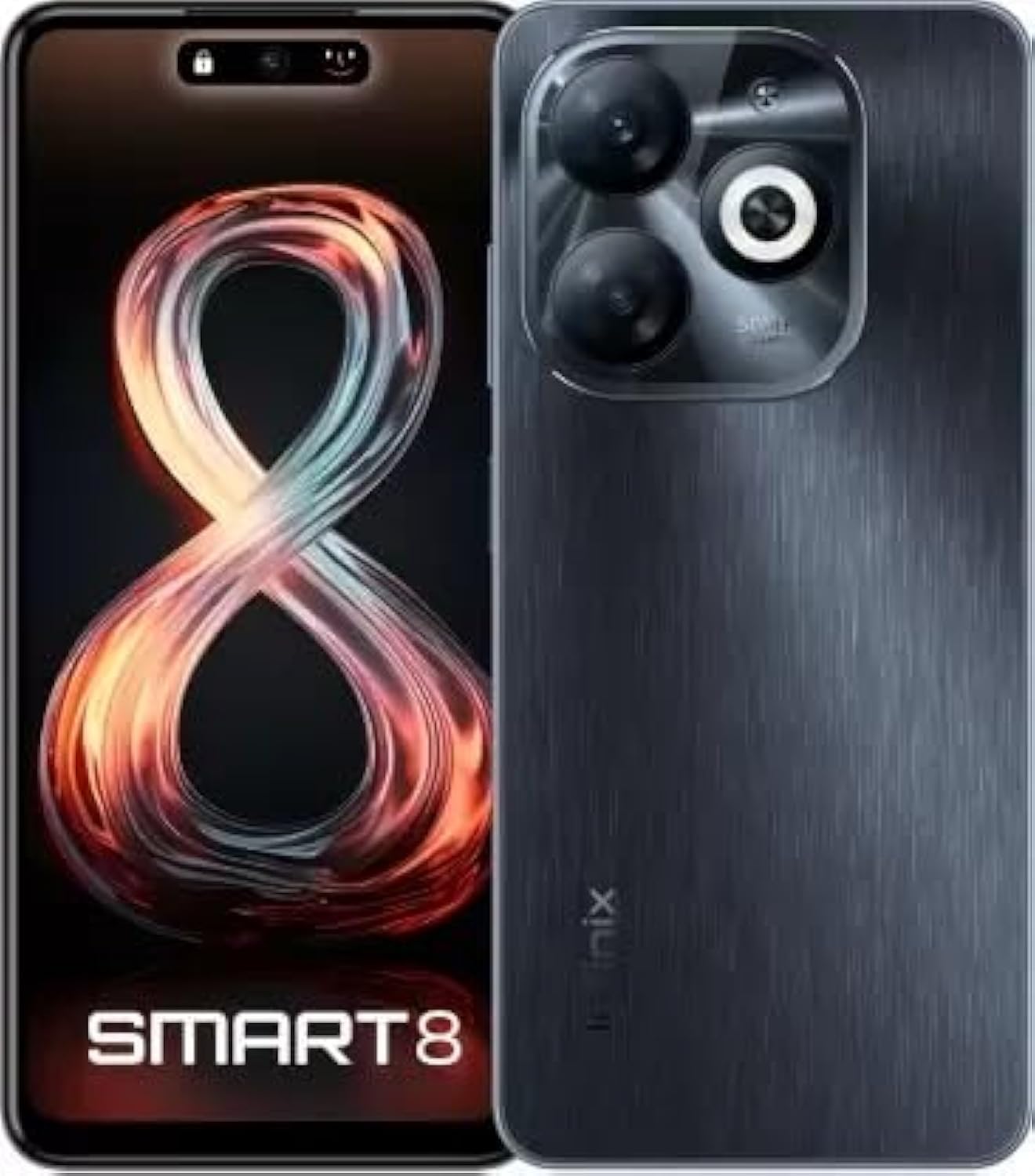
Image: Infinix Smart 8 smartphone in Timber Black, showcasing desain apik lan modul kamera sawijining.
Apa ing Box
Upon unboxing your Infinix Smart 8, please verify that all the following items are included:
- Handset
- Adaptor
- Kabel Type-C USB
- Kasus TPU
- Pin Ejector SIM
- Pandhuan wiwitan cepet
- Kartu Garansi
- Xclub Card
Panuntun Setup
1. Nglebokake Kartu SIM lan Kartu Memori
Locate the SIM card tray on the side of your device. Use the provided SIM ejector pin to open the tray. Insert your Nano-SIM card(s) and/or a microSD card (for expandable storage up to 1 TB) into the designated slots. Ensure the cards are correctly oriented as shown in the diagram in the Quick Start Guide. Gently push the tray back into the device until it clicks into place.
2. Powering On / Off
- Kanggo Power On: Press and hold the Power button (usually on the right side) until the Infinix logo appears.
- Kanggo mateni: Pencet terus tombol Daya, banjur pilih "Pateni" saka pilihan sing katon ing layar.
- Kanggo miwiti maneh: Pencet terus tombol Daya, banjur pilih "Wiwiti maneh" saka pilihan.
3. Persiyapan Awal
The first time you power on your device, you will be guided through an initial setup process. This includes selecting your language, connecting to a Wi-Fi network, setting up your Google account, and configuring security features like fingerprint unlock. Follow the on-screen prompts to complete the setup.
Instruksi Operasi
Navigasi dhasar
- Tutul: Tutul lambang kanggo mbukak app utawa milih item.
- Gesek: Seret driji ing layar kanggo nggulung utawa navigasi ing antarane layar.
- Jiwit: Gunakake rong driji kanggo nggedhekake utawa nyilikake foto lan web kaca.
- Tekan dawa: Pencet terus item kanggo pilihan liyane utawa kanggo mindhah.
Nelpon lan Ngirim Pesen
To make a call, open the Phone app, enter the number, and tap the call icon. To send a message, open the Messages app, tap the new message icon, enter the recipient's number or select from contacts, type your message, and tap send.
Nyambung menyang Jaringan
- Wi-Fi: Bukak Setelan > Jaringan & internet > Wi-Fi. Uripake Wi-Fi, pilih jaringan sing dikarepake, lan lebokake sandhi yen dibutuhake.
- Bluetooth: Bukak Setelan > Piranti sing nyambung > Bluetooth. Uripake Bluetooth, banjur pasangake karo piranti sing kasedhiya.
- Data seluler: Ensure your SIM card is active. Go to Settings > Network & internet > Mobile network to manage data usage and settings.
Fitur Utama
The Infinix Smart 8 offers a range of features designed to enhance your mobile experience:
- Memori & Panyimpenan: Equipped with 4 GB RAM and 64 GB internal storage, expandable up to 1 TB via microSD card.
- Tampilan: Features a 16.76 cm (6.6 inch) HD+ Display with a 90 Hz refresh rate and 5000 Nits brightness for clear and vibrant visuals.
- Sistem kamera: A powerful 50MP main camera with AI Lens and a 5MP front camera for high-quality photos and selfies.
- Baterei: A large 5000 mAh battery ensures extended usage on a single charge.
- Prosesor: Powered by a G36 Processor for smooth performance and multitasking.
- Konektivitas: Supports 4G cellular networks, Bluetooth, USB, and Wi-Fi.
- Keamanan: Includes a fingerprint sensor for secure and convenient unlocking.
Panggunaan kamera
Your Infinix Smart 8 comes with an advanced camera system to capture your moments.
Kamera mburi
The main rear camera is 50 Megapixels, complemented by an AI Lens for enhanced image processing. It features a Quad-LED Flashlight for improved low-light photography.
Kamera ngarep
The front camera is 5 Megapixels, perfect for clear selfies and video calls.

Gambar: Detil view of the Infinix Smart 8's rear camera setup, highlighting the 50MP dual camera and Quad-LED flashlight.
To access the camera, tap the Camera app icon. You can switch between photo, video, and other modes. Tap the shutter button to take a picture or start/stop recording a video.
Tampilan Informasi
The Infinix Smart 8 features a vibrant 6.6-inch HD+ display.
- ukuran: 16.76 cm (6.6 inci)
- Resolusi: 1600 x 720 piksel
- Refresh Rate: 90 Hz for smoother scrolling and gaming.
- padhange: Up to 5000 Nits, ensuring visibility even in bright sunlight.
- Tipe: Punch-Hole Display design.

Image: The Infinix Smart 8's 6.6-inch HD+ display, illustrating its punch-hole design and high brightness.
Spesifikasi Teknis
Below are the detailed technical specifications for the Infinix Smart 8:
| Fitur | Spesifikasi |
|---|---|
| Sistem Operasi | Android |
| RAM | 4 GB |
| Panyimpenan internal | 64 GB |
| Panyimpenan sing bisa ditambahi | Nganti 1 TB |
| Prosesor | G36 Processor |
| Ukuran Tampilan | 16.76 cm (6.6 inch) HD+ |
| Resolusi Tampilan | 1600 x 720 piksel |
| Kamera mburi | 50MP + AI Lens |
| Kamera ngarep | 5MP |
| Kapasitas baterei | 5000 mAh |
| Wektu Dhiskusi Telpon | 25 Jam |
| Komunikasi Nirkabel | Cellular (4G Ready) |
| Teknologi Konektivitas | Bluetooth, USB, Wi-Fi |
| GPS | GLONASS |
| Jack Audio | ya wis |
| Bobot Barang | 350 g |
| Nomer Model Item | smart 8 |

Image: A visual summary of the Infinix Smart 8's technical specifications, including RAM, storage, battery, and processor details.
Informasi baterei
The Infinix Smart 8 is equipped with a 5000 mAh battery, providing ample daya kanggo nggunakake saben dina.
- Kapasitas: 5000 Miliamp jam
- Wektu Dhiskusi: Nganti 25 jam kanthi daya lengkap.
- Ngisi daya: Use the provided Adaptor and USB Type-C Cable for optimal charging.
For best battery life, avoid fully discharging the battery frequently and use the original charger.
Ngatasi masalah
If you encounter issues with your Infinix Smart 8, refer to the following common solutions:
- Piranti ora urip: Ensure the battery is charged. Connect the charger and wait a few minutes before attempting to power on again. If unresponsive, try a forced restart by holding the power button for 10-15 seconds.
- Aplikasi Crash/Freezing: Close the problematic app and reopen it. If the issue persists, clear the app's cache (Settings > Apps > [App Name] > Storage & cache > Clear cache). Consider updating the app or the phone's software.
- Sinyal Jaringan Miskin: Priksa manawa kertu SIM wis dipasang kanthi bener. Coba miwiti maneh piranti. Priksa manawa sampeyan ana ing wilayah kanthi jangkoan jaringan.
- Baterei cepet bosok: Kurangi padhange layar, tutup aplikasi sing ora digunakake sing mlaku ing latar mburi, mateni kabar sing ora perlu, lan mateni Wi-Fi/Bluetooth nalika ora digunakake.
- Layar tutul ora responsif: Wiwiti maneh piranti. Yen masalah terus, priksa manawa layar resik lan ora lembab.
For more complex issues, refer to the official Infinix support websitus utawa hubungi layanan pelanggan.
Maintenance lan Care
To ensure the longevity and optimal performance of your Infinix Smart 8, follow these maintenance guidelines:
- Reresik: Gunakake kain sing alus lan tanpa serat kanggo ngresiki layar lan awak. Ngindhari bahan kimia sing atos utawa bahan abrasif.
- Suhu: Aja mbabarake piranti ing suhu ekstrem (panas utawa adhem) utawa sinar srengenge langsung sajrone wektu sing suwe.
- Paparan banyu: Piranti iki ora tahan banyu. Aja nganti kena banyu utawa cairan liyane.
- Nganyari piranti lunak: Regularly check for and install software updates to benefit from performance improvements and security patches.
- Panyimpenan: Avoid overfilling your device's storage. Regularly clear unnecessary files lan cache aplikasi.
Warranty lan Dhukungan
Your Infinix Smart 8 is covered by a 7-day service center replacement/repair policy from the date of purchase. Please retain your purchase receipt and the warranty card for service claims.
- Produsen: Infinix (G mobile devices private ltd)
- Dhukungan Bebas Pulsa: 18004190525
- Dhukungan Online: Visit the official Infinix websitus kanggo FAQ, sumber dhukungan, lan informasi kontak.
For any issues or queries, please contact the manufacturer's support team.
Informasi Safety Penting
Wacanen informasi keamanan ing ngisor iki kanthi teliti kanggo nyegah ciloko utawa kerusakan piranti sampeyan:
- Do not attempt to disassemble, repair, or modify the device yourself. This can cause damage, fire, or electric shock.
- Gunakake mung pangisi daya lan aksesoris kompatibel asli utawa sing wis disertifikasi.
- Avoid exposing the device to open flames or extreme heat.
- Aja mbuwang piranti ing geni utawa banyu.
- Simpen piranti lan aksesorise tebih saka jangkauan bocah-bocah lan kewan ingon.
- Turuti kabeh undang-undang lan peraturan lokal babagan panggunaan ponsel, utamane nalika nyopir.
Produk Overview Video
Tonton video produk resmi iki kanggo visualisasi luwih lanjutview of the Infinix Smart 8's features and capabilities.
Video: Resmi rampungview of the Infinix Smart 8 smartphone, detailing its technical specifications, key features, camera, and display.