1. はじめに
This manual provides detailed instructions for the setup, operation, and maintenance of your XBJ K6 Mini Portable Projector. Please read this manual thoroughly before using the device to ensure proper functionality and to maximize your view体験。 今後の参考のために、このマニュアルを保管してください。
2. 箱の中身
- XBJ K6 Portable Projector
- 電源コード
- リモートコントロール
- ユーザーマニュアル(このドキュメント)
3.製品オーバーview
The XBJ K6 Mini Portable Projector is designed for versatile entertainment and presentation. It features 1080P support with 4K decoding, electric focus, auto keystone correction, and a 360° rotatable stand. Integrated with a Smart Android System, WiFi 6, and Bluetooth 5.2, it offers seamless connectivity and access to various applications.

Figure 3.1: XBJ K6 Mini Portable Projector front view 主な機能を備えています。
4. セットアップ手順
4.1 配置
Position the projector on a stable, flat surface. The 360° rotatable stand allows for flexible projection angles, including walls, ceilings, or tents. Ensure there are no obstructions in front of the lens.

Figure 4.1: Projector placement flexibility with 360° rotating stand.
4.2電源接続
- 電源コードをプロジェクターの電源入力ポートに接続します。
- 電源コードのもう一方の端を適切な電源コンセントに差し込みます。
- プロジェクタまたはリモコンの電源ボタンを押して、デバイスの電源をオンにします。
4.3 フォーカス調整
The projector features electric focus. Use the remote control to adjust the sharpness of the projected image. Press the 'F+' or 'F-' buttons on the remote until the image is clear.

Figure 4.2: Adjusting electric focus with the remote control.
4.4 台形補正
The XBJ K6 projector includes automatic keystone correction. This feature automatically adjusts the image to be rectangular, even if the projector is placed at an angle. Manual adjustments may also be available through the settings menu if needed.
5. 操作手順
5.1 Navigating the Smart Android System
The projector runs on a Smart Android System, providing access to various pre-installed applications like Netflix and YouTube. Use the remote control to navigate the interface, select apps, and adjust settings.
5.2 Wi-Fi接続
The projector supports Dual-Band WiFi 6 (2.4G/5G) for fast and stable internet connection.
- プロジェクターの設定メニューに移動します。
- 「ネットワーク」または「Wi-Fi」を選択します。
- リストから希望の Wi-Fi ネットワークを選択します。
- プロンプトが表示されたらパスワードを入力して接続します。
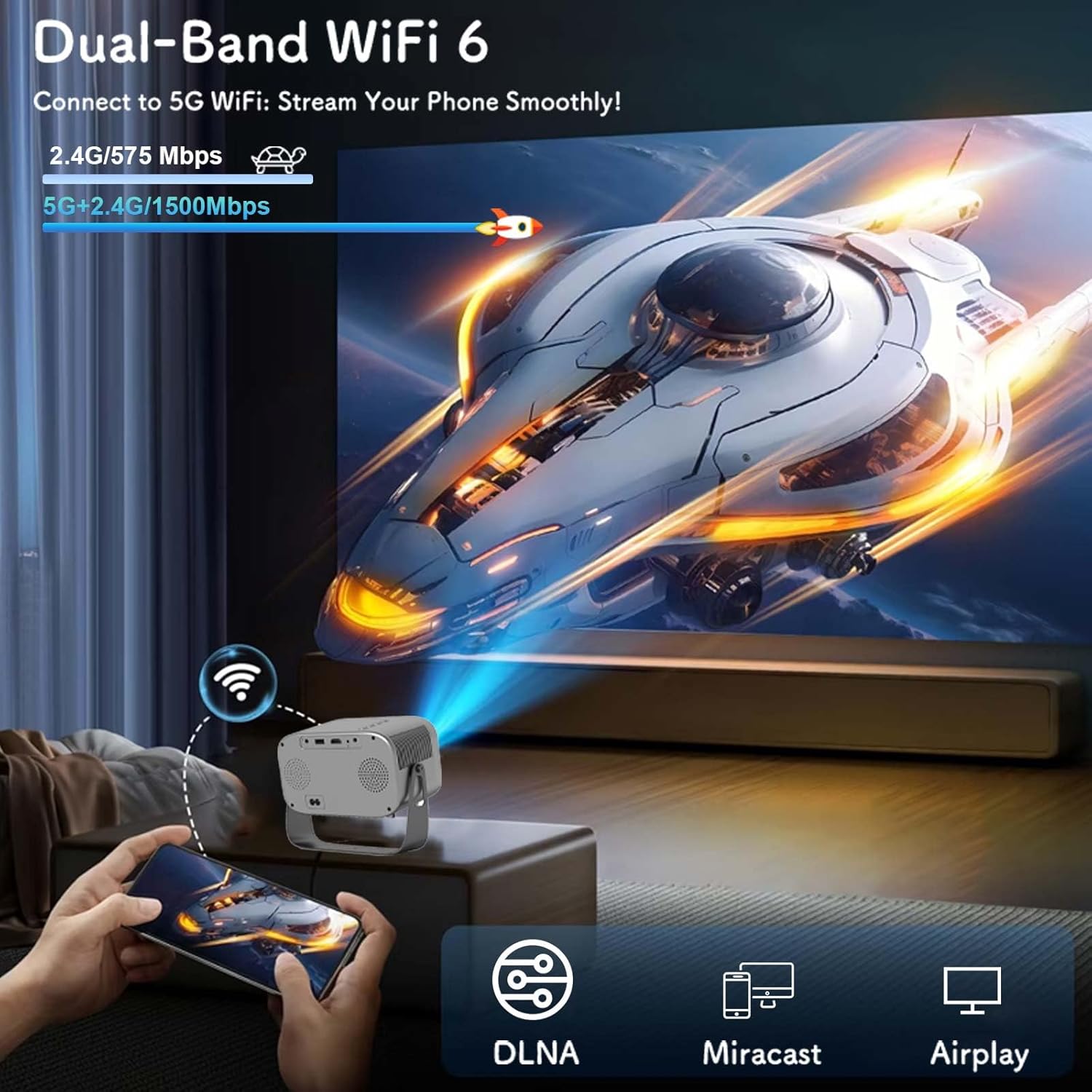
Figure 5.1: Connecting to Dual-Band WiFi 6 and screen mirroring.
5.3 Bluetooth接続
The projector features Bluetooth 5.2, allowing connection to external audio devices like HiFi speakers or headphones for enhanced sound.
- Bluetoothオーディオデバイスがペアリングモードになっていることを確認します。
- On the projector, go to the settings menu and select 'Bluetooth'.
- 利用可能なデバイスをスキャンし、ペアリングするオーディオ デバイスを選択します。

Figure 5.2: Bluetooth 5.2 connectivity for external audio.
5.4 スクリーンミラーリング
The projector supports DLNA, Miracast, and Airplay for screen mirroring from smartphones and other compatible devices. Ensure your device and the projector are connected to the same Wi-Fi network for optimal performance.
5.5 外部機器の接続
The projector offers multiple interfaces for connecting various devices:
- HDMI: Connect laptops, game consoles, TV sticks, etc.
- USB: Play media from USB flash drives.
- AV: AV ケーブル (付属していません) を使用して古いデバイスを接続します。
- 3.5mmオーディオジャック: 有線ヘッドフォンまたは外部スピーカーを接続します。
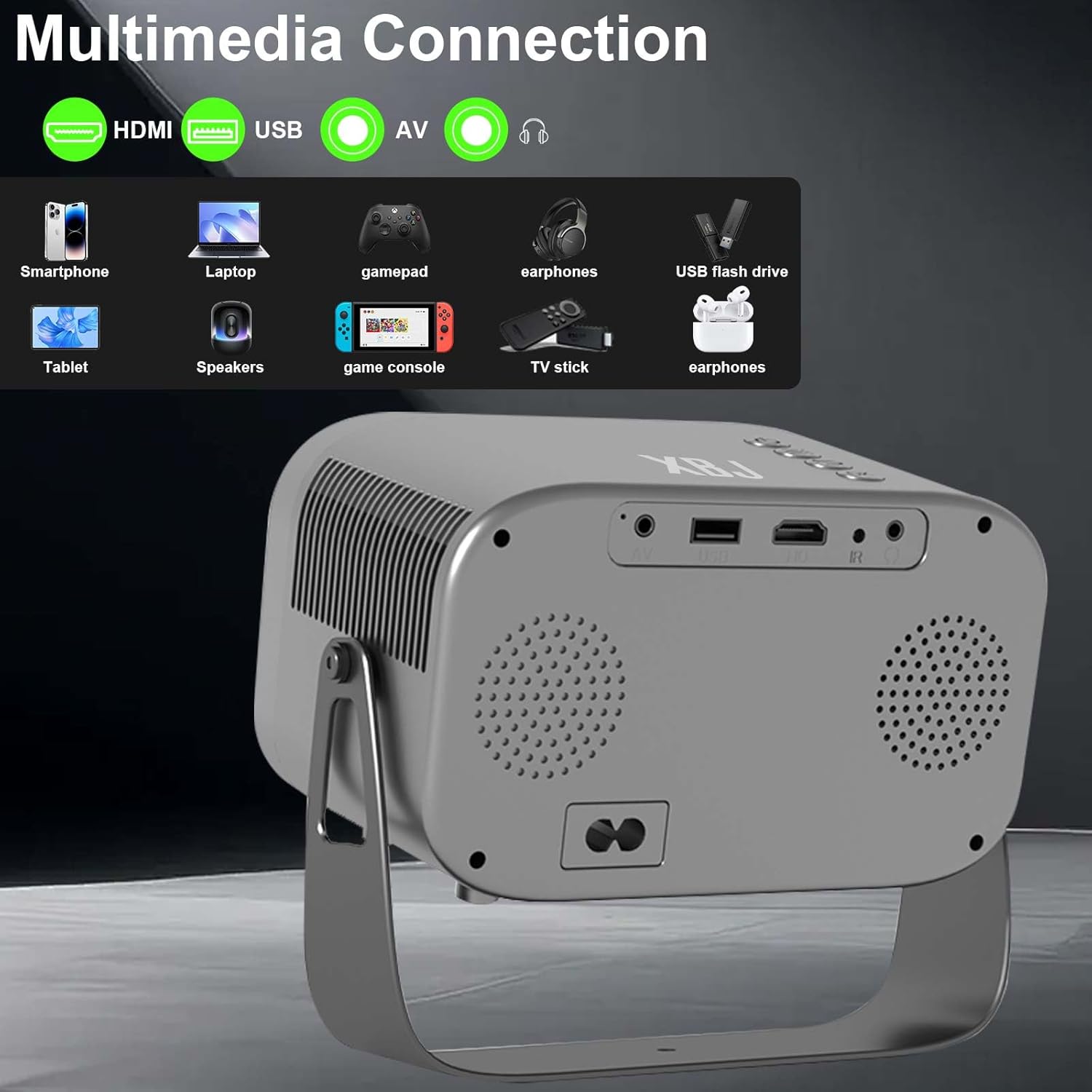
Figure 5.3: Multimedia connection ports on the XBJ K6 projector.
6. メンテナンス
6.1 レンズのクリーニング
プロジェクターレンズを拭く際は、光学レンズ専用の柔らかく糸くずの出ない布をご使用ください。レンズコーティングを損傷する可能性のある研磨剤や強力な化学薬品の使用は避けてください。
6.2 外装の清掃
プロジェクターの外側は、柔らかく乾いた布で拭いてください。頑固な汚れには、軽く湿らせた布で拭いてください。amp 布で拭いた後、乾いた布で拭いてください。デバイス内に液体が入らないようにしてください。
6.3 ストレージ
長期間使用しない場合は、直射日光や極端な温度を避け、涼しく乾燥した場所にプロジェクターを保管してください。レンズをほこりから保護するためにカバーをかけることをお勧めします。
7。 トラブルシューティング
If you encounter issues with your XBJ K6 projector, please refer to the following common solutions:
- 電源なし: 電源コードがプロジェクターとコンセントの両方にしっかりと接続されていることを確認してください。別のコンセントを試してください。
- 画像無し: Check all cable connections (HDMI, AV). Ensure the correct input source is selected in the projector's menu. Adjust focus.
- ぼやけた画像: Use the remote control's 'F+' and 'F-' buttons to adjust the electric focus. Ensure the projection surface is flat.
- 音が出ない、または音が小さい: Adjust the volume on both the projector and any connected external audio devices. Check Bluetooth connection if using wireless speakers/headphones. Ensure internal speakers are not muted.
- Wi-Fi/Bluetooth 接続の問題: Ensure the projector is within range of your router/Bluetooth device. Restart the projector and your network devices. Re-pair Bluetooth devices.
- アプリの機能の問題: Ensure the projector is connected to the internet. Check for app updates within the Android system. Some apps may have specific device compatibility requirements.
さらにサポートが必要な場合は、カスタマー サポートにお問い合わせください。
8. 仕様
| 特徴 | 仕様 |
|---|---|
| ブランド | XBJ |
| モデル番号 | TYYK6SKS001 |
| アイテム重量 | 1.87ポンド |
| 製品寸法 | 7.28 x 4.17 x 6.06インチ |
| ディスプレイ解像度 | 1280 x 720 (Supports 1080P/4K decoding) |
| 輝度 | 300 ANSIルーメン |
| 接続技術 | 3.5mmジャック、Bluetooth 5.2、HDMI、USB、Wi-Fi 6 |
| 特集 | Built-In Cooling System, Built-In Speaker, Built-In Wi-Fi, Digital Keystone Correction, Portable, Electric Focus, 360° Rotatable Stand |
| 推奨用途 | 教育、ゲーム、ホームシアター |
9. 保証とサポート
9.1 保証情報
New products may be damaged during shipping. If you receive a damaged item, please contact our store immediately. We are fully responsible for products sold via our official store.
9.2 カスタマーサポート
For technical support or any issues you encounter with your XBJ K6 Mini Portable Projector, please contact our customer support team. We are committed to helping you resolve any problems.
メールアドレス: ESzxkj@outlook.com
24時間7日のカスタマーサポートをご利用いただけます。


