1. はじめに
This manual provides detailed instructions for the Symcode Wearable Glove Barcode Scanner. This device is designed for efficient, hands-free barcode scanning, featuring dual wireless connectivity (Bluetooth 6.0 & 2.4G) and a long-lasting battery. It is suitable for various applications including warehouses, retail, and logistics, offering fast decoding of 1D, 2D, and QR codes.
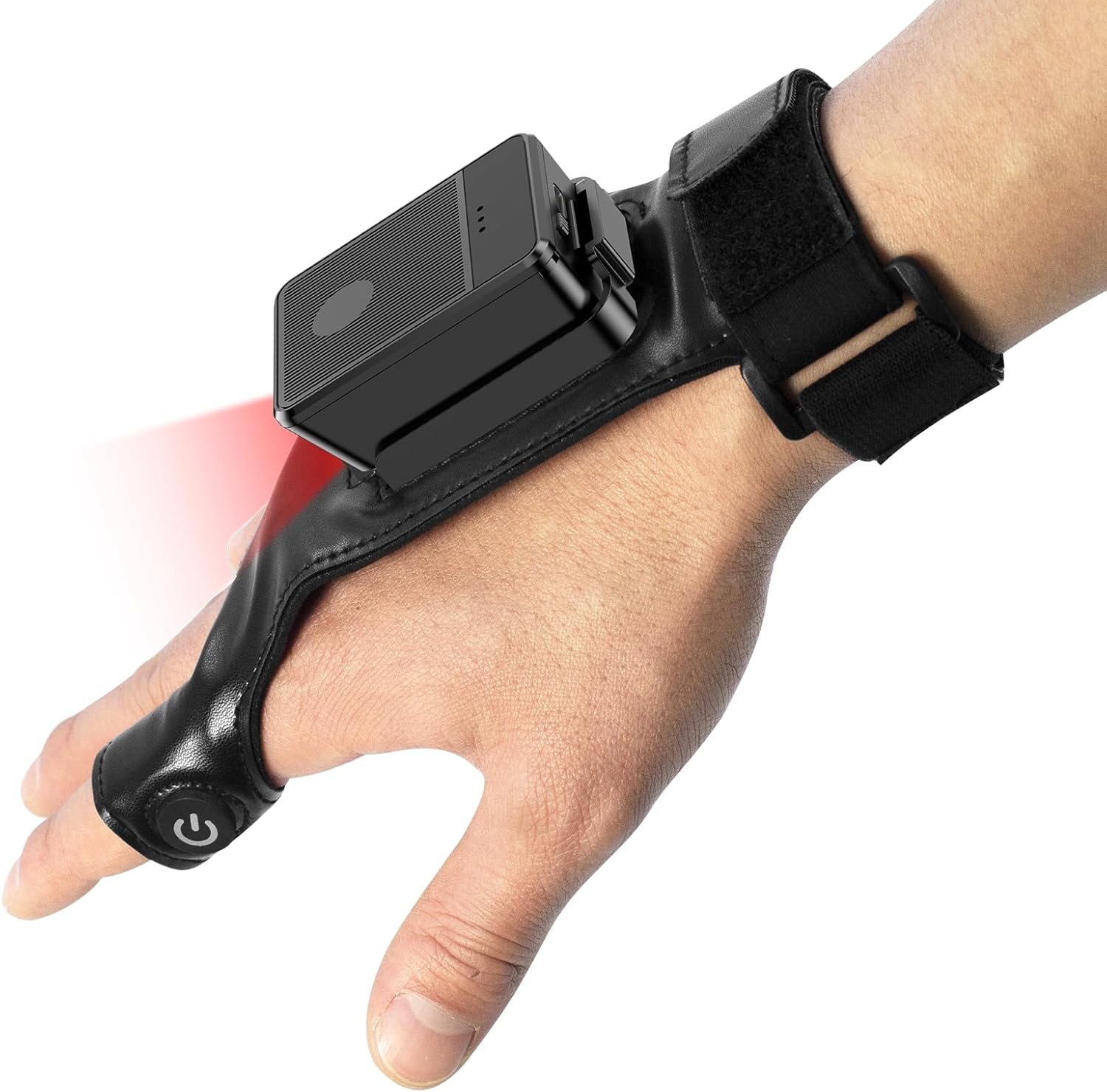
This image shows the Symcode Wearable Glove Barcode Scanner attached to a user's hand, demonstrating its ergonomic, hands-free design. The scanner unit is positioned on the back of the hand, with the scanning beam visible.
2. 安全情報
- デバイスを極端な温度、湿気、腐食性物質にさらさないでください。
- スキャン光が直接目に入らないようにしてください。
- ご自身でデバイスの分解や修理を試みないでください。修理が必要な場合は、資格のある担当者にご連絡ください。
- 損傷を防ぐため、付属の充電ケーブルとアダプターのみを使用してください。
3. パッケージ内容
商品をお受け取りになった後、パッケージの内容をご確認ください。不足品や破損品がございましたら、販売店までご連絡ください。
- Symcode Wearable Glove Barcode Scanner
- USB充電ケーブル
- 2.4Gワイヤレスドングル
- ユーザーマニュアル
4.製品オーバーview
The Symcode Wearable Glove Barcode Scanner consists of a compact scanning unit and an adjustable glove-style strap. The scanning unit features a durable trigger button, indicator lights, and a charging port. The glove is designed for comfort and secure fit, allowing for hands-free operation.

クローズアップ view of the scanner on a hand, highlighting the red scanning beam and the durable resin material of the trigger button located on the index finger. The image also shows a roll of barcode labels, indicating its primary function.
5. セットアップ
5.1デバイスの充電
Before first use, fully charge the scanner. Connect the USB charging cable to the scanner's charging port and to a power source (e.g., computer USB port or USB wall adapter). The charging indicator light will show charging status. A full charge takes approximately 5 hours.
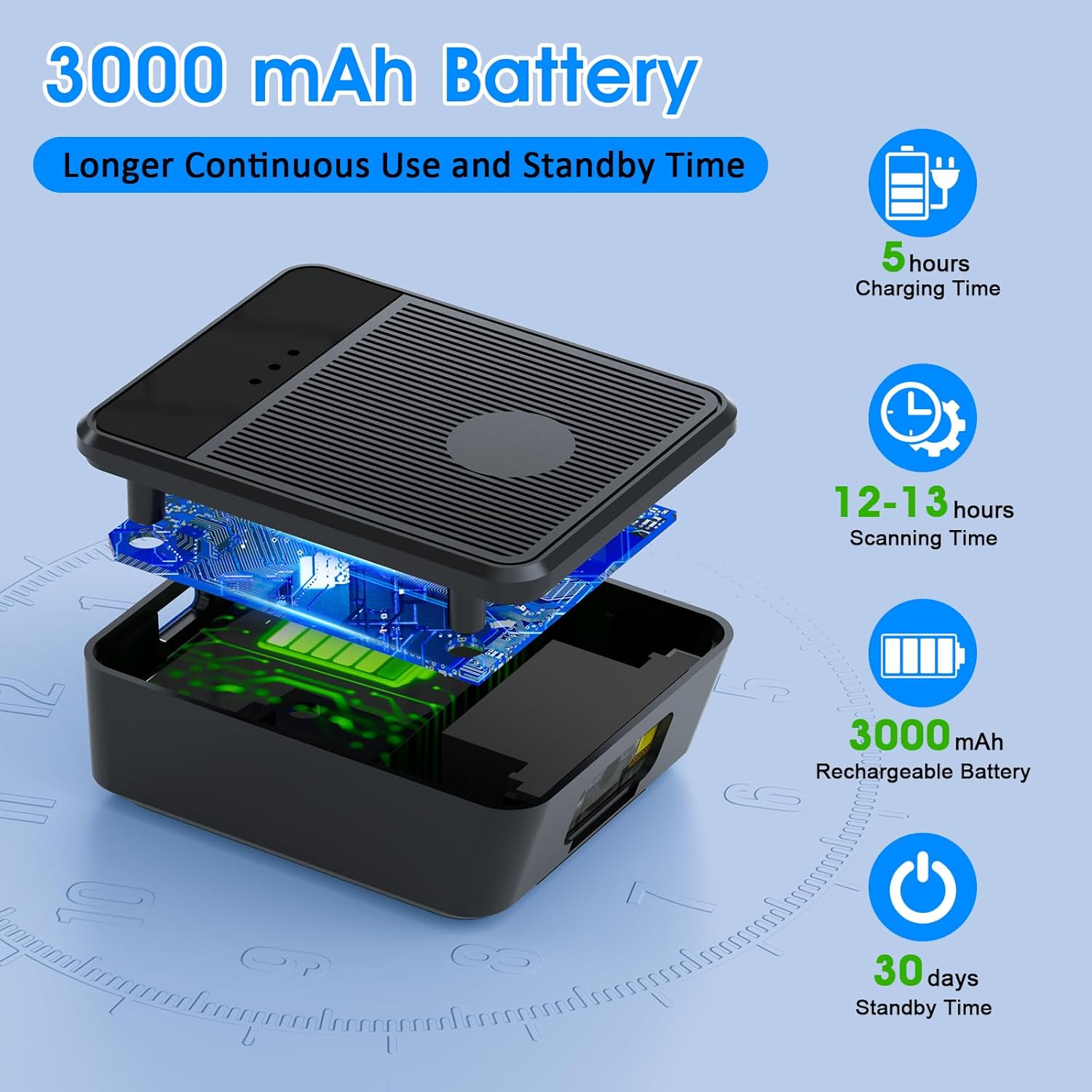
爆発した view diagram of the scanner unit, emphasizing its 3000 mAh rechargeable battery. Accompanying text indicates a 5-hour charging time, 12-13 hours of continuous scanning, and 30 days of standby time.
5.2 スキャナの装着
Slide your hand into the glove, ensuring the scanner unit is positioned comfortably on the back of your hand. Adjust the strap for a secure fit. The trigger button should align with your index finger for easy access.

Two workers are shown in a warehouse environment, handling boxes. One worker is actively using the wearable barcode scanner on their hand to scan a package, demonstrating the hands-free benefit of the device during logistics operations.
5.3 デバイスへの接続
The scanner supports two wireless connection methods:
5.3.1 2.4G Wireless Dongle Connection
- Plug the 2.4G wireless dongle into a USB port on your computer or compatible device.
- スキャナーの電源を入れます。ドングルと自動的にペアリングされます。
- A successful connection is indicated by a specific light pattern or sound (refer to device indicators).
5.3.2 Bluetooth 6.0接続
- スキャナーの電源をオンにします。
- ホストデバイス(スマートフォン、タブレット、コンピューターなど)で Bluetooth を有効にします。
- 検索する available Bluetooth devices and select the Symcode scanner from the list.
- Pairing may require a confirmation or a default PIN (check device documentation for specific PIN if required).
6. 操作手順
6.1 基本的なスキャン
To scan a barcode, point the scanner's beam at the barcode and press the trigger button located on your index finger. A successful scan will typically be indicated by a beep, a vibration, or a change in the indicator light.
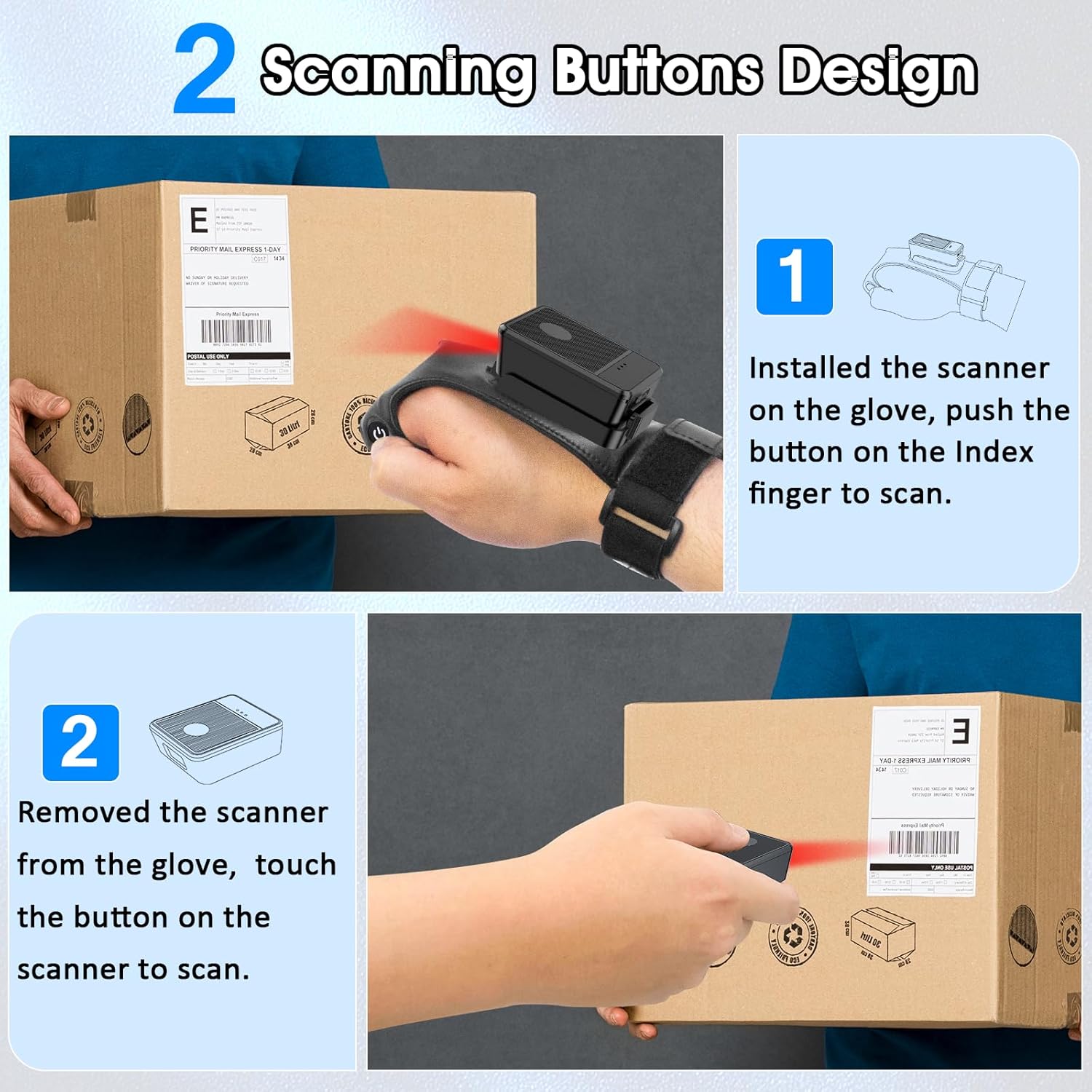
This diagram illustrates two ways to use the scanner: 1) installed on the glove, scanning with the index finger button, and 2) removed from the glove, scanning by touching the button directly on the scanner unit. Both methods are shown with the scanner pointed at a package.
6.2 動作モード
The scanner supports two operational modes:
6.2.1 インスタントアップロードモード
In this mode, scanned barcode data is immediately transmitted to the connected host device. This is ideal for real-time inventory updates or point-of-sale transactions.
6.2.2 オフラインストレージモード
This mode allows the scanner to store up to 50,000 barcodes internally when not connected to a host device or when connectivity is intermittent. Data can then be uploaded to a computer or POS system at a later time.
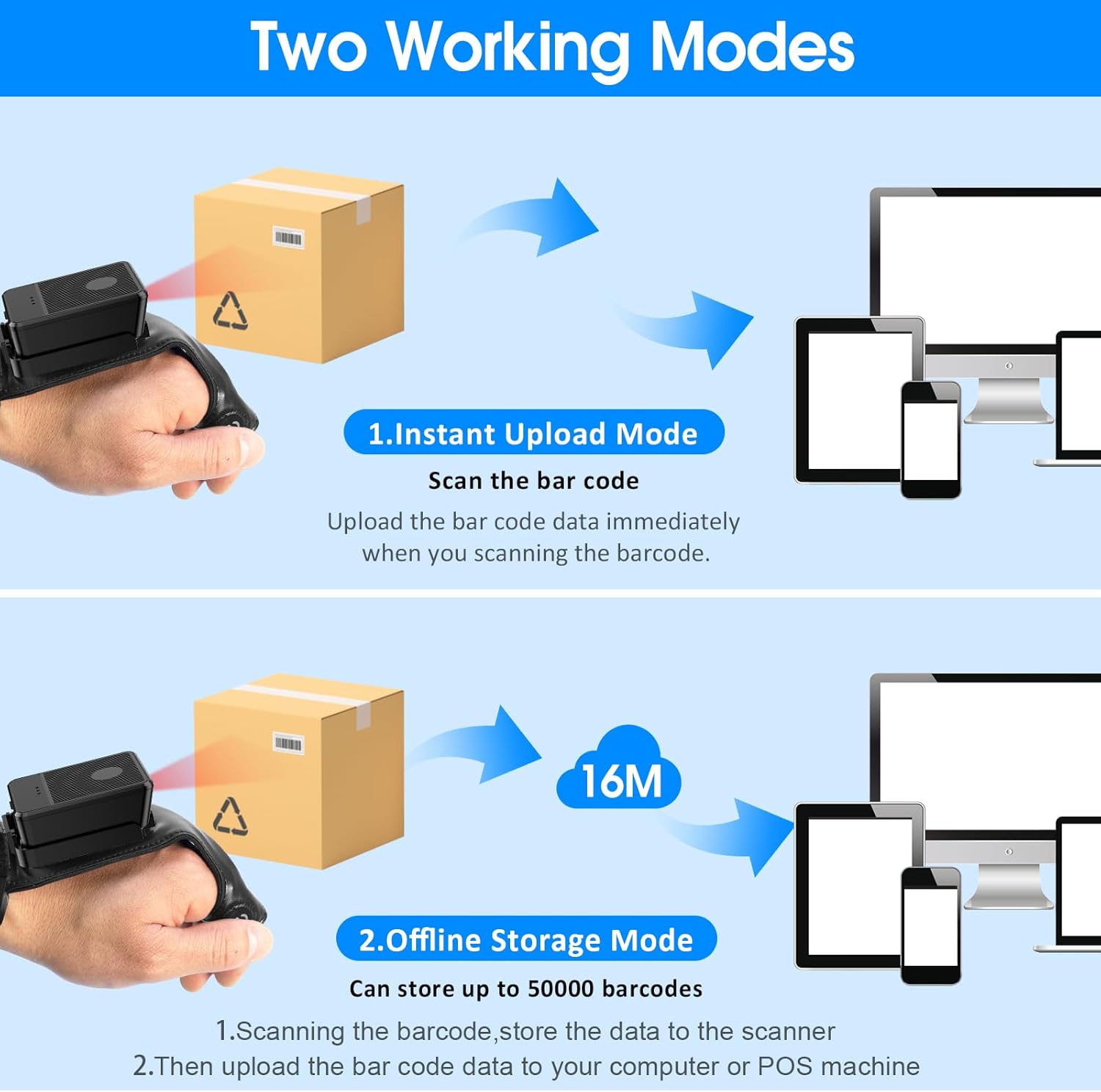
This image explains the two operational modes: Instant Upload Mode, where scanned data is immediately sent to a connected device, and Offline Storage Mode, which allows storing up to 50,000 barcodes internally before uploading them to a computer or POS system.
6.3 設定のカスタマイズ
The scanner allows for customization of various settings, including:
- 音: Enable or disable the audible beep for successful scans.
- 振動: Enable or disable vibration alerts for successful scans, useful in quiet environments.
- キーボードの機能: Add keyboard functions such as TAB or Enter after each scan for seamless data entry into applications.
Refer to the quick setup guide or manufacturer's website for specific programming barcodes to adjust these settings.
7. メンテナンス
- クリーニング: Use a soft, dry cloth to clean the scanner's exterior. For stubborn dirt, slightly damp布を水で拭いてください。刺激の強い化学薬品や研磨剤入りの洗剤は使用しないでください。
- ストレージ: スキャナーを使用しないときは、直射日光や極端な温度を避け、涼しく乾燥した場所に保管してください。
- バッテリーのケア: バッテリーの寿命を延ばすには、バッテリーを頻繁に完全に放電させないでください。頻繁に使用しない場合でも、定期的に充電してください。
8。 トラブルシューティング
8.1 スキャナが起動しない
- バッテリーが充電されていることを確認してください。スキャナーを電源に接続し、少なくとも30分間充電してから、再度電源を入れてください。
8.2 Unable to Connect Wirelessly
- 2.4G接続: Verify the 2.4G dongle is securely plugged into the host device. Try plugging it into a different USB port. Ensure the scanner is within range of the dongle.
- Bluetooth接続: Ensure Bluetooth is enabled on your host device. Delete any previous pairings for the scanner and attempt to pair again. Ensure the scanner is in pairing mode (refer to device indicators).
- スキャナーとホストデバイスの両方を再起動します。
8.3 スキャナがバーコードを読み取れない
- バーコードがきれいで、損傷がなく、明瞭に印刷されていることを確認してください。
- スキャナーとバーコード間の距離と角度を調整します。
- Check if the scanner is in the correct working mode (Instant Upload or Offline Storage).
- Verify that the barcode type is supported by the scanner (1D, 2D, QR codes are supported).
9. 仕様
| ブランド | シンコード |
| モデル | Wearable Glove Barcode Scanner (B0F1FSMWCD) |
| 接続技術 | 2.4G、Bluetooth 6.0 |
| 対応デバイス | Desktop, Laptop, Tablet, Smartphone (Windows XP/7/8/10, Android, iOS) |
| 電源 | 電池駆動 |
| 電池のタイプ | 1 リチウムポリマー電池 (付属) |
| バッテリー容量 | 1100mAh (Product Description) / 3000mAh (Image) - Note: Discrepancy in source data, refer to product packaging for accurate capacity. |
| 連続運転時間 | Up to 10 hours (Product Description) / 12-13 hours (Image) - Note: Discrepancy in source data, refer to product packaging for accurate time. |
| 充電時間 | 約5時間 |
| 待機時間 | 最長30日間 |
| スキャン速度 | 1秒あたり最大300回のスキャン |
| スキャン範囲 | 2〜4.9フィート |
| オフラインストレージ容量 | 最大50,000個のバーコード |
| アイテム重量 | 5オンス |
| パッケージ寸法 | 7.48 x 3.74 x 2.44インチ |
10. 保証情報
This Symcode product is covered by a manufacturer's warranty. For specific warranty terms, duration, and conditions, please refer to the warranty card included with your product or visit the official Symcode webサイトでご確認ください。保証請求に備えて購入証明書を保管してください。
11. カスタマーサポート
If you encounter any issues or have questions regarding your Symcode Wearable Glove Barcode Scanner, please contact Symcode customer support. Contact details can typically be found on the product packaging, the official Symcode webサイト、または小売店を通じてご購入いただけます。


