導入
The 1Mii SafeFly Pro is a versatile Bluetooth 5.3 audio adapter designed to transmit and receive audio wirelessly. It features an OLED screen for clear status display and supports advanced audio codecs for high-quality sound. This device allows you to connect your wireless headphones to non-Bluetooth audio sources or stream audio from your Bluetooth-enabled devices to wired audio systems.
箱の中身

This image displays all items included in the 1Mii SafeFly Pro package. You will find the SafeFly Pro Bluetooth Audio Adapter, a USB-C Charging Cable, a 3.5mm Female to Female Audio Adapter, and a Keychain.
- SafeFly Pro Bluetoothオーディオアダプター
- USB-C充電ケーブル
- 3.5mmメス-メスオーディオアダプター
- キーチェーン
- ユーザーマニュアル(このドキュメント)
製品終了view

この画像は詳細な view of the 1Mii SafeFly Pro, highlighting its key components. These include the flexible audio cable with a 3.5mm audio connection, an audio plug protector, the OLED display screen, the 'M' key, the 'OK' key, the TX/RX sliding switch, a one-click reset button, and the USB-C charging port.
コンポーネントと機能:
- 3.5mmオーディオ接続: Connects to audio source (TX mode) or audio receiver (RX mode).
- オーディオプラグプロテクター: Protects the 3.5mm audio plug when not in use.
- OLEDディスプレイ画面: Shows battery level, volume, paired device names, and active audio codecs.
- 「M」キー: In pairing mode, press once to select the connected device. In TX mode, press twice to switch the Bluetooth decoding format.
- 'OK' Key: Power ON/OFF (long press for 1 second). Long press for 2 seconds to enter pairing mode. Also functions as Play/Pause.
- TX/RXスライドスイッチ: Selects Transmitter (TX) or Receiver (RX) mode.
- リセットボタン: デバイスをリセットするには、3秒間長押しします。
- USB-C充電ポート: 内蔵バッテリーを充電します。
設定
1. デバイスの充電
Before first use, fully charge the SafeFly Pro using the provided USB-C charging cable. Connect the cable to the USB-C port on the device and a standard USB power adapter (not included). The OLED screen will indicate charging status.
2.電源のオン/オフ
- 電源を入れるには: Long press the 'OK' button for 1 second.
- 電源を切るには: Long press the 'OK' button for 1 second.
3. 動作モードの選択(TX/RX)
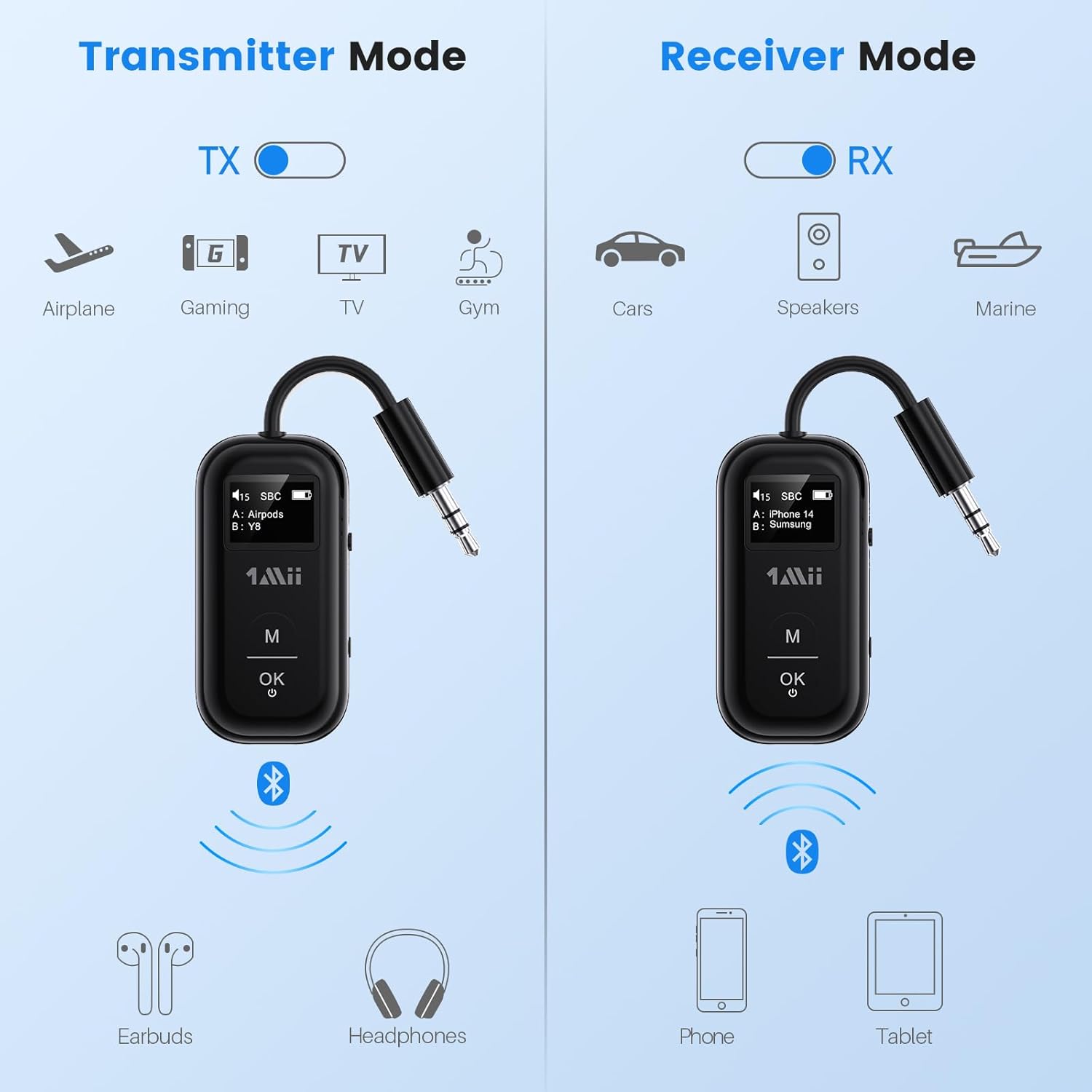
This image illustrates the two operating modes: Transmitter (TX) and Receiver (RX). TX mode is used for devices like airplanes, gaming consoles, TVs, and gym equipment to transmit audio to earbuds or headphones. RX mode is used for cars, speakers, and marine systems to receive audio from phones or tablets.
Use the TX/RX sliding switch on the side of the device to select the desired mode:
- TX(送信)モード: For sending audio from non-Bluetooth devices (e.g., airplane entertainment, TV, gym equipment) to Bluetooth headphones or speakers.
- RX(受信)モード: For receiving audio from Bluetooth-enabled devices (e.g., smartphones, tablets) to wired audio systems (e.g., car stereo, home speakers).
4. Pairing in TX Mode (Connecting to Headphones)

- Set the SafeFly Pro to TX mode using the sliding switch.
- Plug the 3.5mm audio connection into your audio source (e.g., airplane entertainment system, TV headphone jack). If needed, use the dual-prong airplane adapter.
- Long press the 'OK' button on the SafeFly Pro for 2 seconds to enter pairing mode. The screen will display "Searching".
- Put your Bluetooth headphones or speakers into pairing mode. Refer to your headphone's manual for specific instructions.
- SafeFly Proは近くのBluetoothデバイスを自動的に検索し、接続します。接続されると、デバイス名がOLED画面に表示されます。
- To connect a second pair of headphones: After the first device is connected, long press the 'OK' button again for 2 seconds to enter pairing mode for the second device. Put the second pair of headphones into pairing mode. Both devices will then be connected simultaneously.

This image shows the 1Mii SafeFly Pro connected to an airplane's in-flight entertainment system, enabling wireless audio streaming to a user's Bluetooth headphones.
5. Pairing in RX Mode (Connecting to Smartphones/Tablets)
- Set the SafeFly Pro to RX mode using the sliding switch.
- Plug the 3.5mm audio connection into your wired audio system's AUX input (e.g., car stereo, home speaker).
- Long press the 'OK' button on the SafeFly Pro for 2 seconds to enter pairing mode. The screen will display "Searching".
- On your smartphone or tablet, go to Bluetooth settings and select "1Mii SafeFly Pro" from the list of available devices to connect.
- 接続されると、デバイス名が OLED 画面に表示されます。
- To connect a second smartphone/tablet: After the first device is connected, long press the 'OK' button again for 2 seconds to enter pairing mode for the second device. Connect the second smartphone/tablet via its Bluetooth settings.

This image shows the 1Mii SafeFly Pro in RX mode, connected to a car's audio system, receiving audio wirelessly from a smartphone.
操作手順
OLEDスクリーンディスプレイ

この画像はクローズアップです view of the OLED screen, indicating the power status, audio format (e.g., SBC), volume level, battery level, and the names of the two currently paired devices (A and B).
The OLED screen provides real-time information:
- バッテリー残量: バッテリー残量を表示します。
- 音量レベル: Displays the current audio output volume.
- ペアリングされたデバイス: Shows the name(s) of the connected Bluetooth headphones or smartphones.
- オーディオコーデック: Displays the active audio codec (e.g., aptX LL, aptX HD, aptX Adaptive, aptX, AAC, SBC).
ボタンの機能
- 'OK' Button: Short press to Play/Pause audio.
- 「M」ボタン: In TX mode, press twice to cycle through available audio codecs (aptX LL, aptX HD, aptX Adaptive, AAC, SBC) if supported by your connected headphones.
メンテナンス
1Mii SafeFly Pro の寿命と最適なパフォーマンスを確保するには、次のメンテナンス ガイドラインに従ってください。
- クリーニング: 柔らかく乾いた布で拭いてください。液体クリーナーや研磨剤は使用しないでください。
- ストレージ: デバイスは直射日光や極端な温度を避け、涼しく乾燥した場所に保管してください。
- バッテリーのケア: バッテリーを頻繁に完全に放電することは避けてください。バッテリーの状態を維持するために、使用していない場合でも定期的に充電してください。
- 取り扱い: デバイスは丁寧に取り扱ってください。落としたり、強い衝撃を与えたりしないでください。
トラブルシューティング
If you encounter issues with your SafeFly Pro, try the following steps:
- デバイスの電源が入っていない: デバイスが完全に充電されていることを確認してください。USB-Cケーブルを使用して電源に接続してください。
- ペアリングできません:
- SafeFly Pro が正しい TX または RX モードになっていることを確認します。
- Make sure both the SafeFly Pro and your target Bluetooth device are in pairing mode.
- デバイスを互いに近づけます。
- 両方のデバイスの電源をオフにしてからオンにして、もう一度ペアリングを試みてください。
- 音声が出ない/音質が悪い:
- Check that the 3.5mm audio cable is securely connected to both the SafeFly Pro and the audio source/receiver.
- Ensure the volume on both the SafeFly Pro and the connected device is turned up.
- Verify that the correct audio codec is selected (in TX mode, press 'M' twice to cycle).
- Test with a different audio cable or source/receiver if possible.
- Device Frozen/Unresponsive: Long press the Reset Button (small hole on the side) for 3 seconds using a thin object (e.g., paperclip) to restart the device.
仕様
| 製品寸法 | 2.24 x 1.18 x 0.51インチ |
| アイテム重量 | 0.64オンス |
| 商品型番 | セーフフライ プロ |
| バッテリー | 1 リチウムポリマー電池 (付属) |
| 接続技術 | AUX、Bluetooth 5.3 |
| 電源 | 電池駆動 |
| 材料 | アクリロニトリルブタジエンスチレン(ABS) |
| 特集 | AptX LL/HD/Adaptive, Bluetooth Transmitter & Receiver, Built-in Battery, Connect 2 Devices, with Screen |
安全情報
デバイスの損傷や人身傷害を防ぐために、以下の安全ガイドラインを読んで従ってください。
- 極端な温度(高温または低温)にさらさないでください。
- Handle the battery with care. Do not puncture, disassemble, or expose to fire.
- 他のワイヤレス デバイスとの干渉の可能性に注意してください。
- デバイスを水やその他の液体から遠ざけてください。
- ご自身でデバイスの修理や改造を試みないでください。サポートが必要な場合は、カスタマーサポートにお問い合わせください。
保証とサポート
1Mii products are designed for reliability and performance. For warranty information, technical support, or customer service inquiries, please refer to the official 1Mii web公式サイトをご覧いただくか、カスタマーサポートチームに直接お問い合わせください。保証請求の際は、購入証明としてレシートを保管してください。


