1. はじめに
This manual provides detailed instructions for the installation, operation, and maintenance of your VANBAR 2-in-1 Android Car Wireless Adapter. This device converts your car's wired Apple CarPlay or Android Auto system into a wireless connection, enhancing convenience and user experience.
2. 安全情報
- デバイスを分解または変更しようとしないでください。
- デバイスを水、湿気、極端な温度から遠ざけてください。
- Ensure the device is securely placed to avoid obstruction while driving.
- 責任を持ってデバイスを操作し、運転中は注意をそらさないようにしてください。
3. パッケージ内容
パッケージに以下の項目が含まれているか確認してください。
- VANBAR 2-in-1 Wireless Adapter (Model: Carplay01)
- USB-A to USB-C Adapter Cable
- ユーザーマニュアル(このドキュメント)
4.製品オーバーview
The VANBAR 2-in-1 Wireless Adapter is a compact device designed to enable wireless Apple CarPlay and Android Auto in compatible vehicles. It features a durable alloy casing for efficient heat dissipation and includes both USB-A and USB-C connectivity options.

Image 4.1: VANBAR 2-in-1 Wireless Adapter showing USB-A and USB-C connectivity. The adapter is a small black square with a USB cable attached, and an additional USB-C adapter is shown.

Image 4.2: Diagram illustrating the internal structure of the adapter, highlighting the glass and metal alloy components for excellent heat dissipation.
5. セットアップ手順
初期設定は次の手順で行います。
- アダプターを接続します:
Plug the VANBAR wireless adapter into your car's USB port that supports wired Apple CarPlay or Android Auto. Use the provided USB-C adapter if your car has a USB-C port.
- Bluetooth経由でペアリング:
スマートフォンで Bluetooth と Wi-Fi を有効にします。 検索する the adapter's Bluetooth name (e.g., "VANBAR-XXXX") and pair with it. Confirm any pairing requests on your phone and car display.
- 自動接続:
Once paired, the adapter will automatically connect to your phone via Wi-Fi to initiate Apple CarPlay or Android Auto. The car's display should switch to the CarPlay or Android Auto interface.

Image 5.1: Visual guide for connecting the adapter to the car's USB port, pairing via Bluetooth, and the automatic connection process.
6. 操作手順
After successful setup, the adapter will automatically connect to your smartphone when you start your car. You can then use Apple CarPlay or Android Auto wirelessly.
- ナビゲーション: Use your preferred navigation apps directly on your car's display.
- 音楽とメディア: 音楽、ポッドキャスト、オーディオブックをストリーミングします。
- 通話とメッセージ: 音声コマンドまたは車のインターフェースを使用して、電話をかけたり受けたり、メッセージを送受信したりできます。
- 音声コントロール: Utilize Siri (for Apple CarPlay) or Google Assistant (for Android Auto) for hands-free operation.

図6.1: 例ample of a car display showing multiple CarPlay functions simultaneously, including navigation, music playback, and an incoming call.

Image 6.2: Illustration of different control methods for the car's infotainment system, including touchscreen, steering wheel buttons, and a central rotary knob.
7. 互換性
This wireless adapter is designed for vehicles equipped with factory-wired Apple CarPlay or Android Auto. It supports:
- 車両: Compatible with most car models from 2015 onwards that have wired CarPlay/Android Auto.
- スマートフォン:
- Apple CarPlay: Requires iPhone with iOS 10 or later.
- Android Auto: Requires Android phone with Android 11 or later.
For detailed compatibility lists, please refer to the official resources:
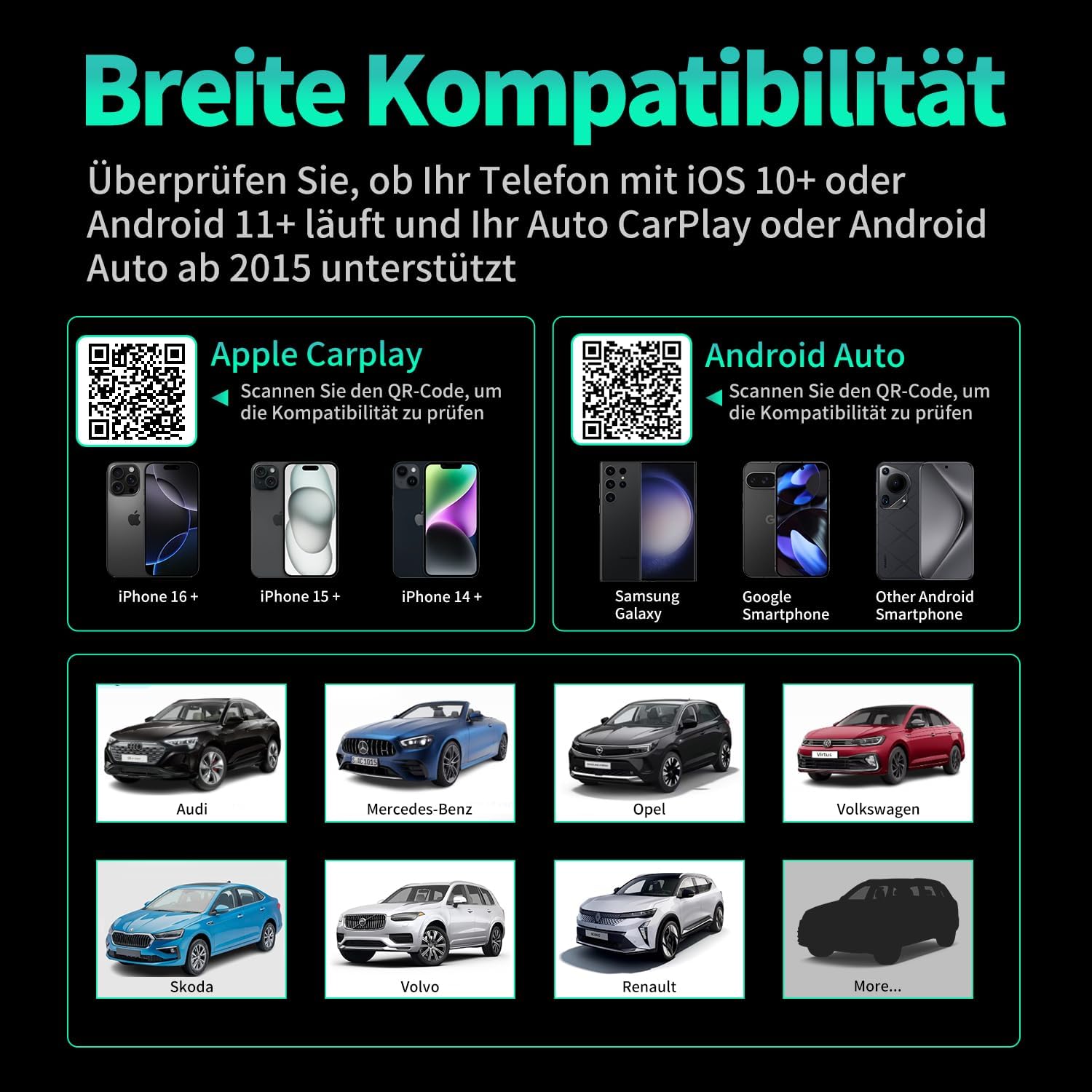
画像7.1: 互換性終了view displaying supported iPhone models (14+, 15+, 16+), Samsung Galaxy, Google, and other Android smartphones, along with car brands like Audi, Mercedes-Benz, Opel, Volkswagen, Skoda, Volvo, and Renault.
8. メンテナンス
- クリーニング: 柔らかく乾いた布で拭いてください。液体クリーナーや研磨剤は使用しないでください。
- ストレージ: 長期間使用しない場合は、デバイスを涼しく乾燥した場所に保管してください。
- ファームウェアの更新: メーカーの web最適なパフォーマンスと互換性を確保するために、利用可能なファームウェア アップデートを定期的にサイトで確認してください。
9。 トラブルシューティング
| 問題 | 考えられる原因 | 解決 |
|---|---|---|
| アダプタが車に接続されていません。 | Incorrect USB port, car not compatible, loose connection. | Ensure the adapter is plugged into the correct USB port that supports wired CarPlay/Android Auto. Verify car compatibility. Re-plug the adapter firmly. |
| Phone not connecting to adapter. | Bluetooth/Wi-Fi off, incorrect pairing, phone OS not supported. | Ensure Bluetooth and Wi-Fi are enabled on your phone. Forget previous Bluetooth connections and re-pair. Check phone OS version for compatibility (iOS 10+, Android 11+). |
| 断続的な接続または遅延。 | Interference, weak signal, outdated firmware. | Ensure no other devices are causing Wi-Fi interference. Try restarting both the car's infotainment system and your phone. Check for firmware updates. |
| CarPlay/Android Autoが起動しません。 | CarPlay/Android Auto not enabled in car settings, app issues. | Check your car's infotainment settings to ensure CarPlay/Android Auto is enabled. Restart your phone and the car's system. |
10. 仕様
| モデル番号 | Carplay01 |
| ブランド | ヴァンバー |
| 接続技術 | Bluetooth 5.0, Wi-Fi (2.4 GHz + 5 GHz), USB |
| 対応デバイス | スマートフォン(iOS 10以降、Android 11以降) |
| コネクタタイプ | USB Type A, USB Type C (with adapter) |
| 製品寸法 | 1 x 5.5 x 4.5 cm |
| アイテム重量 | 12グラム |
| 色 | 黒 |
| 特集 | Wireless Android Auto, Wireless Apple CarPlay, GPS Navigation, Spotify, iHeart Radio support |
11. 保証とサポート
For warranty information and technical support, please refer to the official VANBAR web公式サイトをご覧いただくか、カスタマーサービスに直接お問い合わせください。保証請求のために購入時のレシートを保管してください。


