導入
This manual provides detailed instructions for the setup, operation, and maintenance of your MageGee V560 Wireless Gaming Keyboard and Mouse Combo. Please read this manual thoroughly before use to ensure optimal performance and longevity of your device.

Image: The MageGee V560 Wireless Gaming Keyboard and Mouse Combo, featuring a blue, white, and purple color scheme, with the USB receiver visible.
パッケージ内容
パッケージにすべてのアイテムが揃っていることを確認してください:
- MageGee V560 ワイヤレスキーボード
- MageGee ワイヤレスマウス
- 2.4GHz USB Receiver (stored in mouse battery compartment)
- USB-C充電ケーブル
- ユーザーマニュアル

Image: Contents of the MageGee V560 package, including the keyboard, mouse, USB receiver, charging cable, and user manual.
セットアップ手順
- USB レシーバーを見つけます。 Open the battery cover of the wireless mouse. The 2.4GHz USB receiver is stored inside the compartment next to the mouse battery slot.
- 受信機を接続します。 USBレシーバーをコンピューターの使用可能なUSBポートに接続します。
- デバイスの電源をオンにします: Ensure both the keyboard and mouse are powered on. The devices are plug-and-play and should connect automatically.
- 初期費用: For optimal performance, it is recommended to fully charge both the keyboard and mouse before first use. Use the provided USB-C charging cable.

Image: Illustration showing the 2-in-1 USB receiver connecting the keyboard and mouse wirelessly to a laptop.
操作手順
キーボード機能
- RGBバックライトコントロール:
- プレス FN + イン バックライトをオンまたはオフにします。
- プレス FN + ページアップ or FN + PgDn to adjust the 3-level backlight brightness.
- プレス FN + 1 / 2 / 3 / 4 / 5 to switch between different backlight modes. Note: Backlight settings are not saved after power off.
- マルチメディアショートカット: 使用 FN キーと組み合わせ F1-F12 keys for quick access to multimedia functions such as volume control, media playback, and more.
- 人間工学に基づいたデザイン: The keyboard features a stepped layout and foldable brackets at the bottom, allowing you to adjust the typing angle for comfort during extended use.
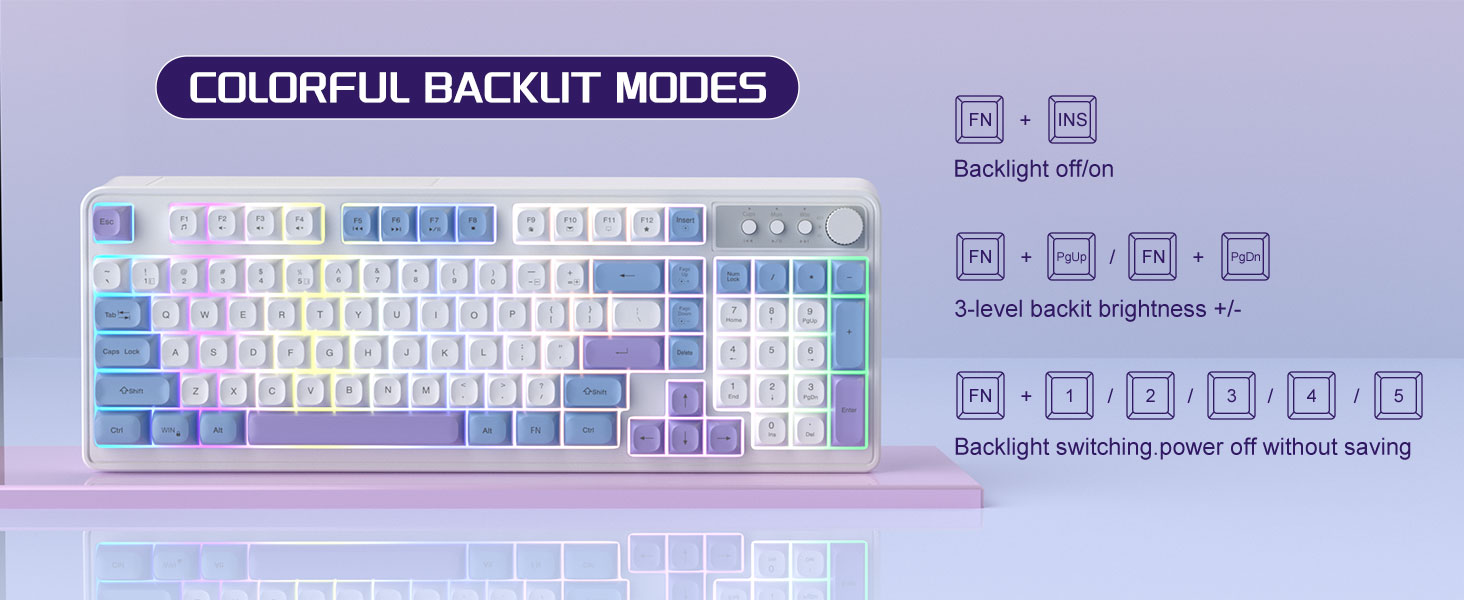
Image: The MageGee V560 keyboard displaying various colorful backlit modes, with instructions for controlling them.

Image: A visual representation of the 16 multimedia shortcuts available on the MageGee V560 keyboard, activated via the FN key.
マウス機能
- DPI 調整: The mouse supports 6 levels of DPI adjustment (600-3200 DPI). Press the DPI button (usually located below the scroll wheel) to cycle through the sensitivity settings. Internal indicator lights will show the current DPI level.
- 呼吸するバックライト: The mouse features 7 dazzling color breathing backlights. This lighting is automatic and indicates mouse activity.

Image: The MageGee V560 mouse highlighting its DPI settings (1000, 1200, 1600 DPI) and showing the USB-C charging port.
充電とバッテリー寿命
- Both the keyboard and mouse are rechargeable. Use the provided USB-C charging cable to charge them.
- Keyboard Standby Time: 最大365日。
- Mouse Standby Time: 最大270日。
- 自動スリープ機能: The devices automatically enter sleep mode after a period of inactivity to conserve battery power and extend battery life.

Image: An illustration demonstrating the intelligent auto-sleep feature of the MageGee V560 combo, which conserves battery life.
互換性
The MageGee V560 Wireless Gaming Keyboard and Mouse Combo is compatible with the following operating systems:
- Windows2000で
- XP で勝つ
- 私に勝つ
- ビスタ
- Windows7で
- Windows8で
- Windows10で
- アンドロイド
- リナックス
- Mac OS
トラブルシューティング
MageGee V560 コンボで問題が発生した場合は、次の一般的な解決策を参照してください。
- デバイスが接続されていません:
- USB レシーバーが動作中の USB ポートにしっかりと差し込まれていることを確認します。
- キーボードとマウスの両方の電源がオンになっていることを確認します。
- Check the battery levels of both devices and charge if necessary.
- USB レシーバーを別の USB ポートに接続してみてください。
- 遅延または切断:
- Ensure the devices are within the 33 ft (10 meter) operating range of the USB receiver.
- 他の 2.4GHz ワイヤレス デバイス (Wi-Fi ルーター、コードレス電話など) からの干渉を最小限に抑えます。
- Charge the devices to ensure sufficient power.
- Keys Not Registering / Mouse Not Responding:
- Recharge the keyboard and mouse.
- USB レシーバーが正しく接続されていることを確認します。
- コンピュータを再起動します。
- バックライトの問題:
- キーボードが充電されていることを確認してください。
- 使用 FN + イン バックライトを切り替えます。
- 明るさを調整する FN + PgUp/PgDn.
仕様
| ブランド | マゲギー |
| モデル | バージョン560 |
| 接続技術 | 2.4GHzワイヤレス |
| 特集 | RGB lighting, rechargeable keyboard and mouse, ergonomic design |
| 対応デバイス | Personal Computer (Win2000, Win XP, Win ME, Vista, Win7, Win8, Win10, Android, Linux, Mac OS) |
| アイテム重量 | 1.87ポンド |
| パッケージ寸法 | 16.61 x 9.21 x 1.73インチ |
| メーカー | マギー |
メンテナンス
- クリーニング: キーボードとマウスのお手入れには、柔らかく乾いた布を使用してください。頑固な汚れには、軽く湿らせた布で拭いてください。amp 布を使用することで、液体がデバイス内に入らないようにすることができます。
- ストレージ: デバイスは直射日光や極端な温度を避け、涼しく乾燥した場所に保管してください。
- バッテリーのケア: バッテリーを頻繁に完全に放電することは避けてください。バッテリーの状態を維持するために、定期的に充電してください。
保証とサポート
この製品には、 1年間保証 購入日より。
For any questions or support needs, please contact MageGee customer service via Amazon email. We aim to respond within 12 hours and provide a satisfactory solution.


