導入
This manual provides essential information for the safe and efficient operation, installation, and maintenance of your BYECOLD Smart Bathroom Mirror. Please read these instructions thoroughly before installation and use, and retain them for future reference.

Image: The BYECOLD Smart Bathroom Mirror showcasing its illuminated frame and integrated smart display.
安全情報
注意:
- Although designed to minimize breakage hazards, do not use excessive force to break the glass.
- Keep the mirror away from direct contact with water to maintain its waterproof functionality.
- The anti-fog feature helps prevent slipping hazards by keeping the mirror clear.
- Ensure proper electrical installation by a qualified professional if hardwiring.
セットアップとインストール
取り付けオプション
The mirror supports both plug-in and hardwire installation methods. For hardwiring, it is recommended to consult a professional electrician.

Image: Illustration of plug-in and hardwire installation options for the mirror.
初回電源投入
After successful installation, connect the mirror to a power source. The mirror will typically power on automatically or can be activated via the touch sensor.
操作手順
タッチコントロール
The mirror features smart touch sensors for various functions. These are typically located on the mirror surface.

画像: 詳細 view of the touch sensor icons on the mirror surface.
- ライトコントロール:
- シングルクリック: LEDライトのオン/オフを切り替えます。
- ダブルクリック: Switch between 3 color temperatures (3000K warm, 4500K natural, 6000K white light).
- 長押し: Adjust brightness from 10% to 100%. The mirror includes a memory function to recall your last brightness setting.

Image: The mirror demonstrating its three adjustable color temperatures.

Image: The mirror illustrating its dimmable brightness feature.
- 曇り止め機能:
- 長押し: Activate the defogging function.
- The defogger will automatically shut down after two hours of operation.
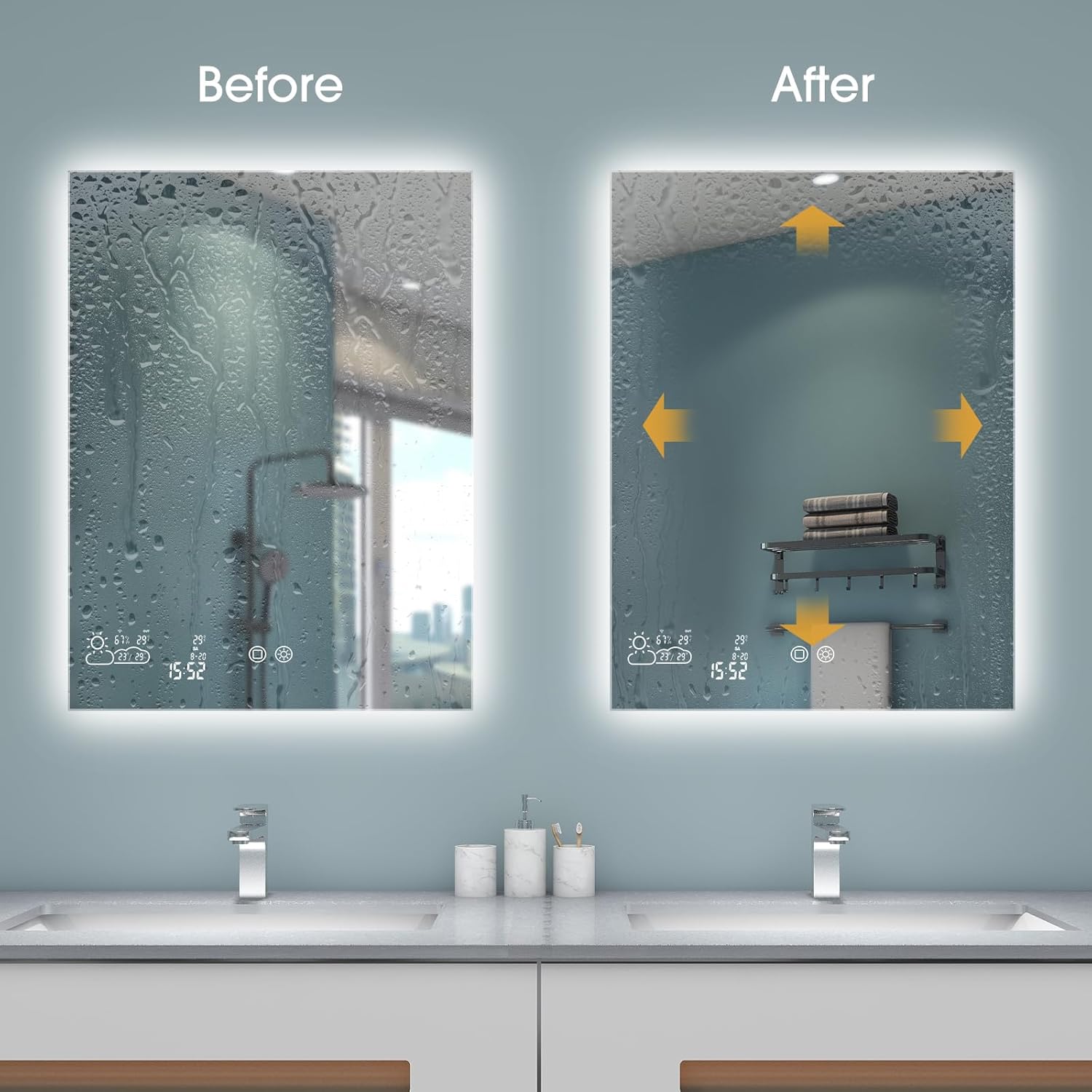
Image: A visual comparison showing the effectiveness of the mirror's defogging feature.
- Weather Display Control:
- ダブルクリック: Turn the weather display on/off.
接続性
- Bluetoothのペアリング:
- Power on the mirror.
- Turn on Bluetooth on your phone and search for the speaker named "XM-518" or similar.
- Select and connect to the device.

Image: Visual guide for connecting a mobile device to the mirror's Bluetooth audio.
Video: Demonstrates the Bluetooth pairing process for the BYECOLD Smart Bathroom Mirror.
- Wi-Fi & App Connection (WiseMirror App):
- Download the WiseMirror App to your smartphone.
- Follow the in-app instructions to connect the mirror to your Wi-Fi network.
- Once connected, the mirror will display real-time weather updates, time, date, and indoor temperature.

Image: The mirror's display showing various smart features like weather, time, and temperature.
ビデオ: 終了view of the BYECOLD Smart Bathroom Mirror's features, including Bluetooth connectivity and smart display.
メンテナンス
鏡の掃除
- Always turn off the mirror's power before cleaning.
- 柔らかくてamp cloth with a mild glass cleaner.
- Do not spray cleaner directly onto the mirror surface; apply it to the cloth first.
- Avoid abrasive cleaners or materials that could scratch the mirror surface or damage the integrated electronics.
トラブルシューティング
If you encounter issues with your BYECOLD Smart Bathroom Mirror, consider the following:
- 電源なし: Check the power connection. Ensure the plug is fully inserted or the hardwiring is correctly connected.
- ライトが点灯しない: Verify the power supply. If connected via a wall switch, ensure the switch is on. Try cycling the power.
- デフォッガーが作動しない: Ensure the defogging touch sensor is activated (long press). Check for power supply.
- Bluetooth接続の問題: Ensure Bluetooth is enabled on your device and the mirror. Try restarting both devices. Confirm you are connecting to the correct device name (e.g., "XM-518").
- Wi-Fi/App Issues: Ensure your Wi-Fi network is 2.4GHz, as the mirror may not support 5GHz networks. Verify correct Wi-Fi password in the WiseMirror App. Try restarting your router and the mirror.
- 表示の不具合: If the weather display or other smart features are not working correctly, try restarting the mirror. If the issue persists, contact customer service.
仕様
| 特徴 | 詳細 |
|---|---|
| ブランド | 寒さ |
| モデル番号 | G1206MD |
| 製品寸法 | 長さ47インチ x 幅23.6インチ |
| フレーム素材 | アルミニウム |
| 特集 | Color Changing, Fogless, Touch Sensor, Bluetooth, WiFi Enabled Weather Display, Memory Function |
| 防水等級 | IP54 |
| アイテム重量 | 38 ポンド |
| 取り付けタイプ | 壁掛け |
保証とサポート
BYECOLD offers the following support for your Smart Bathroom Mirror:
- 30-day replacement policy.
- 45日間返金保証。
- 2-year repair warranty.
- 24-hour customer service for assistance and inquiries.
For further assistance or inquiries, please feel free to contact BYECOLD customer service.


