導入
This user manual provides detailed instructions for the Heegomn Waterproof Digital Camera, Model BL8026. It covers essential information regarding product setup, operation, maintenance, and troubleshooting to ensure optimal performance and longevity of your device. This camera is designed for capturing high-definition photos and videos, particularly in underwater environments up to 17 feet (5 meters) deep, and is suitable for amateur enthusiasts, children, and students.
パッケージ内容
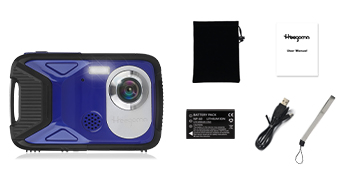
以下にリストされているすべてのアイテムがパッケージに含まれていることを確認してください。
- Heegomn Waterproof Digital Camera (Blue)
- NP-60 3.7V 1050mAh Lithium-Ion Battery
- 32GB マイクロ SD カード
- USB充電ケーブル
- リストストラップ
- ユーザーマニュアル
- 収納ポーチ

カメラオーバーview
The Heegomn Waterproof Digital Camera features a robust design suitable for various environments. It includes a 2.8-inch LCD screen for easy viewing and navigation, a high-resolution lens, and intuitive control buttons for seamless operation.

設定
1. バッテリーの取り付けと充電
- Locate the battery compartment on the side or bottom of the camera.
- Carefully open the battery compartment. Note that the compartment may be designed for a tight seal to ensure waterproofing, requiring firm but gentle pressure to open.
- Insert the provided NP-60 3.7V 1050mAh Lithium-Ion battery, ensuring correct polarity.
- Close the battery compartment securely until you hear a click or feel it lock into place. It is crucial to ensure the battery cover is properly locked to maintain the camera's waterproof capability.
- Connect the camera to a power source using the supplied USB cable for initial charging. The battery can record continuously for 3-4 hours on a full charge.
2. SDカードのインストール
- バッテリー収納部を開いたら、Micro SD カード スロットを見つけます。
- Insert the 32GB Micro SD/SDHC card into the slot until it clicks into place. Ensure the card is inserted in the correct orientation.
- 電池ケースをしっかりと閉めてください。
3. 初回電源投入と設定
- 電源ボタンを長押ししてカメラの電源を入れます。
- Upon first use, you may be prompted to set the date and time. Navigate using the directional buttons and confirm with the OK button.
4. Waterproof Seal Verification
Before using the camera underwater, always double-check that the battery compartment cover is completely sealed and locked. A loose cover will compromise the camera's waterproof integrity. It is recommended to perform a waterproof test without the camera first by submerging the empty compartment in water to ensure no leaks.
カメラの操作
1. 電源のオン/オフ
- 電源を入れるには、 力 ボタン。
- 電源を切るには、 を長押しします 力 もう一度ボタンを押します。
2.モードの選択
を押す モード button to switch between Photo, Video, and Playback modes.
3. 写真を撮る
In Photo mode, frame your shot using the LCD screen and press the シャッター 画像をキャプチャするためのボタン。

4.ビデオの録画
ビデオモードでは、 シャッター ボタンを押すと録画が開始されます。もう一度押すと録画が停止します。
5. Using the Flash Light
The camera features a built-in flash light for low-light conditions. Access flash settings through the menu or a dedicated flash button to select modes like Auto or Off.

6.デジタルズーム
Utilize the zoom buttons (often marked with 'W' and 'T' or up/down arrows) to adjust the 8X digital zoom for closer shots.

7.連続撮影
The camera supports 6 continuous shooting modes. Activate this feature through the camera's menu to capture a rapid sequence of images.
8. セルフタイマー
Set a delay (e.g., 2, 5, or 10 seconds) before a photo is taken, allowing you to be part of the shot.
9. 顔検出と笑顔キャプチャ
Enable face detection to automatically focus on faces. With smile capture, the camera can automatically take a photo when a smile is detected.

10.アンチシェイク。
Activate the anti-shaking function in the settings to reduce blur caused by camera movement, especially useful in dynamic environments or when shooting handheld.
11. 再生と削除 Files
In Playback mode, use the directional buttons to browse through your photos and videos. Press the 消去 button (often marked with a trash can icon) to remove unwanted files.
12. Connecting to Computer (Downloading Pictures)
To transfer photos and videos to your computer, connect the camera using the provided USB cable. The camera will appear as a removable disk, allowing you to copy file直接。

メンテナンス
1. カメラのクリーニング
- カメラ本体と画面を清掃するには、柔らかく糸くずの出ない布を使用してください。
- レンズには、傷を防ぐために専用のレンズクリーニングクロスと洗浄液を使用してください。
- 水中で使用した後は、カメラを真水で洗い流し、柔らかい布で完全に乾かしてください。
2. バッテリーのお手入れ
- Charge the battery fully before each use, especially for extended sessions.
- バッテリーを使用しないときは、涼しく乾燥した場所に保管してください。
- カメラを長期間使用しない場合は、バッテリーを取り外してください。
3. Waterproofing Best Practices
- Always ensure the battery compartment cover is completely sealed and locked before submerging the camera.
- Avoid opening the battery compartment in wet or sandy environments.
- Regularly inspect the rubber seals around the battery compartment for any signs of damage or debris.
トラブルシューティング
This section addresses common issues you might encounter with your Heegomn Waterproof Digital Camera.
- Question: Why is my camera not waterproof?
答え: The camera is completely sealed once the battery cover is securely closed. If the battery cover is not properly locked, water may enter. Always ensure to tightly close the battery cover after each charging session and before any water exposure. - Question: Why is the photo not clear when viewed back on the camera?
答え: The camera uses energy-saving technology, which may slightly reduce screen display clarity to extend battery life. For best viewing clarity, import your photos or videos to your computer. - Question: I don't receive the 32GB Micro SD Card, or it said card error.
答え: Please contact customer support to receive a new card. - Question: Battery not working or will not hold charge.
答え: Please contact customer support to receive a new battery. - Issue: Difficulty opening the battery compartment.
解決: The battery compartment is designed for a tight, waterproof seal. Apply firm, even pressure to slide or unlatch the cover. Avoid excessive force to prevent damage. If persistent difficulty occurs, ensure no debris is obstructing the mechanism.
仕様
| ブランド | ヘーゴムン |
| モデル名 | 8026年 |
| モデル番号 | BL8026 |
| 最大 Webカム画像解像度 | 13 MP |
| 実効静止画解像度 | 21 MP |
| フォトセンサー解像度 | 13 MP |
| ビデオ解像度 | 1080p(フルHD) |
| フレームレート | 30fps |
| 光学ズーム | 8倍 |
| デジタルズーム | 8倍 |
| 画像安定化 | 光学 |
| 画面サイズ | 2.8インチ(液晶) |
| 耐水性レベル | 防水 |
| 耐水深度 | 5メートル(17フィート) |
| 電池のタイプ | Lithium Ion (NP-60) |
| バッテリー容量 | 1.05 Amp 時間(1050mAh) |
| バッテリーの平均寿命 | 3-4 Hours (recording) |
| 外部メモリサイズ | 32 GB (SD/SDHC Card) |
| 接続技術 | USB |
| 色 | 青 |
保証とサポート
保証情報
This Heegomn Waterproof Digital Camera comes with a 1年間のメーカー保証. Additionally, a 3-month free replacement or refund service is available.
カスタマーサポート
Should you have any questions, concerns, or require assistance with your product, please do not hesitate to contact our customer support team. We are committed to responding to all inquiries within 24 hours.
For support, please refer to the contact information provided on the product packaging or the official Heegomn webサイト。