導入
ご購入ありがとうございますasing the Proscan PSP333 Portable Bluetooth Speaker. This manual provides important safety instructions, operational guidelines, and maintenance tips to ensure optimal performance and longevity of your device. Please read this manual thoroughly before using the product and retain it for future reference.
安全情報
- 極端な温度、直射日光、高湿度の場所にユニットを放置しないでください。
- スピーカーを落としたり、強い衝撃を与えたりしないでください。
- ユニットをご自身で分解したり修理したりしないでください。修理はすべて資格のある専門家にご依頼ください。
- スピーカーを水やその他の液体から遠ざけてください。
- 指定された充電ケーブルのみを使用してください。
- スピーカーを操作するときは適切な換気を確保してください。
パッケージ内容
パッケージに以下のアイテムが含まれていることを確認してください。
- Proscan PSP333 Portable Bluetooth Speaker
- USB充電ケーブル
- ユーザーマニュアル(このドキュメント)
製品の特徴
The Proscan PSP333 speaker offers a range of features for an enhanced audio experience:
- Wireless Bluetooth connectivity for streaming audio from compatible devices.
- Integrated LED lights for visual ambiance.
- Built-in FM radio for listening to local stations.
- Auxiliary (AUX) input for wired connection to non-Bluetooth devices.
- Adjustable Bass, Treble, and Volume controls.
- 携帯に便利な充電式バッテリー。
- Convenient carrying handles that also function as a built-in stand.
- Output Power: 2 x 3W (6-Watt-RMS total).
コントロールと接続
Familiarize yourself with the control panel and connection ports of your speaker.

図1: フロント view of the Proscan PSP333 speaker, highlighting the speaker grilles and the central control interface.
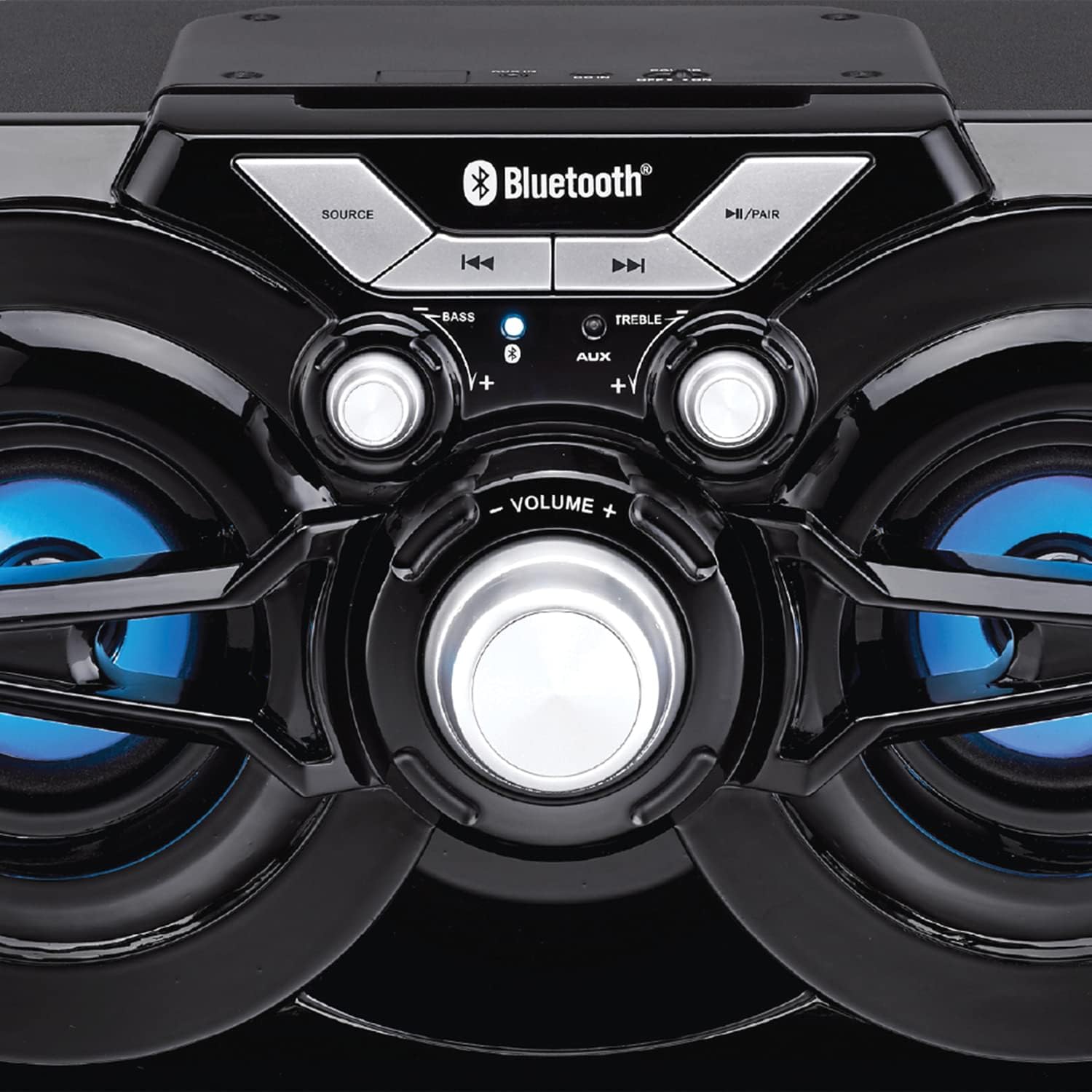
図2: 詳細 view of the speaker's control panel, illustrating the various buttons and adjustment knobs.
コントロールパネルの機能:
- ソースボタン: Press to switch between Bluetooth, FM Radio, and AUX input modes.
- ◀◀ (Previous Track/Tune Down) Button: In Bluetooth mode, press to go to the previous track. In FM mode, press to tune down the frequency.
- ▶▶ (Next Track/Tune Up) Button: In Bluetooth mode, press to go to the next track. In FM mode, press to tune up the frequency.
- ►/PAIR Button: Press to Play/Pause audio. Press and hold to initiate Bluetooth pairing mode. In FM mode, press and hold to auto-scan for stations.
- 低音ノブ: 回して低音レベルを調整します。
- 高音ノブ: 回して高音レベルを調整します。
- ボリュームノブ: Rotate to adjust the overall volume output.
- AUX入力: 3.5mm jack for connecting external audio devices via an auxiliary cable (not included).
- 充電ポート: USB充電ケーブルを接続します。
設定
初期充電:
- Before first use, fully charge the speaker. Connect the small end of the included USB charging cable to the charging port on the speaker.
- USB ケーブルの大きい方の端を USB 電源アダプタ (別売) またはコンピュータの USB ポートに接続します。
- The charging indicator light will illuminate. Once fully charged, the light may change color or turn off (refer to specific indicator behavior if detailed in product).
- フル充電には通常数時間かかります。
電源のオン/オフ:
- To power on the speaker, locate the power switch (usually on the back or side) and slide it to the 'ON' position.
- 電源を切るには、スイッチを「OFF」の位置にスライドします。
操作手順
Bluetoothモード:
- Power on the speaker. It will automatically enter Bluetooth pairing mode, indicated by a flashing LED light (e.g., blue LED).
- If the speaker is not in Bluetooth mode, press the ソース button until the Bluetooth indicator light flashes.
- モバイル デバイス (スマートフォン、タブレットなど) で Bluetooth を有効にし、利用可能なデバイスを検索します。
- Select "PSP333" or "Proscan Speaker" from the list of devices.
- Once paired, the Bluetooth indicator light will stop flashing and remain solid. You can now play audio from your device through the speaker.
- Use the ◀◀, ▶▶, and ►/PAIR buttons on the speaker or your device to control playback.
AUX入力モード:
- スピーカーの電源を入れます。
- 3.5mm オーディオ ケーブル (付属していません) の一方の端をスピーカーの AUX 入力ポートに接続します。
- Connect the other end of the 3.5mm audio cable to the headphone jack or audio output of your external device (e.g., MP3 player, computer).
- を押す ソース button until the speaker is in AUX mode.
- Play audio from your external device. Volume can be controlled via the speaker's VOLUME knob and your external device.
FMラジオモード:
- スピーカーの電源を入れます。
- を押す ソース button until the speaker is in FM Radio mode.
- To auto-scan and save available stations, press and hold the ►/PAIR button. The speaker will scan and store stations automatically.
- Once scanning is complete, use the ◀◀ and ▶▶ buttons to navigate between the saved stations.
- For manual tuning, short press the ◀◀ or ▶▶ buttons to adjust the frequency incrementally.
LEDライト:
The speaker features integrated LED lights that illuminate the speaker cones. These lights typically activate automatically when the speaker is powered on. There may be a dedicated button or a combination of button presses to cycle through light modes or turn them off/on. (Note: Specific control for LED lights is not detailed in product description, assume automatic or simple toggle if present.)
スピーカーの充電
The Proscan PSP333 speaker is equipped with a built-in rechargeable Lithium Ion battery.
- When the battery is low, the speaker may emit an audible alert or an indicator light may flash.
- Connect the included USB charging cable to the speaker's charging port and to a suitable USB power source (e.g., 5V USB adapter, computer USB port).
- 充電インジケーターに充電状態が表示されます。
- Disconnect the charging cable once the battery is fully charged to preserve battery life.
メンテナンス
- クリーニング: スピーカーの外装を清掃する際は、柔らかく乾いた布をご使用ください。液体クリーナーや研磨剤は使用しないでください。
- ストレージ: 長期間使用しない場合は、スピーカーを直射日光や極端な温度を避け、涼しく乾燥した場所に保管してください。
- バッテリーのケア: To maintain battery health, avoid fully discharging the battery frequently. Charge the speaker regularly, even if not in use, to prevent deep discharge.
トラブルシューティング
| 問題 | 考えられる解決策 |
|---|---|
| スピーカーの電源が入りません。 | Ensure the battery is charged. Connect the speaker to a power source using the USB cable. Check the power switch is in the 'ON' position. |
| スピーカーから音が出ない。 | Increase the volume on both the speaker and the connected device. Ensure the correct source mode (Bluetooth, AUX, FM) is selected. Check audio cable connection for AUX mode. |
| Bluetooth経由でペアリングできません。 | Ensure the speaker is in Bluetooth pairing mode (flashing LED). Make sure the speaker is within 30 ft (9 meters) of your device. Turn off and on Bluetooth on your device. Forget "PSP333" from your device's Bluetooth list and try pairing again. |
| FMラジオの受信状態が悪いです。 | Relocate the speaker to an area with better signal. Ensure no large metallic objects are blocking the signal. |
| 歪んだ音。 | Reduce the volume on both the speaker and the connected device. Check Bass and Treble settings. Ensure the audio source is not distorted. |
仕様

図3: Dimensions of the Proscan PSP333 speaker, showing its length, height, and depth.
| 特徴 | 詳細 |
|---|---|
| モデル番号 | PSP333 |
| 出力電力 | 2 x 3W (6-Watt-RMS) |
| 接続性 | Bluetooth, Auxiliary (3.5mm Jack) |
| ドライバーサイズ | 3インチ |
| ワイヤレス範囲 | 最大30フィート(9メートル) |
| 電源 | 充電式リチウムイオン電池 |
| 製品寸法(長さ x 幅 x 高さ) | 24.31 x 42.09 x 24.1 cm(約9.57 x 16.57 x 9.49インチ) |
| アイテム重量 | 2.61 kg(約5.75ポンド) |
| 色 | 黒 |
保証とサポート
This product is covered by a limited manufacturer's warranty. For specific warranty terms and conditions, please refer to the documentation provided at the time of purchase or contact the retailer. For technical support or service inquiries, please contact the customer service department of PROSCAN or your authorized dealer.
メーカー: カーティスインターナショナル
事業所所在地: ミシサガ、オンタリオ州 L5S 2A4


