導入
The Epson EpiqVision Mini EF11 Laser Projector delivers a versatile and immersive viewing experience. Designed for portability and ease of use, this projector features advanced 3LCD technology for vibrant Full HD 1080p images up to 150 inches. With 1000 lumens of color and white brightness, a built-in dual-speaker audio system, and flexible connectivity options, it's ideal for various entertainment and presentation needs.
主な機能は次のとおりです。
- 驚異的な画質: Enjoy immersive Full HD 1080p images up to 150 inches.
- 高輝度: Delivers 1000 lumens of color and white brightness for clear visuals.
- Integrated Dual-Speaker Audio System: Features a high-quality internal speaker system for rich audio.
- Elegant Compact Design: Portable and modern design allows for easy placement and transport.
- Epson MicroLaser Array Technology: Provides exceptional brightness and enhanced black density.
- Advanced Scene Adaptive Color Correction: Automatically adjusts color for a natural picture.
- True 3-Chip Projector Design: Ensures outstanding color accuracy and brightness without "rainbowing."
- Auto Picture Skew Correction: Automatically corrects vertical image geometry for optimal viewing。
- Single HDMI Input: Standard HDMI port for video and audio connections.
箱の中身
Upon unboxing your Epson EpiqVision Mini EF11 Laser Projector, ensure all the following items are present:
- Epson EF-11 Laser Projector
- 電源コード
- Remote Control with AAA Batteries
- クイックセットアップガイド

Image: Contents of the Epson EpiqVision Mini EF11 box, including the projector, remote, power cord, and quick setup guide.
設定
- 配置: Position the projector on a stable, flat surface. Ensure there is adequate space around the projector for ventilation. The projector can be placed in front of the screen or wall, or mounted on a ceiling.
- 電源接続: Connect the provided power cord to the projector's power input and then to an electrical outlet.
- デバイスの接続:
- HDMI: Connect your streaming device (e.g., Apple TV, Roku, Amazon Fire TV, Android TV, game console) to the projector's HDMI port using an HDMI cable.
- USB: The projector features a USB Type-A port (5V/2A power supply) for connecting compatible devices.
- 電源オン: Press the power button on the projector or the remote control to turn on the device. The projector will automatically perform initial setup and image adjustments.
- 画像調整: The projector features Auto Picture Skew Correction to automatically adjust the vertical geometry of the picture. Manual adjustments for focus and keystone can be made via the projector's settings menu if needed.

Image: The Epson EpiqVision Mini EF11 Projector showcasing its compact design and projected image quality.
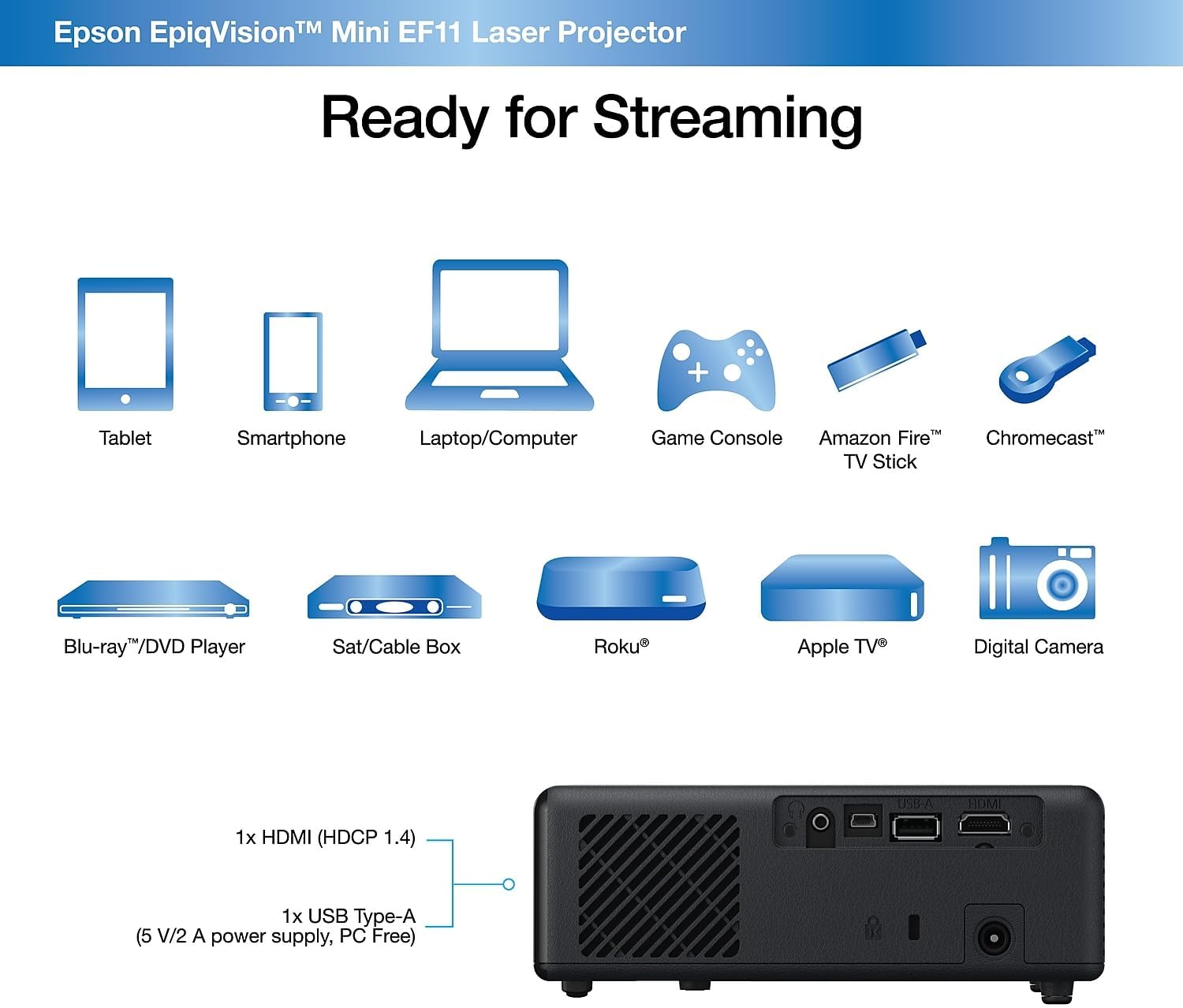
画像: 背面 view of the Epson EpiqVision Mini EF11 Projector, highlighting the HDMI and USB ports for connecting various devices.
オペレーティング
- 電源オン/オフ: プロジェクターの上部パネルまたはリモコンの電源ボタンを押して、デバイスの電源をオンにします。
- ソースの選択: Use the "Source" button on the remote or projector to cycle through available input sources (e.g., HDMI).
- 音量コントロール: Adjust the volume using the '+' and '-' buttons on the remote control or the projector's top panel.
- コンテンツへのアクセス:
- If using an external streaming device, navigate its interface using its remote.
- The projector is compatible with various streaming solutions like Apple TV, Roku, Amazon Fire TV, or Android TV.
- 画像設定: Access the projector's menu to adjust picture settings such as color mode, light output, scene adaptive gamma, color temperature, dynamic contrast, and noise reduction.
- サウンド設定: Customize your audio experience through sound settings, including sound mode (e.g., Theatre, TV, Studio), virtual surround, clear voice, auto loudness, and bass extension.

Image: The Epson EpiqVision Mini EF11 Laser Projector displaying a high-quality, vibrant image on a wall.

Image: A visual representation of the Epson EpiqVision Mini EF11 Projector's capability to project images at different sizes, from 70 inches to 150 inches.
メディア統合
Official Product Video: EF12 Plug and Play
Video: This official video from Epson America Inc. demonstrates the "Plug and Play" functionality of the EpiqVision Mini EF12 (similar to EF11), highlighting its ease of setup and immediate use for various media content.
仕様
| 特徴 | 詳細 |
|---|---|
| 製品寸法 | 6.89 x 6.89 x 2.28インチ |
| アイテム重量 | 2.7ポンド |
| 商品型番 | EF11 |
| ブランド | エプソン |
| 推奨用途 | ゲーム |
| 特集 | スピーカー内蔵、軽量 |
| 接続技術 | HDMI |
| ディスプレイ解像度 | 1920 x 1080 (フルHD) |
| 輝度 | 1000ルーメン(カラーと白の明るさ) |
| プロジェクション技術 | 3LCD, Laser |
メンテナンス
適切なメンテナンスを行うことで、プロジェクターの寿命が長くなり、最適なパフォーマンスが確保されます。
- レンズの掃除: Use a soft, dry, lint-free cloth to gently wipe the projector lens. Avoid using abrasive cleaners or solvents.
- 通気口の掃除: Regularly check and clean the air vents to prevent dust buildup, which can lead to overheating. Use a soft brush or a vacuum cleaner with a brush attachment.
- ストレージ: 長期間使用しない場合は、プロジェクターを直射日光や極端な温度を避け、涼しく乾燥した場所に保管してください。
トラブルシューティング
プロジェクターで問題が発生した場合は、次の一般的なトラブルシューティング手順を試してください。
- 電源なし:
- Ensure the power cord is securely connected to both the projector and the electrical outlet.
- 別のデバイスを接続して、電源コンセントが機能していることを確認します。
- 画像無し:
- プロジェクターで正しい入力ソースが選択されていることを確認します。
- Ensure the HDMI cable (or other video cable) is securely connected to both the projector and the source device.
- ソースデバイスの電源がオンになっていて、信号を出力していることを確認します。
- ぼやけた画像:
- Adjust the focus using the projector's settings menu.
- Ensure the projector is placed at an appropriate distance from the screen or wall.
- レンズの前に障害物がないか確認してください。
- 音が出ない:
- プロジェクターとソースデバイスの両方の音量を上げます。
- ソース デバイスのオーディオ出力設定をチェックして、HDMI 経由でオーディオが送信されていることを確認します。
- 外部スピーカーを使用する場合は、正しく接続され、電源がオンになっていることを確認してください。
保証とサポート
The Epson EpiqVision Mini EF11 Laser Projector comes with a standard 2-year limited warranty, including full-unit replacement. Free technical phone support is available for the life of the product.
For further assistance or to explore other Epson products, please visit the エプソンストア.


