導入
The EDIAG BM310 is a compact and easy-to-use 12V car battery and alternator tester designed to quickly assess the health of your vehicle's battery and charging system. This device provides clear indications of battery status and alternator performance through its intuitive LED display, helping you identify potential issues before they lead to vehicle breakdown.
安全情報
Always prioritize safety when working with vehicle batteries. Please read and understand the following safety precautions:
- Ensure the vehicle engine is turned off before connecting or disconnecting the tester, unless performing an alternator test as instructed.
- Wear appropriate personal protective equipment, including safety glasses and gloves, to protect against battery acid and electrical hazards.
- Avoid contact with battery terminals and cables while the engine is running or the battery is connected.
- Keep the tester away from water, oil, and other liquids.
- The BM310 features a reverse protection function to prevent damage from incorrect polarity connection. However, always double-check connections to ensure proper operation and safety.
- テスターを分解したり改造したりしないでください。修理は必ず資格のある担当者にご依頼ください。
製品終了view
The EDIAG BM310 tester is designed for ease of use and durability. It features a clear LED indicator panel and robust construction.

図1: 前面 view of the EDIAG BM310 Battery Tester showing the LED indicators and connection clamps.
主なコンポーネントと機能は次のとおりです。
- LEDディスプレイパネル: Six distinct LED indicators provide clear status updates for both alternator and battery conditions.
- Pure Copper Wire and Clips: Ensures excellent conductivity and accurate voltage readings. The copper clips offer better conductivity and more precise measurements compared to standard iron clips.
- 人間工学に基づいたデザイン: The device is designed for comfortable handling and ease of use.
- ABS工業グレード素材: Provides durability and protection for the internal components.

図2:詳細 view highlighting the ergonomic design and durable ABS material of the tester.
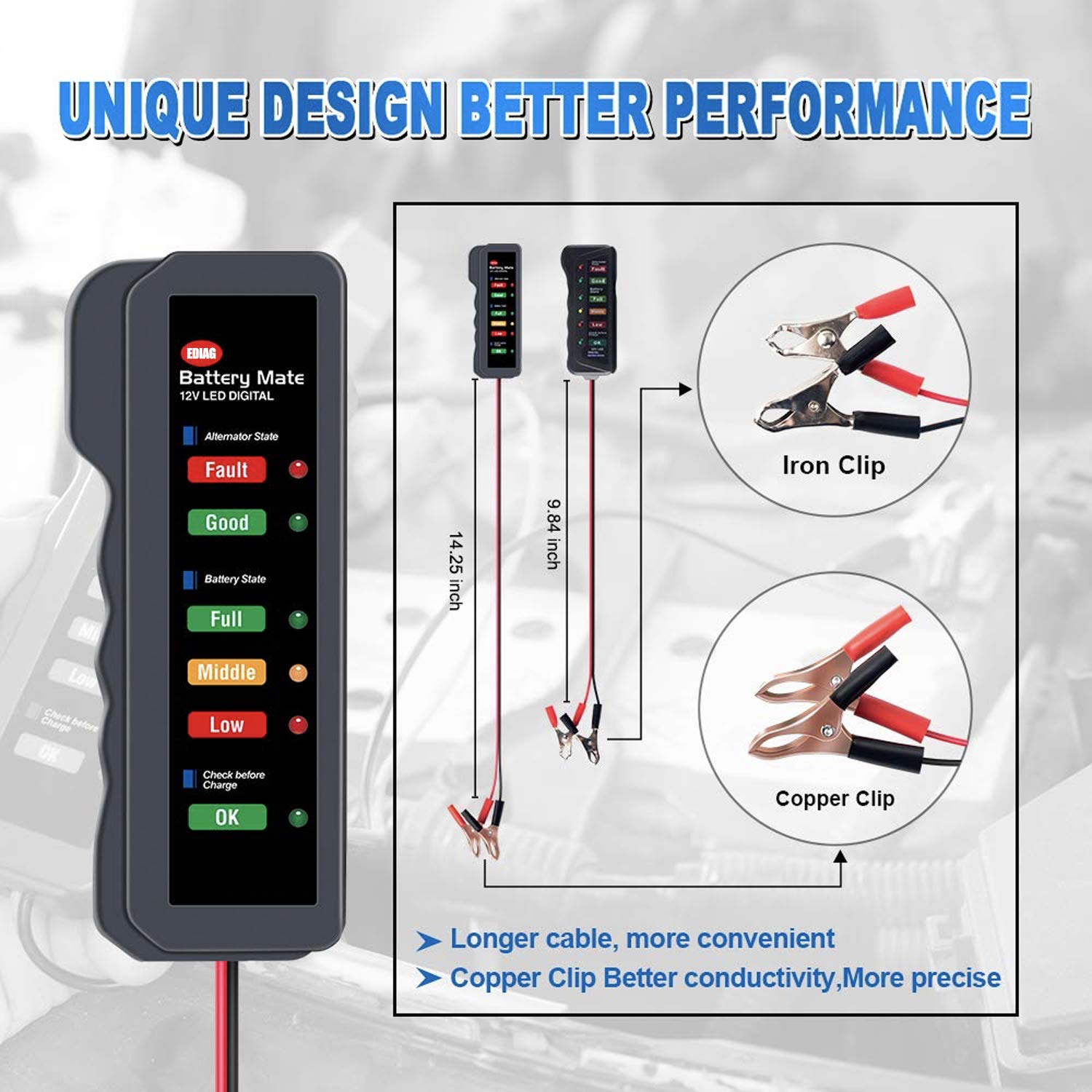
Figure 3: Illustration of the tester's dimensions and the superior conductivity of the copper clips.
設定
The EDIAG BM310 is designed for quick and simple setup. It is compatible with all 12V automotive and motorcycle batteries.
- Ensure the vehicle is turned off before connecting the tester for a battery check. For an alternator check, the engine will need to be running later.
- 接続する 赤いワニ口クリップ に プラス(+)端子 of the 12V battery.
- 接続する 黒のワニ口クリップ に マイナス(-)端子 of the 12V battery.
- Once connected, the tester will automatically power on and begin its assessment.

Figure 4: Connection diagram for the EDIAG BM310 to a 12V battery.
操作手順
The BM310 provides two primary functions: Battery State Check and Alternator State Check.
1. Battery State Check
With the tester connected to the 12V battery and the engine off, observe the "Battery State" LEDs:
- Full (Green LED): バッテリーが完全に充電されていることを示します。
- Middle (Orange LED): Indicates the battery is moderately charged.
- Low (Red LED): Indicates the battery charge is low and may require charging.
- Check before Charge (Green LED): If this LED is lit, it suggests the battery could be charged. If the voltage drops to 10V, the battery may be damaged and cannot be charged.
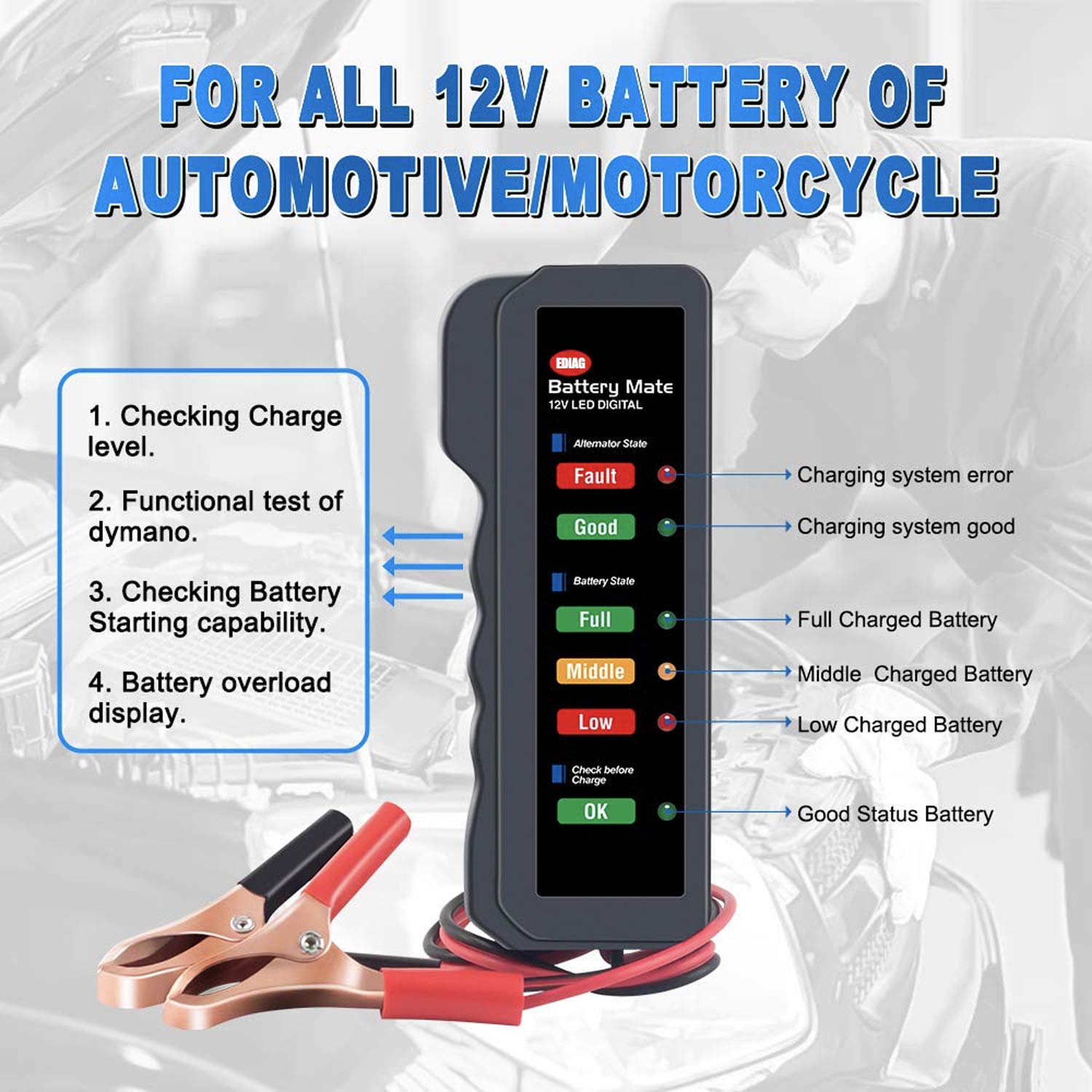
図5:以上view of the tester's functions, including charge level, functional test of dynamo, battery starting capability, and battery overload display.
2. Alternator State Check
To check the alternator's performance:
- Ensure the tester is correctly connected to the battery.
- 車両エンジンを始動します。
- Accelerate the engine to approximately 2000 回転.
- Observe the "Alternator State" LEDs:
- Good (Green LED): Indicates the charging circuit is functioning correctly.
- 障害(赤色LED): Indicates a charging system error. If this light is lit, the alternator voltage may be too high, which could damage your battery.

Figure 6: The EDIAG BM310 in use, connected to a car battery for testing.
メンテナンス
To ensure the longevity and accurate performance of your EDIAG BM310 tester, follow these simple maintenance guidelines:
- クリーニング: 使用後は毎回、柔らかく乾いた布で拭いてください。研磨剤入りの洗剤や溶剤は使用しないでください。
- ストレージ: テスターは直射日光や極端な温度を避け、涼しく乾燥した場所に保管してください。使用しないときは、元の包装または保護ケースに入れて保管してください。
- ケーブルのお手入れ: ケーブルとclを検査しますamp定期的に摩耗、ほつれ、損傷がないか確認してください。必要に応じて交換してください。
- ドロップを避ける: While built with durable ABS material, avoid dropping the device to prevent internal damage.
トラブルシューティング
If you encounter issues with your EDIAG BM310, refer to the following common problems and solutions:
| 問題 | 考えられる原因 | 解決 |
|---|---|---|
| No LEDs light up when connected. | Incorrect connection; Battery completely dead; Faulty clamps/ケーブル。 | 極性(+と+、-と-)が正しいことを確認してください。電池の容量を確認してください。tage with a multimeter. Inspect clamps and cables for damage. |
| "Fault" LED for Alternator State is lit. | Alternator charging system error; Over-voltage. | Consult a professional mechanic to diagnose the alternator or charging system. |
| "Low" LED for Battery State is lit. | バッテリーが放電しました。 | Charge the battery. If the "Check before Charge" LED does not light up after charging, the battery may be damaged. |
| 一貫性のない測定値。 | Poor connection; Dirty battery terminals. | clを確認してくださいamps are securely attached. Clean battery terminals to remove corrosion. |
仕様
| 特徴 | 詳細 |
|---|---|
| 製品寸法 | 4.7 x 2 x 0.7インチ |
| アイテム重量 | 2.4 オンス (0.07 キログラム) |
| モデル番号 | BM310 |
| 電源 | バッテリー駆動(車両バッテリーから) |
| スタイル | デジタルLEDディスプレイ |
| 色 | 緑 |
| メーカー | 編集 |
保証情報
Specific warranty details for the EDIAG BM310 are not provided in this manual. Please refer to the product packaging or contact the manufacturer directly for warranty terms and conditions.
カスタマーサポート
For technical assistance, troubleshooting beyond this manual, or general inquiries, please contact EDIAG customer support through their official website or the retailer from whom you purchased the product. Please have your product model number (BM310) ready when contacting support.


