導入
Thank you for choosing the 360 Robot Vacuum and Mop Cleaner. This intelligent cleaning device is designed to provide efficient and thorough cleaning for your home, featuring advanced laser navigation, powerful suction, and smart app control. This manual will guide you through the setup, operation, and maintenance of your new robot vacuum to ensure optimal performance and longevity.

The 360 Robot Vacuum and Mop Cleaner, Model S6, shown with its companion mobile application interface.
安全情報
- 機器を使用する前に、すべての説明書をよくお読みください。
- お子様にロボット掃除機を操作させないでください。ロボット掃除機が作動中は、お子様やペットから目を離さないでください。
- 充電ドックが壁に沿った平らな面に置かれ、周囲に十分なスペースがあることを確認してください。
- ロボット掃除機を湿気の多い環境や液体の近くで使用しないでください。
- 絡まりや損傷を防ぐため、掃除する前に、緩んだケーブル、小さな物体、壊れやすい物を床から取り除いてください。
- Do not use the robot vacuum to pick up large debris, sharp objects, or burning/smoking materials.
- 製造元が提供するオリジナルの充電器とバッテリーのみを使用してください。
- 安全で効率的な操作を確保するために、このマニュアルに記載されているとおりに定期的にメンテナンスを実行してください。
パッケージ内容
パッケージにすべてのコンポーネントが含まれていることを確認します。
- 360 Robot Vacuum and Mop Cleaner (S6)
- 充電ドック
- 電源アダプター
- 水槽
- モップクロス
- サイドブラシ(2組)
- クリーニングツール
- ユーザーマニュアル
- バッテリー(プリインストール)
- フィルター(プリインストール)
製品終了view
Familiarize yourself with the main components of your 360 Robot Vacuum and Mop Cleaner.

以上view of the robot vacuum's intelligent features including anti-collision, anti-drop sensors, long-lasting battery, LDS laser navigation, and SLAM algorithm for mapping.
トップ View:
- LDSレーザーナビゲーションセンサー: 正確なマッピングとナビゲーションを実現します。
- 電源/クリーンボタン: Press to start/pause cleaning, long press to turn on/off.
- 充電ボタン: 押すとロボットが充電ドックに戻ります。
- Dustbin Compartment: Located under the top cover.
底 View:
- メインブラシ: カーペットや硬い床の徹底的な掃除に。
- サイドブラシ: 端や角からゴミを掃き取ります。
- 駆動輪: さまざまな表面での移動に。
- Omni-directional Wheel: For steering.
- 充電接点: To connect with the charging dock.
- 崖センサー: 階段からの転落防止に。
- 壁センサー: To sweep along walls and corners effectively.
設定
1. ロボット掃除機の充電
- Place the charging dock on a hard, level surface against a wall. Ensure there is at least 0.5 meters (1.6 feet) of clear space on both sides and 1.5 meters (4.9 feet) in front of the dock.
- Connect the power adapter to the charging dock and plug the other end into a power outlet.
- Place the robot vacuum onto the charging dock, ensuring the charging contacts align. The robot will announce that it is charging. For first use, fully charge the robot before operation.
2. Connecting to the 360 Robot App
- Download the "360 Robot" app from the App Store (iOS) or Google Play Store (Android).
- アプリを開いてアカウントを作成するか、ログインします。
- Follow the in-app instructions to add your device. This typically involves selecting your robot model, connecting to its Wi-Fi hotspot, and then connecting the robot to your home Wi-Fi network (2.4GHz only).
- 接続するとロボットを制御できます。 view cleaning maps, set schedules, and access advanced features through the app.
オペレーティング
クリーニングサイクルの開始
- ロボットボタン経由: Press the Power/Clean button on the robot once to start a cleaning cycle. Press again to pause.
- アプリ経由: Open the 360 Robot app and tap the "Clean" button. You can also select specific cleaning modes (e.g., Spot cleaning, Proximity cleaning) or set schedules.
- Via Voice Command (Alexa): If integrated with Alexa, you can use voice commands like "Alexa, ask 360 Robot to start cleaning."
クリーニングモード

The robot vacuum is capable of both sweeping (vacuuming) and mopping, utilizing its main brush, side brushes, and mop cloth.
- 自動クリーニング: The robot intelligently maps your home and cleans systematically. It identifies carpet and automatically switches to Max Mode with 1800Pa suction power for deep cleaning.
- スポットクリーニング: ロボットに特定の小さな領域を集中的に掃除するように指示します。
- Proximity Cleaning: Cleans a designated area around the robot.
- モップモード: 水タンクを広告で取り付けるamp mop cloth. The robot will mop hard floors. Note: The mopping function is designed for light mopping and not for heavy stains.
高度なアプリ機能
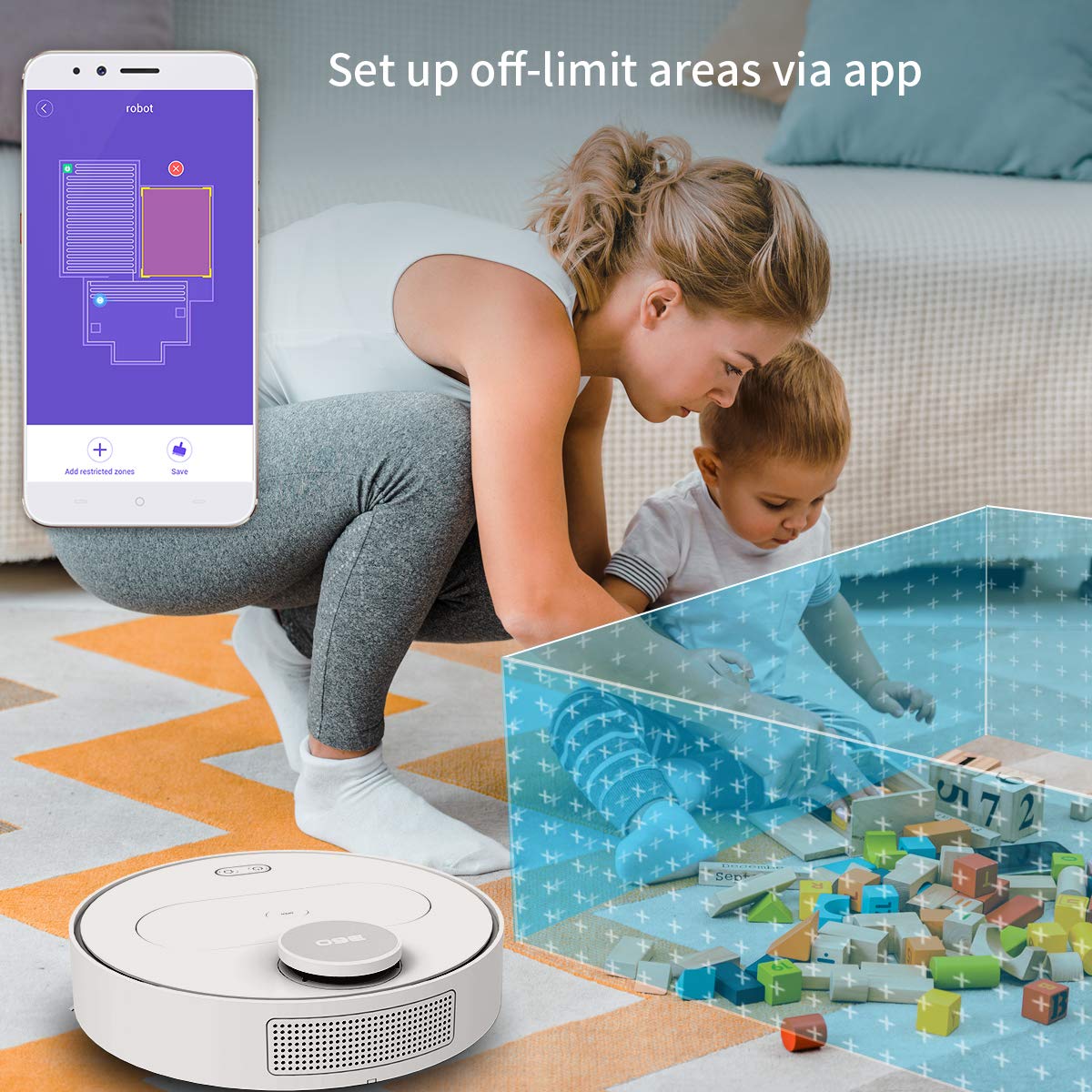
The 360 Robot app allows users to define and set up off-limit areas on the cleaning map, preventing the robot from entering specific zones.
- Multi-map Management: Save and manage multiple floor plans for different levels of your home.
- Off-limit Area: Draw virtual boundaries or no-go zones on the map to prevent the robot from entering specific areas.
- スケジュール: ロボットが自動的に掃除を開始する特定の時間を設定します。
- リモートコントロール: アプリを使用してロボットの動きを手動で制御します。
- トラッククリーニング: Monitor the robot's real-time cleaning path and progress on the map.
- 吸引レベル: Adjust suction power (Quiet, Normal, Powerful, Max) according to your cleaning needs.
Automatic Recharge and Breakpoint Resume
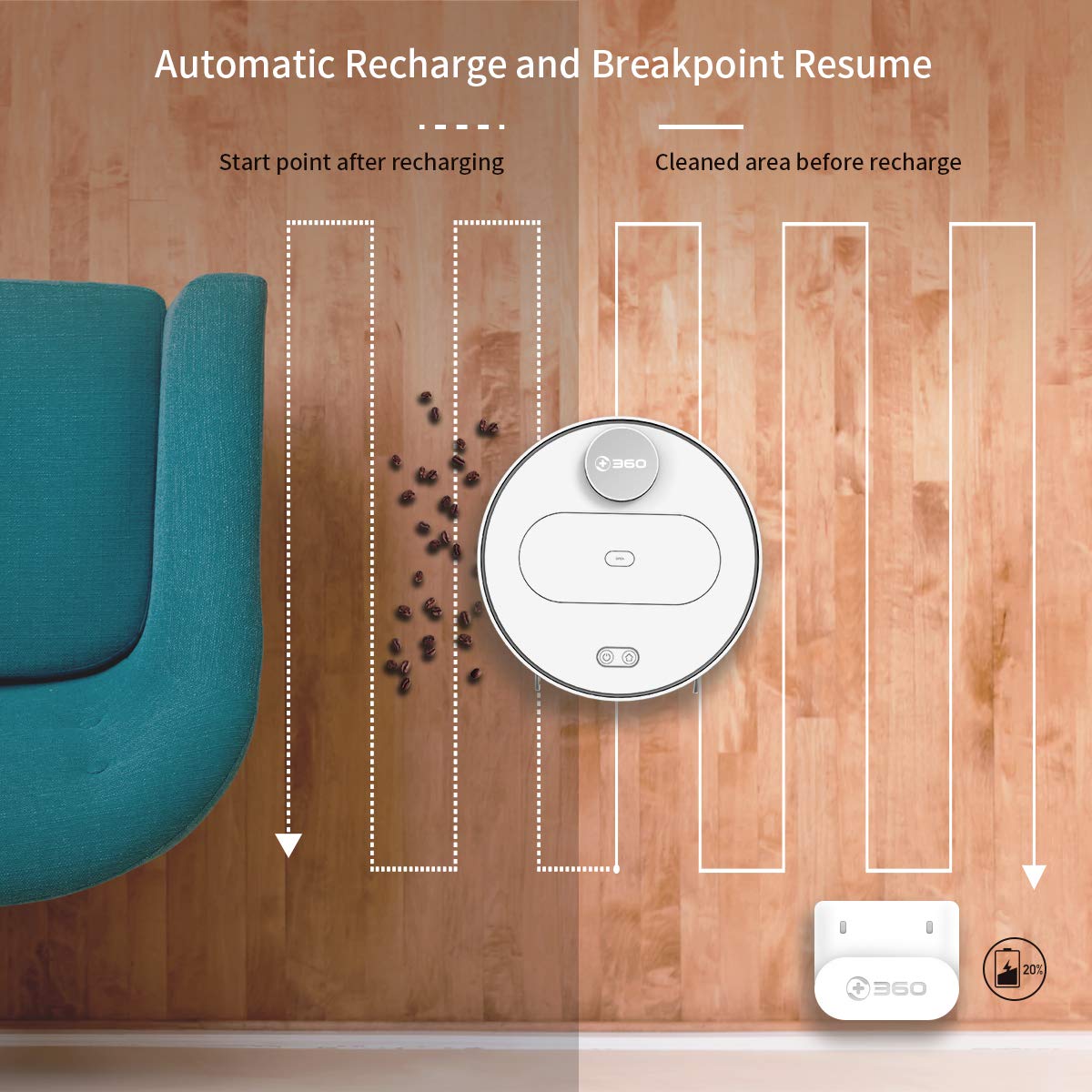
The robot automatically returns to its charging dock when the battery is low and resumes cleaning from the last uncleaned spot after recharging.
When the battery level is low during a cleaning cycle, the robot will automatically return to its charging dock. Once fully recharged, it will resume cleaning from where it left off, ensuring complete coverage of your home.
メンテナンス
ロボット掃除機の最適なパフォーマンスと寿命を延ばすには、定期的なメンテナンスが不可欠です。
1. ゴミ箱を空にする
- ロボットの上部カバーを開き、ゴミ箱を取り外します。
- ゴミ箱の蓋を開けて、中身をゴミ箱に捨てます。
- 各清掃サイクルの後にダストボックスを空にすることをお勧めします。
2.フィルターの清掃

The 360 Robot Vacuum features a washable HEPA filter, which helps maintain high filtration efficiency and contributes to cleaner indoor air.
- ゴミ箱からフィルターを取り出します。
- Tap the filter gently to remove loose dirt.
- Rinse the filter under running water. Ensure it is completely dry before reinserting it into the dustbin. Do not use a brush or other tools to clean the filter, as this may damage it.
- It is recommended to clean the filter weekly and replace it every 3-6 months, depending on usage.
3. 洗浄ブラシ
- メインブラシ: Remove the main brush cover and then the main brush. Use the provided cleaning tool to remove hair and debris tangled around the brush. Reinstall the brush and cover. Clean weekly.
- サイドブラシ: Check side brushes for tangled hair or debris. If necessary, remove them (they can be pulled off) and clean. Reinstall, ensuring they click into place. Replace if worn or damaged. Clean monthly.
4. センサーと充電接点のクリーニング
- Wipe the cliff sensors (on the bottom of the robot), wall sensor (on the side), and charging contacts (on the robot and charging dock) with a clean, dry cloth. This ensures proper navigation and charging. Clean monthly.
5. Water Tank and Mop Cloth Maintenance
- モップがけが終わったら、水タンクを取り外して残った水を捨ててください。
- Remove the mop cloth and wash it thoroughly. Allow it to air dry completely before reattaching or storing.
- Do not leave water in the tank when the robot is not in use for extended periods.
トラブルシューティング
| 問題 | 考えられる原因 | 解決 |
|---|---|---|
| ロボットが起動しません。 | バッテリー残量が少ないか、消耗しています。 | ロボットを充電ドックに置き、充電されていることを確認します。 |
| ロボットはWi-Fiに接続できません。 | Wi-Fi パスワードが正しくありません。ネットワークは 5GHz です。ロボットがルーターから遠すぎます。 | 2.4GHz Wi-Fiのパスワードが正しいことを確認してください。ロボットをルーターに近づけてください。ロボットとルーターを再起動してください。 |
| ロボットが頻繁に動けなくなります。 | Obstacles on the floor; narrow spaces. | Clear obstacles. Use the app to set off-limit areas for problematic zones. |
| 洗浄性能が悪い。 | ゴミ箱がいっぱい、フィルターが詰まっている、ブラシが絡まっている。 | ダストビンを空にしてください。フィルターを清掃または交換してください。メインブラシとサイドブラシを清掃してください。 |
| ロボットが充電ドックに戻りません。 | Charging dock obstructed; charging contacts dirty. | Ensure clear space around the dock. Clean charging contacts on both robot and dock. |
仕様
| 特徴 | 詳細 |
|---|---|
| ブランド | 360 |
| モデル名 | S6 |
| 特集 | Anti-Collision, Anti-Fall, Washable Filter |
| 色 | マルチカラー |
| フィルタータイプ | 布 |
| バッテリー寿命 | 110分 |
| 電源 | 電池駆動 |
| 制御方法 | アプリ |
| 対応デバイス | アレクサ |
| アイテム重量 | 3kg 490グラム |
| アイテムの寸法(LxWxH) | 35 x 35 x 10 センチメートル |
保証とサポート
For warranty information and technical support, please refer to the warranty card included in your product packaging or visit the official 360 SmartAI website. You can also contact customer service through the 360 Robot app for assistance.
追加のリソースとFAQについては、 Amazonの360ストア.


