導入
The CHACON 54008 Mechanical Outdoor Timer is designed to automate the operation of your electrical devices, particularly suitable for outdoor use due to its IP44 protection rating. This timer allows you to program specific on/off cycles, assisting in efficient power management. It features up to 48 on/off cycles per day, with a minimum interval of 15 minutes per cycle.
主な特徴:
- Up to 48 programmable on/off cycles daily.
- Minimum 15-minute switching interval.
- IP44 protection against humidity and splashing water, suitable for outdoor use.
- Maximum power capacity of 3500W.
- Childproof design.
製品終了view

画像の説明: フロント view of the CHACON 54008 Mechanical Outdoor Timer. The timer is black with a clear plastic cover over the dial. The dial shows numbers from 1 to 24, representing hours, and has small segments around its circumference for setting on/off times. The plug is visible at the top.
Familiarize yourself with the components of your CHACON 54008 timer:
- タイムダイヤル: The central rotating dial marked with hours (1-24).
- Programmable Segments (Sliders): Small, depressible segments around the time dial used to set ON/OFF periods. Each segment represents 15 minutes.
- 手動オーバーライド スイッチ: A switch located on the side of the timer to manually activate or deactivate the connected device, bypassing the programmed settings.
- 電源プラグ: For connecting the timer to a wall socket. Note: This model typically uses a Type E/F (Schuko) plug, common in many European countries. Ensure compatibility with your wall socket.
- 出力ソケット: For plugging in the device you wish to control.
セットアップと初期設定
- 現在の時刻を設定: Rotate the entire time dial clockwise until the current time aligns with the arrow indicator on the timer's face. The dial is marked from 1 to 24 hours.
- Program ON/OFF Cycles:
- Each small segment around the dial represents 15 minutes.
- To set a period when the device should be ON対応するセグメントを押します 下向き.
- To set a period when the device should be オフ対応するセグメントを 上向き 位置。
- You can program up to 48 ON/OFF cycles within a 24-hour period.
- 電源に接続: Plug the CHACON 54008 timer into a suitable wall socket. Ensure the socket is compatible with the timer's plug type (e.g., Type E/F).
- デバイスの接続: Plug the electrical device you wish to control into the output socket of the timer. Ensure the device's power consumption does not exceed 3500W.
- 動作モードを選択: Use the manual override switch on the side to select the desired mode:
- タイマーモード(時計アイコン): The timer will operate according to your programmed ON/OFF cycles.
- Always ON (I): 接続されたデバイスはタイマー設定をバイパスして継続的にオンのままになります。
- Always OFF (O): The connected device will remain continuously off, bypassing the timer settings.

画像の説明: The CHACON 54008 Mechanical Outdoor Timer is shown in a circular inset, superimposed over a blurred image of a garden path with outdoor lighting. This illustrates the timer's intended use for controlling outdoor electrical appliances.
操作手順
Once the timer is set up and the operating mode is selected to 'Timer Mode', it will automatically switch your connected device on and off according to your programmed schedule. The internal mechanism will continuously rotate the time dial, activating the switch when a depressed segment passes the indicator.
- 監視: Periodically check the timer to ensure it is functioning as expected, especially after power outages, as mechanical timers do not retain time during power loss.
- Adjusting Programs: To change the ON/OFF schedule, simply push the segments up or down as required.
- 手動オーバーライド: Use the side switch to temporarily turn the device ON or OFF without altering the programmed schedule. Remember to switch it back to 'Timer Mode' for automatic operation.
メンテナンス
- クリーニング: 清掃する前にタイマーをコンセントから外してください。外側は柔らかくて乾いた布で拭いてください。amp cloth. Do not use abrasive cleaners or immerse the timer in water.
- 環境保護: The timer has an IP44 rating, meaning it is protected against solid objects larger than 1mm and against splashing water from any direction. While suitable for outdoor use, avoid direct exposure to heavy rain or submersion.
- ストレージ: タイマーを長期間保管する場合は、清潔で乾燥した状態を保ってください。直射日光を避け、涼しく乾燥した場所に保管してください。
トラブルシューティング
| 問題 | 考えられる原因 | 解決 |
|---|---|---|
| Device does not turn ON/OFF as programmed. |
|
|
| Timer does not fit into wall socket. | Incompatible plug type. | The CHACON 54008 typically uses a Type E/F (Schuko) plug. Ensure your wall socket is compatible. Do not force the plug. Consult an electrician if unsure. |
| Device connected to timer is not working. |
|
|
仕様
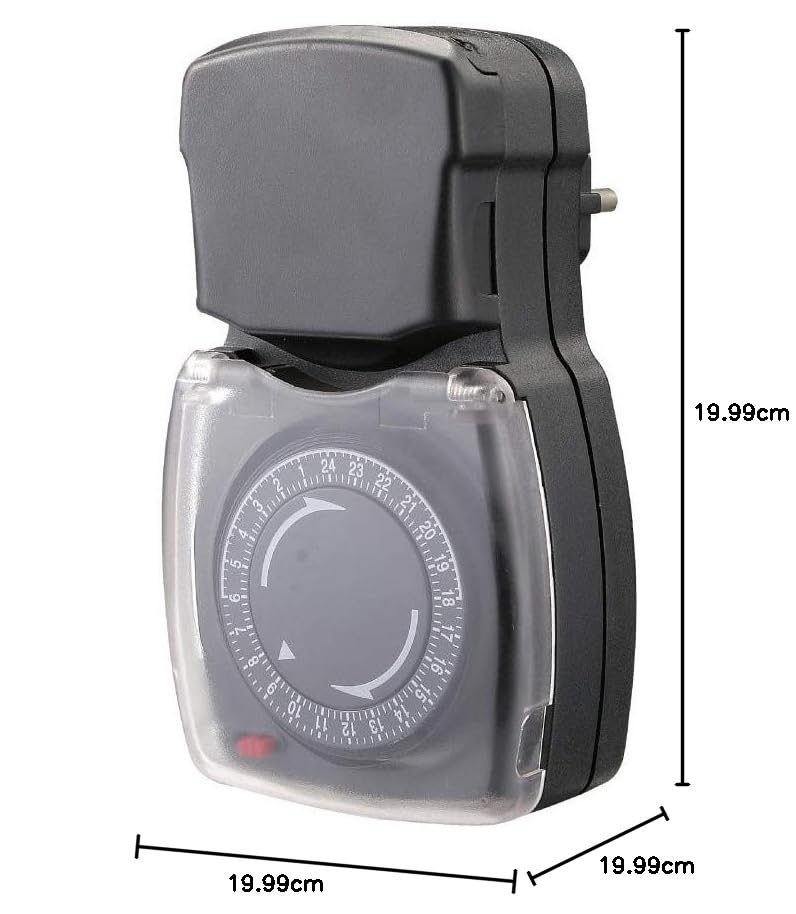
画像の説明: サイド view of the CHACON 54008 Mechanical Outdoor Timer with measurement lines indicating its approximate dimensions. The image shows the height and width of the device.
| 特徴 | 詳細 |
|---|---|
| モデル番号 | 54008 |
| ブランド | チャコン |
| タイプ | 機械式タイマー |
| 色 | 黒 |
| 材料 | プラスチック |
| 最大電力定格 | 3500W |
| Number of ON/OFF Cycles | 1日最大48回 |
| 最小スイッチング間隔 | 15 minutes |
| 保護の程度 | IP44(水しぶきに対して保護) |
| プラグタイプ | Type E/F (Schuko) |
| アイテム重量 | 0.2キログラム(200グラム) |
| 商品寸法(約) | 20 x 20 x 20 Centimeters (LxWxH) |
保証情報
This CHACON 54008 Mechanical Outdoor Timer comes with a 2年間保証 from the date of purchase. This warranty covers manufacturing defects under normal use. Please retain your proof of purchase for any warranty claims. The warranty does not cover damage resulting from misuse, unauthorized modifications, accidents, or improper installation.
サポート
For further assistance, technical support, or warranty inquiries regarding your CHACON 54008 Mechanical Outdoor Timer, please contact CHACON customer service through their official website or the retailer from whom you purchased the product. Please have your model number (54008) and proof of purchase ready when contacting support.


