導入
This manual provides comprehensive instructions for the setup, operation, maintenance, and troubleshooting of your Proscan CRK83X PSVR82 TV Remote Control. This remote is designed to work seamlessly with various Proscan TV and VCR models, offering a direct replacement or compatible control solution.
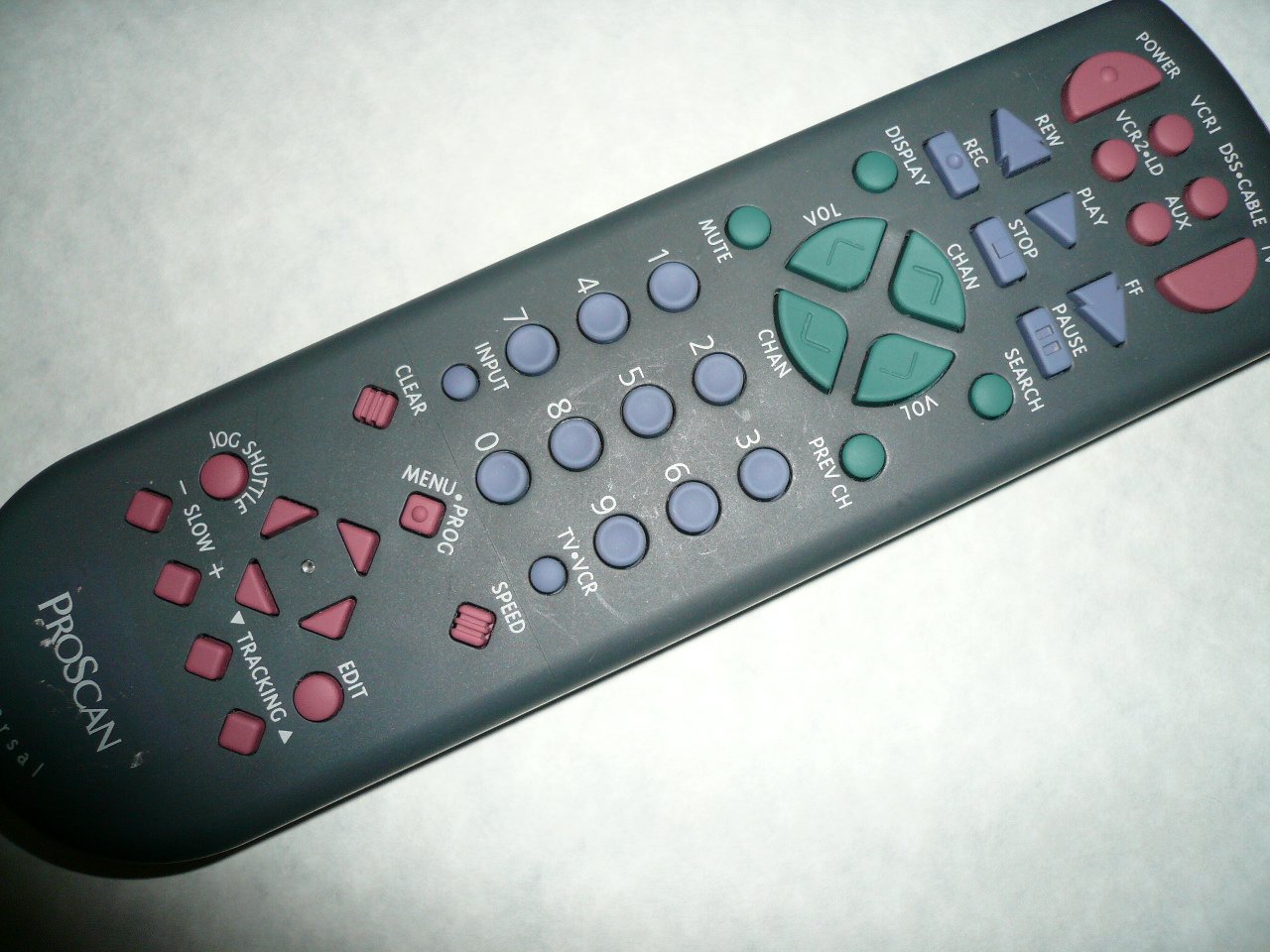
An image showing the Proscan CRK83X PSVR82 TV Remote Control, highlighting its ergonomic design and button layout. The remote is dark gray with purple and teal buttons, clearly labeled for various functions.
設定
1. バッテリーの取り付け
- リモコンの背面にある電池ボックスのカバーを見つけます。
- カバーを下方向にスライドするか、ラッチを押して開きます。
- Insert two (2) AAA batteries (not included), ensuring the positive (+) and negative (-) terminals align correctly with the markings inside the compartment.
- 電池ボックスのカバーを、カチッと音がするまで元の位置に戻してしっかりと閉めます。
2.初期使用
The Proscan CRK83X PSVR82 remote control is typically pre-programmed for compatible Proscan TV and VCR models. No complex programming steps are usually required for initial use with supported devices. Simply point the remote at your device and press the desired function button.
This remote is compatible with a wide range of models, including but not limited to: P5VR74, PAVR57, PCVR72, PRVR71, PSDR72, PSDR73, PSNKVSR72, PSNPSVR57, PSNPSVR65, PSNPSVR70, PSNPSVR71, PSNPSVR72, PSNPSVR73, PSNPSVR74, PSNPSVRR73, PSNR65, PSNVR74, PSRV65, PSRV71, PSRV72, PSRV74, PSRVR65, PSRVR71, PSUR70, PSUR72, PSV174, PSV65, PSV71, PSV72, PSVDR73, PSVER72, PSVH57, PSVP71, PSVR22, PSVR27, PSVR57, PSVR61, PSVR62, PSVR65, PSVR72L, PSVR72VCR, PSVR75, PSVR79, PSVR83, PSVT73, PSVV73, PSZR65, PSZR71, PSZR73, PVSR73, R65, RCU800, RSVR73, SPVR65, SSVR62, VR653HF, VR730, VR730HF.
操作手順
Familiarize yourself with the buttons and their functions for optimal control of your television and VCR.
| ボタン名 | 関数 |
|---|---|
| 力 | Turns the connected device (TV/VCR) on or off. |
| VCR1, DSS/CABLE, VCR2/LD, AUX | Selects the input source for the television or VCR. |
| ミュート | オーディオ出力をミュートまたはミュート解除します。 |
| ボリューム +/- | 音量レベルを上げたり下げたり調整します。 |
| チャン +/- | チャネルを上下に変更します。 |
| 前のチャンネル | 以前の viewedチャンネル。 |
| 画面 | チャンネル番号や時間などの画面情報を表示します。 |
| 記録 | Initiates recording on the VCR. |
| 戻る | Rewinds the tape during VCR playback. |
| 遊ぶ | Starts playback of a tape or disc. |
| FF | Fast forwards the tape during VCR playback. |
| 停止 | 再生または録音を停止します。 |
| 一時停止 | 再生または録音を一時停止します。 |
| 検索 | Activates search function, typically for VCR content. |
| テンキー(0-9) | Directly enters channel numbers or menu selections. |
| 入力 | 利用可能な入力ソースを切り替えます。 |
| クリア | Clears entered numbers or menu selections. |
| MENU / PROG | Accesses the on-screen menu or programming functions. |
| TV-VCR | Toggles control between TV and VCR modes. |
| ジョグシャトル | Provides frame-by-frame or variable speed control for VCR playback. |
| 遅い +/- | Adjusts slow-motion speed during VCR playback. |
| スピード | Adjusts playback speed, typically for VCR. |
| TRACKING ▲/▼ | Adjusts the VCR tracking for optimal picture quality. |
| 編集 | Activates editing functions, typically for VCR. |
メンテナンス
リモコンのクリーニング
- リモコンは柔らかく乾いた布で拭いてください。
- 頑固な汚れには、軽くamp布に水または低刺激性の非研磨性洗剤を含ませてください。リモコンに直接洗剤を吹きかけないでください。
- Avoid using harsh chemicals, solvents, or abrasive cleaning pads, as these can damage the remote's surface or internal components.
バッテリー交換
Replace batteries when the remote's response becomes sluggish or it stops functioning. Refer to the "Battery Installation" section under Setup for detailed instructions.
使用済みの電池は必ず地域の規制に従って責任を持って廃棄してください。
トラブルシューティング
| 問題 | 考えられる原因 / 解決策 |
|---|---|
| リモコンが動作しません。 |
|
| リモコンは断続的に動作します。 |
|
| 特定のボタンが反応しません。 |
|
仕様
- ブランド: プロスキャン
- モデル: CRK83X PSVR82
- メーカー: プロスキャン
- 対応デバイス: Television (and various Proscan VCR models as listed in Setup section)
- 接続技術: 赤外線
- コントローラタイプ: ボタンコントロール
- 特集: 人間工学に基づいたデザイン
- ASIN: B00P82T2LS
- 発売日: 4年2014月XNUMX日
保証とサポート
Specific warranty information for the Proscan CRK83X PSVR82 TV Remote Control is not provided in this manual. Please refer to the product packaging or contact your retailer for details regarding warranty coverage.
For further assistance or technical support, please contact the manufacturer or your point of purchase. No specific support contact details are available in this document.


