1. הקדמה
This manual provides comprehensive instructions for the SHANLING EC Zero Portable CD Player. Please read this manual thoroughly before using the device to ensure proper operation and to maximize its performance and longevity. The EC Zero is a high-fidelity portable CD player designed for audiophiles, featuring advanced audio components and versatile connectivity options.
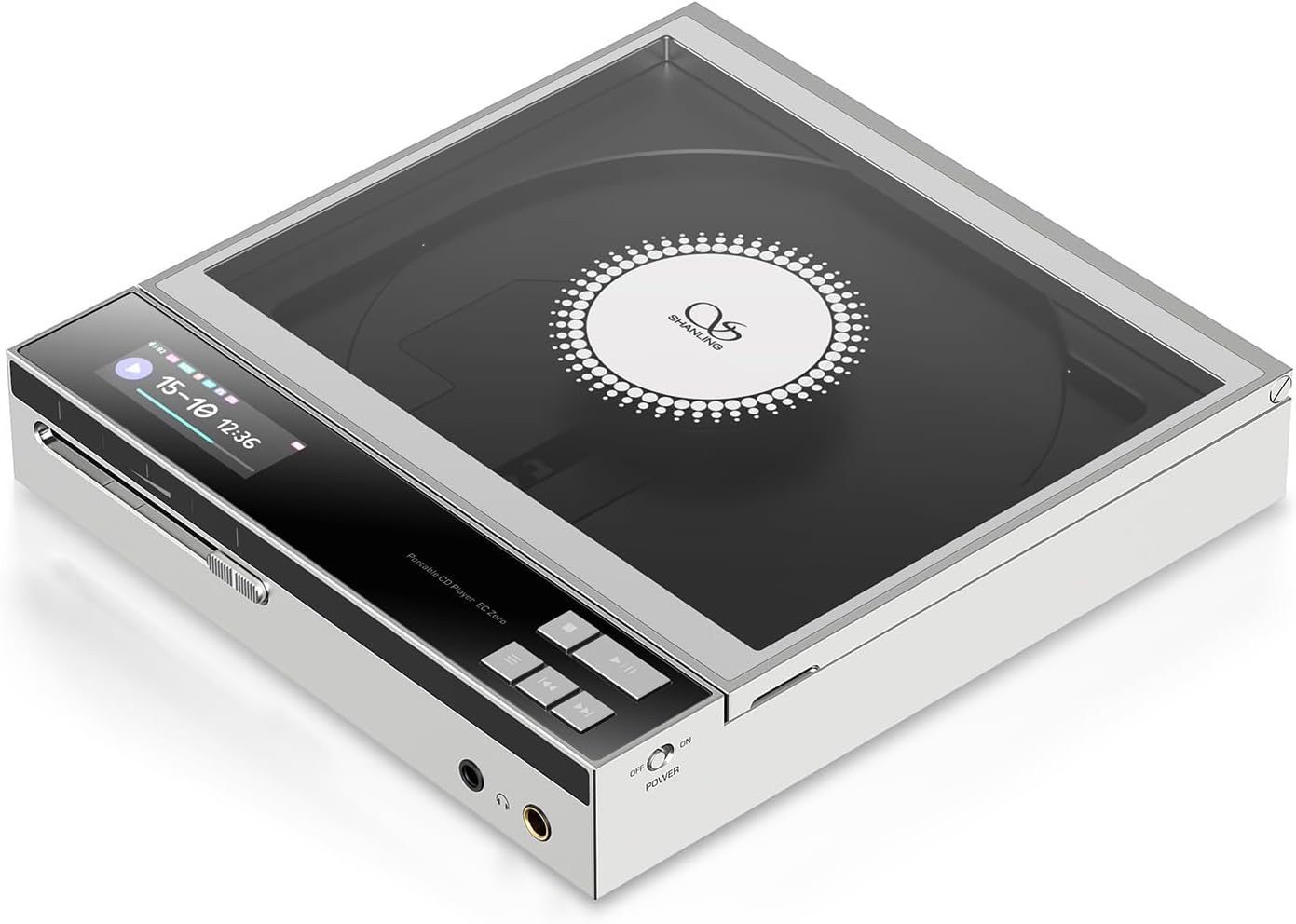
Image 1.1: The SHANLING EC Zero Portable CD Player, showcasing its sleek design and transparent CD cover.
2. תכולת החבילה
ודא שכל הפריטים המפורטים להלן נמצאים באריזת המוצר שלך:
- 1x SHANLING EC Zero CD Player
3. המכשיר נגמרview
Familiarize yourself with the various components and controls of your EC Zero CD Player.
3.1 לוח קדמי ובקרות
תמונה 3.1: חזית view of the SHANLING EC Zero, highlighting the display and playback controls.
- מסך תצוגה: Shows track information, playback status, battery level, and settings.
- בקרות השמעה: Play/Pause, Skip Forward, Skip Backward buttons for CD playback.
- מחוון עוצמת הקול: Analog potentiometer for precise volume adjustment.
- פלט אוזניות 3.5 מ"מ: שקע אוזניות סטנדרטי.
- יציאת אוזניות מאוזנת 4.4 מ"מ: For balanced headphones, offering higher power output.
- מתג הפעלה: On/Off toggle.
3.2 פאנל אחורי ויציאות

Image 3.2: Rear panel of the SHANLING EC Zero, showing connectivity options.
- יציאת קו: 3.5mm analog line output for connecting to external ampמחצבים או רמקולים.
- SPDIF OUT: Coaxial/Optical digital output for connecting to external DACs or receivers.
- USB DAC: USB-C port for using the EC Zero as an external DAC for a computer or other digital source.
- USB/DC IN: USB-C port for charging and external DC power input.
- P MODE (Playback Mode Switch): Selects between battery power and external DC power mode.
- EXT DC: Indicator for external DC power.
4. התקנה
4.1 טעינת הסוללה
The EC Zero is equipped with a built-in 5500mAh battery. Before first use, fully charge the device.
- Connect the provided USB-C cable to the "USB/DC IN" port on the rear of the EC Zero.
- Connect the other end of the USB-C cable to a compatible USB power adapter (5V/2A recommended, not included).
- התצוגה תציג את מצב הטעינה. טעינה מלאה אורכת בדרך כלל מספר שעות.
- להשגת תקינות סוללה אופטימלית, הימנעו מריקון מלא של הסוללה לעתים קרובות.
4.2 הפעלה/כיבוי
- כדי להפעיל: Slide the "POWER" switch to the "ON" position. The display will illuminate.
- כדי לכבות: Slide the "POWER" switch to the "OFF" position. The display will turn off.
4.3 הכנסת תקליטור

Image 4.1: Demonstrating the process of inserting a CD into the player.
- Gently open the transparent top cover of the CD player.
- Place a standard audio CD onto the spindle, ensuring it is centered and lies flat.
- סגור את המכסה העליון בחוזקה עד שייכנס למקומו בנקישה.
- The player will read the disc, and track information will appear on the display.
פֶּתֶק: Ensure the CD is clean and free of scratches or smudges for optimal playback.
4.4 חיבור התקני שמע
- אוזניות: Connect your headphones to either the 3.5mm or 4.4mm output jack on the front panel.
- חִיצוֹנִי Amplifier/Speakers (Line Out): Use a 3.5mm to RCA or 3.5mm to 3.5mm cable to connect the "LINE OUT" port to your ampקלט של המפיץ.
- External DAC (SPDIF Out): Use a coaxial or optical cable to connect the "SPDIF OUT" port to your external DAC's digital input.
5. הוראות הפעלה
5.1 השמעת תקליטורים
- הכנס תקליטור כמתואר בסעיף 4.3.
- הקש על הפעל/השהה כפתור להפעלת השמעה.
- הקש על הפעל/השהה לחצן שוב כדי להשהות את ההשמעה.
- השתמש ב- דלג קדימה ו דלג אחורה כפתורים לניווט בין רצועות.
- Adjust the volume using the sliding potentiometer on the front panel.
5.2 קישוריות בלוטות'
The EC Zero supports Bluetooth 5.3 for wireless audio transmission to compatible headphones or speakers.
- Ensure the EC Zero is powered on.
- Access the Bluetooth settings on the EC Zero (refer to the on-screen menu if available, or long-press a specific button if indicated in a full manual).
- Enable Bluetooth pairing mode on the EC Zero.
- On your Bluetooth headphones or speaker, enable pairing mode.
- Select "SHANLING EC Zero" from the list of available devices on your receiving device.
- Once connected, audio from the EC Zero will be transmitted wirelessly.
Supported codecs include aptX Adaptive, aptX, and SBC.
מצב 5.3 USB DAC
The EC Zero can function as an external USB Digital-to-Analog Converter (DAC) for your computer or other compatible devices, supporting up to 768kHz/32bit PCM and DSD512.
- Connect the EC Zero to your computer using a USB-C to USB-A/C cable via the "USB DAC" port.
- The computer should automatically recognize the EC Zero as an audio output device.
- Select "SHANLING EC Zero" as the audio output device in your computer's sound settings.
- Play audio from your computer, and it will be processed and outputted by the EC Zero.
5.4 פונקציית קריעת תקליטורים
The EC Zero allows you to rip audio tracks from your CDs to a USB storage device in WAV format.
- Insert a CD into the EC Zero.
- Connect a USB storage device (formatted to FAT32) to the "USB DAC" port.
- Navigate to the CD Ripping function in the EC Zero's menu (specific steps may vary, refer to on-screen prompts).
- Select the tracks you wish to rip or choose to rip the entire CD.
- Initiate the ripping process. The display will show progress.
- Once complete, safely remove the USB storage device.
פֶּתֶק: Ripping speed is 1x. Ensure the USB drive is formatted to FAT32 for compatibility.
5.5 External DC Power Mode
For extended listening sessions or to achieve maximum output power, connect the EC Zero to an external DC power source.
- Connect a USB-C power adapter (5V/2A recommended) to the "USB/DC IN" port.
- Slide the "P MODE" switch on the rear panel to the "EXT DC" position.
- The "EXT DC" indicator light will illuminate, confirming the device is operating on external power.
6. תחזוקה
6.1 ניקוי
- נגבו את החלק החיצוני של המכשיר בעזרת מטלית רכה, יבשה ונטולת סיבים.
- אין להשתמש בחומרי ניקוי שוחקים, ממסים או כימיקלים חזקים.
- Keep the CD compartment clean and free of dust. Use a soft brush or compressed air if necessary.
6.2 טיפול בסוללה
- כדי להאריך את חיי הסוללה, הימנעו מטמפרטורות קיצוניות.
- אם מאחסנים את המכשיר לתקופה ממושכת, יש לטעון אותו לכ-50% כל כמה חודשים.
- Do not attempt to replace the internal battery yourself. Contact authorized service personnel.
6.3 אחסון
Store the EC Zero in a cool, dry place away from direct sunlight, excessive heat, and moisture. Keep it away from strong magnetic fields.
7. פתרון תקלות
| בְּעָיָה | סיבה אפשרית | פִּתָרוֹן |
|---|---|---|
| המכשיר לא נדלק. | הסוללה התרוקנה. מתג ההפעלה כבוי. | טען את הסוללה. ודא שמתג ההפעלה נמצא במצב "ON". |
| הדיסק לא מתנגן או מדלג. | CD is dirty or scratched. CD is not inserted correctly. | Clean the CD with a soft cloth. Re-insert the CD, ensuring it is flat and centered. |
| אין פלט קול. | Volume is too low. Headphones/speakers not connected properly. Incorrect output mode selected. | Increase volume. Check headphone/speaker connections. Verify correct output (e.g., 3.5mm, 4.4mm, Line Out, Bluetooth). |
| התאמת Bluetooth נכשלה. | Device is not in pairing mode. Receiving device is too far or not in pairing mode. | Ensure both devices are in pairing mode and within range. Restart both devices and try again. |
| CD Ripping fails. | USB drive not formatted to FAT32. USB drive full. | Ensure USB drive is FAT32. Check available space on USB drive. |
If the problem persists after attempting these solutions, please contact SHANLING customer support.
8. מפרטים
| תכונה | פְּרָט |
|---|---|
| מידות | 158 x 150 x 28 מ"מ |
| מִשׁקָל | 575 גרם (2.16 פאונד) |
| לְהַצִיג | תצוגת LCD בגודל 1.68 אינץ' |
| שבב DAC | AKM AK4493S |
| תמיכה ב-USB DAC | 768kHz/32bit, DSD512 |
| כניסת חשמל חיצונית | USB-C 5V / 2A |
| העתקת CD | 1x speed, to FAT32 USB Drive, WAV format |
| פלט דיגיטלי | 3.5mm Combined Coaxial / Optical SPDIF |
| גרסת בלוטות' | V5.3 |
| Bluetooth Transmitter Codecs | aptX Adaptive, aptX, SBC |
| יציאת אוזניות 3.5 מ"מ | Low Gain: 52mW@32Ω, High Gain: 122mW@32Ω (213mW@32Ω External Power) |
| יציאת אוזניות 4.4 מ"מ | Low Gain: 211mW@32Ω, High Gain: 525mW@32Ω (836mW@32Ω External Power) |
| סוֹלְלָה | סוללת ליתיום-יון 5500mAh (כלולה) |
| Playback Time (3.5mm/4.4mm) | עד 10 שעות |
| Playback Time (Bluetooth) | עד 18 שעות |
| Signal-to-Noise Ratio (CD Play) | 117dB |
| Dynamic Range (CD Play) | 119dB |
| THD+N (CD Play) | 0.0004% |
9. אחריות ותמיכה
מוצרי SHANLING מכוסים על ידי אחריות מוגבלת. לתנאי האחריות הספציפיים, אנא עיינו בכרטיס האחריות המצורף למוצר שלכם או בקרו באתר הרשמי של SHANLING. webאֲתַר.
For technical support, troubleshooting assistance, or service inquiries, please contact SHANLING customer support through their official webאתר או מרכזי שירות מורשים. שמור את קבלת הרכישה כהוכחת קנייה לתביעות אחריות.
שאנלינג הרשמי Webאֲתַר: www.shanling.com


