מָבוֹא
Thank you for choosing the iTOMA 515 Alarm Clock. This device combines an alarm clock with an FM radio, a dimmable LED display, and dual alarm functionality, designed for convenience and reliability. This manual provides detailed instructions for setup, operation, and maintenance to ensure optimal performance.
תוכן החבילה
- 1 x iTOMA 515 Alarm Clock
- 1 x מדריך למשתמש
הערה: מתאם חשמל אינו כלול ויש לרכוש אותו בנפרד.
המוצר נגמרview
Familiarize yourself with the main components and controls of your iTOMA 515 Alarm Clock.
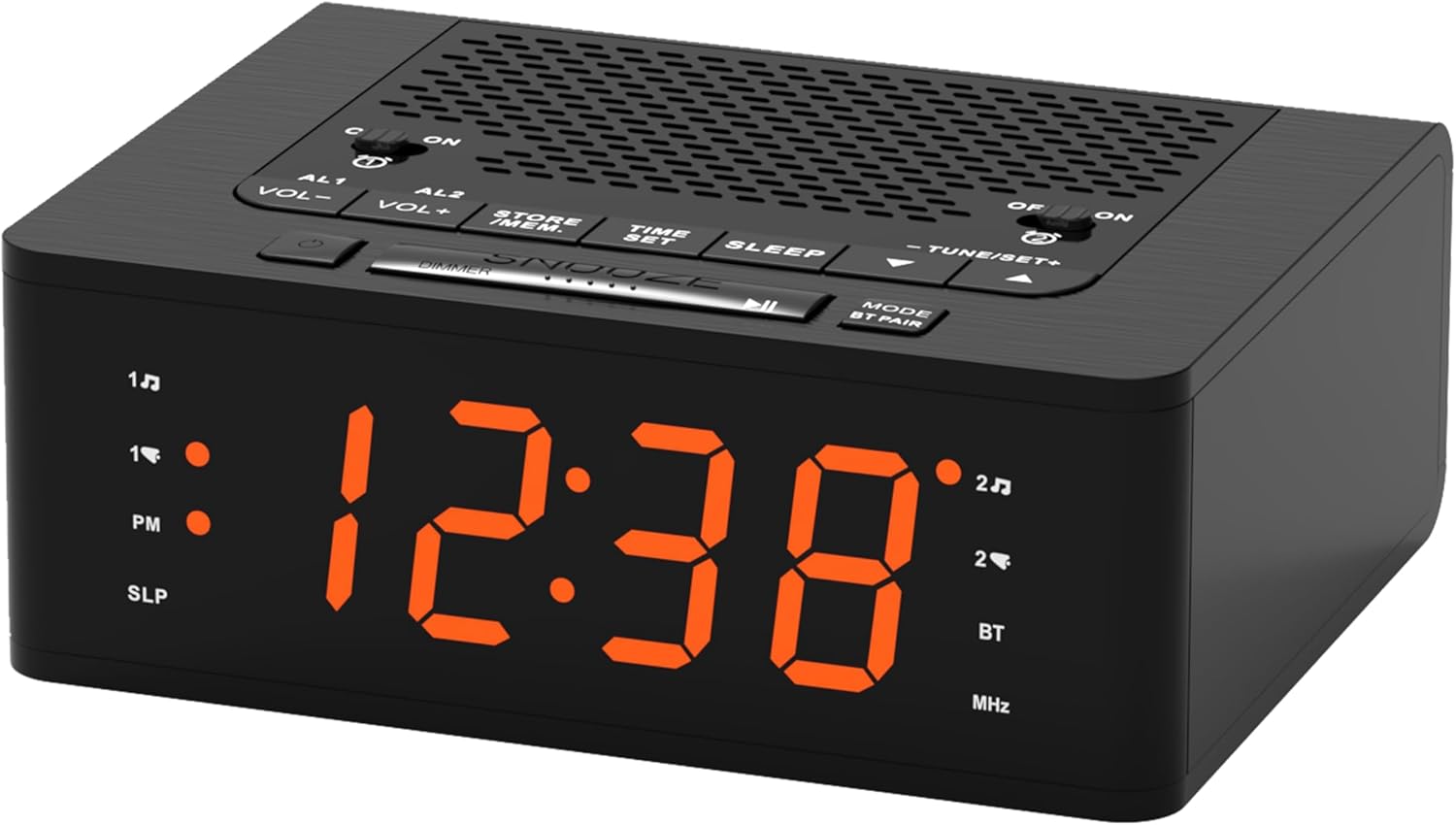
תְמוּנָה: חֲזִית view of the iTOMA 515 Alarm Clock, showcasing the orange LED display and top-mounted control buttons.

תְמוּנָה: רֹאשׁ view of the alarm clock, highlighting the various control buttons for volume, alarm settings, time, sleep, and tuning.
לחצני שליטה:
- AL1 / AL2: Alarm 1 / Alarm 2 setting buttons.
- VOL+ / VOL-: מתאים את עוצמת הקול.
- STORE / MEM: Saves and recalls FM radio presets.
- זמן מוגדר: נכנס למצב הגדרת זמן.
- לִישׁוֹן: Activates sleep timer for FM radio.
- TUNE+ / TUNE-: Adjusts FM radio frequency.
- נודניק / עמעום: Snoozes alarm; adjusts display brightness.
- MODE / BT PAIR: Switches between modes (FM, Bluetooth); initiates Bluetooth pairing.
- ON / OFF (for AL1/AL2): Toggles alarms on or off.
הגדרה
1. חיבור חשמל
- Connect a compatible DC 5V power adapter (not included) to the DC IN port on the back of the alarm clock.
- חבר את המתאם לשקע חשמל סטנדרטי בקיר. התצוגה תידלק.
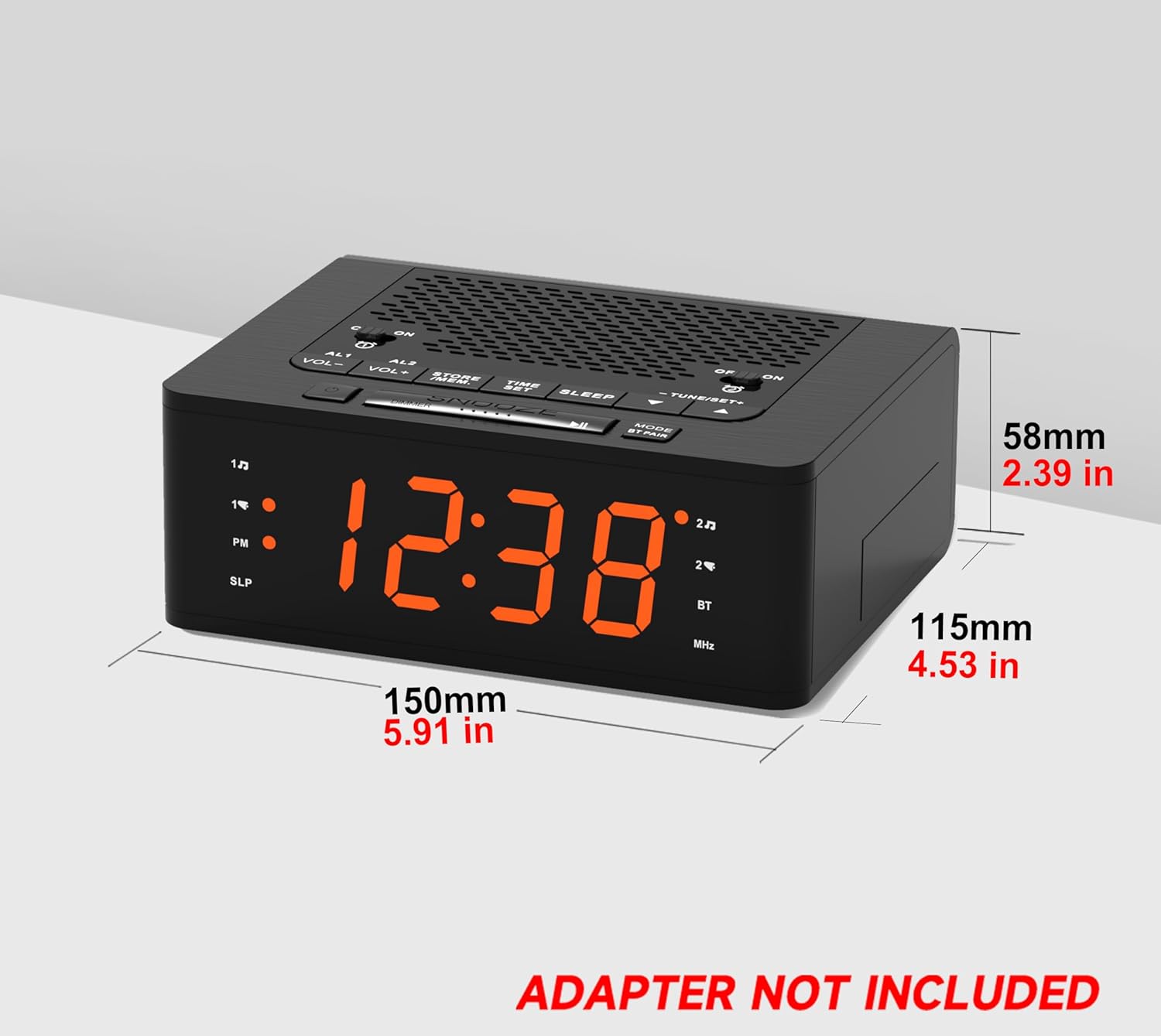
תְמוּנָה: צַד view of the iTOMA 515 Alarm Clock with dimensions indicated, and a clear note stating "ADAPTER NOT INCLUDED".
2. הגדרת זמן ראשונית
- לחץ והחזק את זמן מוגדר עד שספרות השעות יתחילו להבהב.
- השתמש ב- TUNE+ or מנגינה- כפתורים כדי לכוון את השעה. שימו לב למחוון PM אם אתם משתמשים בפורמט של 12 שעות.
- לִלְחוֹץ זמן מוגדר again to confirm the hour and move to minute adjustment.
- השתמש ב- TUNE+ or מנגינה- כפתורים לכוונון הדקות.
- לִלְחוֹץ זמן מוגדר once more to confirm the minutes and exit time setting mode.
3. 12/24 Hour Format Selection
While the time is flashing during setup, press the MODE כפתור כדי לעבור בין פורמט תצוגה של 12 שעות ל-24 שעות.
הוראות הפעלה
1. Display Brightness Control (Dimmer)
The iTOMA 515 features a 4-level dimmable LED display.
- הקש על נודניק / דימר button repeatedly to cycle through the brightness levels: Level 3 (brightest), Level 2, Level 1, and OFF.
- Select the brightness level that suits your preference for optimal visibility without disturbance.

תְמוּנָה: The alarm clock display transitioning through four brightness levels (L3, L2, L1, OFF) to illustrate the dimmer function.
2. Setting Alarms (AL1 & AL2)
The clock supports two independent alarms. You can set the alarm time, sound source (buzzer or FM radio), and alarm week mode.
- לחץ והחזק את המקש AL1 or AL2 עד שספרות שעות האזעקה יהבהבו.
- השתמש ב- TUNE+ or מנגינה- לחצנים לכוונון שעת האזעקה.
- לחץ על המקביל AL1 or AL2 לחיצה נוספת על הכפתור תתבצע כדי לאשר את השעה ולעבור לכוונון הדקות.
- השתמש ב- TUNE+ or מנגינה- כפתורים כדי לכוונן את דקות השעון המעורר.
- הקש על AL1 or AL2 button again to select the alarm sound source: זַמזָם or רדיו FM.
- הקש על AL1 or AL2 button again to select the alarm week mode: d1-7 (every day), d1-5 (weekdays only), or d6-7 (weekends only).
- הקש על AL1 or AL2 button one last time to save the settings and exit.

תְמוּנָה: The alarm clock display with indicators for two separate alarms, showing AM 7:00 (Wake Up Time) and PM 7:00 (Coffee Time) as examples.
3. Turning Alarms ON/OFF
To activate or deactivate an alarm, use the dedicated הפעלה/כיבוי buttons located on the top panel for AL1 and AL2.
4. פונקציית נודניק
כאשר נשמעת אזעקה, לחצו על הכפתור הגדול נִמנוּם button on the top of the clock to temporarily silence the alarm for an additional 9 minutes of sleep. The alarm will sound again after this period.

תְמוּנָה: A hand reaching to press the large SNOOZE button on the top of the alarm clock, indicating its function for an extra 9 minutes of sleep.
5. תפעול רדיו FM
The iTOMA 515 features an FM radio with 20 preset stations and adjustable volume.
- הקש על MODE button to switch to FM radio mode. The frequency will appear on the display.
- סריקה אוטומטית: לחץ והחזק את TUNE+ or מנגינה- כפתור כדי לסרוק אוטומטית את התחנה הזמינה הבאה.
- כוונון ידני: לחץ לחיצה קצרה על TUNE+ or מנגינה- button to manually adjust the frequency in small increments.
- התאם את עוצמת הקול: השתמש ב- VOL+ or כרך- buttons to adjust the radio volume (16 levels).
- שמור הגדרות קבועות מראש: To save a station, tune to your desired frequency, then press and hold the STORE / MEM עד שמספר מוגדר מראש יהבהב. השתמשו בלחצן TUNE+ or מנגינה- to select the preset number (P01-P20), then press STORE / MEM שוב כדי לשמור.
- אחזור הגדרות קבועות מראש: במצב FM, לחצו לחיצה קצרה על STORE / MEM button to cycle through your saved preset stations.

תְמוּנָה: The alarm clock displaying an FM radio frequency (87.5 MHz), with icons indicating sleep timer, presets, and volume levels.
6. FM Radio Sleep Timer
טיימר השינה מאפשר לך להירדם לצלילי הרדיו, אשר יכבה אוטומטית לאחר משך זמן מוגדר.
- While the FM radio is playing, press the לִישׁוֹן button repeatedly to cycle through the sleep timer options (e.g., 90, 80, 70... 10 minutes, OFF).
- הרדיו יתנגן למשך הזמן שנבחר ולאחר מכן יכבה אוטומטית.
7. זיווג Bluetooth
The iTOMA 515 supports Bluetooth connectivity for audio streaming.
- הקש על MODE / BT PAIR button to switch to Bluetooth mode. The display will show "BT" and flash, indicating it's in pairing mode.
- במכשיר הנייד שלך, הפעל את Bluetooth וחפש מכשירים זמינים.
- Select "iTOMA 515" from the list of devices to pair.
- Once paired, the "BT" indicator on the clock will stop flashing and remain solid. You can now stream audio from your device to the alarm clock.
תְמוּנָה: The iTOMA 515 Alarm Clock positioned next to a smartphone, illustrating its capability to play music via Bluetooth connection.
תַחזוּקָה
To ensure the longevity and proper functioning of your iTOMA 515 Alarm Clock, follow these simple maintenance guidelines:
- ניקוי: Use a soft, dry cloth to wipe the exterior of the clock. Avoid using abrasive cleaners, waxes, or solvents as they may damage the finish.
- מיקום: הנח את השעון על משטח יציב ושטוח, הרחק מאור שמש ישיר, מקורות חום ולחות מוגזמת.
- אוורור: ודאו שפתחי האוורור בחלק העליון ובצדדי היחידה אינם חסומים כדי למנוע התחממות יתר.
- ניתוק חשמל: If the clock will not be used for an extended period, unplug it from the power outlet.
פתרון בעיות
If you encounter issues with your iTOMA 515 Alarm Clock, refer to the following common problems and solutions:
| בְּעָיָה | סיבה אפשרית | פִּתָרוֹן |
|---|---|---|
| תצוגת השעון כבויה או לא פועלת. | אין חיבור לחשמל או מתאם פגום. | Ensure the power adapter is securely plugged into the clock and a working wall outlet. Verify the adapter is functional. |
| לא ניתן להגדיר זמן או שעון מעורר. | Incorrect button sequence or not in setting mode. | לחץ והחזק את זמן מוגדר or respective אַזעָקָה button until digits flash. Follow the instructions carefully. |
| קליטת רדיו FM גרועה. | אות חלש או הפרעות. | Adjust the position of the clock. Extend the FM antenna fully if available (not explicitly mentioned but common for radios). Try scanning for stations again. |
| האזעקה לא נשמעת. | Alarm is off or volume is too low. | Ensure the alarm's הפעלה/כיבוי button is set to ON. Check the alarm volume setting. |
| Cannot switch off military time (24-hour format). | Incorrect setting during time adjustment. | During time setting (when hour digits flash), press the MODE כפתור כדי לעבור בין פורמטים של 12 שעות ל-24 שעות. |
| לא ניתן לבצע התאמה בין מכשירי בלוטות'. | Clock not in pairing mode or device too far. | Ensure the clock is in Bluetooth pairing mode (BT flashing). Move your device closer to the clock. Try restarting both devices. |
מפרטים
- מותג: iTOMA
- דֶגֶם: 515
- סוג תצוגה: LED (כתום)
- בהירות תצוגה: 4 levels (L3, L2, L1, OFF)
- מקור כוח: Mains powered (DC 5V adapter, not included)
- מידות המוצר: 15 ס"מ (אורך) x 11.5 ס"מ (רוחב) x 5.8 ס"מ (גובה) / 5.91 אינץ' (אורך) x 4.53 אינץ' (רוחב) x 2.39 אינץ' (גובה)
- משקל פריט: 420 גרם
- תדר רדיו FM: 87.5 - 108 מגהרץ
- קביעות קבועות מראש של FM: עד 20 תחנות
- עוצמת רדיו: 16 רמות מתכווננות
- טיימר שינה: 10-90 דקות
- סוגי אזעקות: Buzzer, FM Radio
- Alarm Week Modes: Every day (d1-7), Weekdays (d1-5), Weekends (d6-7)
- קישוריות: בלוטות'
מידע על אחריות
iTOMA products are manufactured to high-quality standards. For specific warranty details, please refer to the warranty card included with your purchase or contact iTOMA customer support. Keep your purchase receipt as proof of purchase for any warranty claims.
תְמִיכָה
For further assistance, technical support, or inquiries regarding your iTOMA 515 Alarm Clock, please visit the official iTOMA webבאתר או צרו קשר עם מחלקת שירות הלקוחות שלהם. פרטי התקשרות ניתן למצוא בדרך כלל על אריזת המוצר או בנוכחות המקוונת הרשמית של המותג.


