מָבוֹא
This manual provides essential information for the proper setup, operation, and maintenance of your ProLite B2280HS-1 LED Monitor. Please read this manual thoroughly before using the product to ensure safe and efficient operation. Keep this manual for future reference.
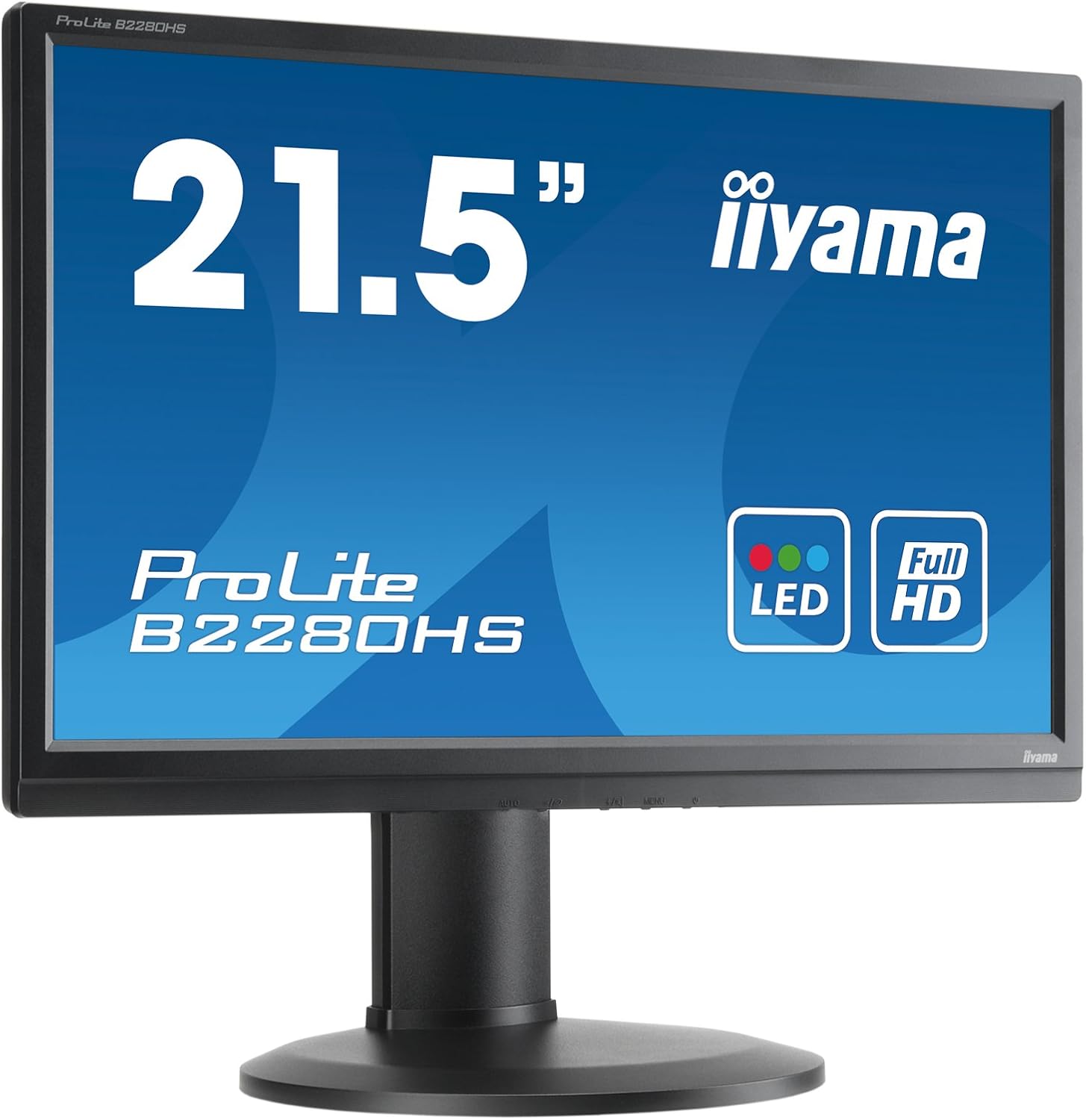
איור 1: חזית view of the ProLite B2280HS-1 LED Monitor.
מידע בטיחות
- ודא שהמסך ממוקם על משטח יציב ומאוזן כדי למנוע נפילות מקריות.
- אין לחסום פתחי אוורור. זרימת אוויר תקינה חיונית למניעת התחממות יתר.
- Use only the power cord supplied with the monitor or a suitable replacement.
- הימנעו מחשיפת הצג ללחות או לטמפרטורות קיצוניות.
- אל תנסה לטפל בצג בעצמך. יש לפנות לאנשי שירות מוסמכים בכל הנוגע לטיפול.
- נתק את תקע החשמל משקע הקיר אם הצג לא יהיה בשימוש למשך תקופה ארוכה.
תוכן החבילה
ודא שכל הפריטים נמצאים בחבילה:
- ProLite B2280HS-1 LED Monitor
- כבל חשמל
- DVI-D Cable (as noted in customer reviews, may be included)
- כבל שמע (אם רלוונטי)
- מדריך למשתמש (מסמך זה)
- מדריך להתחלה מהירה
הגדרה
1. הרכבת המעמד
- הוציאו בזהירות את רכיבי הצג והמעמד מהאריזה.
- חברו את בסיס המעמד לצוואר המעמד, תוך אבטחתו באמצעות הבורג המצורף (אם רלוונטי).
- יישר את המעמד המורכב עם חורי ההרכבה בגב הצג.
- Secure the stand to the monitor using the screws or locking mechanism.

איור 2: אחורי view of the monitor with stand assembly.
2. חיבור הצג
The ProLite B2280HS-1 monitor supports multiple input types:
- HDMI: חבר כבל HDMI מיציאת ה-HDMI של המחשב לכניסת ה-HDMI של הצג.
- DVI-D: Connect a DVI-D cable from your computer's DVI-D output to the monitor's DVI-D input.
- VGA: חבר כבל VGA מיציאת ה-VGA של המחשב לכניסת ה-VGA של הצג.
- שֶׁמַע: If using an analog audio source, connect an audio cable from your computer's audio output to the monitor's audio input.
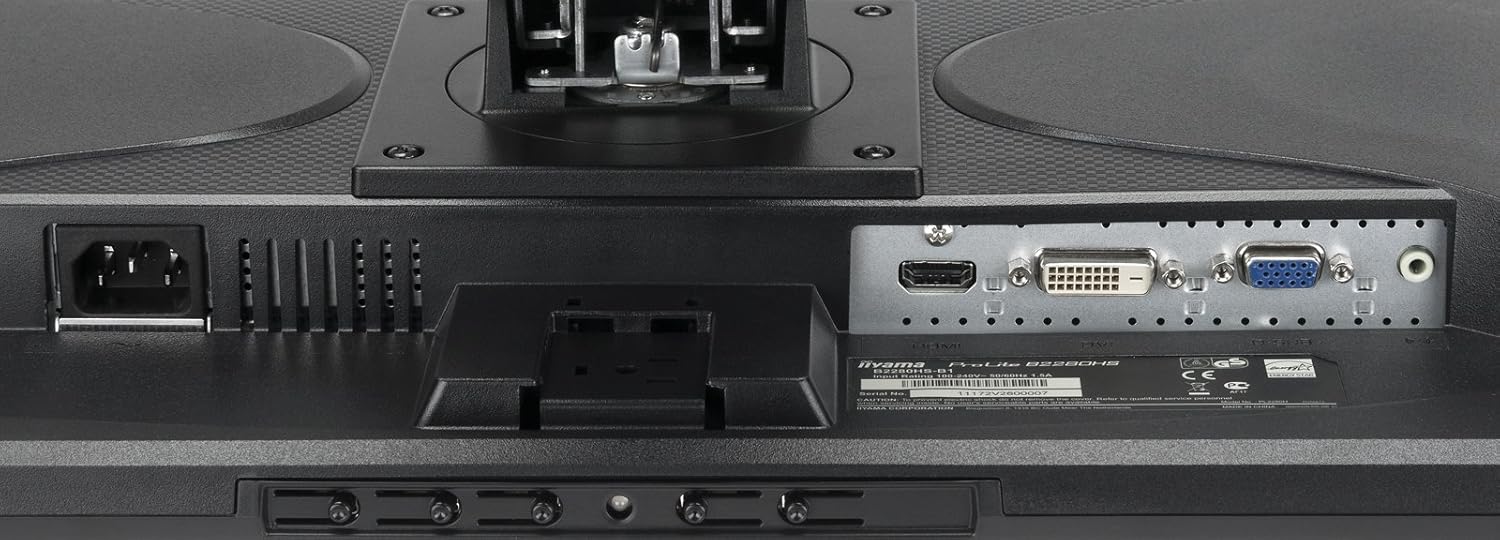
Figure 3: Available input ports on the monitor.
After connecting the video cable, connect the power cable to the monitor and then to a wall outlet.
פועל
הפעלה/כיבוי
לחץ על לחצן ההפעלה הממוקם בחזית או בתחתית הצג כדי להפעיל או לכבות אותו. נורית חיווי ההפעלה תידלק כאשר הצג דולק.

Figure 4: Location of control buttons.
התאמת הגדרות תצוגה
Use the OSD (On-Screen Display) menu to adjust various display settings. The OSD menu is typically accessed via buttons on the monitor's bezel.
- ניגוד בהירות: כוונן את הבהירות והניגודיות הכוללת של התצוגה.
- הגדרות צבע: שנה את טמפרטורת הצבע, רמות ה-RGB או בחר מצבי צבע מוגדרים מראש.
- בחירת קלט: Manually switch between HDMI, DVI-D, or VGA inputs.
- מצב תמונה: Select from various picture modes optimized for different content (e.g., Standard, Game, Movie).
- יחס גובה-רוחב: Adjust the display's aspect ratio (e.g., 16:9, 4:3).
התאמות ארגונומיות
The ProLite B2280HS-1 features a highly adjustable stand for optimal viewנוחות:
- התאמת גובה: הרם או הנמך את הצג לגובה העיניים.
- הטיה: Adjust the screen's vertical angle to reduce glare.
- לְהִסְתוֹבֵב: סובב את הצג אופקית על בסיסו.
- ציר (מצב דיוקן): סובב את המסך ב-90 מעלות למצב לאורך viewשימושי למסמכים או web דִפדוּף.


Figure 5: Monitor in portrait mode (left) and side view showing stand adjustability (right).
תַחזוּקָה
ניקוי הצג
- תמיד נתקו את הצג משקע החשמל לפני ניקויו.
- השתמש במטלית רכה נטולת מוך מעט דampנשטפו במים או בחומר ניקוי מסכים שאינו שוחק.
- אין לרסס חומר ניקוי ישירות על המסך.
- הימנעו משימוש בכימיקלים חזקים, רפידות שוחקות או ממסים.
אִחסוּן
אם מאחסנים את הצג לתקופה ממושכת, נתק את כל הכבלים ואחסן אותו במקום קריר ויבש, רצוי באריזתו המקורית כדי להגן עליו מפני אבק ונזקים פיזיים.
פתרון בעיות
| בְּעָיָה | סיבה אפשרית | פִּתָרוֹן |
|---|---|---|
| אין תמונה על המסך | Power cable not connected; Video cable not connected; Incorrect input selected. | Check power and video cable connections; Press the 'Input Select' button to cycle through inputs. |
| התמונה מטושטשת או מעוותת | Incorrect resolution; Loose video cable; Graphics card driver issue. | Set display resolution to 1920 x 1080; Ensure video cable is securely connected; Update graphics drivers. |
| אין צליל מרמקולי הצג (אם רלוונטי) | Audio cable not connected; Volume too low; Monitor not selected as default audio device. | Connect audio cable; Increase monitor volume via OSD; Set monitor as default audio output in OS settings. |
| הבהוב של המסך | אי התאמה בקצב רענון; הפרעה. | Adjust refresh rate in display settings; Ensure no strong electromagnetic devices are nearby. |
מפרטים
| תכונה | פְּרָט |
|---|---|
| מספר דגם | B2280HS-B1 |
| גודל מסך | 21.5 אינץ' (54.61 ס"מ) |
| הַחְלָטָה | 1920 x 1080 (Full HD) |
| יחס גובה-רוחב | 16:9 |
| בהירות תמונה | 250 תקליטורים/מ"ר |
| זמן תגובה | 5ms |
| יחס ניגודיות | 1000:1 |
| יציאות קלט | VGA, DVI-D (HDCP), HDMI |
| יציאות USB | 1 |
| מידות המוצר (L x W x H) | 9.63 x 20.06 x 15.47 אינץ' |
| משקל פריט | 11.22 פאונד |
| יַצרָן | IIYAMA |
| תאריך ראשון זמין | 8 באוגוסט 2012 |
אחריות ותמיכה
למידע על אחריות ותמיכה טכנית, אנא עיינו בכתובת הרשמית website of the manufacturer, IIYAMA, or contact their customer service department. Details regarding warranty periods and service procedures are typically provided with your purchase documentation or on the manufacturer's support pages.
Please have your model number (B2280HS-B1) and serial number ready when contacting support.


