1. Introduzione
This manual provides essential information for setting up, operating, and maintaining your OPPO Reno15 5G smartphone. Please read this guide thoroughly to ensure optimal performance and longevity of your device. The OPPO Reno15 5G combines advanced technology with elegant design, offering a sophisticated smartphone experience.
2. Cosa c'è nella scatola
Upon unboxing your OPPO Reno15 5G, verify that all the following items are included:
- Smartphone OPPO Reno15 5G
- Adattatore di alimentazione (SuperVOOC 80W)
- Cavo USB (tipo C)
- Custodia per telefono
- Espulsore del vassoio SIM
- Guida rapida (questo documento)
Descrizione del video: An unboxing video demonstrating the contents of the OPPO Reno15 5G retail package, including the phone, charger, USB cable, protective case, and SIM ejector tool.
3. Dispositivo suview
Familiarize yourself with the physical components of your OPPO Reno15 5G.

Descrizione dell'immagine: Davanti view of the OPPO Reno15 5G smartphone, showcasinil suo display e la fotocamera frontale.

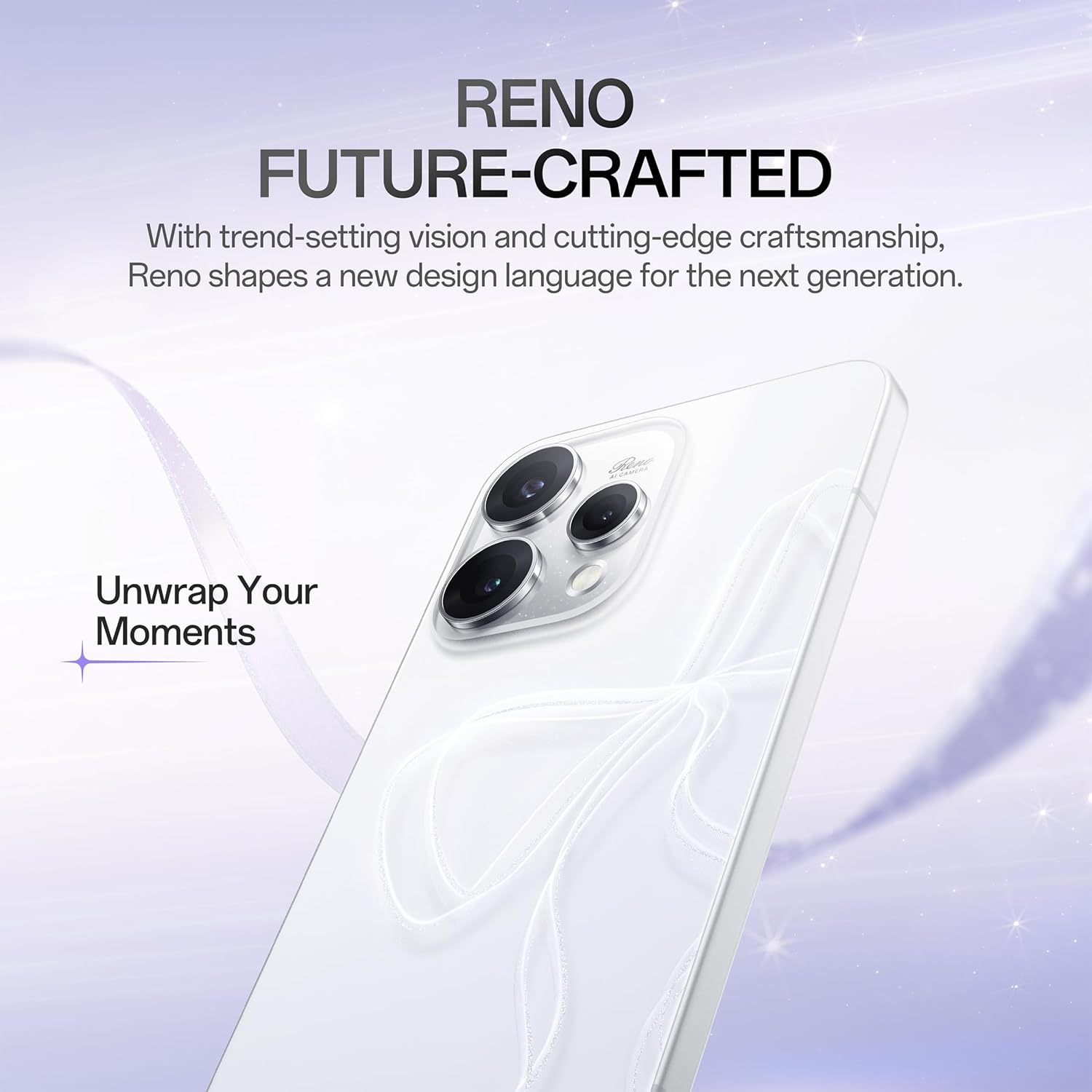
Descrizione dell'immagine: Indietro view of the OPPO Reno15 5G smartphone, highlighting the camera module and the OPPO logo.
Descrizione dell'immagine: Lato view of the OPPO Reno15 5G smartphone, showing the power and volume buttons, and the SIM card slot.
4. Configurazione iniziale
4.1 Inserimento della scheda SIM
- Individua il vassoio della scheda SIM sul lato del dispositivo.
- Inserire lo strumento di espulsione della SIM nel piccolo foro accanto al vassoio e premere delicatamente finché il vassoio non fuoriesce.
- Place your Nano-SIM card(s) onto the tray with the gold contacts facing down. Ensure proper orientation.
- Spingere con cautela il vassoio nella fessura finché non scatta in posizione.
4.2 Accensione/Spegnimento
- Per accendere: Tenere premuto il pulsante di accensione (situato sul lato destro) finché non viene visualizzato il logo OPPO.
- Per spegnere: Tieni premuto il pulsante di accensione, quindi tocca "Spegni" sullo schermo.
- Ricominciare: Tieni premuto il pulsante di accensione, quindi tocca "Riavvia" sullo schermo.
5. Caratteristiche principali
5.1 design
The OPPO Reno15 5G features a stunning Dancing Aurora Design with a shaped glass back that displays flowing light patterns. It incorporates Glacier Glow Glass e un Aerospace-grade Aluminum Frame for a premium and artistic look.

Descrizione dell'immagine: Close-up of the OPPO Reno15 5G's back panel, highlighting the intricate Glacier Glow Glass design and the 'Reno AI Camera' branding.
5.2 Sistema di telecamere
Capture exceptional photos and videos with the advanced triple-camera system:
- Fotocamera principale da 50 MP: Features optical image stabilization (OIS) to reduce blur from handshakes, ensuring clear portraits and landscapes.
- Teleobiettivo da 50 MP: Offers 3.5x optical zoom for detailed shots without quality loss.
- Ultra-Wide Selfie Camera: Allows you to fit more into your self-portraits.
- Ottimizzazione dell'IA: Smart AI recognizes subjects (people, food, sunset) and automatically enhances colors, details, and lighting.
- 4K 60fps HDR Ultra-Steady Video: Record smooth, high-quality videos with enhanced dynamic range.

Descrizione dell'immagine: Comparison shots demonstrating the 3.5x telephoto portrait camera capability of the OPPO Reno15 5G, showing a subject at 1x and 3.5x zoom.

Descrizione dell'immagine: Comparison shots illustrating the wide-angle capability of the 50MP Ultra Wide Selfie Camera on the OPPO Reno15 5G, showing a subject at 1x and 0.6x zoom.

Descrizione dell'immagine: A visual representation of the OPPO Reno15 5G recording 4K 60fps HDR Ultra-Steady Video, emphasizing its cinematic quality.
Descrizione del video: A short demonstration of the 'Popout Click. Arrange. Popout.' camera feature, showing how to create dynamic visual content.
5.3 Visualizzazione
Enjoy a large Schermo da 6.59 pollici progettato per viewing comfort with clear and bright visuals. The Frequenza di aggiornamento 120Hz ensures incredibly fluid and fast scrolling, web browsing, and gaming experiences.
5.4 Prestazioni
The Reno15 5G is powered by the efficient Piattaforma mobile Snapdragon 7 Gen 4, providing reliable speed for everyday applications, social media, entertainment, and casual gaming. With 8 GB di RAM, it handles multiple tasks smoothly while optimizing battery power. It also features AI LinkBoost 3.0 per una connettività migliorata.

Descrizione dell'immagine: An illustration highlighting the Snapdragon 7 Gen 4 Mobile Platform, emphasizing its 4nm chip manufacturing process, CPU improvement, GPU boost, and NPU increase for smooth high-FPS gaming.

Descrizione dell'immagine: Visual representation of AI LinkBoost 3.0 features, including AI Super Wi-Fi Booster, AI Gaming Antenna System Acceleration, and AI Network Booster for Teamfights, ensuring fluid and decisive connectivity.
5.5 Batteria e ricarica
Un grande Batteria da 6500 mAh ensures extended usage for work and entertainment. When the battery is low, Carica flash SuperVOOC da 80 W quickly replenishes power, minimizing downtime.

Descrizione dell'immagine: An infographic detailing the 6500mAh large battery and 80W SUPERVOOC Flash Charge, showing usage times like 2.42 days of typical use, 50 minutes for 1-100% charge, and 5.8 hours of video streaming from a 10-minute charge.
5.6 Software (ColorOS 16)
The OPPO Reno15 5G runs on ColoreOS 16, offering a smooth, smart, and secure user experience. It features the All-New Trinity Engine, powered by OPPO's self-developed AI All-Scenario Scheduler, which delivers smoothness tailored to your habits. The Luminous Rendering Engine ensures every interaction feels alive and frames flow effortlessly. Additionally, AI Mind Space acts as your second brain, always in sync.

Descrizione dell'immagine: A graphic introducing the All-New Trinity Engine within ColorOS 16, emphasizing its AI All-Scenario Scheduler for personalized smoothness.

Descrizione dell'immagine: Screenshots of the OPPO Reno15 5G's interface, demonstrating the smooth and responsive experience provided by the All-New Luminous Rendering Engine in ColorOS 16.

Descrizione dell'immagine: A visual depicting the AI Mind Space feature on the OPPO Reno15 5G, showing various AI-powered suggestions and information cards for travel, communication, and daily tasks.
6. Utilizzo del dispositivo
6.1 Navigazione di base
- Schermata iniziale: Scorri verso sinistra o verso destra per accedere alle diverse schermate iniziali.
- Cassetto delle applicazioni: Scorri verso l'alto dalla parte inferiore dello schermo per aprire il cassetto delle app.
- Applicazioni recenti: Scorri verso l'alto e tieni premuto dalla parte inferiore dello schermo per view applicazioni utilizzate di recente.
- Indietro: Swipe inward from the left or right edge of the screen to go back.
6.2 Notifiche e impostazioni rapide
- Notifiche: Scorri verso il basso dalla parte superiore dello schermo a view notifiche.
- Impostazioni rapide: Swipe down again to access quick settings toggles for Wi-Fi, Bluetooth, brightness, etc.
6.3 Volume and Sound
- Use the Volume Up/Down buttons on the left side of the device to adjust media volume.
- Access sound settings in the Settings app to customize ringtones, notification sounds, and vibration patterns.
7. Manutenzione e cura
- Pulizia: Utilizzare un panno morbido e privo di lanugine per pulire lo schermo e il corpo del telefono. Evitare prodotti chimici aggressivi.
- Aggiornamenti software: Controlla regolarmente e installa gli aggiornamenti software per assicurarti che il tuo dispositivo abbia le ultime funzionalità e patch di sicurezza. Vai a Settings > System & update > Software update.
- Gestione della memoria: Cancellare periodicamente ciò che non è necessario filee app per mantenere prestazioni ottimali.
- Evitare condizioni estreme: Do not expose your phone to extreme temperatures, direct sunlight for prolonged periods, or excessive moisture.
8. Risoluzione Dei Problemi
- Il dispositivo non risponde: If your device becomes unresponsive, press and hold the Power button for about 10 seconds to force a restart.
- La batteria si scarica rapidamente: Controlla l'utilizzo delle app in background in Impostazioni> BatteriaRidurre la luminosità dello schermo e disattivare le funzioni non necessarie come il GPS o il Bluetooth quando non vengono utilizzate.
- Problemi di rete: Try restarting your device or toggling Airplane Mode on and off. Ensure your SIM card is correctly inserted.
- Arresti anomali dell'app: Cancella la cache e i dati dell'app problematica in Impostazioni > App > [Nome app] > ArchiviazioneSe il problema persiste, reinstalla l'app.
9. Specifiche
Detailed technical specifications for the OPPO Reno15 5G (Model: CPH2825).
| Caratteristica | Specificazione |
|---|---|
| OS | Android 15 (ColorOS 16) |
| Dimensioni del prodotto | Dimensioni: 15.8 x 7.5 x 0.7 cm |
| Peso dell'articolo | 197 grammi |
| Numero modello articolo | CPH2825 |
| Tecnologie di connettività | Bluetooth, USB, Wi-Fi (5G Capable) |
| Fattore di forma | Ardesia |
| Colore | Glacier White (other variants available) |
| Potenza nominale della batteria | 6500 mAh |
| Dimensione della memoria RAM installata | 8 GB |
| Capacità di archiviazione della memoria | 256 GB |
| Dimensioni dello schermo | 6.59 pollici |
| Processore | Piattaforma mobile Snapdragon 7 Gen 4 |
| Fotocamera principale | 50MP (with OIS) + 50MP (Telephoto) |
| Fotocamera frontale | 50MP Ultra Wide Selfie Camera |
| Ricarica | Carica flash SuperVOOC da 80 W |
10. Garanzia e supporto
Your OPPO Reno15 5G comes with a standard manufacturer's warranty. For detailed warranty terms and conditions, please refer to the warranty card included in your product packaging or visit the official OPPO website. For technical support, service, or further assistance, please contact OPPO customer service or visit an authorized service center.


