1. Introduzione
Thank you for choosing the HUAYU KL RM-L1710 Universal LCD LED TV Remote Control. This remote is designed to provide seamless control over various LCD and LED televisions, featuring dedicated buttons for popular streaming services. This manual will guide you through the setup, operation, and maintenance of your new remote control.
2. Importanti istruzioni di sicurezza
- Non mischiare batterie vecchie e nuove.
- Non mischiare batterie alcaline, standard (zinco-carbone) o ricaricabili (nichel-cadmio).
- Always remove exhausted batteries promptly to prevent leakage and damage.
- Smaltire le batterie usate secondo le normative locali.
- Tenere il telecomando lontano dalla luce solare diretta, da fonti di calore e dall'umidità.
- Non tentare di smontare o modificare il telecomando.
3. Contenuto della confezione
- 1 x HUAYU KL RM-L1710 Universal LCD LED TV Remote Control
- 1 x Manuale utente (questo documento)
4. Remote Control Button Layout
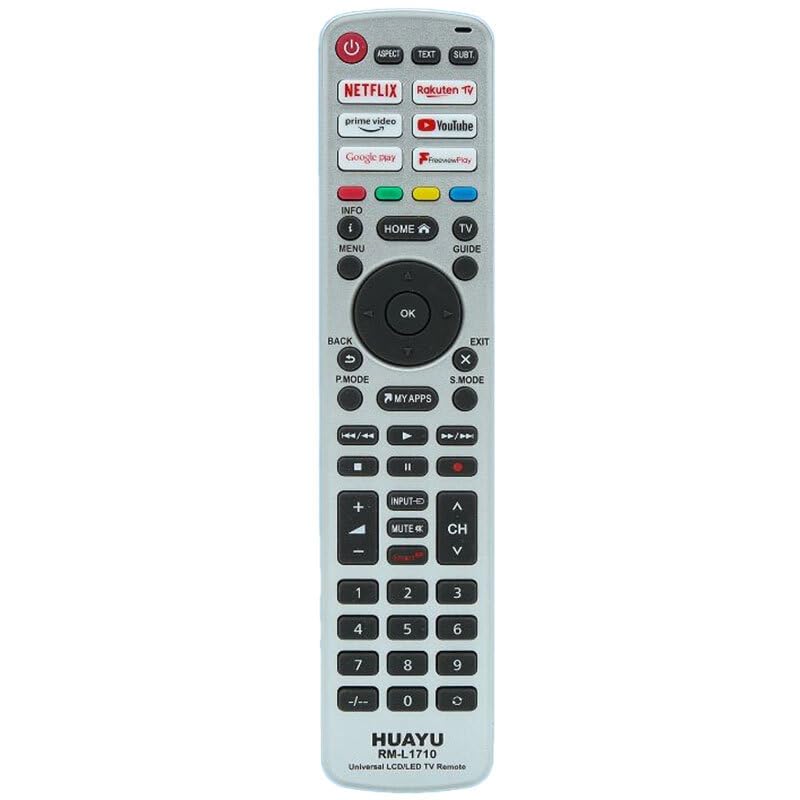
This image displays the full layout of the HUAYU RM-L1710 remote control. It is a silver-colored remote with black buttons. At the top are the power button, aspect ratio, text, and subtitle buttons. Below these are dedicated app buttons for Netflix, Rakuten TV, Prime Video, YouTube, Google Play, and FreeviewPlay. The central navigation cluster includes Home, Info, Menu, TV Guide, and a directional pad with an OK button. Below this are Back, Exit, P.Mode, S.Mode, and My Apps buttons. Media playback controls (rewind, play, fast forward, stop, pause, record) are located next. Further down are volume and channel controls, input, and mute buttons. The bottom section features a numeric keypad from 0-9, along with a dash button. The brand 'HUAYU' and model 'RM-L1710 Universal LCD/LED TV Remote' are printed at the very bottom.
Funzioni dei pulsanti:
- POTENZA (pulsante rosso): Accende o spegne la TV.
- ASPETTO: Modifica le proporzioni dello schermo.
- TESTO: Attiva o disattiva il televideo.
- SOTTO: Attiva o disattiva i sottotitoli.
- NETFLIX, Rakuten TV, prime video, YouTube, Google play, FreeviewGiocare: Pulsanti di accesso diretto per le rispettive applicazioni di streaming.
- INFORMAZIONI (i): Visualizza le informazioni sullo schermo.
- HOME (House icon): Ritorna alla schermata principale del televisore o allo smart hub.
- GUIDA TV: Apre la guida elettronica dei programmi.
- MENU: Accede al menu principale del televisore.
- Tasti direzionali (su, giù, sinistra, destra): Naviga attraverso i menu e le opzioni.
- OK: Conferma le selezioni.
- BACK (U-turn arrow): Ritorna alla schermata o al menu precedente.
- USCITA (X): Esce dal menu o dall'applicazione corrente.
- MODO P.: Cambia le modalità immagine.
- S.MODO: Cambia le modalità audio.
- LE MIE APP: Accesses the TV's applications list.
- Media Playback Controls (Rewind, Play, Fast Forward, Stop, Pause, Record): Controlla la riproduzione multimediale.
- INPUT (Arrow into box): Seleziona le sorgenti di ingresso (HDMI, AV, ecc.).
- MUTE (Speaker with cross): Disattiva o riattiva l'audio della TV.
- VOLUME (+/-): Regola il livello del volume.
- CH (Up/Down arrows): Cambia canale TV.
- Numeric Keypad (0-9, -/--): Enters channel numbers or other numerical data.
5. Configurazione iniziale
5.1 Installazione delle batterie
- Aprire il coperchio del vano batterie sul retro del telecomando.
- Inserire due batterie AAA (non incluse), assicurandosi che i terminali positivo (+) e negativo (-) corrispondano alle marcature all'interno del vano.
- Chiudere saldamente il coperchio del vano batterie.
5.2 Programmazione del telecomando
As a universal remote, the RM-L1710 may require programming to operate your specific TV model. There are typically two methods for programming universal remotes:
Method 1: Auto Search
- Assicurati che la TV sia accesa.
- Press and hold the 'SET' button (if available, or a combination like 'POWER' + 'SET' for 3 seconds) until the indicator light stays on.
- Point the remote at your TV and repeatedly press the 'POWER' button (or 'CH+' button) until your TV turns off or changes channel.
- Once the TV responds, immediately press the 'SET' or 'OK' button to save the code. The indicator light should turn off.
- Test all functions of the remote. If some functions do not work, repeat the auto-search process to find a more compatible code.
Method 2: Code Entry
- Locate the brand code for your TV from the code list provided with the remote (if applicable). Note: A code list is not provided with this manual. Please refer to the packaging or manufacturer's website for specific codes.
- Accendi la TV.
- Press and hold the 'SET' button (or a similar programming button) until the indicator light stays on.
- Enter the 3 or 4-digit code for your TV brand using the numeric keypad.
- If the code is valid, the indicator light will turn off.
- Test the remote's functions. If it does not work, try another code for your TV brand.
6. Utilizzo del telecomando
6.1 Funzioni TV di base
- Premere ENERGIA to turn your TV on or off.
- Utilizzo volume +/- per regolare il volume dell'audio.
- Utilizzo CH Su/Giù to change channels sequentially.
- Premere MUTE to temporarily silence the TV.
- Premere INGRESSO to cycle through available input sources (e.g., HDMI 1, AV, Component).
6.2 Funzioni Smart TV e App
The remote features dedicated buttons for quick access to popular streaming services:
- Premere Netflix to launch the Netflix application.
- Premere video principale to launch the Amazon Prime Video application.
- Premere YouTube to launch the YouTube application.
- Premere TV Rakuten to launch the Rakuten TV application.
- Premere Giocare a Google to launch the Google Play Store or Google Play Movies & TV.
- Premere GratuitoviewGiocare to access the Freeview Play platform (if supported by your TV).
- Premere LE MIE APP A view all installed applications on your TV.
6.3 Navigazione e controlli del menu
- Utilizzare il Pad direzionale (Up, Down, Left, Right arrows) to move the cursor or highlight items in menus.
- Premere OK to confirm a selection or open a highlighted item.
- Premere MENU to open the TV's main settings menu.
- Premere CASA to return to the TV's main home screen or smart hub.
- Premere INDIETRO to go back to the previous screen or menu.
- Premere EXIT to close the current menu or application.
- Premere INFORMAZIONI to display information about the current program or input.
- Premere GUIDA TV to access the electronic program guide.
6.4 Controlli di riproduzione multimediale
These buttons control media playback in compatible applications or when viewing content from connected devices:
- Giocare: Avvia la riproduzione.
- Pausa: Sospende la riproduzione.
- Stop: Interrompe la riproduzione.
- Rewind (Double left arrow): Riavvolge i contenuti multimediali.
- Fast Forward (Double right arrow): Avanzamento rapido dei media.
- Skip Back (Double left arrow with line): Passa alla traccia/capitolo precedente.
- Skip Forward (Double right arrow with line): Passa alla traccia/capitolo successivo.
- Record (Red dot): Initiates recording (if supported by your TV and connected storage).
6.5 Tastierino numerico
- Use numbers 0-9 per immettere direttamente i numeri dei canali.
- IL -/-- button is used for entering two-digit channel numbers or other specific functions.
7. Cura e manutenzione
- Clean the remote control with a soft, dry cloth. Do not use liquid or aerosol cleaners.
- Evitare di far cadere il telecomando o di sottoporlo a forti urti.
- Se il telecomando non viene utilizzato per un periodo prolungato, rimuovere le batterie per evitare perdite.
- Store the remote in a cool, dry place.
8. Guida alla risoluzione dei problemi
| Problema | Possibile causa | Soluzione |
|---|---|---|
| Il telecomando non funziona. | Le batterie sono scariche o inserite in modo errato. | Sostituire le batterie con batterie nuove, assicurandosi che la polarità sia corretta. |
| Il telecomando non funziona. | Remote is not programmed to the TV. | Refer to Section 5.2 "Programming the Remote Control" and try programming again. |
| Il telecomando ha una portata ridotta o una risposta intermittente. | Weak batteries. Obstruction between remote and TV. | Sostituire le batterie. Assicurarsi che il ricevitore IR del televisore sia ben visibile. |
| Alcuni pulsanti non funzionano. | Incorrect TV code programmed. | Try reprogramming the remote with a different code for your TV brand (if available). |
| App buttons (Netflix, YouTube, etc.) do not work. | TV does not support the app or is not connected to the internet. | Ensure your Smart TV is connected to the internet and the apps are installed and up-to-date. Some older TVs may not support these direct access buttons. |
9. Specifiche del prodotto
- Modello: Modello RM-L1710
- Marca: HUAYU
- Compatibilità: Universal for most LCD/LED TVs
- Fonte di energia: 2 x batterie AAA (non incluse)
- Trasmissione: Infrarossi (IR)
10. Informazioni sulla garanzia e assistenza clienti
This product is covered by a standard manufacturer's warranty. Please refer to the warranty card included with your purchase or contact your retailer for specific warranty terms and conditions. For technical support or further assistance, please contact the point of purchase or visit the HUAYU official websito per le informazioni di contatto.


