1. Introduzione
Welcome to the user manual for your new TCL 55C6K 55-inch 4K QLED Mini LED Smart Google TV. This television combines advanced display technologies like 4K resolution, QLED, and Mini LED with a high 144Hz refresh rate for exceptional visual clarity and smoothness. Enjoy immersive audio with the integrated Onkyo 2.1 Hi-Fi sound system and Dolby Atmos. Powered by Google TV, it offers a smart and intuitive user experience with access to a wide range of applications and voice control capabilities. This manual provides essential information for setup, operation, maintenance, and troubleshooting to ensure you get the most out of your television.
2. Informazioni sulla sicurezza
Before operating your television, please read all instructions carefully. Keep this manual for future reference. Adhere to all warnings and instructions marked on the product.
- Fonte di energia: Only use the power cord supplied with the TV. Ensure the voltage corrisponde all'alimentazione elettrica locale.
- Ventilazione: Non ostruire le aperture di ventilazione. Lasciare spazio sufficiente attorno al televisore per garantire un corretto flusso d'aria ed evitare il surriscaldamento.
- Acqua e umidità: Non esporre il televisore a pioggia o umidità. Non posizionare oggetti contenenti liquidi, come vasi, sul televisore.
- Pulizia: Scollegare il televisore prima di pulirlo. Utilizzare un panno morbido e asciutto. Non utilizzare detergenti liquidi o spray.
- Posizionamento: Posizionare il televisore su una superficie stabile e piana. Evitare di esporlo alla luce diretta del sole o vicino a fonti di calore.
- Bambini: Sorvegliare i bambini per evitare che si arrampichino sul televisore o sul supporto.
- Manutenzione: Non tentare di riparare questo prodotto da soli. Affidare tutte le operazioni di manutenzione a personale di assistenza qualificato.
3. Contenuto della confezione
Verificare che tutti gli articoli siano presenti nel pacco:
- TCL 55C6K 55-inch 4K QLED Mini LED Smart Google TV
- Telecomando
- Cavo di alimentazione
- Manuale dell'utente (questo documento)
- Scheda di garanzia
- Componenti del supporto TV (se applicabile)
4. Impostazione
4.1 Disimballaggio
Estrarre con cautela il televisore dall'imballaggio. Si consiglia di effettuare questa operazione in due, date le dimensioni e il peso dell'unità. Conservare il materiale di imballaggio per eventuali trasporti o interventi di manutenzione futuri.
4.2 Installazione su supporto / montaggio a parete
Installazione del supporto:
- Place the TV screen-down on a soft, flat surface (e.g., a blanket or foam) to prevent damage.
- Fissare i componenti del supporto agli appositi alloggiamenti sul fondo del televisore utilizzando le viti in dotazione. Assicurarsi che siano fissati saldamente.
Montaggio a parete:
If you plan to wall mount your TV, please refer to the separate wall mount instruction manual provided with your wall mount kit. Ensure you use a VESA-compatible mount and follow all safety guidelines. Professional installation is recommended.

Figure 4.2.1: TCL 55C6K TV Dimensions
4.3 Collegamento dei dispositivi
Your TCL 55C6K TV offers various connectivity options. Refer to the image below for port locations.

Figura 4.3.1: lato View con porte
- Porte HDMI (x4): Connect Blu-ray players, gaming consoles, soundbars, and other HDMI-enabled devices. Supports ARC/eARC on one port and VRR 2.1 for enhanced gaming.
- Porta USB (x1): Connect USB storage devices for media playback. Supports VRR 3.0.
- RF In (x1): Connect an antenna or cable for digital broadcast reception (DVB-T/T2/S/S2).
- Porta LAN (x1): Collegare un cavo Ethernet per una connessione Internet cablata.
- Uscita audio digitale (ottica) (x1): Connect to an external audio receiver or sound system for high-quality digital audio.
- Wifi: Built-in 5G Wi-Fi for wireless internet connectivity.
- Bluetooth: Version 5.4 for connecting wireless headphones, speakers, or other Bluetooth devices.
4.4 Accensione iniziale
- Collegare il cavo di alimentazione al televisore e poi a una presa di corrente.
- Premere il pulsante di accensione sul telecomando o sul televisore stesso.
- Follow the on-screen instructions to complete the initial setup, including language selection, network connection, and Google TV account setup.
5. Istruzioni per l'uso
5.1 Controllo remoto finitoview
The remote control allows you to navigate the TV's features. Familiarize yourself with the buttons for power, volume, channel, input selection, and smart TV functions.
5.2 Interfaccia di Google TV e funzionalità intelligenti
Your TCL 55C6K runs on Google TV, providing a personalized and intuitive smart TV experience.
- Navigazione: Use the directional pad and OK button on your remote to browse content and settings.
- Applicazioni: Access pre-installed apps like Netflix, YouTube, and Amazon Prime Video. Download more apps from the Google Play Store.
- Controllo vocale: Use the built-in Google Assistant for voice commands. The TV supports Far Field Voice Control, allowing you to use voice commands without the remote.
- Chromecast integrato e AirPlay 2: Trasmetti i contenuti direttamente dal tuo smartphone o tablet alla TV.
- Other Smart Features: Time Shift, EPG (Electronic Program Guide), Recording, Sleep Timer, OSD Multi-language, Favorite Channel List, Channel Editor, PVR (Personal Video Recorder), Parental Control.
5.3 Impostazioni immagine
Ottimizza il tuo viewesperienza con varie impostazioni delle immagini.
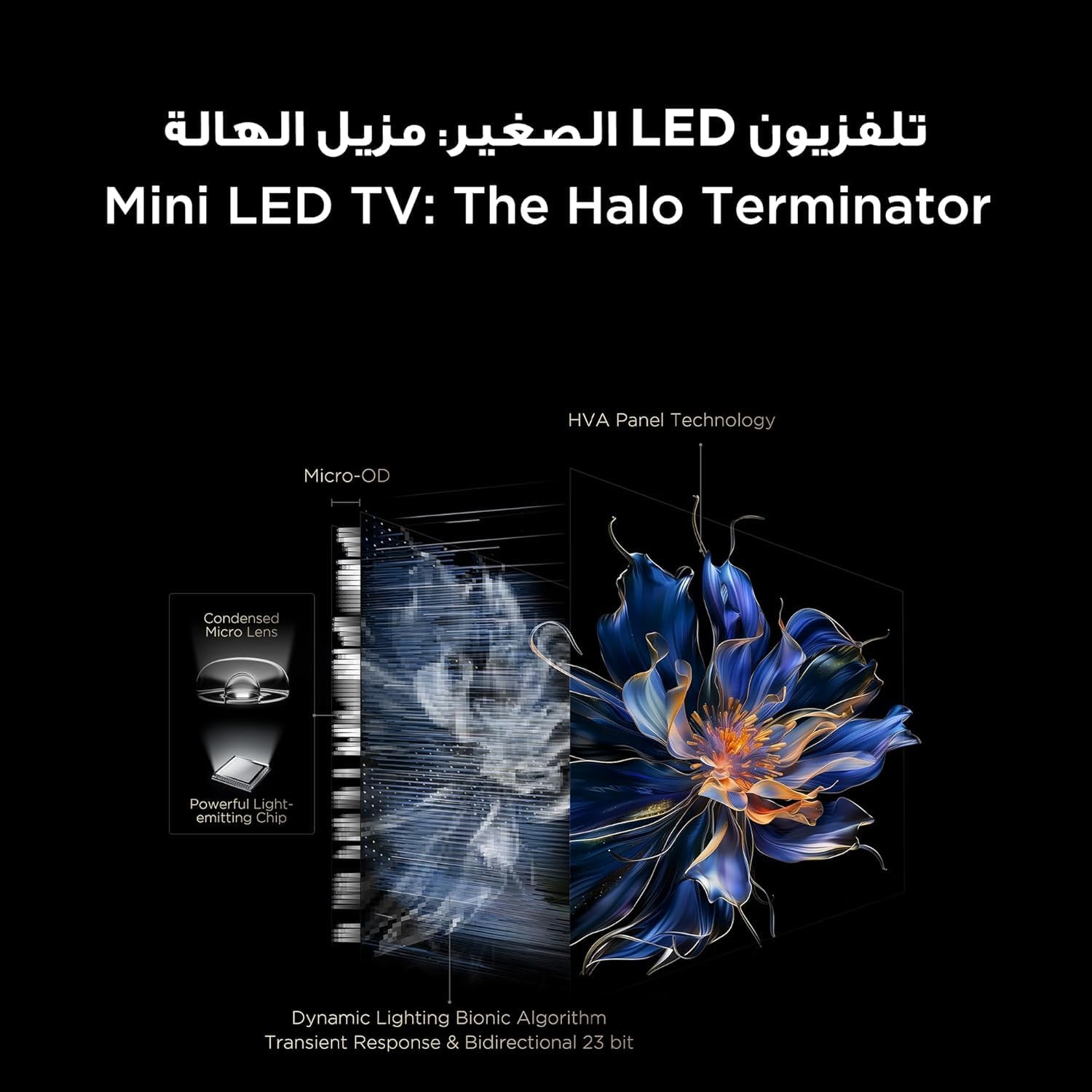
Figure 5.3.1: TV Feature Overview
- Modalità immagine: Standard, Sports, Filmmaker Mode, Film, Game, Smart Game.
- Tecnologia HDR: Supports Dolby Vision IQ, HDR 10+, and HLG for enhanced contrast and color.
- Schermo QLED: Enjoy over a billion hues of vivid color with 93% DCI-P3 color space.
- Mini LED Backlight: Precise dimming zones for deep blacks and high brightness.
- MEMC: Stima del movimento, compensazione del movimento per scene in rapido movimento più fluide.
- iMax Contrast Enhancer: Improves contrast for a more dynamic picture.
- Temperatura del colore: Adjust between Normal, Cool, and Warm settings.

Figura 5.3.2: Tecnologia del colore QLED

Figure 5.3.3: Mini LED Technology
5.4 Impostazioni audio
Experience rich and immersive audio with your TV's advanced sound system.
- Tecnologia audio: Features Dolby Atmos and DTS Virtual X for multi-dimensional sound.
- Onkyo 2.1 Hi-Fi Audio: Integrated Onkyo sound system with 10W x 2 speakers and a 20W subwoofer for powerful and clear audio.
- Modalità audio: Dynamic, Standard, Film, Music, Voice, Game, Sports.

Figure 5.4.1: Onkyo 2.1 Sound System
5.5 Caratteristiche di gioco
The TCL 55C6K is designed for an enhanced gaming experience.
- Frequenza di aggiornamento nativa di 144 Hz: Enjoy ultra-smooth motion for fast-paced games.
- VRR (frequenza di aggiornamento variabile): Synchronizes the display's refresh rate with the game's frame rate to eliminate screen tearing and stuttering.
- FreeSync Premium Pro: Provides fluid, tear-free gameplay at peak performance.
- ALLM (modalità automatica a bassa latenza): Passa automaticamente il televisore alla modalità a bassa latenza quando viene rilevata una console di gioco, riducendo il ritardo di input.
- Maestro di gioco: A dedicated suite of gaming features for optimal performance.

Figure 5.5.1: 144Hz Native Refresh Rate
6. Manutenzione
6.1 Pulizia del televisore
- Schermo: Pulire delicatamente lo schermo con un panno morbido e privo di lanugine. Per macchie ostinate, strofinare leggermenteampImmergere il panno in acqua o in un detergente specifico per schermi (assicurarsi che sia sicuro per gli schermi TV) e pulire delicatamente. Non spruzzare mai il liquido direttamente sullo schermo.
- Telaio: Utilizzare un panno morbido e asciutto per pulire la cornice e il supporto del televisore.
- Prima di pulire il televisore, scollegarlo sempre dalla presa di corrente.
6.2 Aggiornamenti software
Your TV may receive software updates to improve performance and add new features. It is recommended to keep your TV connected to the internet to receive these updates automatically. You can also manually check for updates in the TV's settings menu.
7. Risoluzione Dei Problemi
Se riscontri problemi con il tuo televisore, fai riferimento ai seguenti problemi comuni e alle relative soluzioni:
| Problema | Possibile soluzione |
|---|---|
| Nessun potere | Check if the power cable is securely connected to the TV and the power outlet. Ensure the power outlet is working. Try a different outlet. |
| Nessuna immagine, ma l'audio è presente | Controlla la sorgente di ingresso. Assicurati che il dispositivo collegato sia acceso e funzioni correttamente. Prova un altro cavo HDMI. |
| Nessun suono, ma l'immagine è presente | Check the volume level and mute status. Ensure external audio devices are connected correctly and powered on. Check audio output settings on the TV. |
| Il telecomando non funziona | Sostituisci le batterie. Assicurati che non ci siano ostacoli tra il telecomando e il sensore IR del televisore. |
| Problemi di connessione di rete | Restart your router and modem. Check Wi-Fi password. Try a wired Ethernet connection if available. |
| Problemi di qualità dell'immagine (ad esempio, sfocata, distorta) | Check the source resolution. Adjust picture settings (brightness, contrast, sharpness). Ensure the TV's software is up to date. |
If the problem persists after trying these solutions, please contact TCL customer support or your retailer for further assistance.
8. Specifiche
Detailed technical specifications for the TCL 55C6K TV:
| Caratteristica | Specificazione |
|---|---|
| Dimensioni dello schermo | 55 pollici |
| Risoluzione | 3840 x 2160 (4K Ultra HD) |
| Tecnologia di visualizzazione | QLED Mini LED |
| Proporzioni | 16:9 |
| Viewangolo di ing | 178 gradi |
| Frequenza di aggiornamento | 144 Hz (nativo) |
| VRR Support | 144Hz, FreeSync Premium Pro |
| Supporto HDR | Dolby Vision IQ, HDR 10+, HLG |
| Memoria interna | 32 GB |
| Sistema operativo | TV di Google |
| Sistema audio | Onkyo 2.1 Hi-Fi Audio |
| Potenza di uscita audio | 2 x 10W (speakers) + 20W (subwoofer) |
| Tecnologia audio | Dolby Atmos, DTS Virtual X |
| Porte HDMI | 4 (ARC/eARC, VRR 2.1 compatible) |
| Porte USB | 1 (VRR 3.0 compatible) |
| Connettività | Wi-Fi 5G, Bluetooth 5.4, LAN, RF In, Digital Audio Out (Optical) |
| Alimentazione elettrica | 220-240V / 50-60Hz |
| Consumo energetico (in funzione) | 220W |
| Consumo energetico (standby) | 0.5W |
| Dimensions (without stand, WxHxD) | Dimensioni: 1229 x 713 x 55.9 mm |
| Dimensions (with stand, WxHxD) | Dimensioni: 1229 x 776 x 297 mm |
| Peso netto | 12.4 kg |
| Peso lordo | 16.3 kg |
| Paese di origine | Egitto |
9. Garanzia e supporto
9.1 Informazioni sulla garanzia
Your TCL 55C6K television comes with a 2-year full free warranty from the date of purchase. Please refer to the warranty card included in your package for detailed terms and conditions. Keep your proof of purchase for warranty claims.
9.2 Assistenza clienti
For technical assistance, troubleshooting beyond this manual, or warranty service, please contact TCL customer support. You can find contact information on the warranty card or the official TCL website for your region. When contacting support, please have your TV model number (55C6K) and serial number ready.


