Introduzione
This manual provides detailed instructions for the EasySMX S10 Wireless Controller. It covers setup, operation, maintenance, and troubleshooting to ensure optimal performance and user experience across various platforms including Nintendo Switch, PC, iOS, and Android devices.
Caratteristiche del prodotto
- One-Tap Wake Up: Seamlessly wake up your Nintendo Switch console with a single button press.
- TMR Anti-Drift Joysticks: Combines Hall Effect durability with carbon-film precision for zero-drift and ultra-smooth analog input.
- Pulsanti completamente meccanici: Micro-switch buttons with 0.3mm actuation and a lifespan of over 5 million clicks, providing tactile feedback.
- Vibrazione HD: Equipped with ALPS Linear HD Rumble motors for multi-layered haptic feedback.
- Batteria a lunga durata: Built-in 1200mAh battery offers up to 17 hours of playtime with lights and vibration, or up to 26 hours without.
- Interchangeable D-pad & Custom Faceplate: Allows swapping between disc and cross-style D-pads and magnetic removable faceplates for personalization.
- Caratteristiche aggiuntive: Customizable RGB lighting, 2 programmable back buttons, 6-axis gyroscope for motion sensing, and NFC function.
Impostare
Contenuto della confezione
- Controller wireless EasySMX S10
- Cavo di ricarica USB-C
- Interchangeable D-pads (if included)
- Customizable Faceplates (if included)
- Manuale d'uso
Layout del controller
The EasySMX S10 controller features standard gaming buttons, including A/B/X/Y buttons, directional pad, left and right analog sticks, shoulder buttons (L/R), and triggers (ZL/ZR). Additionally, it includes a HOME button, a Capture button, and two programmable back buttons (GR/GL).
Caricamento del controller
Connect the provided USB-C cable to the controller's charging port and the other end to a USB power source (e.g., a computer, wall adapter). The LED indicators on the controller will show charging status and turn off when fully charged. A full charge typically takes approximately 3 hours.
Istruzioni per l'uso
Connecting to Nintendo Switch / Switch 2
- Set the mode toggle switch on the back of the controller to the "S" mode.
- Tenere premuto il pulsante HOME sul controller per 3 secondi finché gli indicatori LED non lampeggiano rapidamente.
- Sulla tua console Nintendo Switch, vai a Controllori > Cambia impugnatura/ordine.
- When the LED on the controller becomes solid and you feel a short vibration, pairing is complete.
- (First-time connection only) Within 20 seconds after pairing, remove and reattach the Joy-Con controllers from the console. This action activates the wireless wake-up function for future use.
- For future reconnections, simply short-press the HOME button to automatically reconnect and wake the console.
Video: Instructions on how to connect the EasySMX S10 controller to a Nintendo Switch or Switch 2 console for the first time and for subsequent reconnections.
Connessione al PC
- Set the mode toggle switch on the back of the controller to the "X" mode.
- Connect the controller to your PC via the provided Type-C cable. The controller will be recognized as an Xbox Wireless Controller.
- For wireless connection, ensure Bluetooth is enabled on your PC. Cercare "Xbox Wireless Controller" in your Bluetooth settings and select it to pair.
Video: Tutorial on connecting the EasySMX S10 controller to a PC, including both wired and wireless (Bluetooth) methods.
Connecting to Mobile (iOS & Android)
- Set the mode toggle switch on the back of the controller to the "X" mode.
- Abilita il Bluetooth sul tuo cellulare.
- Cercare "Xbox Wireless Controller" in your phone's Bluetooth settings and select it to pair.
- When the LED on the controller becomes steady with a short vibration, pairing is confirmed.
Video: Guide on how to connect the EasySMX S10 controller to both iOS and Android mobile devices via Bluetooth.
Personalizzazione dell'illuminazione RGB
The controller features customizable RGB lighting. Refer to the quick start guide included in the packaging for specific button combinations to change lighting modes, colors, or to turn the lighting off.
Programming Back Buttons
The two back buttons (GR and GL) can be programmed to perform specific actions or combos. Consult the quick start guide for detailed instructions on how to map functions to these buttons.
Swapping D-Pads and Faceplates
The S10 controller allows for easy customization. The D-pad can be swapped between a classic cross-style and a smooth circular control. The magnetic faceplates can also be removed and replaced to personalize the controller's appearance.

Image: The EasySMX S10 controller highlighting the swappable D-pads, allowing users to choose between a classic cross-style or a smooth circular control.
Manutenzione
- Mantenere pulito il controller pulendolo con un panno morbido e asciutto.
- Evitare di esporre il controller a temperature estreme, umidità o luce solare diretta.
- Non tentare di smontare il controller, poiché ciò potrebbe invalidare la garanzia.
- Quando non lo si utilizza, conservare il controller in un luogo sicuro per evitare danni.
Risoluzione dei problemi
Il controller non si connette/non si associa
- Assicurarsi che il controller sia sufficientemente carico.
- Verify the mode toggle switch on the back is set to the correct platform (S for Switch, X for PC/Mobile).
- Restart the console/device and the controller, then attempt the pairing process again.
- If connecting to Switch for the first time and wake-up function doesn't activate, repeat the pairing process and ensure Joy-Cons are removed and reattached within 20 seconds after initial pairing.
Video: A guide explaining why the S10 controller might not wake up the Switch 2 and how to fix it.
NFC Function Not Working
- Ensure the NFC function is enabled on your console/device settings.
- Place the Amiibo or NFC tag directly over the NFC sensor area on the controller.
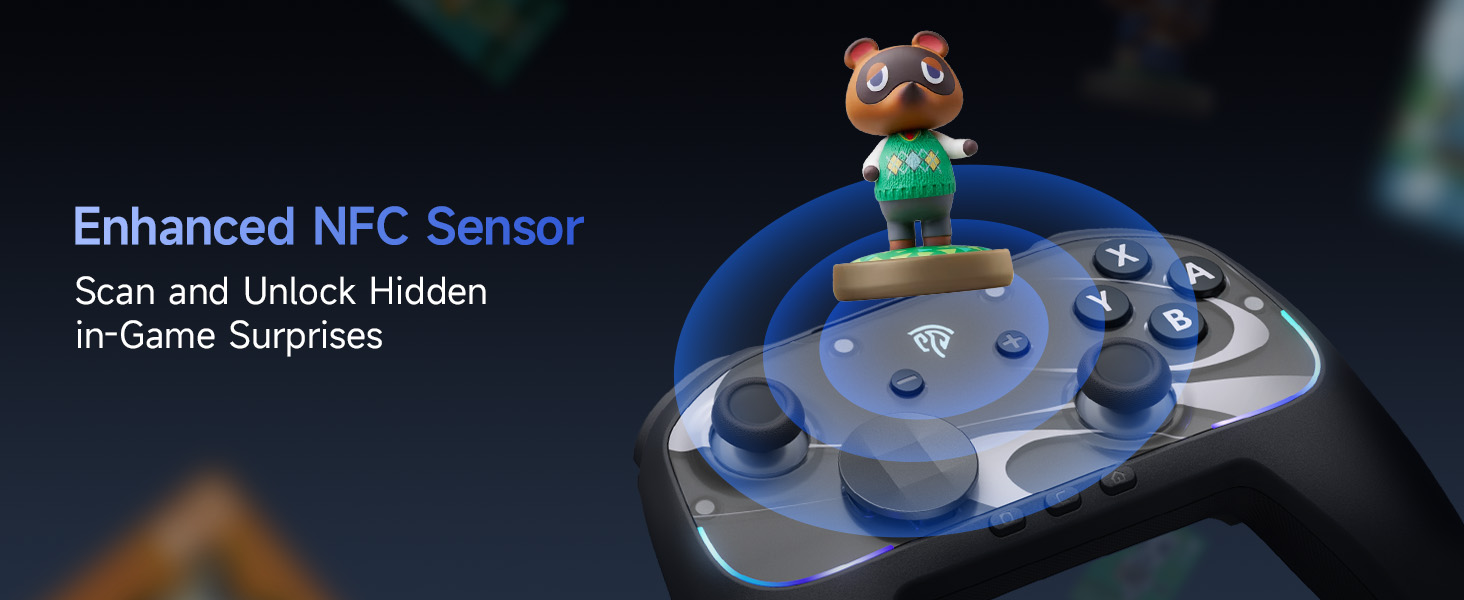
Image: The EasySMX S10 controller demonstrating its NFC function, allowing for scanning and unlocking in-game surprises.
Specifiche
| Modello | EasySMX S10 |
| Connettività | Bluetooth, USB-C (cablato) |
| Compatibilità | Nintendo Switch / Switch 2, PC (Windows), iOS (13.0 and above), Android (8.0 and above) |
| Tipo di joystick | TMR Anti-Drift Joysticks |
| Tipo di pulsante | Full Mechanical Micro-Switch Buttons |
| Vibrazione | HD Rumble (ALPS Linear HD Rumble Motors) |
| Rilevamento del movimento | Giroscopio ad asse 6 |
| Capacità della batteria | 1200mAh |
| Tempo di gioco | Up to 17 hours (with lights/vibration), up to 26 hours (without) |
| Tempo di ricarica | Circa 3 ore |
| Peso | 1.17 libbre |
| Dimensioni | 7.32 x 5.79 x 2.91 pollici |
Garanzia e supporto
I prodotti EasySMX sono generalmente coperti da garanzia del produttore. Consultare la scheda di garanzia inclusa nella confezione del prodotto o visitare il sito ufficiale EasySMX. websito per informazioni dettagliate e termini di garanzia.
For technical support, troubleshooting assistance, or any product-related inquiries, please contact EasySMX customer service through their official websito o le informazioni di contatto fornite nella documentazione del prodotto. Puoi anche visitare il sito Negozio EasySMX su Amazon per ulteriori informazioni e risorse di supporto.