1. Introduzione
Thank you for choosing the Dreo 110-Pint Smart Dehumidifier. This appliance is designed to efficiently remove excess moisture from large spaces up to 4500 square feet, such as basements, bedrooms, living rooms, bathrooms, and laundry rooms. Featuring smart controls, multiple operating modes, and dual drainage options, it provides a comfortable and healthy environment by maintaining optimal humidity levels. Please read this manual thoroughly before operation to ensure proper use and maintenance.
2. Importanti istruzioni di sicurezza
Per ridurre il rischio di incendi, scosse elettriche o lesioni, seguire sempre le precauzioni di sicurezza di base quando si utilizza questo apparecchio.
- Leggere tutte le istruzioni prima di utilizzare il deumidificatore.
- Questo apparecchio è destinato esclusivamente all'uso in ambienti interni.
- Assicurarsi che l'alimentazione corrisponda al voltage specificato sulla targhetta dei dati tecnici.
- Non utilizzare il deumidificatore se il cavo o la spina sono danneggiati.
- Always unplug the unit before cleaning, servicing, or moving.
- Non ostruire le prese d'aria o le uscite.
- Keep the unit upright for at least 24 hours before plugging it in after transport.
- The Dreo Dehumidifier is ETL-certified to meet stringent electrical safety standards, featuring a 90° tilt waterproof design that automatically powers off when tilted, along with comprehensive thermal protection (23°F to 248°F) to prevent overheating and 15A overcurrent protection against power surges.
3. Prodotto finitoview
3.1. componenti
The Dreo 110-Pint Smart Dehumidifier is designed for efficient and user-friendly operation. Below are the main components:
- Pannello di controllo: Located on the top, with touch buttons and a digital display.
- Uscita aria: Top-mounted for efficient moisture expulsion.
- Presa d'aria: Rear-mounted for air intake.
- Serbatoio dell'acqua: Front-loading, 2-gallon (8L) capacity with a visible water level indicator.
- Drain Hose Outlet: Located at the rear for continuous drainage.
- Ruote piroettanti: 360° smooth-rolling wheels for easy mobility.
- Maniglie per il trasporto: Integrated on the sides for convenient lifting.
- Filtro lavabile: Easily accessible for cleaning to maintain air quality.
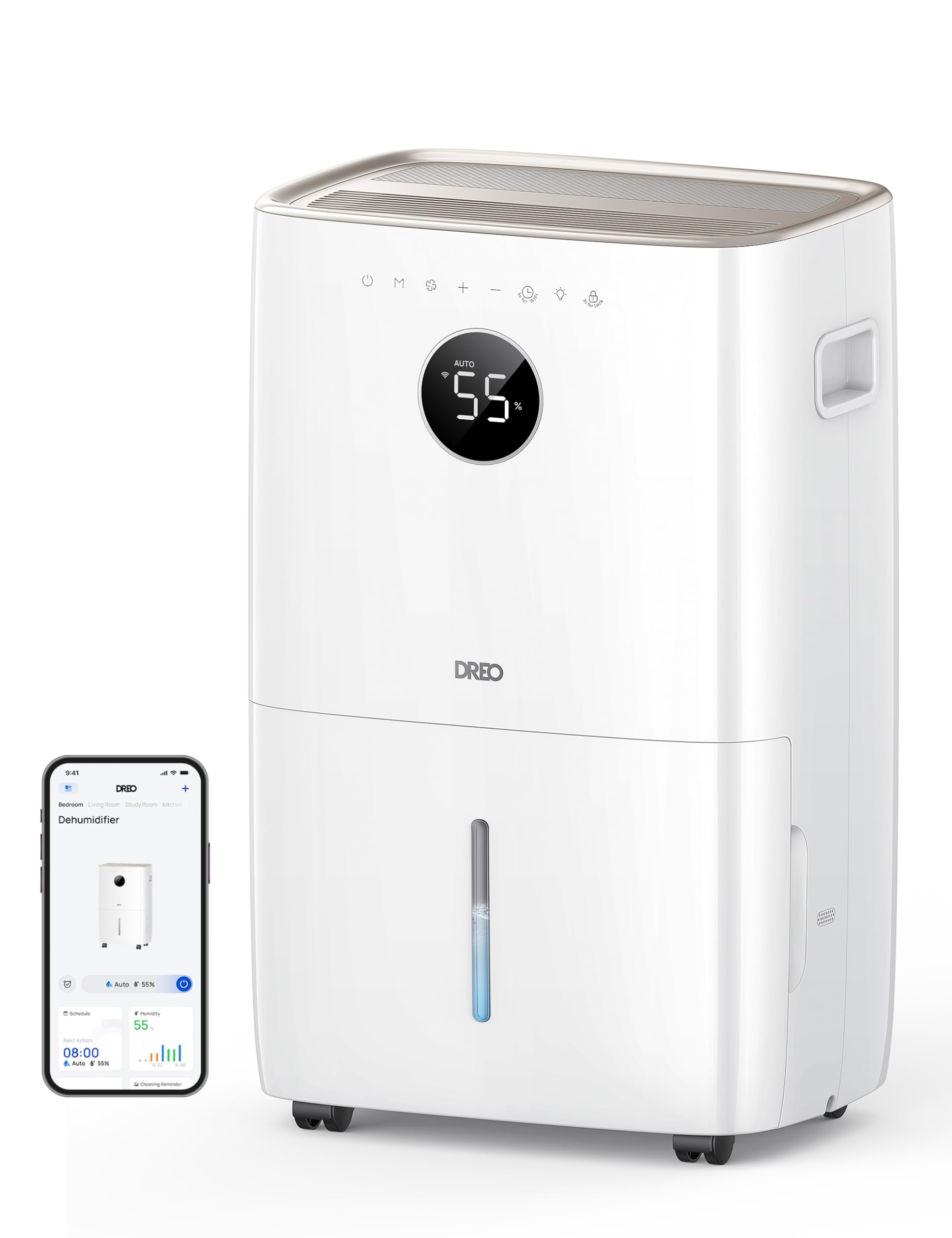
Immagine: Frontale view of the Dreo 110-Pint Smart Dehumidifier, highlighting its compact design and dimensions (11.3"D x 15.4"W x 24.4"H).
3.2. Pannello di controllo
The intuitive control panel allows for easy operation and monitoring of your dehumidifier.
- Pulsante di accensione: Accende o spegne l'unità.
- Pulsante Modalità: Cycles through Auto, Comfort, and Continuous modes.
- Pulsante velocità ventola: Regola la velocità della ventola (bassa, media, alta).
- Pulsanti di regolazione dell'umidità (+/-): Sets desired humidity level in Auto Mode.
- Pulsante Timer: Sets a 24-hour timer for automatic on/off.
- Indicatore Wi-Fi: Mostra lo stato della connessione Wi-Fi.
- Pulsante Blocco bambini: Blocca il pannello di controllo per evitare modifiche accidentali.
- Indicatore di ripristino del filtro: Lights up when the filter needs cleaning.
- Water Full Alert: Illuminates when the water tank is full, and the unit stops operation.
- Indicatore di sbrinamento: Activates automatically at 41°F (5°C) for optimal performance in cold environments.

Image: Close-up of the dehumidifier's control panel, showing the digital display set to 55% humidity in Auto Mode, with various function icons.
4. Impostazione
4.1. Disimballaggio e posizionamento
- Estrarre con cautela il deumidificatore dalla confezione.
- Place the unit upright on a flat, stable surface. Ensure there is at least 8 inches (20 cm) of space around the air inlets and outlets for proper airflow.
- Allow the unit to stand upright for at least 24 hours before plugging it in to allow the refrigerant to settle.
4.2. Collegamento elettrico
Plug the power cord into a grounded electrical outlet. Ensure the outlet meets the electrical requirements of the dehumidifier.
4.3. Opzioni di drenaggio
The Dreo dehumidifier offers two drainage methods: manual emptying of the water tank or continuous drainage via a hose.

Image: The dehumidifier illustrating both the manual water tank removal and the continuous drainage hose connection.
4.3.1. Drenaggio manuale
- When the water tank is full, the unit will automatically stop and display a "Water Full" alert.
- Carefully pull out the water tank from the front of the unit using the integrated handle.
- Svuotare l'acqua raccolta in un lavandino o in uno scarico.
- Reinserire il serbatoio dell'acqua vuoto nell'unità finché non scatta in posizione. Il deumidificatore riprenderà a funzionare.
4.3.2. Drenaggio continuo
- Locate the drain hose outlet at the rear of the dehumidifier.
- Remove the rubber stopper from the outlet.
- Connect the provided drain hose (or a standard garden hose) to the outlet. Ensure the connection is secure to prevent leaks.
- Route the hose to a suitable drain point (e.g., floor drain, sink, or sump pump). Ensure the hose is sloped downwards to allow gravity to drain the water and is free of kinks.
- The dehumidifier will now continuously drain water without needing to empty the tank manually.
5. Istruzioni per l'uso
Premere il tasto Pulsante di accensione to turn the dehumidifier on. The unit will start operating in its last used mode and settings.
5.1. Modalità operative
Premere il tasto Pulsante Modalità per scorrere le modalità operative disponibili:
- Modalità automatica: The dehumidifier intelligently adjusts fan speed to maintain your target humidity level within a 5% tolerance. Use the Pulsanti +/- to set your desired humidity (e.g., 45-55% is generally recommended).
- Modalità Comfort: The unit operates to maintain a comfortable humidity level based on ambient temperature.
- Modalità continua: The dehumidifier runs continuously at the selected fan speed, regardless of the ambient humidity. This is ideal for very damp conditions or for continuous drainage.
5.2. Regolazione della velocità della ventola
In Auto or Continuous mode, press the Pulsante velocità ventola to select between Low, Medium, or High fan speeds.
5.3. Funzione timer
Premere il tasto Pulsante timer to set a desired operating duration (from 1 to 24 hours). The unit will automatically turn on or off after the set time has elapsed.
5.4. Smart Control (DREO App)
The Dreo 110-Pint Smart Dehumidifier can be controlled remotely via the DREO app on your smartphone or through voice assistants like Alexa and Google Home.

Image: A smartphone displaying the DREO app interface, showing remote control capabilities for the dehumidifier.
5.4.1. Connecting to the DREO App
- Download the DREO app from your smartphone's app store (available on iOS and Android).
- Crea un account o accedi.
- Follow the in-app instructions to add your Dreo 110-Pint Smart Dehumidifier (Model DH711S). Ensure your phone is connected to a 2.4GHz Wi-Fi network.
Video: This video demonstrates the process of downloading the DREO app and creating a new user account to manage your smart dehumidifier.
Video: This video provides a step-by-step guide on how to connect your Smart Dehumidifier DH711S to the DREO app for remote control and smart features.
5.4.2. Funzionalità dell'app
Through the DREO app, you can:
- Monitora i livelli di umidità in tempo reale.
- Imposta orari e timer.
- Adjust operating modes and fan speeds.
- Receive notifications (e.g., water tank full, filter cleaning reminder).
- Control the unit using voice commands with Alexa or Google Home.
6. Manutenzione
Una manutenzione regolare garantisce prestazioni ottimali e longevità del deumidificatore.
6.1. Pulizia del filtro dell'aria
The filter reset indicator will light up after approximately 250 hours of operation, signaling that the filter needs cleaning.
- Scollegare il deumidificatore dalla presa di corrente.
- Rimuovere il filtro dell'aria dalla parte posteriore dell'unità.
- Wash the filter with clean water (no hotter than 104°F / 40°C) and a mild detergent.
- Risciacquare abbondantemente e lasciare asciugare completamente all'aria prima di reinstallarlo.
- Once the filter is reinstalled, plug in the unit and press the Pulsante di ripristino del filtro for 3 seconds to clear the indicator.

Image: A hand removing the washable air filter from the back of the dehumidifier for cleaning.
6.2. Pulizia del serbatoio dell'acqua
Pulire regolarmente il serbatoio dell'acqua per prevenire la formazione di muffa e funghi.
- Remove the water tank as described in the Manual Drainage section.
- Lavare il serbatoio con acqua tiepida e un detergente delicato.
- Risciacquare abbondantemente e asciugare completamente prima di riporlo nell'unità.
6.3. Pulizia generale
Pulire l'esterno del deumidificatore con un panno morbido, damp stoffa. Non utilizzare prodotti chimici aggressivi o detergenti abrasivi.
7. Risoluzione Dei Problemi
Se riscontri problemi con il tuo deumidificatore, fai riferimento ai seguenti problemi comuni e alle relative soluzioni:
| Problema | Possibile causa | Soluzione |
|---|---|---|
| Il deumidificatore non si accende. | Nessuna corrente, cavo di alimentazione allentato, serbatoio dell'acqua pieno. | Check power connection, ensure plug is secure, empty water tank. |
| Unit is not collecting water. | Livello di umidità troppo basso, temperatura ambiente troppo bassa, filtro dell'aria intasato. | Increase target humidity, ensure room temp is above 41°F (5°C), clean air filter. |
| L'unità è rumorosa. | Unità non posizionata su una superficie piana, filtro dell'aria intasato. | Posizionare su una superficie piana e pulire il filtro dell'aria. |
| Perdite d'acqua dall'unità. | Water tank not properly installed, continuous drain hose is loose or kinked. | Reinstall water tank correctly, check drain hose connection and ensure no kinks. |
| Display shows fluctuating numbers. | Normal adjustment to current humidity. | This is normal operation as the sensor adjusts to ambient conditions. |
| Unit isn't defrosting automatically. | Issue with the condenser. | Contattare l'assistenza clienti per ricevere assistenza. |
8. Specifiche
| Caratteristica | Dettaglio |
|---|---|
| Marca | Dreo |
| Nome del modello | DR-HDH001S |
| Capacità | 110 Pints (at 86°F, RH 90%) / 50 Pints per Day (DOE Standard) |
| Area di copertura | Fino a 4500 piedi quadrati |
| Volume del serbatoio dell'acqua | 2 galloni (8L) |
| Modalità operative | Auto, Comfort, Continuous |
| Velocità della ventola | 3 (Basso, Medio, Alto) |
| Capacità del flusso d'aria | 210 piedi cubi al minuto (CFM) |
| Controllo dell'umidità | Adjustable, with ±5% precision sensor |
| Caratteristiche speciali | Smart Control (DREO App, Alexa, Google Home), Auto-Defrost, 90° Tilt Waterproof Design, Thermal Protection, 15A Overcurrent Protection, Washable Filter, 360° Caster Wheels |
| Dimensioni del prodotto | 11.3"P x 15.4"L x 24.4"A |
| Peso dell'articolo | 43.7 libbre |
| Materiale | Metallo, Plastica |
| Certificazioni | Certificato ETL |
9. Garanzia e supporto
Dreo products come with a standard warranty. For specific warranty details, please refer to the warranty card included in your product packaging or visit the official Dreo websito.
9.1. Assistenza clienti
If you have any questions, concerns, or require assistance with your Dreo 110-Pint Smart Dehumidifier, please contact Dreo Customer Support:
- E-mail: support@dreo.com
- Websito: www.dreo.com
Please have your model number (DR-HDH001S) and purchase information ready when contacting support.


