Introduzione
Welcome to the HONOR 400 Lite 5G Smartphone user manual. This guide provides essential information for setting up, operating, maintaining, and troubleshooting your new device. Please read this manual thoroughly to ensure optimal performance and longevity of your smartphone.
Cosa c'è nella scatola
Upon unboxing your HONOR 400 Lite, you should find the following items:
- Smartphone HONOR 400 Lite 5G
- Cavo USB
- Strumento di espulsione della SIM
- Guida rapida
- Scheda di garanzia
Note: The specific contents may vary by region.
Dispositivo suview
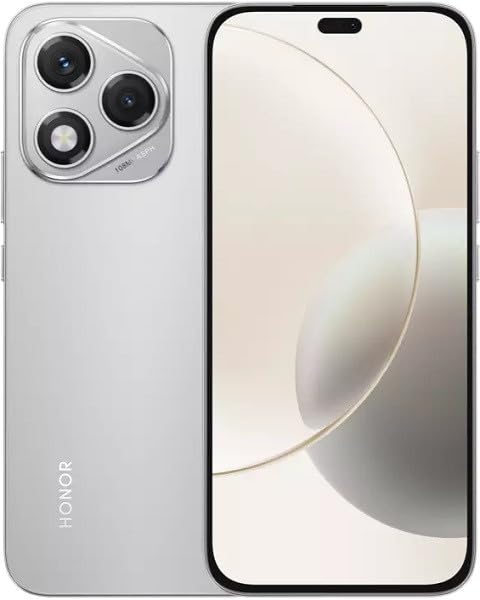
Image: The HONOR 400 Lite 5G Smartphone in Velvet Grey, showcasinil suo design elegante e il modulo della fotocamera sul retro.
The HONOR 400 Lite features a 6.7-inch AMOLED display with a resolution of 1080 x 2412 pixels. The device is equipped with a powerful camera system, including a 108 MP main sensor. Its ergonomic design ensures a comfortable grip and easy access to all physical buttons and ports.
Impostare
1. Installazione della scheda SIM
- Individua il vassoio della scheda SIM sul lato del dispositivo.
- Inserire lo strumento di espulsione della SIM nel piccolo foro accanto al vassoio e premere con decisione finché il vassoio non fuoriesce.
- Place your Nano-SIM card(s) and/or eSIM (if applicable) into the tray with the gold contacts facing down, ensuring they are correctly aligned.
- Spingere con attenzione il vassoio nuovamente nel dispositivo finché non scatta in posizione.
Importante: This smartphone is designed for GSM networks only and is not compatible with CDMA networks (e.g., Verizon, Sprint, US Cellular in the USA). Please verify network compatibility with your service provider before use.
2. Accensione iniziale
- Press and hold the Power button (usually on the right side) until the HONOR logo appears.
- Seguire le istruzioni sullo schermo per completare la configurazione iniziale, inclusa la selezione della lingua, la connessione Wi-Fi e la configurazione dell'account Google.
Utilizzo del dispositivo
Caratteristiche dello schermo
The 6.7-inch AMOLED display offers vibrant colors and deep blacks. Utilize gestures for navigation, access quick settings by swiping down from the top, and customize your home screen layout and widgets to personalize your experience.
Utilizzo della fotocamera
Your HONOR 400 Lite is equipped with a high-resolution 108 MP main camera. Open the Camera app to access various modes such as Photo, Video, Portrait, and more. Tap on the screen to focus and use the on-screen shutter button to capture images or start recording videos. Explore settings for advanced options like HDR and AI enhancements.
Batteria e ricarica
The device is powered by a 5230mAh non-removable battery. Use the provided USB cable to charge your device. Connect the USB-C end to your phone and the USB-A end to a compatible power adapter (not always included, check box contents) or computer USB port. For optimal charging speed, use a compatible fast charger.
Manutenzione
- Aggiornamenti software: Regularly check for and install system updates to ensure your device has the latest features, security patches, and performance improvements. Go to Settings > System & updates > Software update.
- Pulizia: Utilizza un panno morbido e privo di lanugine per pulire lo schermo e il corpo del telefono. Evita prodotti chimici aggressivi o materiali abrasivi.
- Gestione della memoria: Cancellare periodicamente ciò che non è necessario filee app per liberare spazio di archiviazione e mantenere prestazioni ottimali.
Risoluzione dei problemi
If you encounter issues with your HONOR 400 Lite, try the following common troubleshooting steps:
- Il dispositivo non risponde: Per forzare il riavvio, tenere premuto il pulsante di accensione per circa 10 secondi.
- Arresto anomalo dell'app: Clear the app's cache and data (Settings > Apps > [App Name] > Storage > Clear cache/Clear data) or reinstall the app.
- Batteria scarica: Check battery usage in Settings to identify power-hungry apps. Reduce screen brightness and disable unnecessary features like GPS or Wi-Fi when not in use.
- Problemi di rete: Ensure your SIM card is correctly inserted. Try toggling Airplane Mode on and off. If issues persist, contact your network provider.
Specifiche
| Nome del modello | Onore 400 Lite |
| Display | 6.7 pollici AMOLED, 1080 x 2412 pixel |
| Processore | Mediatek Dimensity 7025 Ultra (6 nm), Octa-core (2x2.5 GHz Cortex-A78 e 6x2.0 GHz Cortex-A55) |
| Memoria RAM | 12 GB |
| Memoria interna | 256 GB (non espandibile) |
| Telecamera posteriore | 108 MP, f/1.8, (wide), 1/1.67", PDAF; 16 MP, f/2.5, (wide) |
| Sistema operativo | Androide 15 |
| Batteria | 5230mAh, non rimovibile |
| Compatibilità di rete | 2G, 3G, 4G, 5G (GSM Only) |
| Colore | Grigio velluto |
| Caratteristiche speciali | Doppia SIM |
Garanzia e supporto
Your HONOR 400 Lite smartphone comes with a standard manufacturer's warranty. Please refer to the included Warranty Card for detailed terms and conditions, including coverage period and service procedures. For technical support or further assistance, please visit the official HONOR support websito o contattare il loro servizio clienti.
Conserva la prova d'acquisto per le richieste di garanzia.


