PRUNUS J-177 Retro Vintage Alarm Clock Radio User Manual
Modello: J-177 | Marca: PRUNUS
1. Introduzione
Thank you for choosing the PRUNUS J-177 Retro Vintage Alarm Clock Radio. This device combines classic aesthetics with modern functionality, offering dual alarms, FM radio, fast wireless charging, and a clear LED display. This manual provides detailed instructions to help you set up and operate your new alarm clock radio effectively.
2. Informazioni sulla sicurezza
- Assicurarsi che il dispositivo sia posizionato su una superficie stabile e piana.
- Keep away from water, moisture, and direct heat sources.
- Use only the provided power adapter or a compatible 15W+ fast charger and cable for optimal performance and safety.
- Non tentare di smontare o riparare il dispositivo da soli. Contattare personale qualificato per assistenza.
- For wireless charging, remove phone cases for better charging efficiency and to prevent overheating.
3. Contenuto della confezione
- PRUNUS J-177 Alarm Clock Radio
- USB-C Power Cable (Note: Wall adapter not included)
- Manuale d'uso
4. Prodotto finitoview
Familiarize yourself with the main components and controls of your PRUNUS J-177.

Figura 1: Pannello frontale sopraview
The front panel features a large LED display showing time, date, day of the week, and temperature. Below the display are control buttons for various functions, and a central knob for dimmer control and confirmation.

Figura 2: Pannello posteriore sopraview
The rear panel includes the USB-C power input, a USB-A output port for charging other devices, and the connection point for the telescopic FM antenna.
5. Impostazione
5.1 Collegamento di alimentazione
- Connect the provided USB-C cable to the "DC 5V" port on the back of the alarm clock.
- Plug the other end of the USB-C cable into a compatible USB wall adapter (not included). A 15W+ fast charger is recommended for optimal wireless charging performance.
- Il display si illuminerà, indicando che il dispositivo è acceso.
5.2 Configurazione dell'antenna FM
For improved FM radio reception, extend the telescopic antenna located on the back of the unit.
Video 1: PRUNUS 177 Radio Overview
This video demonstrates various features of the PRUNUS J-177, including power connection, time setting, alarm setting, sleep timer, and FM radio functionality. It provides a visual guide to the initial setup and basic operations.
6. Istruzioni per l'uso
6.1 Impostazione dell'ora e della data
- Switch 12/24H Format: Long press the <TIME/DATE> button to toggle between 12-hour and 24-hour time formats.
- Adjust Time/Date: Press the <TIME/DATE> button to enter time setting mode. Use the <-> / <+ / °F/°C> buttons or rotate the <OK> knob to adjust the hour, minute, year, month, and day. Press <OK> to confirm each setting.
6.2 Impostazione dell'allarme
The PRUNUS J-177 supports dual alarms (ALARM 1 and ALARM 2).
- Imposta ora sveglia: Press <ALARM 1> or <ALARM 2> to select the desired alarm. Use the <-> / <+ / °F/°C> buttons or rotate the <OK> knob to set the hour and minute. Press <OK> to confirm.
- Select Alarm Tone: After setting the time, use <-> / <+ / °F/°C> to browse 8 available alarm sounds (S01-S08) or FM radio. Press <OK> to confirm.
- Adjust Alarm Volume: Rotate the <OK> knob to adjust the alarm volume (16 levels). Press <OK> to confirm.
- Abilita/Disabilita allarme: Long press <ALARM 1> or <ALARM 2> to enable or disable the respective alarm. An alarm icon will appear on the display when active.
- Funzione snooze: When the alarm sounds, press the <OK> knob to activate snooze for 9 minutes. The alarm icon will flash.
- Dismiss Alarm: Press any button (except <OK>) to dismiss the alarm.

Figure 3: Dual Alarms & Smart Snooze
Set two independent alarms for different schedules and utilize the smart snooze function for extra rest.
6.3 Display Brightness Control
The display offers 4 adjustable brightness modes:
- Press the <OK> knob to cycle through brightness levels: Bright > Medium > Off > Auto Dimming.
- Oscuramento automatico: In this mode, the display brightness intelligently adjusts to ambient light conditions.
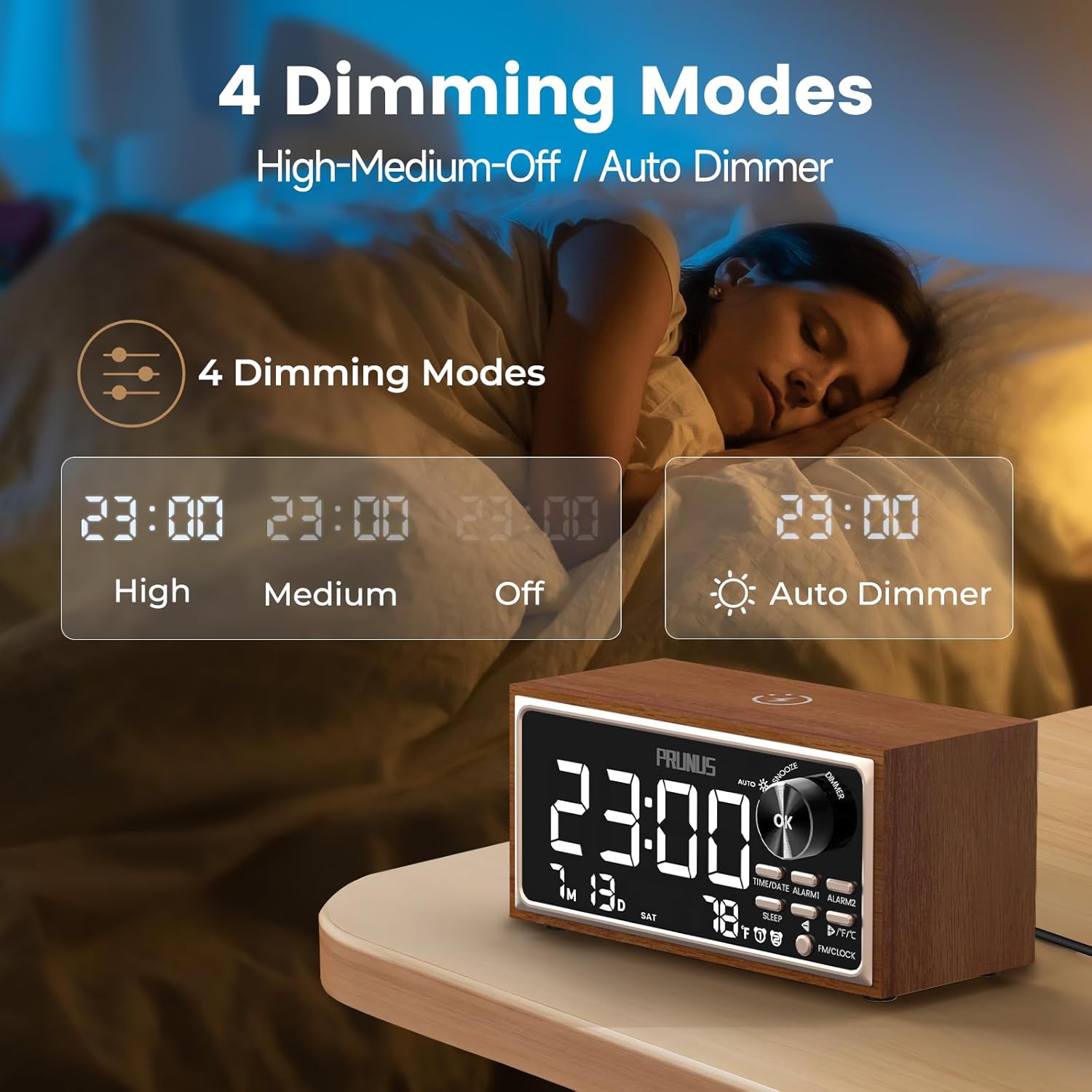
Figure 4: 4 Adjustable Brightness Modes
Customize the display brightness to suit your preference and environment, including an auto-dimming feature.
6.4 Funzionamento della radio FM
- Passa alla modalità FM: Press the <FM/CLOCK> button to switch to FM radio mode. The display will show the current FM frequency.
- Stazioni di scansione automatica: Long press the <-> or <+ / °F/°C> button to auto-scan for the next available FM station.
- Regola volume: Rotate the <OK> knob to increase or decrease the volume. Alternatively, short press <-> or <+ / °F/°C> to adjust the volume.

Figure 5: Digital Clock & FM Radio
Enjoy clear FM radio reception with the extendable antenna and easily tune to your favorite stations.
6.5 Ricarica wireless
The top of the alarm clock features a 15W wireless charging pad.
- Place your Qi-compatible smartphone on the wireless charging pad.
- Ensure the phone is centered on the pad for optimal charging.
- L'indicatore di carica sul telefono confermerà l'inizio della ricarica.
- For best results, remove thick phone cases during wireless charging.

Figura 6: Ricarica wireless da 15 W
Conveniently charge your Qi-compatible devices by simply placing them on the top surface.
6.6 Uscita di ricarica USB
A 5W USB-A port is located on the back of the device for charging other gadgets.
- Connect your device (e.g., tablet, earbuds, smartwatch) to the USB-A output port using its charging cable.
- Il dispositivo inizierà a caricarsi.
Figure 7: 5W USB Charging Output
Charge additional devices like earbuds or smartwatches using the convenient USB-A port.
6.7 Timer di spegnimento
The sleep timer allows you to fall asleep to music or white noise, which will automatically turn off after a set duration.
- Press the <SLEEP> button to activate the sleep timer.
- Use the <-> / <+ / °F/°C> buttons to select the desired duration (15 / 30 / 60 / 90 minutes).
- You can also select a sleep sound (S01-S07) or FM radio to play during the sleep timer.
- Press <OK> to confirm the setting.
- Long press <SLEEP> to disable the sleep timer.
7. Manutenzione
- Pulire il dispositivo con un panno morbido e asciutto. Non utilizzare detergenti liquidi o materiali abrasivi.
- Keep the wireless charging pad free from dust and debris to ensure efficient charging.
- Avoid blocking the speaker grille or ventilation openings.
8. Risoluzione Dei Problemi
| Problema | Possibile soluzione |
|---|---|
| Il dispositivo non si accende. | Ensure the USB-C cable is securely connected to both the device and a working power source. Verify the power adapter is functional. |
| La ricarica wireless è lenta o non funziona. | Ensure your phone is Qi-compatible and correctly centered on the charging pad. Remove any thick phone cases. Use a 15W+ fast charger and compatible cable. |
| Scarsa ricezione radio FM. | Fully extend the telescopic antenna. Try repositioning the device to find a better signal. |
| L'allarme non suona. | Verify the alarm is enabled (alarm icon visible). Check the alarm volume setting. Ensure the time is set correctly. |
| Il display è troppo luminoso/scurato. | Press the <OK> knob to cycle through brightness modes or select auto-dimming. |
9. Specifiche
- Marca: Prugna
- Modello: J-177
- Tipo di visualizzazione: LED digitale
- Fonte di energia: Elettrico con cavo (USB-C)
- Uscita di ricarica wireless: 15W
- Uscita USB: 5W
- Frequenza radio FM: Frequenza 87.5-108 MHz
- Caratteristiche dell'allarme: Dual Alarms, 8 Tones (including FM), 16 Volume Levels, 9-minute Snooze
- Sveglia: 15-90 minuti
- Luminosità dello schermo: 4 Modes (High, Medium, Off, Auto-Dimming)
- Dimensioni: 3.5"W x 3.3"H (Product Dimensions)
- Materiale: Wood (Frame Material)
- Peso dell'articolo: 1.28 libbre
10. Garanzia e supporto
For warranty information and customer support, please refer to the contact details provided with your purchase or visit the official PRUNUS websito. Conservare la prova d'acquisto per eventuali reclami in garanzia.


