1. Introduzione
The bHaptics TactSuit Pro is an advanced haptic vest designed to enhance your immersive experiences across various platforms, including Virtual Reality (VR), PC gaming, audio-to-haptics applications, and sim racing. Featuring 32 individually controllable feedback motors, the TactSuit Pro delivers sophisticated and precise haptic sensations, bringing a new level of realism and immersion to your digital interactions.
This manual provides essential information for setting up, operating, maintaining, and troubleshooting your TactSuit Pro. Please read it thoroughly before use to ensure optimal performance and longevity of your device.

Figure 1.1: The TactSuit Pro Haptic Vest
The TactSuit Pro is a black haptic vest with a prominent central zipper and textured panels on the chest and abdomen. A circular controller with colorful LED lighting is visible on the right side of the chest.
2. Cosa c'è nella scatola
Upon opening your TactSuit Pro package, please verify that all the following components are included:
- TactSuit Pro Haptic Vest
- Cavo di ricarica USB di tipo C.
- TactSuit Audio Accessories (cables and adapters for audio-to-haptics)
- Inner Mesh Lining (replacement)
- Bluetooth Dongle
- Manuale dell'utente (questo documento)

Figura 2.1: Componenti inclusi
This image displays all items typically found in the TactSuit Pro package: the main vest, a separate black mesh lining, a coiled USB-C cable with audio adapters, a small black user manual, and a compact Bluetooth dongle.
3. Prodotto finitoview
Familiarize yourself with the key components and features of your TactSuit Pro vest.
3.1 Front View Componenti

Figure 3.1: Front Components
This diagram highlights the front features of the TactSuit Pro, including the internal mesh lining, adjustable shoulder snap buttons, the main zipper, the location of the 32 haptic motors, and the prominent controller wheel.
- Mesh Lining: Internal breathable lining for comfort and hygiene.
- Shoulder Snap Buttons: Used for adjusting the shoulder fit.
- Cerniera: Front closure for wearing and removing the vest.
- 32 Haptic Motors: Distributed across the vest for precise haptic feedback.
- Controller Wheel: Located on the chest, used for manual intensity adjustment and control.
3.2 Indietro View Componenti

Figure 3.2: Back Components
This diagram illustrates the back features of the TactSuit Pro, including the audio cable holder, a hanger loop for storage, the back controller unit, and the charging port.
- Audio Cable Holder: Secures audio cables when using audio-to-haptics.
- Hanger Loop: For convenient storage of the vest.
- Controller posteriore: Main processing unit for the haptic feedback.
- Porta di ricarica: USB Type-C port for charging the vest.
4. Impostazione
4.1 Carica iniziale
Before first use, fully charge your TactSuit Pro. Connect the provided USB Type-C charging cable to the charging port on the back of the vest and plug the other end into a compatible USB power adapter (not included) or a computer USB port. The LED indicator on the controller wheel will show charging status. A full charge typically takes several hours.
4.2 Wearing the Vest
The TactSuit Pro is designed to be one-size-fits-all, accommodating various body shapes and sizes. To wear the vest:
- Unzip the front of the vest.
- Put on the vest like a jacket.
- Zip up the front.
- Adjust the side straps to achieve a snug but comfortable fit. The vest should feel secure without restricting movement or breathing.
- Utilize the shoulder snap buttons to fine-tune the shoulder fit for optimal haptic contact.
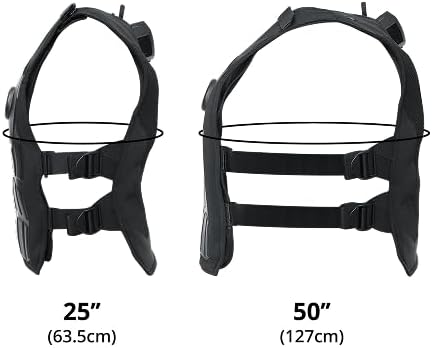
Figure 4.1: Waist Adjustment Range
Questa immagine mostra il lato profile of the TactSuit Pro, illustrating how the vest can expand to fit waist sizes from 25 inches (63.5 cm) to 50 inches (127 cm) using its adjustable straps.

Figure 4.2: Height and Shoulder Adjustment
This image displays two TactSuit Pro vests side-by-side, indicating their approximate height of 22.5 inches (57 cm) and 24 inches (61 cm). An inset image highlights the shoulder snap buttons used for fine-tuning the fit.
4.3 Connecting the Vest
The TactSuit Pro offers dual connectivity options:
- Senza fili (Bluetooth): For most VR and PC gaming applications, use the included Bluetooth dongle. Plug the dongle into a USB port on your PC or VR headset (if supported). Follow the instructions in the bHaptics software application to pair your TactSuit Pro.
- Wired (Audio-to-Haptics): For audio-driven haptic feedback, connect the TactSuit Audio Accessories to your audio source and the vest. This mode converts audio signals into haptic vibrations.
5. Operating the TactSuit Pro
5.1 Power On/Off and Haptic Control
To power on the TactSuit Pro, press and hold the button on the controller wheel until the LEDs illuminate. To power off, press and hold the button again until the LEDs turn off.
The controller wheel allows you to manually adjust the intensity of the haptic feedback. Rotate the wheel clockwise to increase intensity and counter-clockwise to decrease it. You can also use the controller to pause and resume haptic feedback during use.
5.2 Compatibility and Usage Scenarios
The TactSuit Pro is compatible with a wide range of applications and platforms, offering enhanced immersion in various scenarios:
- VR Gaming: Experience directional impacts and environmental effects in over 280 supported VR titles across Meta Quest, SteamVR, and PlayStation VR2.
- Giochi per PC: Integrate haptic feedback into your PC gaming sessions for a more physical connection to the game world.
- Audio-to-Haptics: Convert any audio source into haptic vibrations, allowing you to feel music, movie sound effects, or general audio.
- Sim Racing: Enhance your racing simulations with tactile feedback for engine vibrations, crashes, and road textures.

Figure 5.1: Compatible Game Titles
This image displays a grid of numerous game covers, indicating the wide range of VR titles that are compatible with the TactSuit Pro. Logos for Meta Quest, SteamVR, and PlayStation VR2 are prominently featured below the game collage.

Figure 5.2: Diverse Usage Scenarios
This image is divided into four quadrants, each depicting a different application of the TactSuit Pro: a person playing VR, a person engaged in PC gaming, a person using the vest for sim racing, and a person experiencing audio-to-haptics with headphones.
6. Manutenzione
6.1 Istruzioni per la pulizia
To maintain hygiene and extend the life of your TactSuit Pro:
- Vest Exterior: Pulire le superfici esterne con un panno morbido, damp stoffa. Non utilizzare prodotti chimici aggressivi o detergenti abrasivi.
- Mesh Lining: The inner mesh lining is removable and washable. Hand wash with mild soap and water, then air dry completely before reinserting.
- Do NOT Submerge: Never submerge the TactSuit Pro vest in water or any other liquid.
6.2 Conservazione
When not in use, store your TactSuit Pro in a cool, dry place away from direct sunlight and extreme temperatures. Use the hanger loop for convenient storage to maintain the vest's shape.
7. Risoluzione Dei Problemi
If you encounter issues with your TactSuit Pro, refer to the following common problems and solutions:
| Problema | Possibile causa | Soluzione |
|---|---|---|
| Vest does not power on or hold charge. | Low battery; faulty charging cable/adapter; internal defect. | Ensure the vest is fully charged using the provided USB-C cable and a working power source. Try a different USB port or adapter. If the issue persists after overnight charging, contact bHaptics support. |
| No haptic feedback. | Vest not powered on; not paired/connected; software issue; haptic intensity too low. | Verify the vest is powered on. Check Bluetooth connection or wired audio connection. Ensure the bHaptics software is running and configured correctly for your application. Increase haptic intensity using the controller wheel. |
| Haptic feedback is weak or inconsistent. | Low battery; loose fit; software settings. | Recharge the vest. Adjust side straps and shoulder buttons for a snug fit. Check haptic intensity settings in the bHaptics software and on the controller wheel. |
| Problemi di connessione Bluetooth. | Dongle not properly inserted; interference; incorrect pairing. | Ensure the Bluetooth dongle is fully inserted into a USB port. Move closer to the dongle to reduce interference. Re-pair the device through your computer's Bluetooth settings or the bHaptics software. |
If you experience a problem not listed here or if the suggested solutions do not resolve the issue, please contact bHaptics customer support for further assistance.
8. Specifiche
Detailed technical specifications for the TactSuit Pro:
| Caratteristica | Dettaglio |
|---|---|
| Numero di modello | BHAP-TS-PRO |
| Haptic Feedback Points | 32 ERM Motors |
| Connettività | Bluetooth, Wired (Audio-to-Haptics) |
| Durata della batteria | Fino a 13.5 ore (tempo di riproduzione) |
| Porta di ricarica | USB di tipo C |
| Peso dell'articolo | 4.1 libbre (circa 1.86 kg) |
| Dimensioni articolo (L x P x A) | 22 x 14.2 x 2.2 pollici (circa 55.9 x 36.1 x 5.6 cm) |
| Adjustable Waist Circumference | 25" (63.5cm) to 50" (127cm) |
| Produttore | bHaptics Inc. |
| Componenti inclusi | User Manual, USB Type C Charging Cable, TactSuit Audio Accessories, Inner Mesh Lining, Bluetooth dongle |
9. Garanzia e supporto
9.1 Informazioni sulla garanzia
The TactSuit Pro is covered by a 1-year limited warranty from the date of purchase. This warranty covers manufacturing defects and workmanship under normal use. It does not cover damage caused by misuse, accidents, unauthorized modifications, or improper maintenance. For full warranty terms and conditions, please refer to the official bHaptics websito o contattare l'assistenza clienti.
9.2 Assistenza clienti
For technical support, product inquiries, or warranty claims, please visit the official bHaptics webluogo. Il website provides FAQs, troubleshooting guides, software downloads, and contact information for customer service representatives.
Official bHaptics Websito: www.bhaptics.com


