Introduzione
This manual provides essential information for the setup, operation, maintenance, and troubleshooting of your Onn 22 inch 1080P 100 Hz FHD LED Monitor. Please read this guide thoroughly before using the product to ensure optimal performance and safety.
The Onn 22 inch FHD LED Monitor is designed for a variety of applications, offering a vivid 1920x1080 resolution, a 100Hz refresh rate, and a 6.5ms response time for efficient performance. Its slim profile and T-shaped base are ideal for saving desk space.
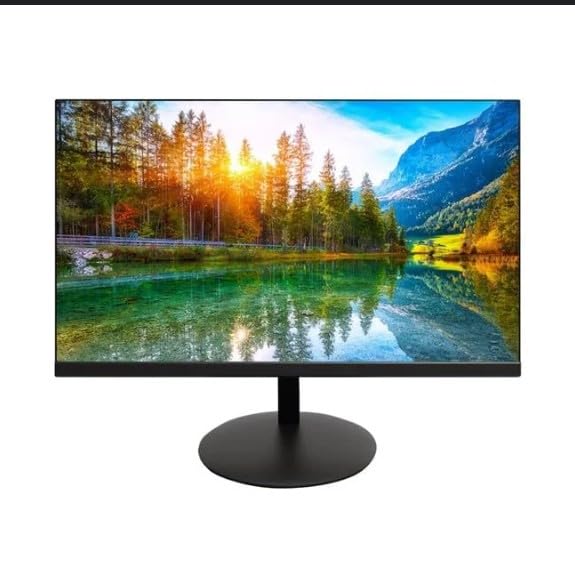
The image shows the Onn 22 inch FHD LED Monitor, highlighting its 100Hz refresh rate and 1080p resolution. The monitor features a slim design and a T-shaped base.
Istruzioni di installazione
- Disimballaggio: Carefully remove the monitor and all accessories from the packaging. Ensure all components are present: monitor, T-shaped base, HDMI cable, and power adapter.
- Montaggio del supporto: Attach the T-shaped base to the monitor. The design is screw-less for easy assembly. Ensure it is securely fastened.
- Connessione a un dispositivo:
The monitor supports both HDMI and VGA inputs. Connect the provided HDMI cable from your computer's HDMI output to the HDMI IN port on the monitor. Alternatively, use a VGA cable for VGA input.

This image displays the rear panel of the Onn monitor, illustrating the available input ports: HDMI IN, VGA IN, and the DC 12V power input. These ports are essential for connecting the monitor to a computer or other devices.
- Collegamento elettrico: Connect the power adapter to the DC 12V input port on the monitor, then plug the adapter into a power outlet.
- Regolazione del monitor: The monitor is capable of swivel, tilt, rotation, and height adjustment. Adjust the screen to your preferred viewangolo di inclinazione per un comfort ergonomico.
- Configurazione doppio monitor: This monitor is suitable for a fully functioning dual monitor setup. Connect a second monitor using the appropriate cables and configure your operating system's display settings.
Istruzioni per l'uso
- Accensione/spegnimento: Per accendere o spegnere il monitor, premere il pulsante di accensione, solitamente situato nella parte inferiore o posteriore.
- Selezione input: If the monitor does not automatically detect the input source, use the On-Screen Display (OSD) menu buttons to manually select between HDMI and VGA inputs.
- Navigazione nel menu OSD: Use the physical buttons on the monitor (typically on the back or bottom edge) to navigate the OSD menu. This allows you to adjust settings such as brightness, contrast, color temperature, and input source.
- Risoluzione e frequenza di aggiornamento: The monitor supports a native resolution of 1920x1080 at a 100Hz refresh rate. Ensure your computer's display settings are configured to these specifications for the best visual experience.
- Sincronizzazione adattiva: The monitor features Adaptive Sync for gaming, which helps to reduce screen tearing and stuttering. Ensure this feature is enabled in your graphics card settings if supported.
Manutenzione
- Pulizia dello schermo: Pulire delicatamente lo schermo con un panno morbido e privo di lanugine. Per i segni ostinati, strofinare leggermenteampen the cloth with water or a non-abrasive, monitor-specific cleaning solution. Avoid spraying liquids directly onto the screen.
- Pulizia del Casing: Utilizzare un panno morbido e asciutto per pulire il monitor casing. Do not use strong detergents or solvents, as they may damage the finish.
- Ventilazione: Assicurarsi che le aperture di ventilazione del monitor non siano ostruite per evitare il surriscaldamento.
- Magazzinaggio: Quando non viene utilizzato per lunghi periodi, conservare il monitor in un luogo fresco e asciutto, lontano dalla luce solare diretta e da temperature estreme.
Risoluzione dei problemi
- Nessun potere:
- Controllare se il cavo di alimentazione è collegato saldamente sia al monitor che alla presa di corrente.
- Verificare che la presa di corrente funzioni correttamente.
- Nessun segnale:
- Assicurarsi che il cavo video (HDMI o VGA) sia collegato saldamente sia al monitor che al computer.
- Selezionare la sorgente di ingresso corretta tramite il menu OSD del monitor.
- Controlla che il computer sia acceso e non in modalità sospensione.
- Flickering Screen or Poor Image Quality:
- Controllare che il cavo video non sia danneggiato o che i collegamenti siano allentati.
- Adjust the resolution and refresh rate settings on your computer to match the monitor's specifications (1920x1080, 100Hz).
- Ripristinare le impostazioni del monitor ai valori predefiniti di fabbrica tramite il menu OSD.
- I pulsanti non rispondono:
- Unplug the monitor from the power outlet, wait for 30 seconds, and then plug it back in.
If problems persist, please refer to the support information provided in the "Support and Warranty" section.
Specifiche
| Marca | Onn |
| Numero di modello | 100140681 |
| Nome del modello | OTTO |
| Dimensioni dello schermo | 21.5 pollici |
| Tipo di visualizzazione | LED, LCD |
| Risoluzione | 1920 x 1080 (FHD 1080p) |
| Frequenza di aggiornamento | Frequenza 100 Hz |
| Tempo di risposta | 6.5 millisecondi |
| Interfaccia Hardware | HDMI, VGA |
| Caratteristiche speciali | Regolazione dell'altezza |
| Viewangolo di ing | 160 gradi |
| Proporzioni | 16:9 |
| Dimensioni del prodotto | Dimensioni: 49.2 x 20 x 37.2 cm; 3.24 kg |
Supporto e garanzia
For technical support, product inquiries, or warranty information, please visit the official Onn support websito o contattare il loro servizio clienti.
- Supporto ufficiale Websito: onnsupport.ca
- Garanzia: Specific warranty details may vary by region and purchase date. Please refer to the documentation included with your product or visit the support websito per le informazioni più aggiornate sulla garanzia.


