Introduzione
This manual provides essential information for the safe and efficient operation of your HEAD HTJ4500 Treadmill. Designed for home use, this electric treadmill offers a maximum speed of 16 km/h, integrated speakers, and compatibility with popular fitness applications like Kinomap and Zwift. It features a clear LED display for monitoring your workout data and 16 pre-set training programs to enhance your fitness journey.
Please read this manual thoroughly before assembly and first use to ensure proper setup, operation, and maintenance, thereby maximizing the lifespan and performance of your treadmill.

Figure 1: The HEAD HTJ4500 Treadmill, showcasing il suo design compatto.
1. Installazione e assemblaggio
The HEAD HTJ4500 Treadmill requires some assembly. Follow these steps carefully to ensure a stable and safe setup.
1.1 Disimballaggio
- Rimuovere con attenzione tutti i componenti dalla confezione.
- Verify that all parts listed in the 'What's in the Box' section (see Specifications) are present and undamaged.
- Conservare i materiali di imballaggio per un eventuale stoccaggio o trasporto futuro.
1.2 Fasi di assemblaggio
- Posizionare il telaio principale su una superficie piana e stabile.
- Attach the uprights to the main frame, securing them with the provided hardware.
- Mount the console to the top of the uprights, ensuring all cables are properly connected and not pinched.
- Attach the handlebars and any safety features as per the detailed assembly instructions included in the product box.
- Prima dell'uso, assicurarsi che tutte le viti e i bulloni siano ben serrati.
1.3 Posizionamento e portabilità
Choose a location with sufficient space around the treadmill for safe operation and access. The treadmill is designed to be easily stored and transported thanks to its folding design and integrated front wheels.

Figure 2: The folding mechanism and front wheels facilitate easy storage and movement.

Figure 3: Treadmill dimensions for space planning.
2. Istruzioni per l'uso
Prima di iniziare l'allenamento, familiarizza con il pannello di controllo e le sue funzioni.
2.1 Pannello di controllo e display
The treadmill features an LED display that shows key workout metrics such as distance, speed, time, and calories burned. The control panel allows you to start, stop, and adjust the speed.

Figure 4: The control panel with integrated buttons for speed adjustment and program selection.
2.2 Iniziare un allenamento
- Ensure the safety key is properly placed on the console and attached to your clothing.
- Collegare il cavo di alimentazione a una presa elettrica con messa a terra.
- Press the 'Start' button to begin the treadmill belt movement. The belt will typically start at a low speed and gradually increase.
- Adjust the speed using the '+' and '-' buttons on the console or handlebars. The maximum speed is 16 km/h.
2.3 Programmi di formazione
The HEAD HTJ4500 Treadmill includes 16 pre-set training programs designed to vary intensity and help achieve different fitness goals. Consult the detailed program guide in your product box for specific program profiles.
2.4 Connettività delle app (Kinomap e Zwift)
Enhance your training experience by connecting your treadmill to Kinomap or Zwift applications. These apps offer interactive workouts, virtual routes, and competitive features.
- Scarica l'app Kinomap o Zwift sul tuo smartphone o tablet.
- Assicurati che il Bluetooth sia abilitato sul tuo dispositivo.
- Follow the in-app instructions to pair your device with the HEAD HTJ4500 Treadmill.
- Once connected, the app can control the treadmill's speed and display real-time workout data.
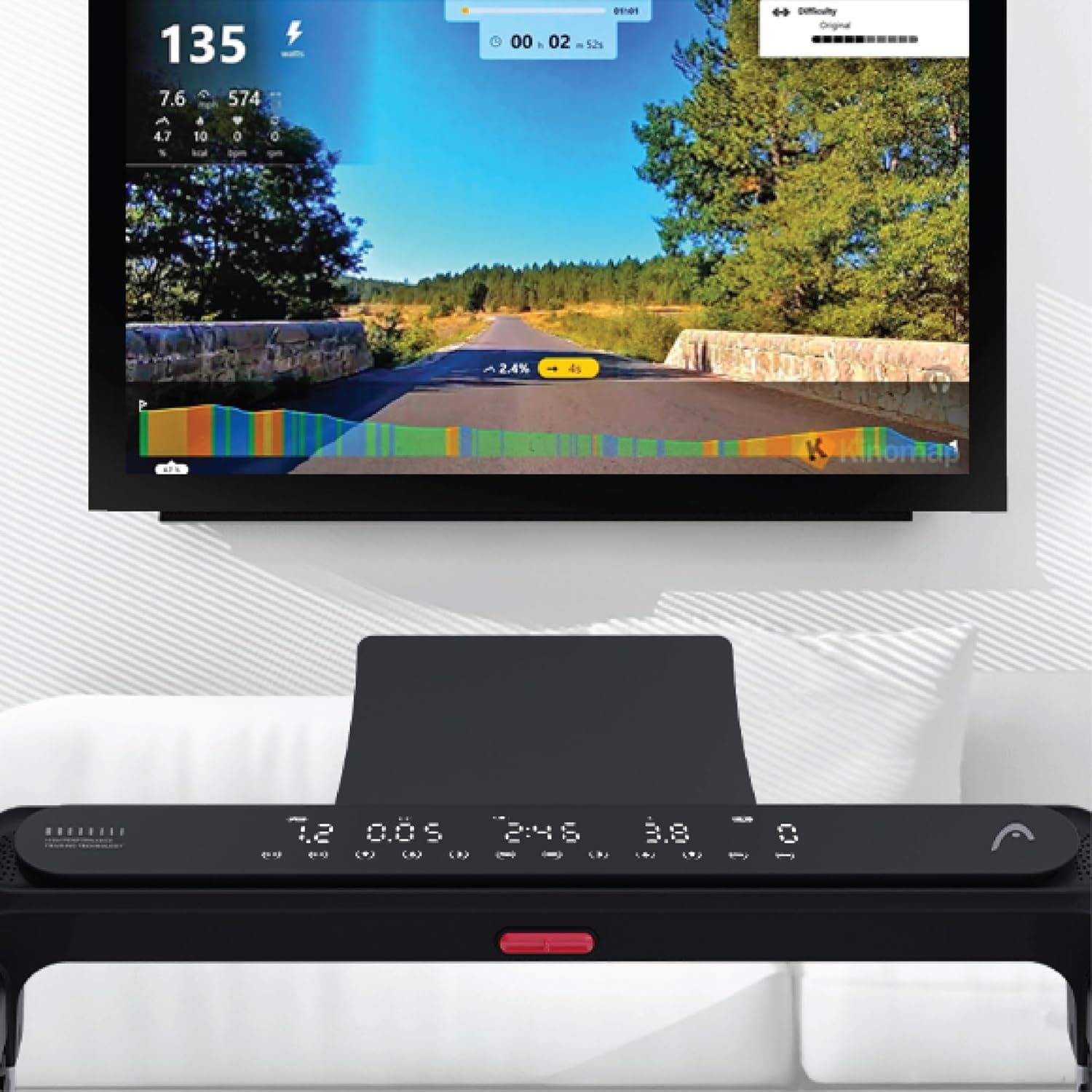
Figure 5: Treadmill display showing connection to Kinomap for interactive training.
2.5 Altoparlanti integrati
The treadmill features integrated speakers for an immersive audio experience. Connect your audio device via Bluetooth or auxiliary cable (if applicable) to enjoy music during your workout.

Figure 6: Detail of the console area, highlighting the integrated speaker.
3. Manutenzione
Una manutenzione regolare garantisce la longevità e le prestazioni ottimali del tuo tapis roulant.
3.1 Pulizia
- Scollegare sempre il tapis roulant prima di pulirlo.
- Pulisci la console e le superfici esterne con un panno morbido eamp panno. Evitare detergenti abrasivi o solventi.
- Passare periodicamente l'aspirapolvere sotto il tapis roulant per evitare l'accumulo di polvere e detriti.
3.2 Lubrificazione della cinghia
The running belt requires periodic lubrication to reduce friction and extend its lifespan. Refer to your product's specific lubrication instructions and recommended lubricant type. Typically, lubrication is needed every few months depending on usage.
3.3 Tensione e allineamento della cinghia
Check the running belt tension and alignment regularly. A belt that is too loose may slip, while one that is too tight can cause excessive wear on the motor and belt. Adjust the tension bolts at the rear of the treadmill as needed, ensuring the belt remains centered.
4. Risoluzione Dei Problemi
Questa sezione affronta i problemi più comuni che potresti riscontrare con il tuo tapis roulant.
4.1 Treadmill Not Starting
- Controlla la potenza: Ensure the power cord is securely plugged into a working outlet and the treadmill's power switch is on.
- Chiave di sicurezza: Verify that the safety key is correctly placed on the console. The treadmill will not operate without it.
- Interruttore: Controlla l'interruttore automatico della tua casa per assicurarti che non sia scattato.
4.2 Belt Slipping or Hesitating
- Tensione della cinghia: The running belt may be too loose. Adjust the tension bolts at the rear of the treadmill.
- Lubrificazione: Insufficient lubrication can cause friction. Apply lubricant as per maintenance instructions.
4.3 Rumori insoliti
- Parti sciolte: Check for any loose screws or bolts on the frame or console and tighten them.
- Belt Friction: If the noise is a squeaking or rubbing sound, the belt may need lubrication.
- Motor/Deck: If the noise persists or is a grinding sound, discontinue use and contact customer support.
4.4 Display non funzionante
- Collegamento elettrico: Assicurarsi che il tapis roulant sia acceso.
- Connessioni via cavo: Check the cable connections between the console and the main frame.
For issues not covered here, please refer to the comprehensive troubleshooting guide in your product's original manual or contact HEAD customer support.
5. Specifiche
| Caratteristica | Dettaglio |
|---|---|
| Marca | TESTA |
| Numero di modello | 8427542134925 |
| Colore | Nero |
| Dimensioni (L x P x A) | Dimensioni: 150 cm x 77 cm x 118 cm |
| Peso del prodotto | 46 chilogrammi |
| Velocità massima | 16 chilometri all'ora |
| Tipo di visualizzazione | GUIDATO |
| Fonte di alimentazione | Cavo elettrico |
| Assemblaggio richiesto | SÌ |
| Componenti inclusi | Front wheels, Surround sound speakers, User manual, Warranty |
| Tipi di misurazione | Distance, Speed |
6. Garanzia e supporto
Your HEAD HTJ4500 Treadmill comes with a manufacturer's warranty. Please refer to the warranty card included in your product packaging for specific terms, conditions, and duration of coverage.
6.1 Assistenza clienti
For technical assistance, warranty claims, or spare parts, please contact HEAD customer support. Contact information can typically be found on the warranty card or the official HEAD website. When contacting support, please have your product model number (8427542134925) and proof of purchase readily available.
For more information about HEAD products, visit the official HEAD store on Amazon: HEAD Store


